1
Natural sounding AI voices
Frequently praised for human like tone, pacing, and emotion across many languages and scenarios.
Murf.ai is an AI voiceover and video studio for creators and teams who need realistic voices quickly. It shines for training, marketing, and content production, but pricing policies and some interface quirks can frustrate heavier or price‑sensitive users.
Independent review — we test tools ourselves and analyze public user reviews. How we test.
Murf.ai delivers consistently high voice quality, with many reviewers praising how natural and human the output sounds across languages and use cases. Ease of use, fast workflow, and strong customization options make it attractive for training videos, marketing content, audiobooks, and IVR. However, multiple users flag steep pricing, aggressive auto renewal, loss of unused minutes on cancellation, and in one case difficulty cancelling altogether. A minority also report clunky studio behavior, missing pronunciation tools on lower tiers, and some accents or translations sounding off. Best suited to creators and teams who prioritize realistic AI voiceovers and can live with a stricter subscription model and occasional interface limitations.
Murf AI is an online voiceover studio, closer to a lightweight video editor than a plain text-to-speech box. You paste a script, choose from more than 120 AI voices across 20-plus languages, and Murf turns the words into narration you can tune for pitch, speed, pauses and emphasis. Its Gen 2 voices are the headline, built to sound like a real narrator rather than a synthetic reader.
What sets it apart from a simple TTS site is the Studio. Your script sits on a timeline where you can sync narration to slides or video and layer in background media, which is why e-learning teams and YouTube creators reach for it.
Founded in 2020 by a group of IIT-Kharagpur graduates, Murf now competes with ElevenLabs and Play.ht. It leans on voice variety and a polished editing workflow rather than the lowest price.
The catch worth knowing upfront: usage is metered by generation time, and the free plan is a preview with no downloads.
Frequently praised for human like tone, pacing, and emotion across many languages and scenarios.
Often described as easy to learn, clean, and efficient, though a few found the studio clunky.
Customization for emphasis and pronunciation appreciated, but some complained advanced controls require high tier.
Used successfully with PowerPoint, Canva, and Camtasia, though one reviewer wanted tighter Canva integration.
Large range of voices valued, yet users requested more Indian, Spanish, children, and improved Australian accents.
Batching voiceovers for courses, sports clubs, and knowledge bases saves substantial production time.
Minutes model enables heavy usage, but forfeiture on cancellation drew strong criticism.
Support often labeled super helpful and quick, contrasting sharply with one report of unresponsiveness.
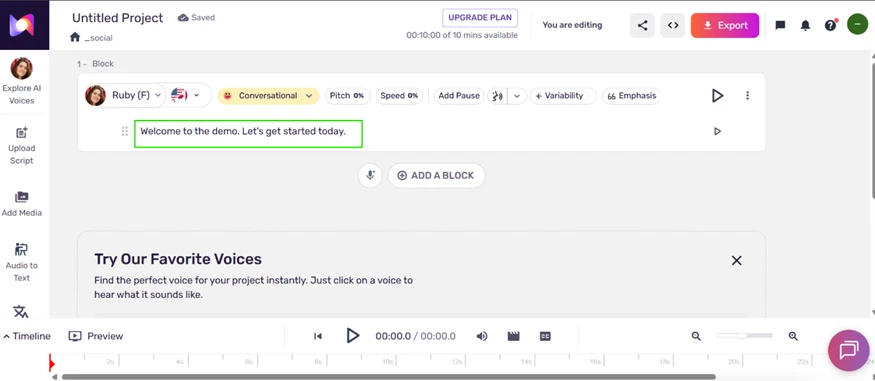
I signed up with a Google account and reached the Studio dashboard in under a minute. The first thing I looked for was the free allowance, and it sits in plain view at the top of the editor: 00:10:00 of 10 mins available. This is a one-time lifetime credit, not a monthly reset, so every second I generated came out of that single budget.
That ceiling shaped how I tested everything below.
The voice library is where Murf makes its first impression. I filtered to English (US and Canada) and found the Gen 2 voices grouped at the top, each tagged MultiNative and offering nine or more speaking styles. A side panel showed that the highlighted voice, Natalie, supports 41 languages.
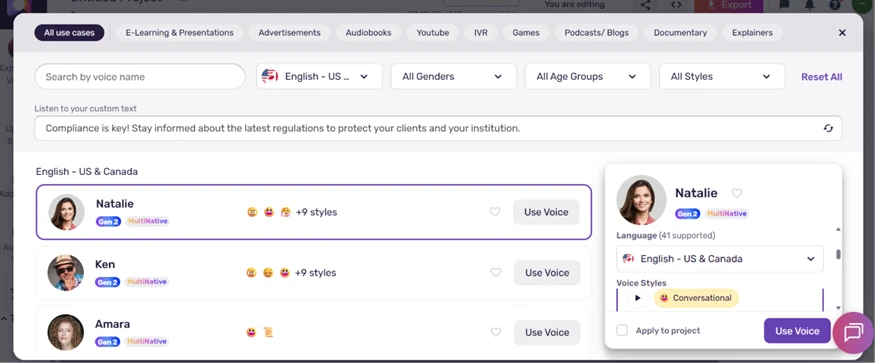
Figure 2. The US and Canada voice library, with Gen 2 tags.
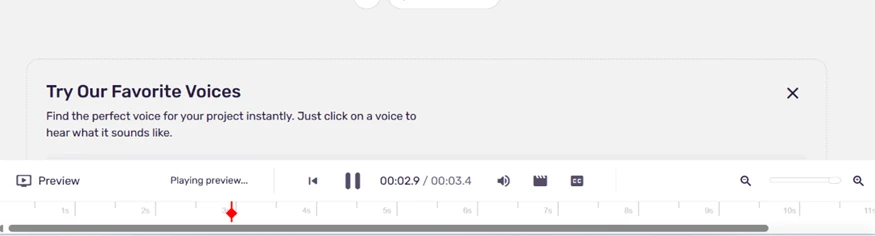
For my test block I picked Ruby (F) in the Conversational style and typed one line: Welcome to the demo. Let's get started today. Murf rendered it as a 3.4 second clip. The playback was clean, with a natural pause at the period and no metallic edge on the vowels. On a line this short, the read was hard to separate from a human recording.
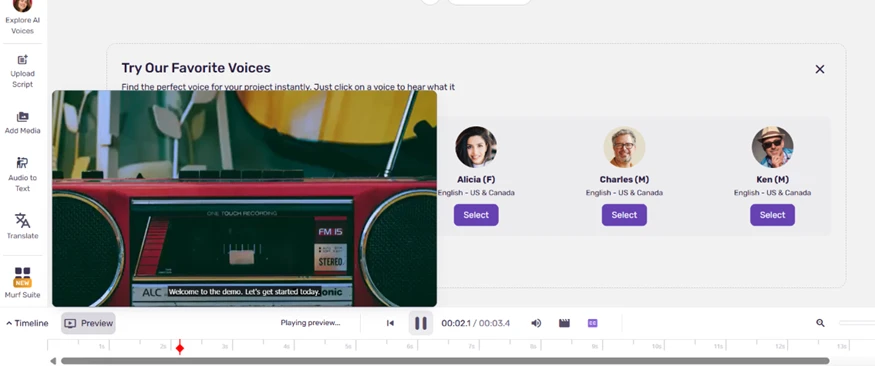
The preview plays against a video background with an on-screen caption, a reminder that Murf wraps a small video studio around the voice engine.
A style selector sat beside sliders for Pitch and Speed, with separate buttons for adding pauses and emphasis. The coarse controls all worked on the free plan.
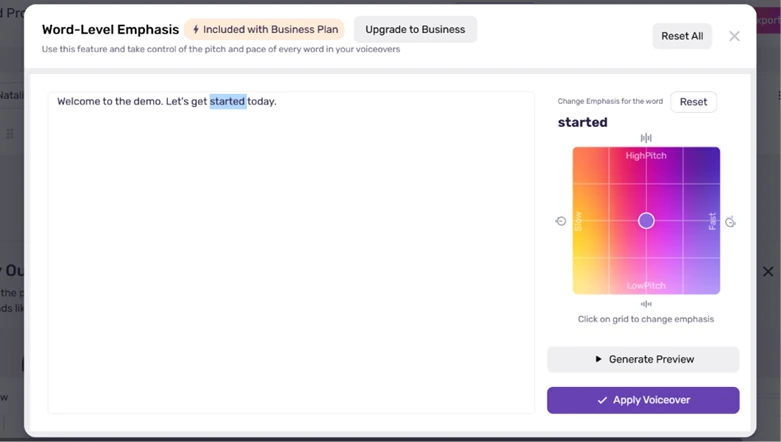
The wall appeared when I opened word-level emphasis. Instead of the control I got a panel headed Word-Level Emphasis, carrying a badge that read Included with Business Plan and an Upgrade to Business button. The pitch-and-pace grid was visible but frozen. Fine per-word tuning, the kind that would rescue an odd stress pattern, is a paid feature.
The pronunciation editor is free, and I leaned on it. Clicking a word opened Edit Pronunciation and Locale, where I could set the locale and choose from phonetic smart suggestions or save my own spelling.
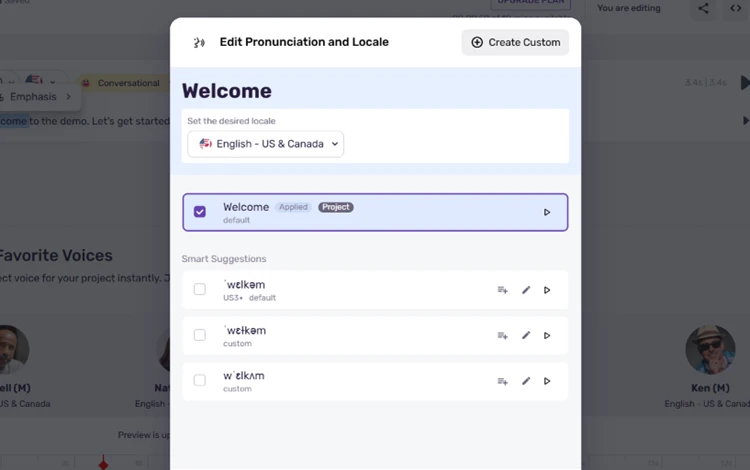
I needed it more than expected. When I generated Please record today's sales record, both copies of the word record were read identically, skipping the noun-versus-verb shift a person makes without thinking. In another line, lead generation came out as leed generation. Every correction meant opening the editor and fixing the word by hand, which solves the problem but slows down any script full of names or technical terms.
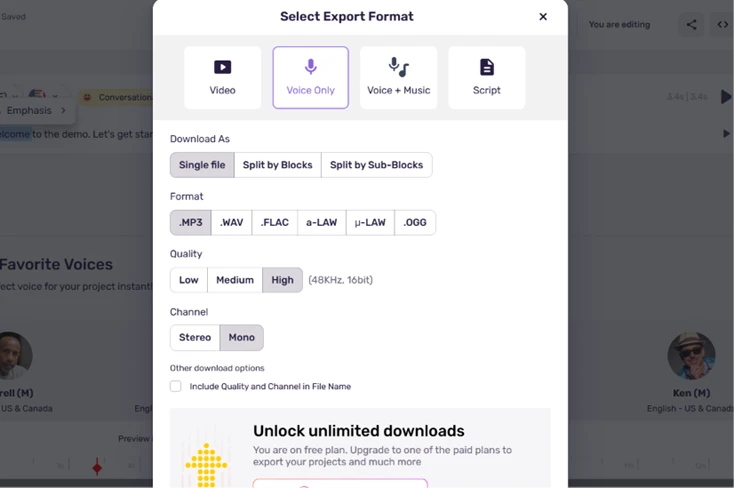
When I opened Export, the panel looked ready for real work. It listed four output types (Video, Voice Only, Voice plus Music and Script) and half a dozen audio formats including MP3 and WAV, with quality reaching 48KHz.
Then I hit the finding at the bottom: a banner reading Unlock unlimited downloads, You are on free plan. On the free tier the export button saves nothing. Every clip stays locked in the editor.
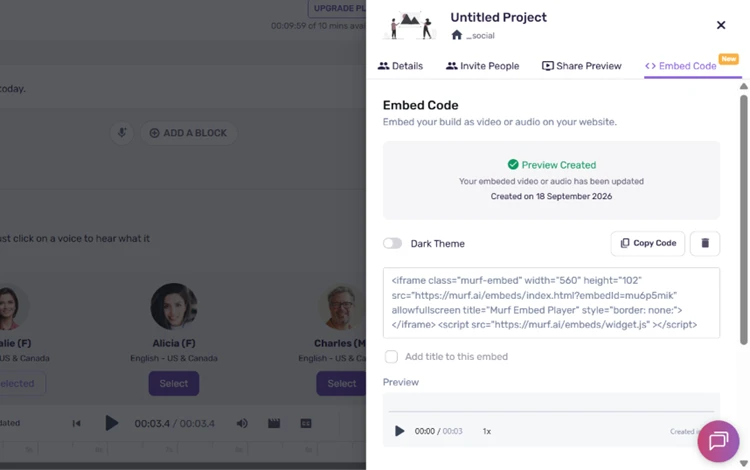
Sharing is the one exit. Under the share menu I generated embed code, an iframe pointing at a Murf preview player, and a shareable preview link. A free clip can reach readers through a webpage embed even though it never lands as a file on your computer.
Opening Upgrade Plan cleared up the value question. The paid tiers start at Creator ($19 a month, or $228 billed annually) and step up to Business ($66 a month, flagged Best Value at $792 a year). Above them sits Enterprise at a custom price behind a Contact Sales button.
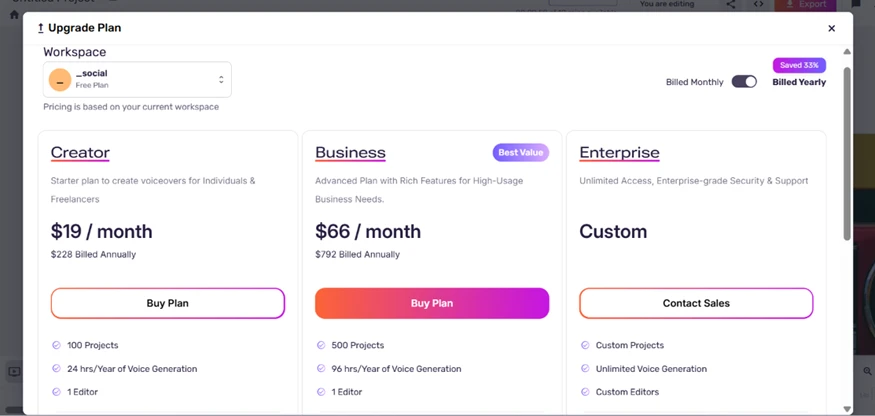
Two details stood out for a US buyer. The generation limit is billed by the year rather than the month, so Creator's 24 hours and Business's 96 hours have to stretch across twelve months, and a single ten-minute video spends ten of those minutes. Both paid plans also cap you at one editor seat, which makes shared team work clumsy.
Voice cloning shows up on none of the self-serve plans. It is folded into Enterprise, reachable only through Contact Sales with no published price, which puts it beyond the solo creators that the Creator plan targets.
| Dimension | Our test | User signal | Verdict | Composite |
|---|---|---|---|---|
| Voice Quality Naturalness and realism of voices | 9.5 | 9.4 | Excellent | |
| Ease of Use Learning curve and usability | 9 | 9.2 | Excellent | |
| Value for Money Perceived value versus pricing | 7 | 7.2 | Good | |
| Feature Depth Controls, options, and flexibility | 8.5 | 8.7 | Excellent | |
| Billing and Policies Fairness of charges and credits | 5.5 | 5 | Weak | |
| Customer Support Helpfulness and responsiveness | 8.5 | 8.3 | Good |
Toolscopia uses cookies to keep you signed in, remember your preferences, and understand how our reviews get read. Analytics are anonymous. See our privacy policy for the full detail.
Comments 0
Join the discussion and share your perspective.
Sign in to post a comment and reply to other readers.
No comments yet
Be the first to share your perspective on this tool.