1
Real time interview assistance
Provides live answers during interviews and calls, widely praised for usefulness when users feel stuck or mentally blocked.
Interview support and preparation app for real time calls, mock interviews, and meetings. Delivers quick, fairly accurate answers plus transcripts, but accuracy, latency, pricing, and mobile reliability still need work.
Independent review — we test tools ourselves and analyze public user reviews. How we test.
Parakeet AI stands out as a strong assistant for interviews and meetings, with many users praising fast responses, helpful prompts, and transcripts that make practice and review easier. It genuinely helps reduce mental blocks and improves interview preparation across technical and behavioral rounds. However, some reviews flag slow or inconsistent response times, occasionally generic or inaccurate answers, mobile reliability problems, and concerns about subscription pricing. It works best as a preparation and on-call support aid, not as something to rely on blindly during high stakes assessments. Ideal for job seekers and professionals who want AI guidance but are willing to double check and adapt responses.
ParakeetAI is a real-time interview copilot built for job seekers. It runs beside your video call, listens to what the interviewer asks, transcribes the question on the spot, and drafts a suggested answer on your screen while you speak.
The tool reaches past live calls into preparation. It bundles a mock interviewer that quizzes you against a specific company and job description, a question bank drawn from real postings, and resume-aware answers when you attach your CV.
Platform reach is wide. ParakeetAI works across Zoom, Google Meet and Microsoft Teams for behavioral rounds, and it reads your screen on coding platforms like LeetCode for technical ones. It supports dozens of languages and lets you pick the underlying model powering each answer.
Pricing follows a credit system rather than a flat subscription, so you buy sessions as you need them, and the credits do not expire.
The product markets itself as undetectable to interviewers, a claim that carries real ethical weight any candidate should weigh before using it in a live interview.
Provides live answers during interviews and calls, widely praised for usefulness when users feel stuck or mentally blocked.
Often delivers quick replies, though some users reported slow or delayed responses in certain sessions.
Converts speech to text quickly, frequently highlighted as very helpful for reviewing interviews and meetings.
Stores organized transcripts and notes, appreciated for helping identify improvement areas and revisit previous discussions.
Supports mock interviews and test runs, repeatedly mentioned as effective preparation before real interviews.
Desktop interface described as invisible on screen, considered useful for discreet assistance during live calls.
Helps with wording when stuck, praised for giving prompts that guide better articulated responses.
Uses uploaded CVs or documents for context, though some reviewers wanted more precise, reference aligned answers.
Monetization mentioned positively and negatively, with value noted but pricing seen as high by some users.
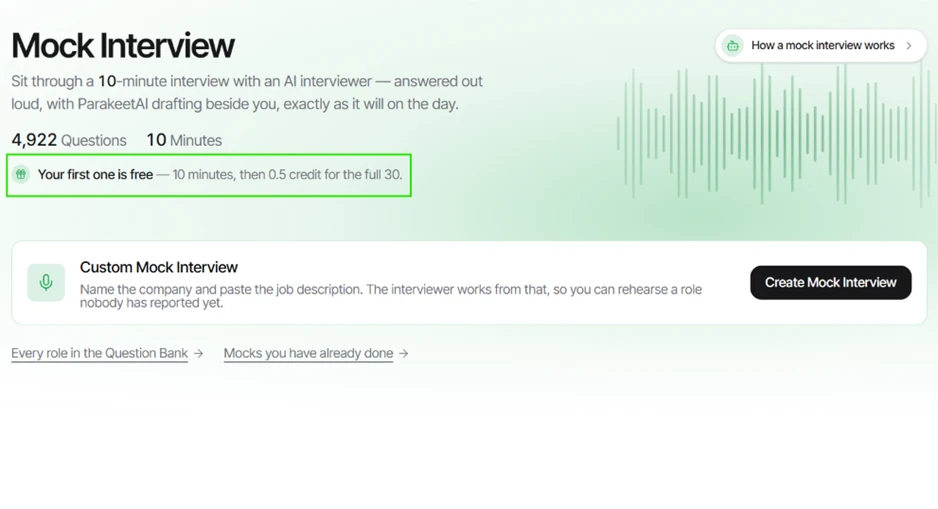
I started on the Mock Interview screen, which listed 4,922 practice questions and a 10 minute format. The green banner spelled out the free offer plainly. My first mock runs for 10 minutes at no cost, and the full 30 minute version costs 0.5 credit after that. For a reviewer testing without paying, this one free run is the entire sandbox.
The Custom Mock Interview box lets you name a company and paste a job description so the AI interviewer works from a real role.
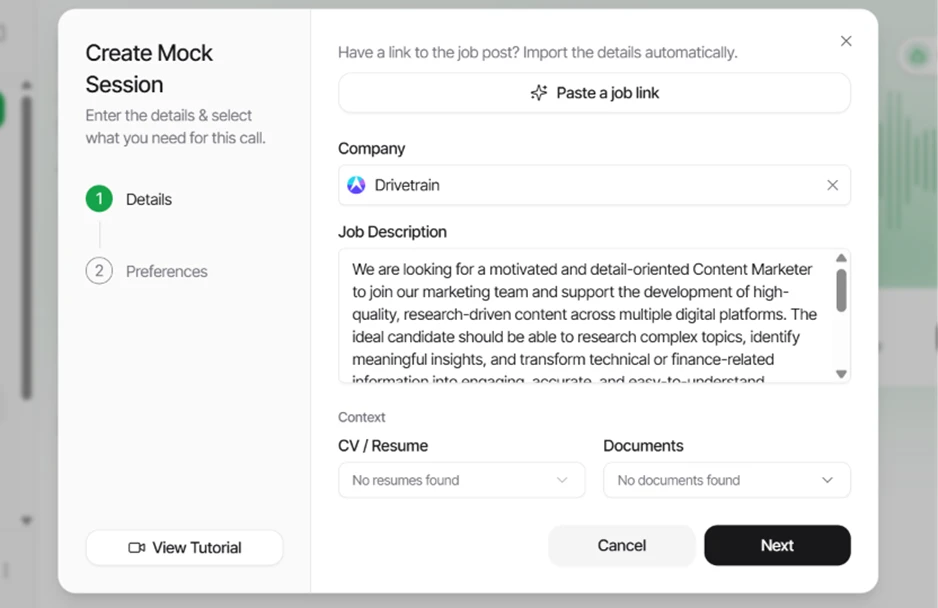
I opened the custom setup, entered Drivetrain as the company, and pasted a Content Marketer job description into the field. Parakeet also offers a Paste a job link button that imports a posting on its own, which I skipped in favor of pasting the text myself.
One detail stood out in the Context row. The CV / Resume dropdown read No resumes found and the Documents dropdown read No documents found on my free account. The interviewer had the job description to work from and nothing about me personally. That gap shows up later in the answers.
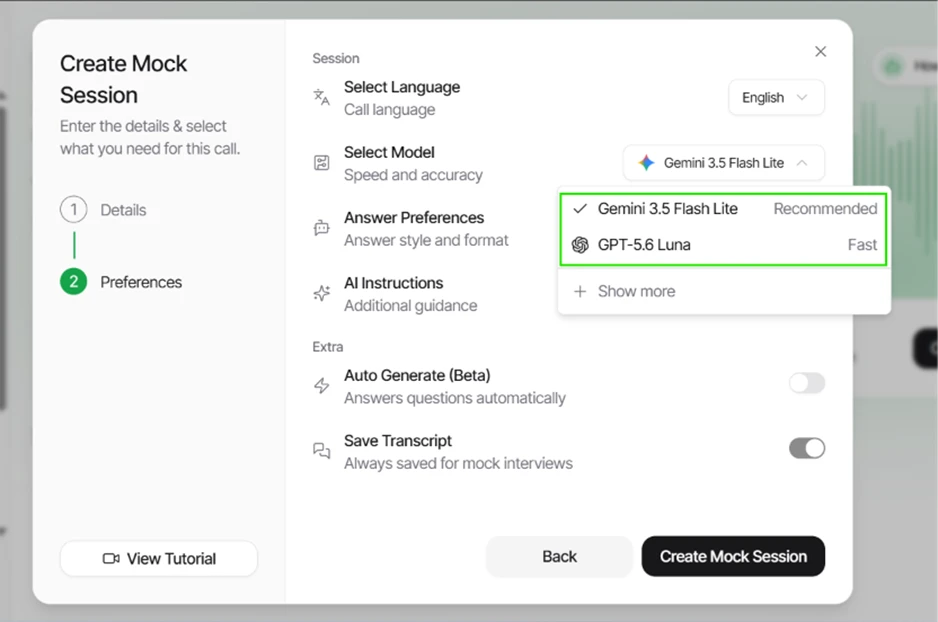
The Preferences step surprised me. Instead of locking users into one engine, Parakeet showed a model picker with Gemini 3.5 Flash Lite marked Recommended and GPT-5.6 Luna marked Fast, with a Show more option for further choices. Call language sat at the top set to English. Save Transcript was on by default, while Auto Generate carried a Beta tag.
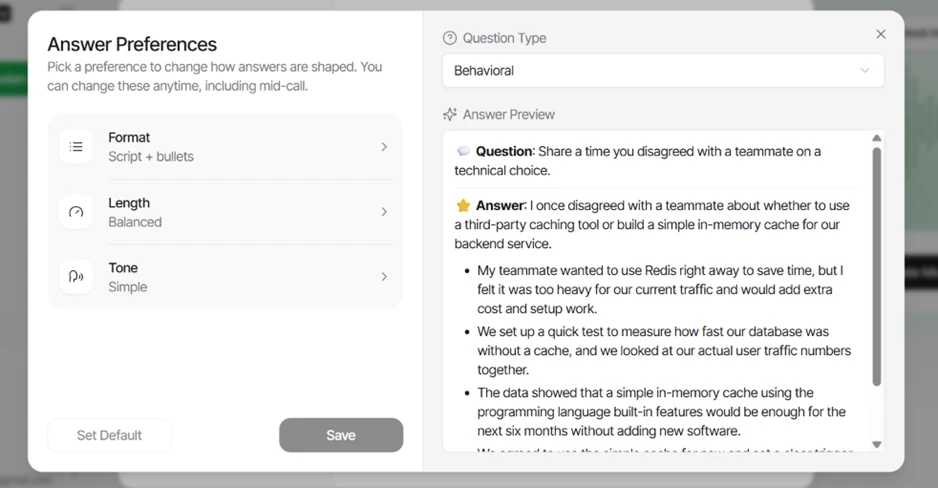
Answer Preferences is where the tool earns points. I set Format to Script + bullets and Length to Balanced, with Tone kept at Simple, and the panel confirmed these can change mid-call. The live Answer Preview rendered a behavioral question about disagreeing with a teammate, then produced a structured reply, a short script followed by supporting bullets. The shaping worked exactly as labeled.
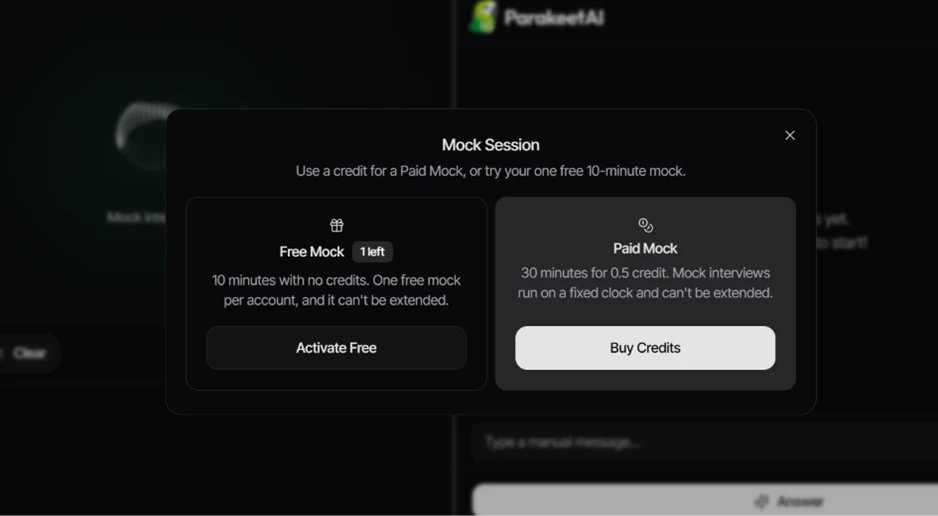
Before the call began, a modal laid out the two paths. The Free Mock showed 1 left, ran 10 minutes with no credits, and warned it was one per account with no extension possible. The Paid Mock offered 30 minutes for 0.5 credit on a fixed clock. I activated the free one.
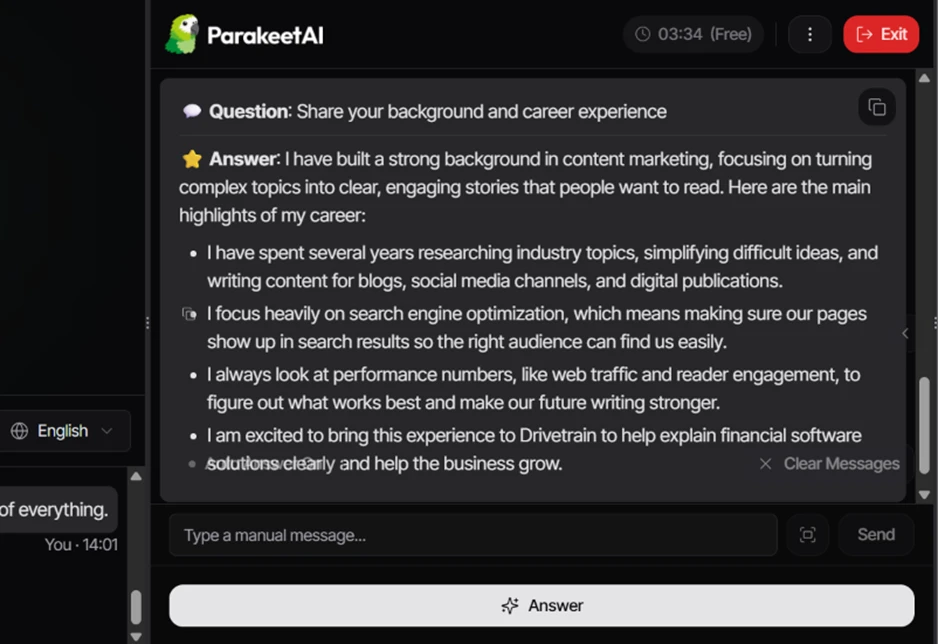
The interviewer opened with a standard prompt, asking me to introduce myself and give some background for the Content Marketer Specialist role at Drivetrain. Parakeet transcribed the question on the right and drafted an answer within a second or two, formatted as the bullets I had requested.
The answer read well. It described a content marketer who turns complex topics into clear stories, and it referenced interest in Drivetrain's finance and software work. The writing was fluent and on topic. It was also generic. With no resume attached, every line traced back to the job description rather than to any lived experience, so the draft sounded like a capable stranger reading the posting back to the panel. A manual message box sat below the draft, so I could type my own words instead of leaning on the suggestion.
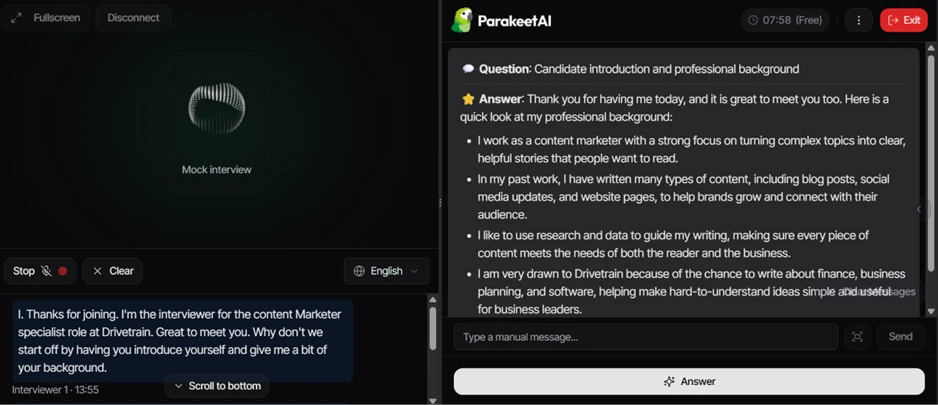
That shortfall is the honest limit of the free run. The tool writes clean sentences and cannot personalize what it was never handed.
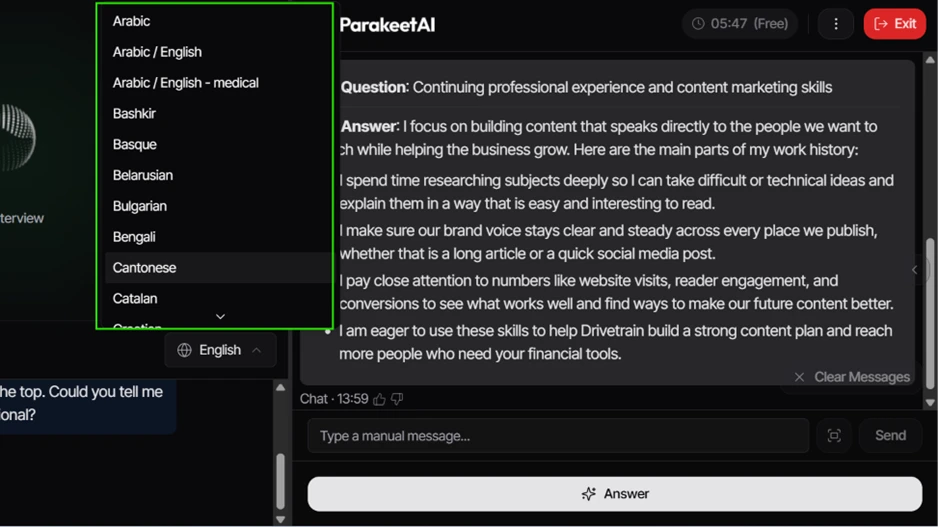
I opened the language control during the call and found a long list that started at Arabic and Arabic / English, then carried down through Bengali, Bulgarian, Cantonese and Catalan with plenty more below. Switching mid-session did not interrupt the flow. For candidates interviewing outside their first language, this breadth is a genuine strength.
The three-dot menu held a Session panel with answer text size, theme, language and an Auto Answer toggle. I switched Auto Answer on.
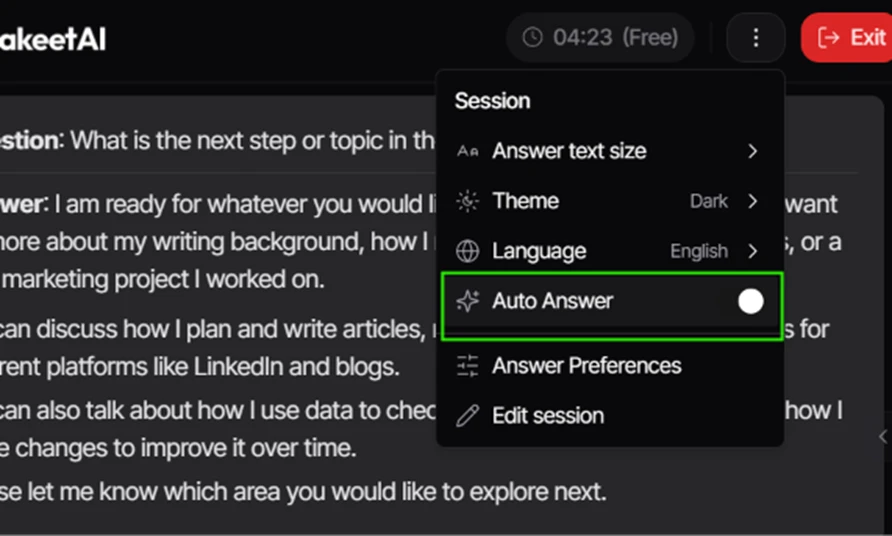
With it active, Parakeet answered each incoming question on its own, no clicking required. The next prompt about my background and career experience produced a fresh bulleted reply automatically, right down to the search optimization and performance-metric lines a content role invites. Hands-free did what it promised.
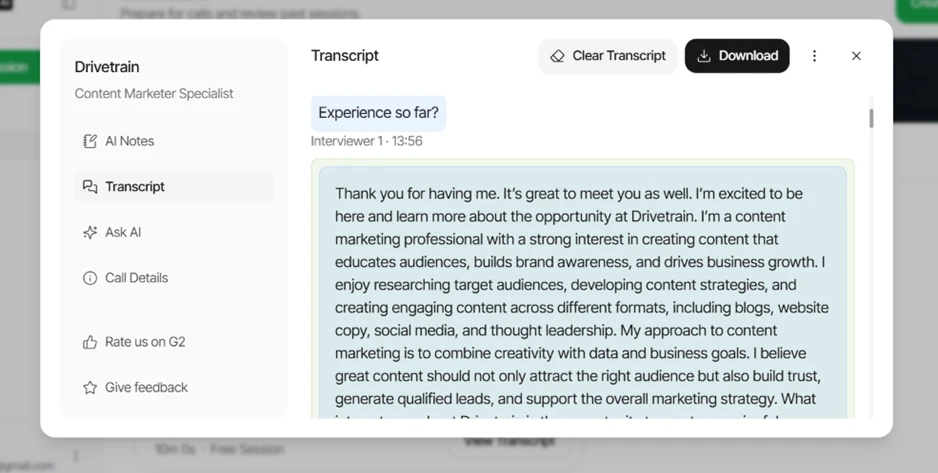
I ended the call at around the two minute mark to check the post-session view. The transcript panel opened with a left rail holding AI Notes, Transcript, Ask AI and Call Details, alongside a Download button for saving the record. The full exchange was captured accurately, every question and answer, timestamped.
One item in that rail is worth flagging for readers. A Rate us on G2 link sits directly inside the transcript view, which shows how the product collects its review profile while a user is still inside the session.
| Dimension | Our test | User signal | Verdict | Composite |
|---|---|---|---|---|
| Answer Quality Accuracy and usefulness of responses | 8.2 | 8.6 | Good | |
| Response Speed How quickly answers are delivered | 8 | 8.4 | Good | |
| Ease of Use Learning curve and daily usability | 8.8 | 9 | Excellent | |
| Reliability Stability across sessions and devices | 7.2 | 7.5 | Good | |
| Interview Support Effectiveness Impact on interview preparation outcomes | 9 | 9.2 | Excellent | |
| Value for Money Perceived value versus subscription costs | 7.8 | 8 | Good | |
| Transcription Quality Speed and clarity of transcripts | 8.7 | 8.8 | Excellent |
Toolscopia uses cookies to keep you signed in, remember your preferences, and understand how our reviews get read. Analytics are anonymous. See our privacy policy for the full detail.
Comments 0
Join the discussion and share your perspective.
Sign in to post a comment and reply to other readers.
No comments yet
Be the first to share your perspective on this tool.