1
Text and image to video generation
Generates short videos from prompts or images, but many reviewers report inconsistent, off prompt results.
PixVerse is an AI video and image generator that can produce striking results, but frequent prompt misunderstandings, opaque credit charging, and difficult subscription management make it risky for cost‑sensitive or support‑reliant users.
Independent review — we test tools ourselves and analyze public user reviews. How we test.
PixVerse can deliver impressive AI videos and images when generations work as intended, and some long term users praise its evolution and creative potential. However, reviews repeatedly describe unstable output quality, with prompts often misunderstood and credits burned on unusable results. Billing, refunds, and cancellation workflows are frequently labeled confusing or deceptive, and support is widely reported as slow, automated, or unresponsive. This platform suits experimental creators willing to tolerate inconsistency and closely monitor spending, but it is a poor fit for risk‑averse professionals or anyone needing clear contracts and dependable support.
PixVerse AI is a video generation platform from a Singapore-based company founded in 2023 that turns text prompts, images, or existing clips into short videos of up to 15 seconds at 1080p. Its V6 model, released in March 2026, added native audio, more than 20 cinematic camera controls, and multi-shot storytelling, while a separate product called R1 generates interactive video in real time. Styles range from realistic and cinematic to anime and 3D animation.
Speed and accessibility are its calling cards: a 360p clip renders in about 30 seconds, and the free tier hands out 60 credits daily, enough to experiment before paying, with paid plans starting around $10 per month. Viral effect templates have made it a favorite for TikTok and Shorts creators. The trade-offs are short clip lengths, a 1080p cap while rivals like Kling push 4K, and a credit system that charges for every generation attempt, successful or not.
Generates short videos from prompts or images, but many reviewers report inconsistent, off prompt results.
Uses subscription and daily credits, often criticized for fast depletion, missing grants, and confusing policies.
Conversational agent helps build projects yet reportedly consumes huge credits for minimal, repetitive replies.
Offers weekly, monthly, and yearly plans, frequently described as mischarged, hard to downgrade, or difficult to cancel.
Paid plans should remove watermarks, but several subscribers report persistent watermarks and unclear communication.
Claims private by default generations, while some users report public URLs and limited clarity on data handling.
Available via web and mobile apps, though some users see crashes, RAM issues, and black screens on devices.
Provides small daily credits for testing, viewed positively but overshadowed by later paid credit frustrations.
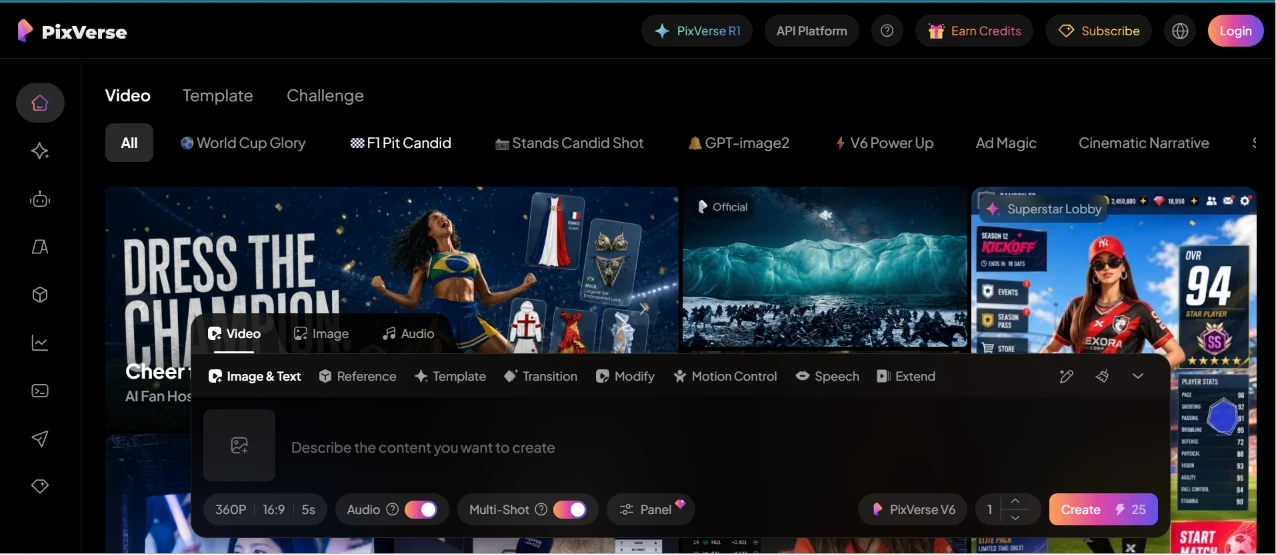
Logging in dropped me straight into the video workspace. A strip of featured community clips ran along the top, tagged with categories like World Cup Glory and F1 Pit Candid. The creation panel was already open at the bottom of the screen, waiting with a text box that read “Describe the content you want to create.”
A lot was crammed into that one panel. The mode row alone gave me Image & Text, Reference, Template, Transition, Modify, Motion Control, Speech, and Extend to pick from. Under the text box I could drop the resolution to 360P, choose a 16:9 frame, hold the clip to 5 seconds, flip audio on, and enable Multi-Shot. The model read PixVerse V6, and the Create button warned me that a run would spend 25 credits.
My first reaction was that the screen is dense. There is no gentle onboarding pointing me to a starting move, so I spent a few seconds scanning before I understood the panel was the heart of everything.
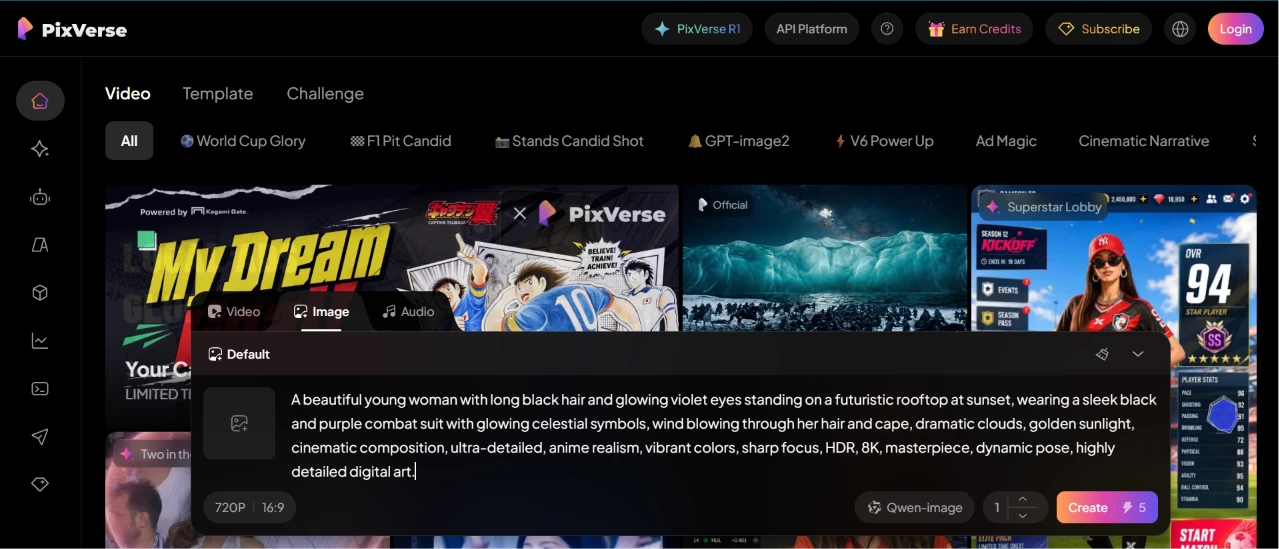
Switching over to the Image tab took one click. The model quietly changed to Qwen-Image while the resolution jumped to 720P. The price per run also dropped to 5 credits, a lot cheaper than the video side.
I pasted in a long, loaded prompt to see how much detail it would swallow:
A beautiful young woman with long black hair and glowing violet eyes standing on a futuristic rooftop at sunset, wearing a sleek black and purple combat suit with glowing celestial symbols, wind blowing through her hair and cape, dramatic clouds, golden sunlight, cinematic composition, ultra-detailed, anime realism, vibrant colors, sharp focus, HDR, 8K, masterpiece, dynamic pose, highly detailed digital art.
The text box took the whole thing without truncating or lagging. Nothing about switching modes felt awkward, and I liked that the tool adjusted the model and pricing on its own instead of making me hunt for the right settings.

This is the part that surprised me.
The output tracked the prompt almost line for line. Black hair, violet eyes that actually glow, the black-and-purple suit with lit symbols across the chest, and a cape scattered with stars fading into a constellation. She is standing on a rooftop with a sunset burning behind a futuristic skyline, exactly as described. A PixVerse.ai watermark sits in the top corner. For a single 5-credit generation, the detail and lighting were far better than I expected going in.
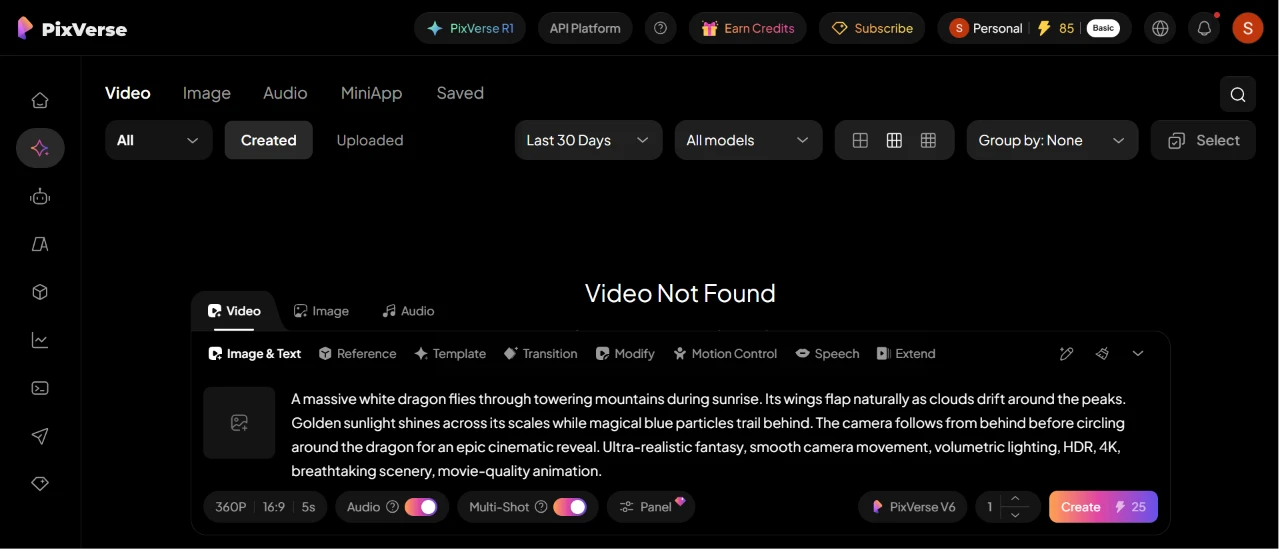
Next I went after a video. I opened the video generator, and the middle of the screen showed a blunt “Video Not Found” message, which threw me for a second until I realized it was just the empty state of my library, not an error from the prompt I was about to run.
Here is what I fed it:
A massive white dragon flies through towering mountains during sunrise. Its wings flap naturally as clouds drift around the peaks. Golden sunlight shines across its scales while magical blue particles trail behind. The camera follows from behind before circling around the dragon for an epic cinematic reveal. Ultra-realistic fantasy, smooth camera movement, volumetric lighting, HDR, 4K, breathtaking scenery, movie-quality animation.
To watch the finished clip, click here
The “Video Not Found” wording is a small thing, but for a new user it looks like something broke. A friendlier empty state would have saved me the double-take.
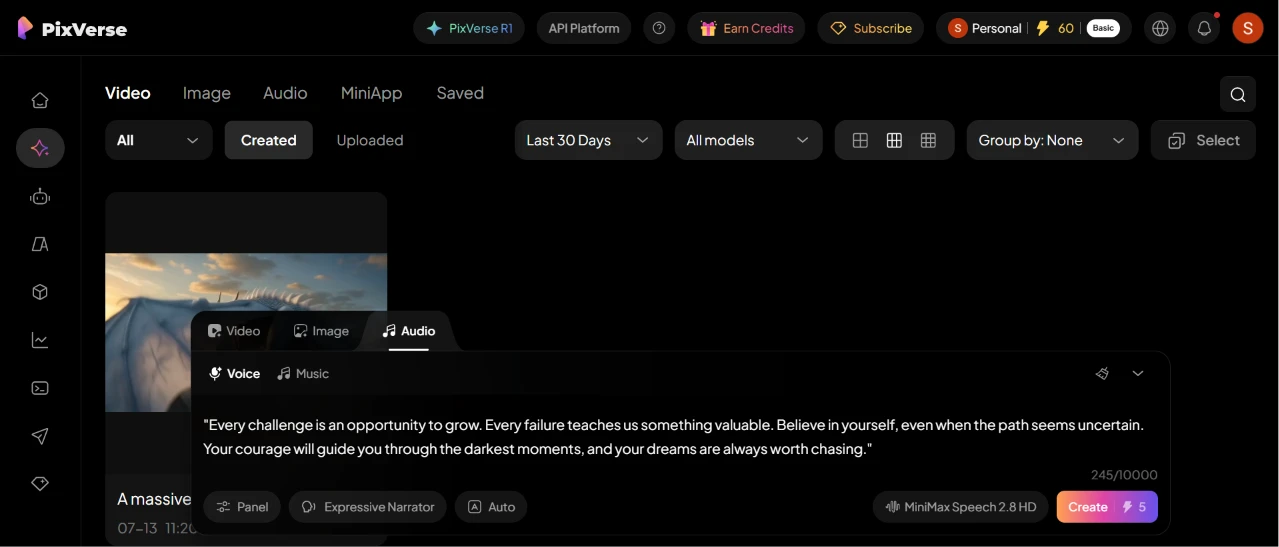
The Audio tab has its own split between Voice and Music. I stayed on Voice and dropped in a short motivational passage:
Every challenge is an opportunity to grow. Every failure teaches us something valuable. Believe in yourself, even when the path seems uncertain. Your courage will guide you through the darkest moments, and your dreams are always worth chasing.
A counter ticked up to 245 out of a 10,000 character ceiling, so there is plenty of headroom for longer scripts. I had it set to an Expressive Narrator voice running on MiniMax Speech 2.8 HD, priced at 5 credits.
To listen to the audio, click here
The voice setup was the smoothest step so far. Picking a voice style and seeing the character budget up front made it obvious what I was working with before spending anything.
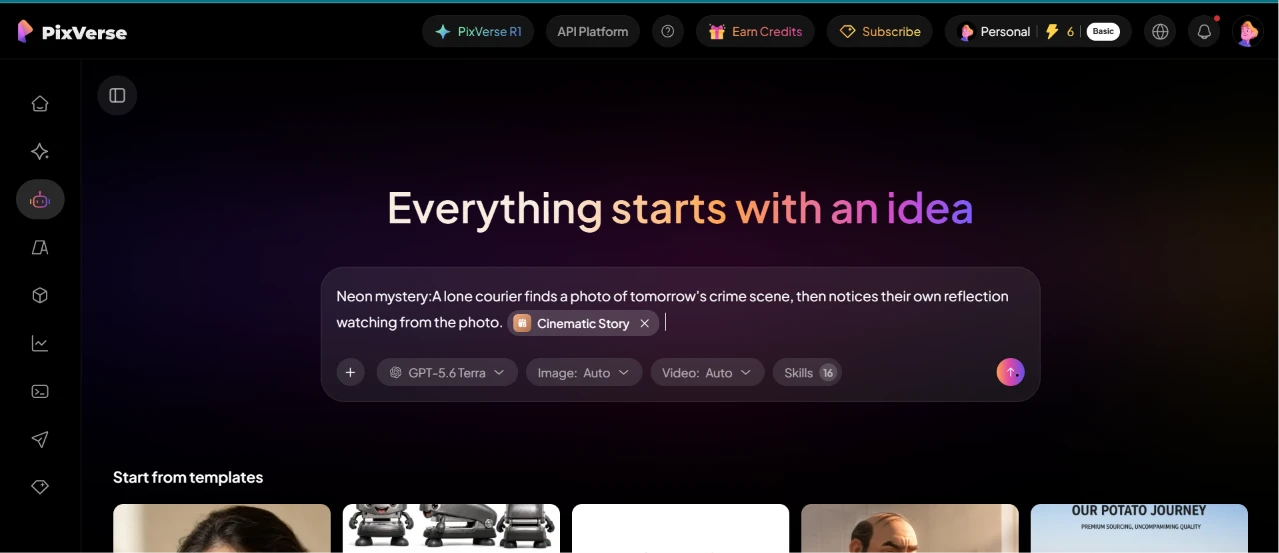
Cinematic Story is pitched as the place to turn a one-line idea into a full scripted piece. The landing screen greets you with “Everything starts with an idea” and a prompt bar tagged for things like an Automotive Ad. It was running on a GPT-5.6 Terra model with image and video set to Auto.
I typed in a moody one-liner:
Neon mystery: A lone courier finds a photo of tomorrow’s crime scene, then notices their own reflection watching from the photo.
Then I hit the wall. No result came back, because I had run out of credits for the day.
That is the frustrating catch. The workspace looked like the most ambitious feature of the whole set, and it is the one I could not actually see through to an output.
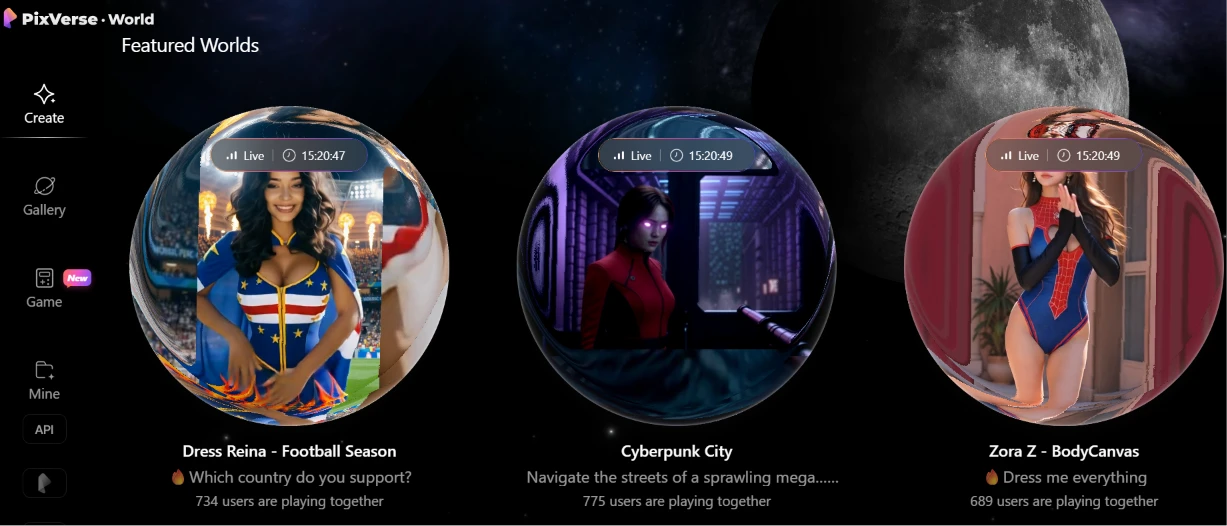
With generation off the table for the day, I poked around PixVerse World instead.
This is a more social, browsing-style corner. Featured Worlds showed live rooms I could drop into, each with a running headcount. Dress Reina - Football Season had 734 people inside. Cyberpunk City was busier at 775. A third room, Zora Z - BodyCanvas, held 689. Seeing live user numbers made it feel less like a solo tool and more like a shared space people hang out in.
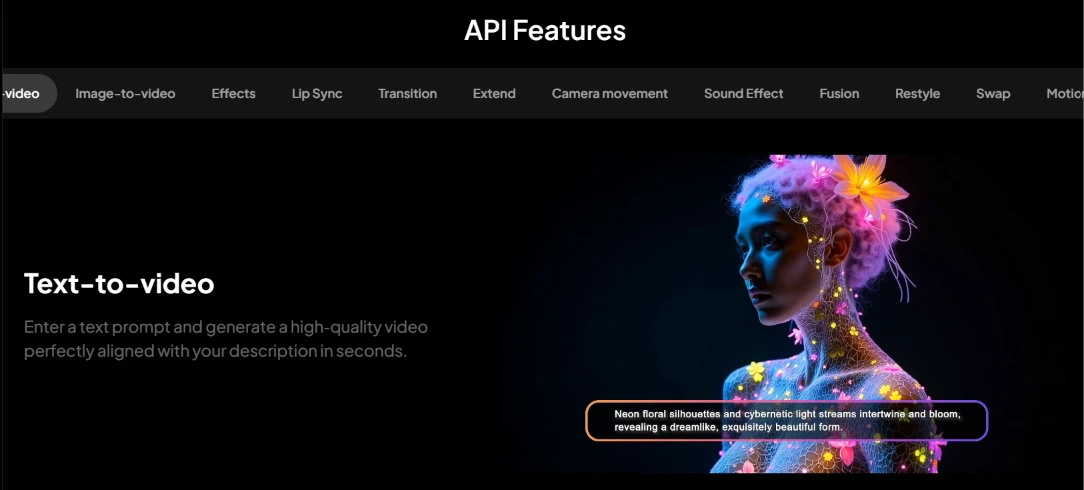
There is a whole developer-facing layer too. The API Features page lays out endpoints as tabs, with Text-to-video sitting front and center and a tagline about generating a video that matches your description in seconds. Around it were tabs for Image-to-video, Effects, Lip Sync, Transition, Camera movement, and more.
I did not build anything against it during this session, so I can only speak to how it presents. As a menu of what is callable programmatically, it is clear about the range on offer.
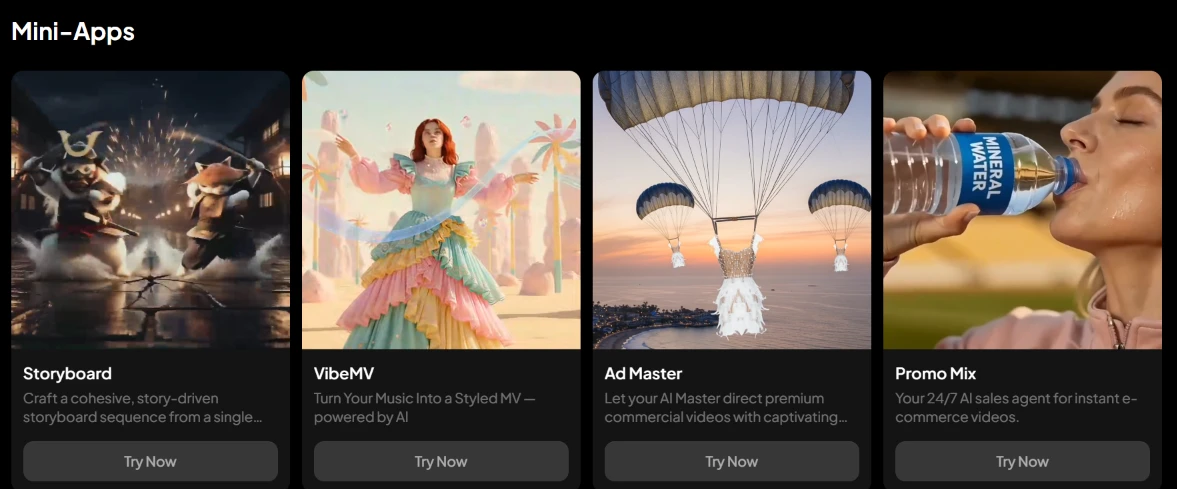
The Mini-Apps hub packages the model into task-specific tools, each with its own Try Now button. Storyboard builds a story-driven sequence from a single input. VibeMV turns a music track into a styled music video. Ad Master aims itself at premium commercial spots, and Promo Mix bills itself as a 24/7 sales agent for e-commerce clips.
I like this framing. Instead of starting from a blank prompt, I am handed a purpose-built entry point for the kind of thing I am trying to make.
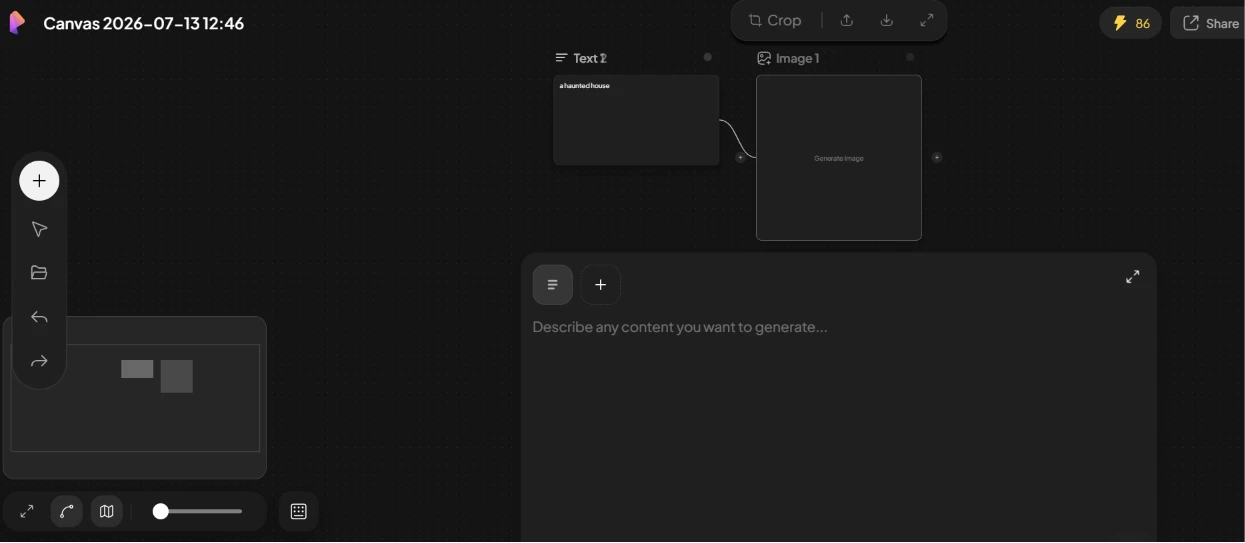
The Canvas editor is the most advanced-looking surface in the app. It gave me a blank board dated 2026-07-13 with draggable nodes I could wire together. A Text node was already linked into an Image node, feeding a prompt into a generation step, with a free-form box below asking me to describe what I wanted to build.
This is closer to a visual pipeline than a single prompt box. I did not have the credits left to run a full graph, but the drag-and-drop wiring was responsive as I moved pieces around, and the concept of chaining steps visually is the kind of thing I would come back to spend real time on.
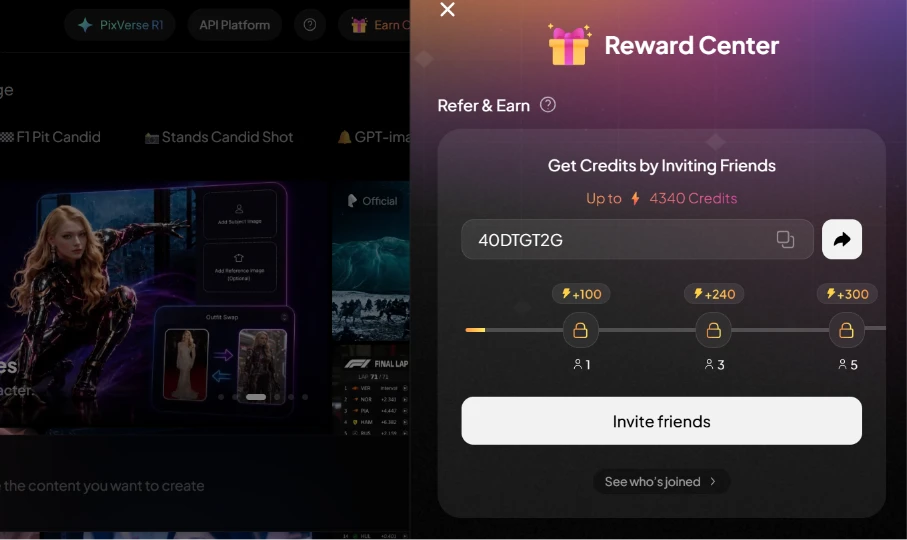
Running dry on credits made the last screen weirdly well-timed. The Reward Center is built around a referral scheme, dangling up to 4,340 credits for inviting people. It handed me a code, 40DTGT2G, and laid out the payouts on a slider. The first friend to sign up is worth 100 credits. Getting three people in bumps that to 240, and five gets you 300. An Invite friends button sat underneath, with a link to check who had already joined.
After hitting the credit ceiling twice in one session, the pitch to earn more by referring friends landed exactly where it was designed to. It is an obvious nudge, and I understood precisely why it was being put in front of me at that moment.
| Dimension | Our test | User signal | Verdict | Composite |
|---|---|---|---|---|
| Output Quality Visual fidelity and prompt adherence | 5 | 4 | Weak | |
| Ease of Use Interface clarity and workflow simplicity | 5.5 | 5 | Weak | |
| Value for Money Perceived fairness of pricing | 2.5 | 2 | Weak | |
| Billing Transparency Clarity of charges and plans | 2 | 1.5 | Weak | |
| Customer Support Speed and usefulness of help | 2.5 | 2 | Weak | |
| Reliability Stability and error frequency | 3.5 | 3 | Weak |
Toolscopia uses cookies to keep you signed in, remember your preferences, and understand how our reviews get read. Analytics are anonymous. See our privacy policy for the full detail.



Comments 0
Join the discussion and share your perspective.
Sign in to post a comment and reply to other readers.
No comments yet
Be the first to share your perspective on this tool.