1
Character based chat
Users praise engaging characters and story driven conversations when interruptions and filters do not interfere.
Polybuzz AI is a character and webtoon style chat app for fans of interactive stories. Creative roleplayers may enjoy it, but aggressive ads, censorship, and safety concerns heavily impact overall experience.
Independent review — we test tools ourselves and analyze public user reviews. How we test.
Polybuzz AI earns praise for engaging characters and webtoon style storytelling when it works. However, aggressive advertising, strict and inconsistent content filters, and wait limits frustrate many users. Serious concerns appear around child safety, mental health impact, and sexualized conversations without clear age gating. Monetization feels pushy and some features like the manga generator waste paid tokens. Best suited only for mature fiction roleplayers who understand the risks and can tolerate heavy ads and restrictions.
PolyBuzz AI is a character chat platform for roleplay and interactive storytelling, offering a library of more than 20 million AI characters from anime, movies, RPGs, and community creators, plus a builder for making your own. Formerly Poly.AI, it rebranded in late 2024 under US-based Cloud Whale Interactive Technology and now draws around 42.8 million monthly visits and over 50 million app downloads.
Chats are text-first, with voice conversation, AI image generation, and multi-character rooms layered on top. A free ad-supported tier covers the basics, while paid plans from $9.90 per month unlock better AI models and longer memory. It is an entertainment platform for adults 18 and up, competing directly with Character.AI, with thin memory on cheaper tiers as its main drawback.
Users praise engaging characters and story driven conversations when interruptions and filters do not interfere.
Webtoons and story format receive strong approval from at least one reviewer who reports no downsides.
Free access exists, but reviewers strongly criticize the extreme volume and length of mandatory ads.
Short chat quotas trigger forced breaks after only a few messages, viewed as money hungry behavior.
Filters often censor even gentle romantic text, frustrating users seeking 18 plus style roleplay.
Manga generator frequently fails with violation errors, consuming many tokens without delivering results.
Token system ties to generation usage, with complaints about wasted tokens and lack of refunds.
One reviewer reports serious negative mental health effects linked to app use by a vulnerable user.
Parents report children accessing sexual AI chats with no effective age gate or restrictions.
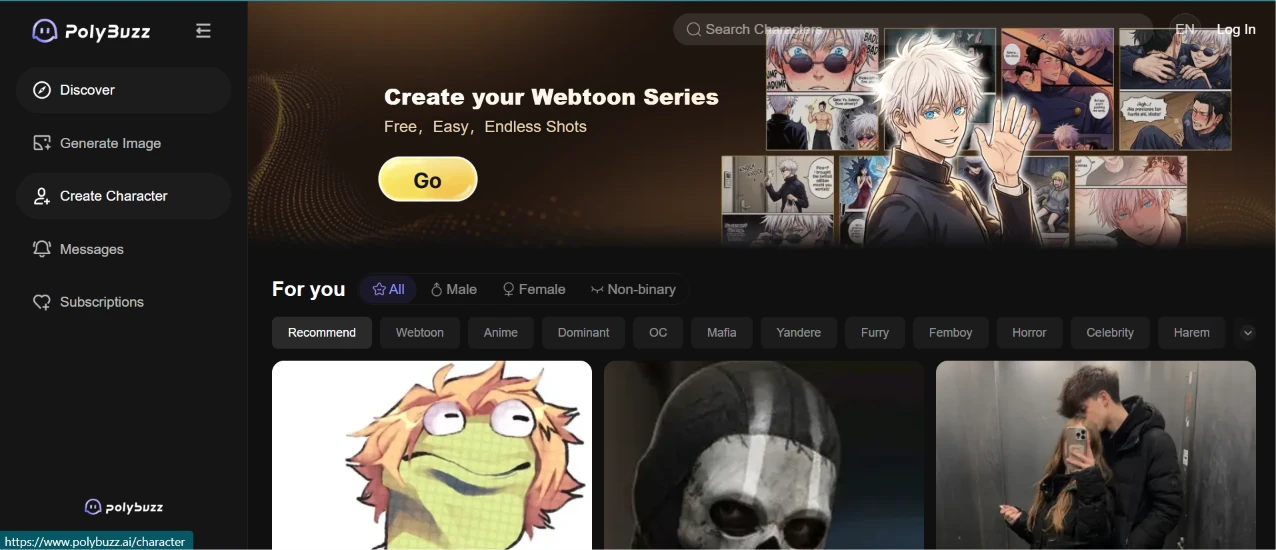
The first thing I did was open the site and see how far I could get without an account. The Discover feed loaded straight away with a Log In button still sitting in the top right corner, so browsing costs nothing. The left rail gave me Discover, Generate Image, Create Character, Messages and Subscriptions. Across the top, a banner pushed the webtoon builder at me with a yellow Go button before I had clicked on anything at all.
Under it was a For You row with All, Male, Female and Non-binary toggles, then a long strip of category chips: Recommend, Webtoon, Anime, Dominant, OC, Mafia, Yandere, Furry, Femboy, Horror, Celebrity, Harem.
What caught my eye was how inconsistent the recommended cards looked. One was a cartoon frog with bulging eyes. Next to it sat a black and white skull mask, and beside that an ordinary phone photo of a man in a stairwell. The three thumbnails shared no visual register at all, which made the feed feel less curated than shuffled. The chip strip also has a small arrow on its right edge that I nearly missed, and it hides at least as many categories as it shows.
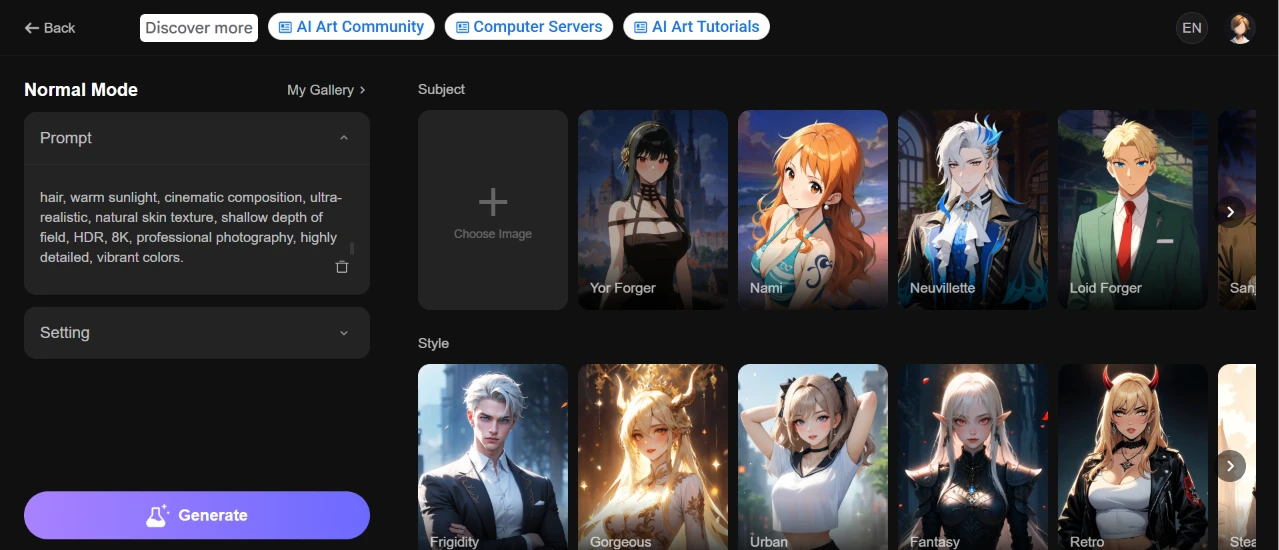
I clicked Generate Image next. The prompt box takes the whole left column, with a collapsed Setting accordion under it and a purple Generate button anchored at the bottom. The right side splits in two: a Subject row where I could pick a reference character or upload my own image, and a Style row of preset thumbnails.
The Subject presets were all anime characters. Yor Forger, Nami, Neuvillette, Loid Forger and one more cut off at the edge. The Style presets were labelled Frigidity, Gorgeous, Urban, Fantasy, Retro and something starting with Ste, and every thumbnail sitting under those labels was anime art. Urban was anime. Retro was anime. That should have been my warning.
The header also says Normal Mode, which implies there is another mode somewhere. I never found it.
I left Subject and Style untouched and typed a deliberately photographic prompt:
“A beautiful young woman with long black hair and expressive brown eyes standing in a lavender field during golden hour, wearing a flowing white dress, gentle breeze moving her hair, warm sunlight, cinematic composition, ultra-realistic, natural skin texture, shallow depth of field, HDR, 8K, professional photography, highly detailed, vibrant colors.”
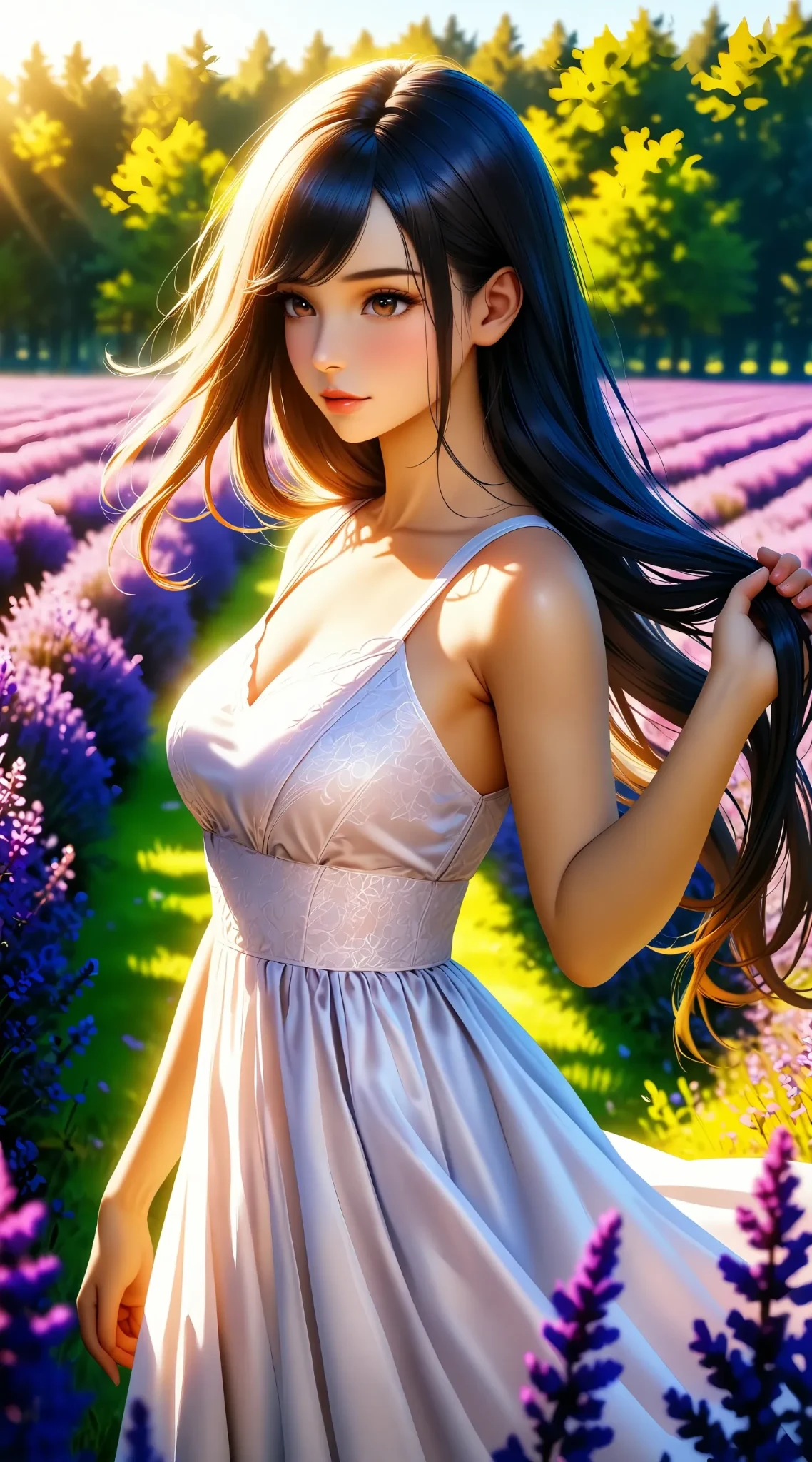
The render is clean. No mangled fingers, no melted background, no obvious artifacts anywhere. Golden hour landed. The backlight through the trees is doing exactly what I asked for, the white dress is there, the eyes are brown, the hair is long.
It is also, unmistakably, an anime illustration.
I asked for ultra-realistic, natural skin texture, HDR, 8K, professional photography. Not one word of that half of the prompt survived. The model took my scene description and discarded every technical instruction attached to it, and it did that with both style presets left unselected, which tells me anime is the house default rather than something I switched on by accident.
A few smaller things drifted too. The hair reads black at the crown and then shifts into blue and orange at the tips, which nothing in my prompt asked for. The mid-ground rows of purple do pass as lavender. The foreground plants are oversized purple spikes that look like a generic flower asset dropped in front of the lens. There is depth of field, but it is painted rather than optical.
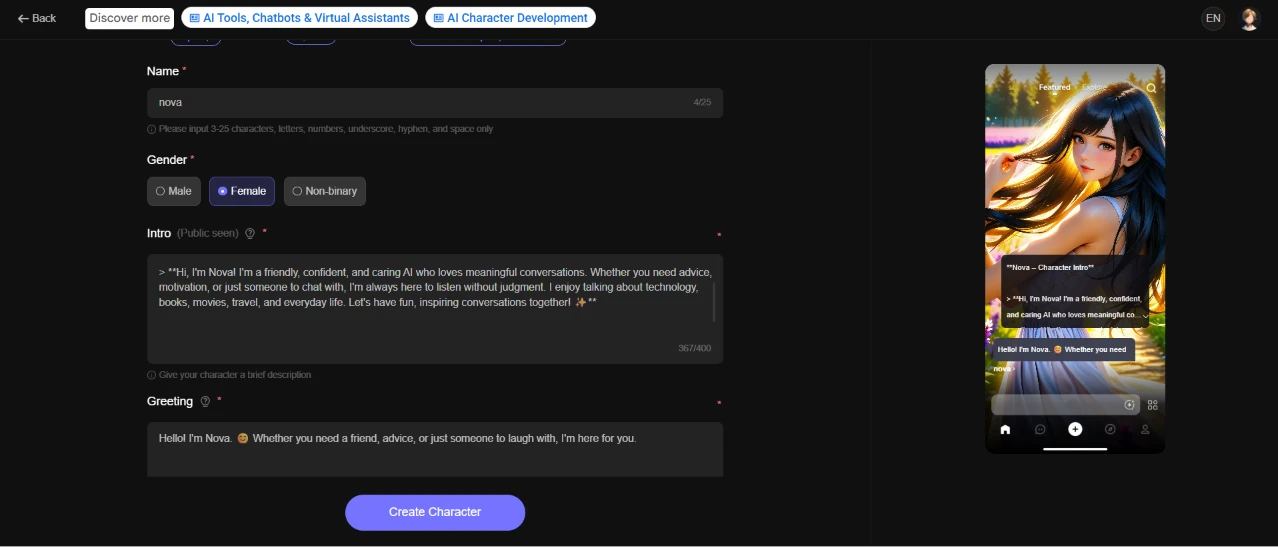
Create Character opens a form and a live phone preview side by side. The name field caps at 15 characters, which I found out when the counter ticked over to 4/15 after I typed nova. Gender is a three-way radio and I picked Female. The Intro box is flagged Public seen, so whatever goes in there is visible to anyone who opens the character, and it stops at 400 characters. Mine came in at 267.
I wrote Nova as friendly and non-judgmental, someone who enjoys talking about technology, books, movies, travel and everyday life. The greeting underneath was one line, offering to be a friend or an ear.
The preview pane on the right updates as you type, and it stacked my intro text over the lavender image inside a phone-shaped frame. That is where I noticed the problem. I had used markdown asterisks in the intro for emphasis, and the preview printed them as literal asterisks. Nothing rendered as bold. The field takes plain text and only plain text, and nothing on the form warns you about that before you paste.
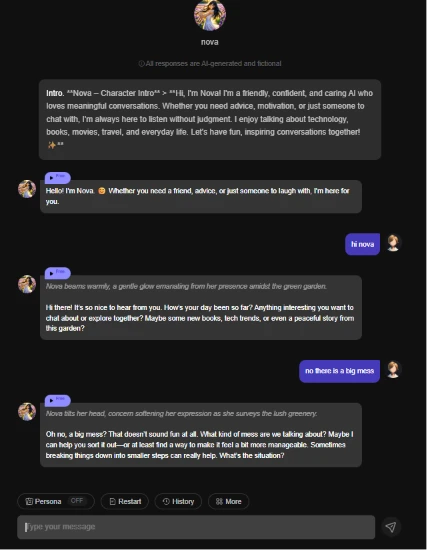
Hitting Create Character dropped me straight into a conversation with her. A grey line under her name says that all responses are AI-generated and fictional, which is the right place for that notice.
The first bubble in the thread is my own intro, printed raw. Every asterisk came through as a character on screen, and so did the quote marker I had left in by mistake.
I typed hi nova. The reply opened with an italic stage direction saying that Nova beams warmly, a gentle glow emanating from her presence amidst the green garden.
There is no garden. Her portrait is a lavender field, and I never wrote the word garden anywhere in her setup. She then offered to talk about tech trends, or to tell me a peaceful story from this garden, doubling down on a setting she had invented one line earlier.
So I answered with no there is a big mess, deliberately vague, to see what she would do with almost nothing. She tilted her head, surveyed the lush greenery (the garden again, three turns in now), and asked what kind of mess we were talking about before offering to break it down into smaller steps.
Asking first was the right call. Committing to smaller steps in the same breath was not, because at that point she had no idea whether the mess was a spilled drink or a divorce. The persona did come through in the tone, though. She sounds like the intro I gave her, which is the part I actually cared about testing.
Along the bottom sit a Persona toggle (off by default), a Restart button, a History button and a More menu.
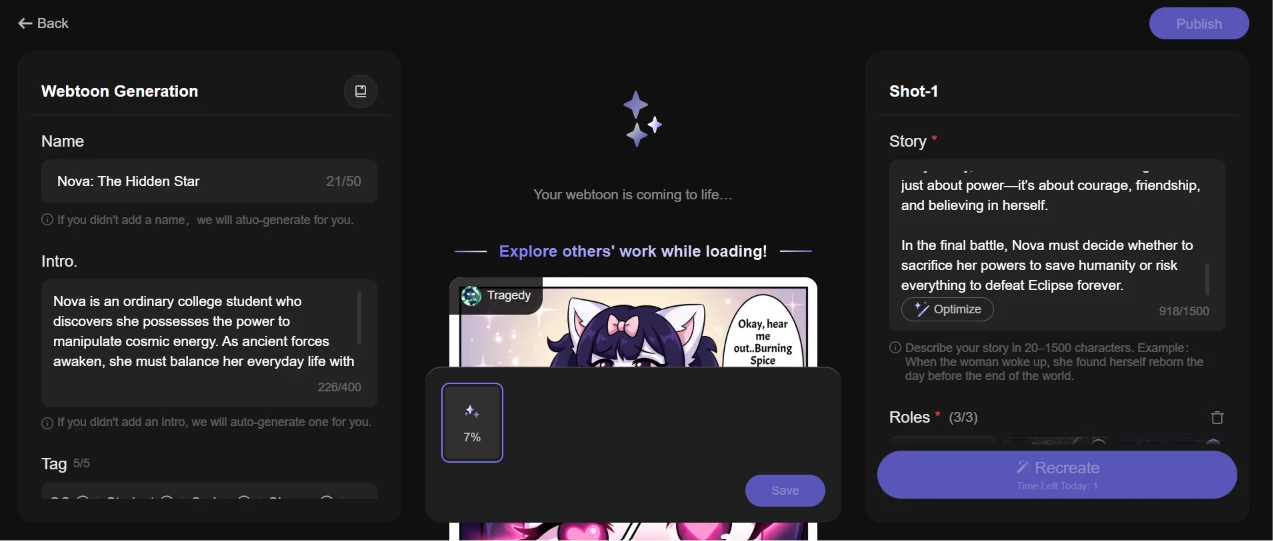
The Webtoon Generation tool splits into three columns. The left one asked for a name and an intro. I called mine Nova: The Hidden Star, which the counter measured at 21 of 50, and the intro came to 226 of 400. Under those sat a tag row, already full at 5 of 5.
The right column is where the work happens. Shot-1 gives you a Story field with a 1500 character ceiling, an Optimize button that offers to rewrite whatever you put in, a Roles counter and a Recreate button. I left Optimize alone because I wanted to see what my own text would produce.
The story I pasted ran 918 characters. A college student touches a celestial crystal buried under a ruin and wakes an ancient guardian power she cannot control. She meets a guardian named Lyra. Together they chase a villain called Eclipse toward a relic named the Celestial Core, and the whole thing ends on a choice about whether Nova gives up her powers to save everyone else.
Roles capped at 3 of 3 with no plus button next to it. My three named characters filled every slot, so a side character was never going to happen.
The middle column then told me my webtoon was coming to life and showed a progress figure of 7 percent. Underneath that, a carousel labelled Explore others' work while loading. Handing me somebody else's comic to read while mine renders is a smart use of dead time, and I did read one, because 7 percent sat there long enough for me to.
The free tier gives two shots a day. The Recreate button greys itself out and prints the remaining count directly on the button, which is the clearest quota display I have run into on a tool like this. Both of my shots ended up here
| Dimension | Our test | User signal | Verdict | Composite |
|---|---|---|---|---|
| Conversation Experience Story quality and immersion | 5.5 | 6 | Weak | |
| Safety and Controls Age gating and safeguards | 2 | 2 | Weak | |
| Monetization and Ads Ads and paywall pressure | 1.5 | 1.5 | Weak | |
| Content Moderation Filter accuracy and fairness | 3 | 3.5 | Weak | |
| Creative Tools Manga and story generation | 3 | 3 | Weak | |
| Overall Reliability Consistency across sessions | 3.5 | 4 | Weak |
Toolscopia uses cookies to keep you signed in, remember your preferences, and understand how our reviews get read. Analytics are anonymous. See our privacy policy for the full detail.



Comments 0
Join the discussion and share your perspective.
Sign in to post a comment and reply to other readers.
No comments yet
Be the first to share your perspective on this tool.