1
Daily visit logging
Enables structured logging of field visits, widely praised for improving visibility.
Field force CRM built for pharmaceutical teams who need structured visit logging, doctor and chemist management, and real time order tracking to organize territory work and improve sales visibility.
Independent review — we test tools ourselves and analyze public user reviews. How we test.
SANeForce delivers targeted CRM capabilities for pharmaceutical field teams, especially around visit logging, doctor management, and real time order tracking. Reviewers highlight meaningful workflow improvements and responsive support once teams are trained. The main drawback is an initial learning curve before adoption feels smooth. It suits organizations that accept some upfront onboarding effort. Best for pharma companies that prioritize structured reporting and field visibility over simplicity for casual users.
SAN SFE is the field reporting app from the Chennai company SANeFORCE.com, built for the people who run pharmaceutical field operations: the medical representatives logging doctor visits and the managers tracking their coverage.
Rather than one catch-all app, the company ships a family of products for different jobs. SAN SFE handles core MR reporting, SAN ZEN and SAN CLM cover e-detailing sessions with doctors, and SAN SALES serves FMCG order booking. Each runs on both mobile and web, with a separate database held for every client.
What sets it apart from a generic CRM is how tightly the features map to a drug company’s daily routine. A rep plans a tour, records the point of business on each call, logs samples against a named doctor, and files expenses from the same place. Managers receive geo-tagged visit proof and monthly coverage grids without chasing paper reports.
More than 235,000 users at companies such as Micro Labs and BSV run their field reporting on it, concentrated across India and neighbouring pharma markets.
Enables structured logging of field visits, widely praised for improving visibility.
Tracks representative activities in detail, helping managers follow execution quality.
Centralizes healthcare professional details, positively mentioned for pharma specific focus.
Provides order status and updates in real time, strongly praised by users.
Gives managers timely information about field operations, seen as a clear strength.
Supports medical representative reporting workflows, aligned with pharmaceutical requirements.
Targets pharma sales processes, improving coordination across distributed field teams.
Offers reporting for performance analysis, highlighted in vendor oriented review.
Support team described as friendly and quick to respond.
SaneForce runs behind a client login, so there is no open account to explore. For this section I worked through every screen the company publishes for its SAN SFE app, checked each one against the 2,000-plus reviews left by reps who use it on the job, and marked where the two line up and where they do not.
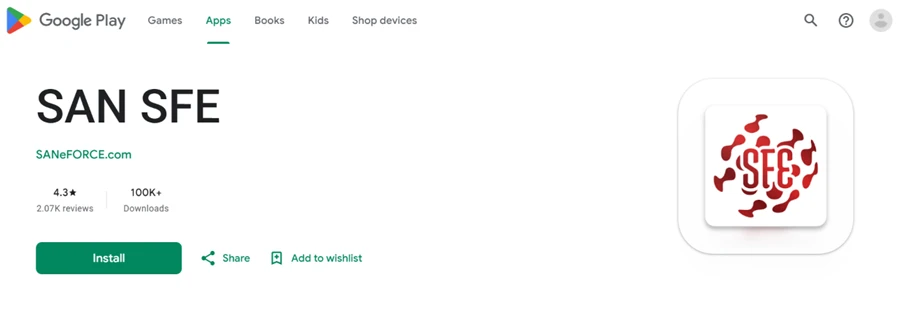
The Play Store page sets the baseline. SAN SFE carries a 4.3 star rating across 2.07K reviews and sits above 100,000 downloads, a heavy install base for a field reporting app aimed at medical reps.
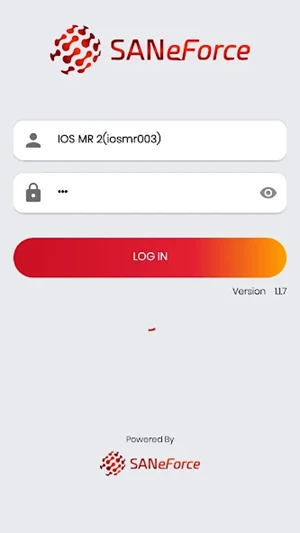
The app itself opens on a bare login. There is no self-signup and no guest mode, so a rep cannot touch anything until head office issues a username like the iosmr003 account in the demo build (version 1.1.7). A buyer learns the pricing model from this screen alone: you evaluate SaneForce through a sales demo, not a free trial.
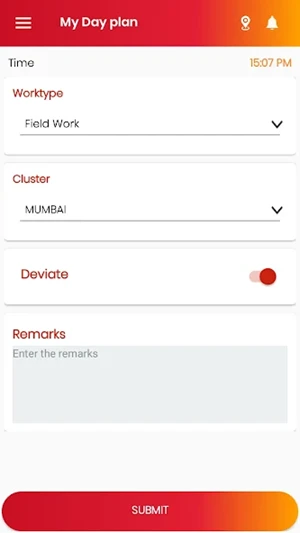
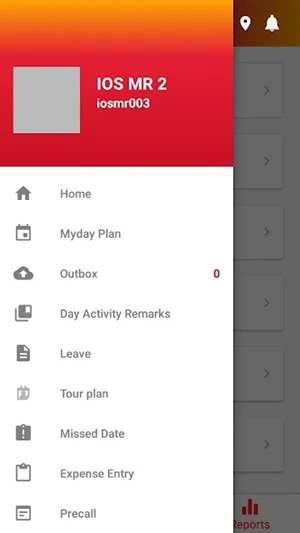
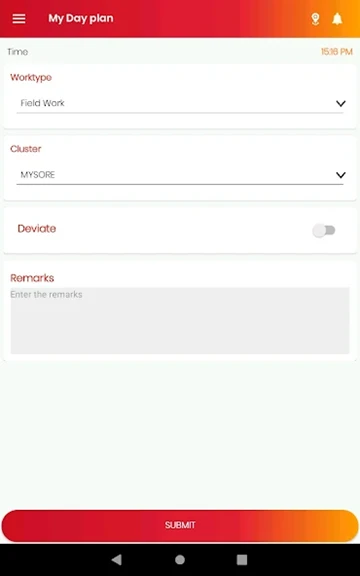
Once inside, the day starts with a short plan. The rep picks a work type, chooses a cluster such as Mumbai, flips a Deviate toggle when the route changes, and adds remarks before submitting. The side menu is where the spread shows, with Myday Plan, Outbox, Day Activity Remarks, Leave, Tour plan, Missed Date, Expense Entry and Precall all one tap away. That covers most of what a pharma rep touches in a day inside a single app.
Login screen: demo account iosmr003, version 1.1.7. |
My Day Plan: work type, cluster and a deviate toggle. |
The side menu and its module spread. |
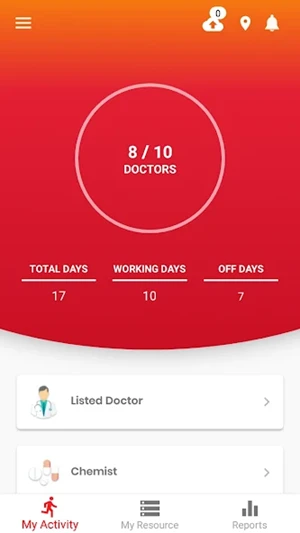
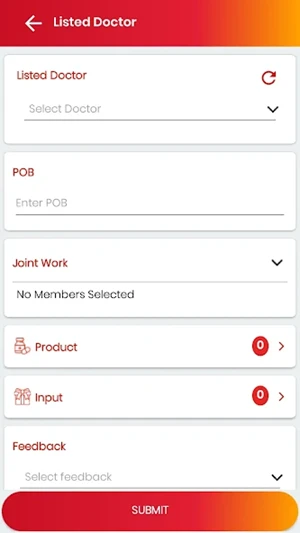
Call reporting is the core job, and SAN SFE builds the screen around the doctor. The Listed Doctor form captures the point of business value, any joint work with a senior, the products promoted, the inputs or samples handed over and a feedback rating, all on one scroll. The My Activity dashboard turns that into a coverage read, a clear 8 of 10 doctors met, with the month's working days set against off days above it.
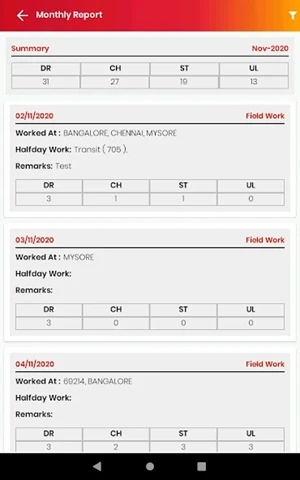
The monthly report rolls everything into a dated grid of doctor, chemist, stockist and unlisted-call counts. One detail stands out: the sample data reads November 2020. The screens SaneForce promotes are a few years old, so the live app may look tidier than these shots suggest.
My Activity: 8 of 10 doctors covered. |
Listed Doctor report, with POB, product, input and feedback. |
Monthly report grid. Note the November 2020 sample data. |
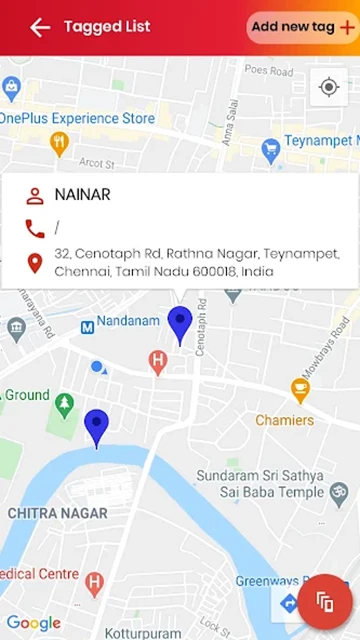
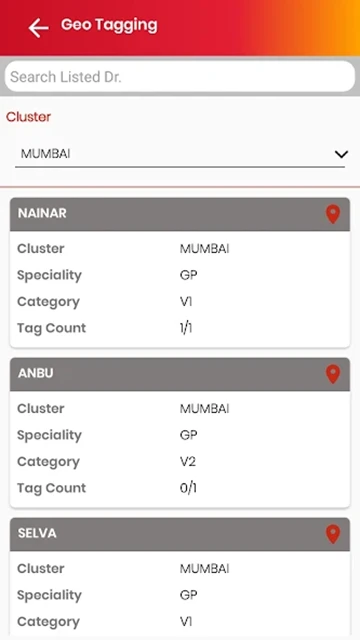
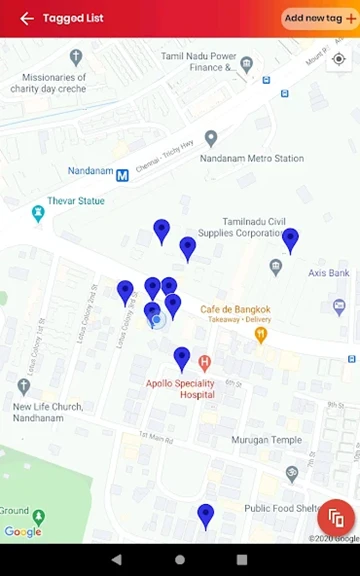
Field verification leans on geo-tagging. Each listed doctor can be pinned to a location, and the tagging list shows cluster, speciality, category and a tag count such as 1/1 or 0/1, so a manager sees at a glance who has been mapped and who has not. The map view drops those pins onto real streets, which is how a supervisor checks that a reported visit matches a real address.
A geo-tagged doctor pinned to a Chennai address. |
Geo-tagging list: cluster, speciality, category and tag count. |
The same screens hold their shape on a tablet, which suits first-line managers who review a full team on a bigger display rather than a phone. The day plan and the tag map carry the same fields, so a manager moving between devices is not relearning the layout.
My Day Plan on a tablet. |
The tagged-doctor map on a tablet. |
Screens show intent. Reviews show what happens on real phones across a month of use, and the signal splits hard.
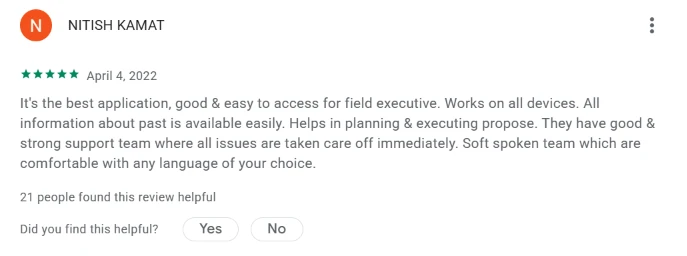
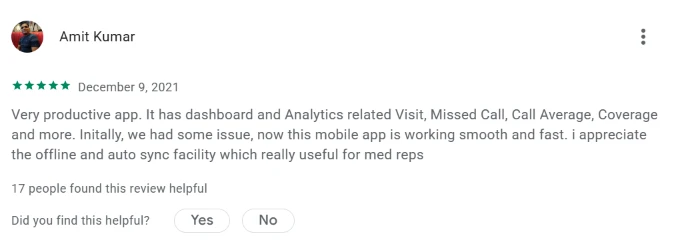
On the positive side, reps call out offline capture with auto-sync as a daily saver in low-network territories, and praise a support team that answers fast and speaks the rep's own language. The dashboard and the visit analytics get named for planning.
Five-star review: support team and language coverage. |
Five-star review: offline capture and auto-sync. |
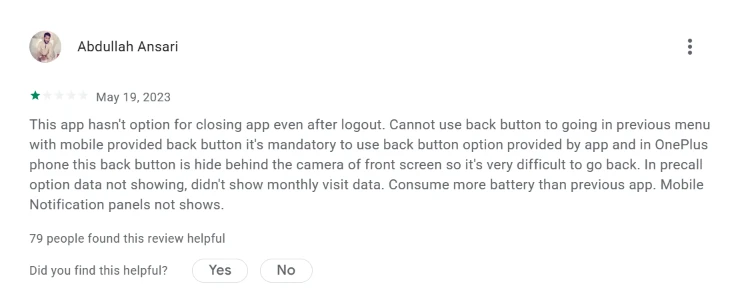
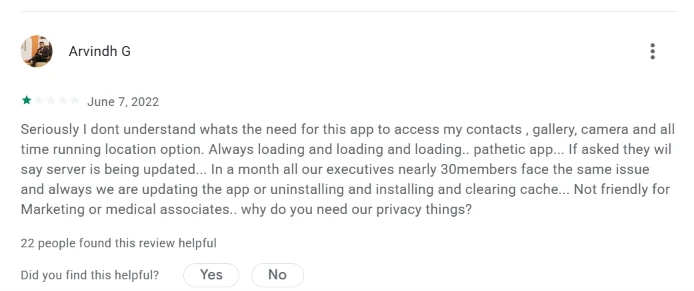
The complaints are just as concrete. One long one-star review, marked helpful by 79 readers, flags heavy battery drain, a back button that fights the phone, precall and monthly visit data that fail to load, and missing notifications. Another questions why the app wants contacts, gallery, camera and always-running location, and reports a team of 30 stuck on repeated reinstalls and cache clears while the server is updating.
One-star review: battery, back-button and data-load issues. |
One-star review: permissions and reliability complaints. |
Battery life and permissions are the two things a buyer should pressure-test before rolling SAN SFE out to a large field force.
Built for pharma
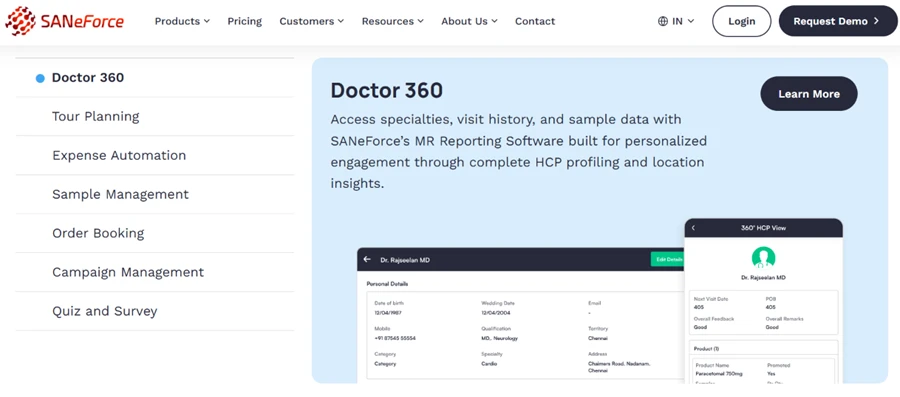
The depth is unmistakably pharma. Doctor 360 pulls a doctor's specialty, visit history, sample records and feedback into one HCP profile, and the module list beside it reads like a medical rep's real workflow, with tour planning, RCPA, sample management and e-detailing all present. A generic sales app does not carry this.
SaneForce does not publish a price list. There is no free plan and no public per-user figure, so the only way to learn what it costs is to request a demo and speak with the sales team.
The demo form itself hints at how the pricing works. It asks for the company name and, more tellingly, the number of medical representatives on the team. That points to per-seat licensing scaled to field-force size, which is standard for pharma SFA tools but worth getting in writing before signing.
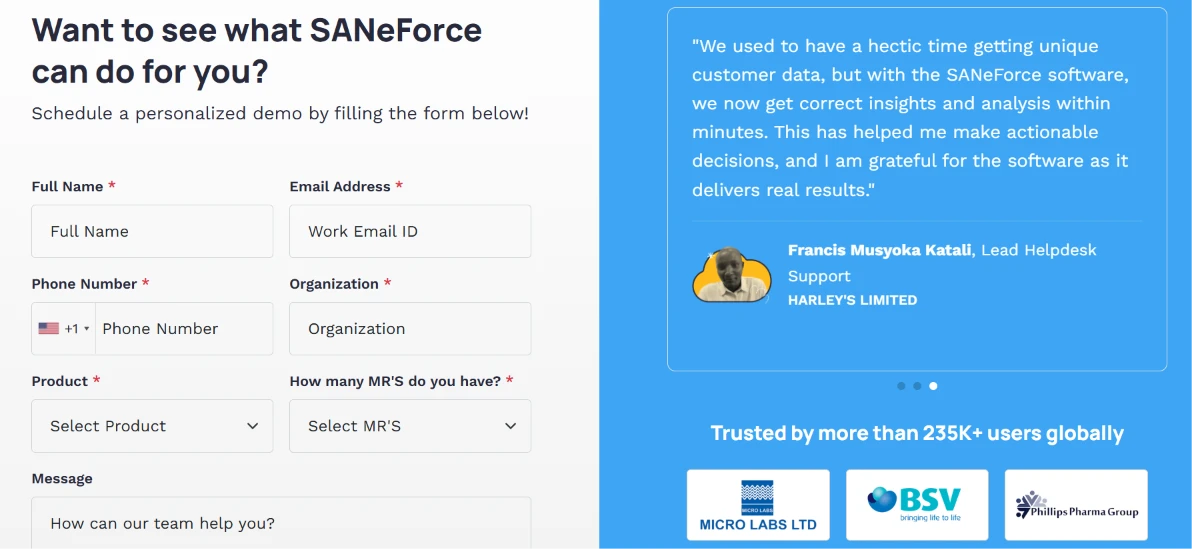
A few points are worth clarifying on that sales call: whether onboarding and data migration carry a separate fee, what the minimum user count is, how long the contract locks a buyer in, and what the premium tiers add over the base plan.
For a small team or a solo evaluator, the missing self-serve trial is a real friction point. A buyer commits to a conversation before ever seeing the product priced.
| Dimension | Our test | User signal | Verdict | Composite |
|---|---|---|---|---|
| Field Activity Management Quality of visit logging | 8 | 8 | Good | |
| Ease of Use Learning curve and usability | 6 | 6 | Moderate | |
| Pharma Specific Fit Alignment with pharma workflows | 9 | 8 | Excellent | |
| Real Time Visibility Timeliness of field data | 7 | 7 | Good | |
| Reporting and Insights Depth of reports and analytics | 8 | 8 | Good | |
| Support and Service Responsiveness of assistance | 7 | 8 | Good |
Toolscopia uses cookies to keep you signed in, remember your preferences, and understand how our reviews get read. Analytics are anonymous. See our privacy policy for the full detail.
Comments 0
Join the discussion and share your perspective.
Sign in to post a comment and reply to other readers.
No comments yet
Be the first to share your perspective on this tool.