1
600+ AI voices
Hundreds of neural voices across styles and accents.
TTSMaker is a free online text-to-speech tool that turns written text into downloadable audio across 100+ languages and 600+ AI voices, with full commercial-use rights and no account required.
Independent review — we test tools ourselves and analyze public user reviews. How we test.
TTSMaker is one of the most generous free voice tools a US creator can open today. It hands you hundreds of voices, a hundred-plus languages, multi-speaker dialogue, and full commercial rights without asking for a sign-up or a card. The voice quality is serviceable rather than stunning, clear enough for a YouTube narration or an e-learning clip but short of a premium paid engine. The friction is real: a captcha on every conversion, ads, and audio that self-deletes in 30 minutes. For light or occasional work the free plan is hard to beat. For daily production, the small per-conversion cap and the bot checks are what nudge you toward paying.
TTSMaker is a browser-based text-to-speech service that converts typed text into spoken audio using neural voices. It belongs to the same category as NaturalReader or Play.ht, with a far more open free tier than most rivals offer.
The target user is anyone who needs a voice track without hiring one. Video creators dubbing YouTube or TikTok clips, teachers producing pronunciation samples, and marketers laying down a quick voiceover are the core audience.
Everything runs in the browser with no install. You type or paste text, pick a language and voice, convert, and download the file. Generated audio is held for only 30 minutes before deletion, so the workflow assumes you save each file as you go.
The headline promise is openness. The service grants 100 percent commercial-use rights with no required attribution, which removes the licensing worry that shadows many free audio tools. An API is offered for developers who want to wire the engine into their own products.
Hundreds of neural voices across styles and accents.
Broad global coverage, from English to Hindi to Arabic.
Some voices do not count against the weekly quota.
Assign voices to blocks and merge into one dialogue.
Export MP3, OGG, AAC, OPUS, or WAV.
Generate a matching subtitle file per clip.
Adjust speed, volume, pitch, and paragraph pauses.
Insert timed pauses inside the text.
Upload a BGM track under the audio.
Use generated audio commercially with no attribution.
We tested TTSMaker the way a US creator would on a deadline: free, no account, one short script, and a careful listen to what came back. The sentence we used throughout was a plain line of office English with a time and a weekday in it, so we could hear how the voice handled names and numbers.
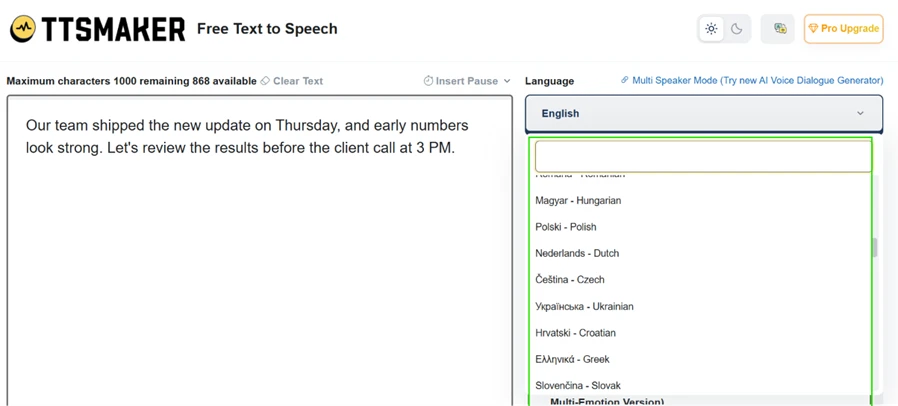
The home screen is one text box, a language menu, and a convert button. Our test line went in, and the language list ran far past English into Hungarian, Polish, Ukrainian, Greek, and dozens more.
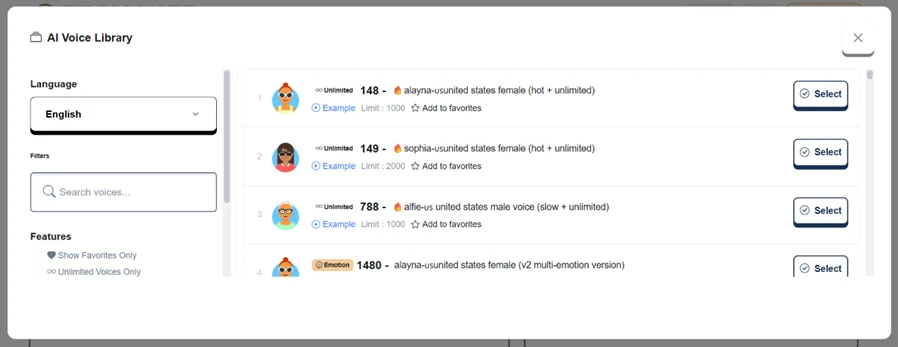
Opening the voice library is where the scale shows. Each English voice carries its own card with a preview button, and several are tagged “unlimited,” meaning they do not draw down your weekly character quota. A few carry a multi-emotion version.
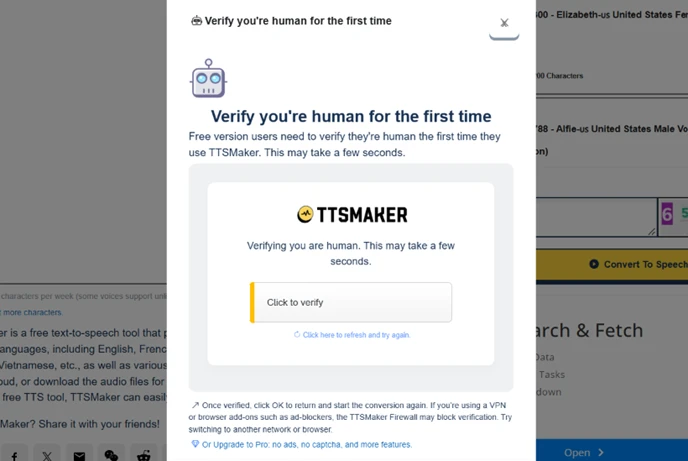
Then came the part we did not expect from an AI tool. Hitting convert asked us to solve a captcha, and on the first run a separate window made us verify we were human.
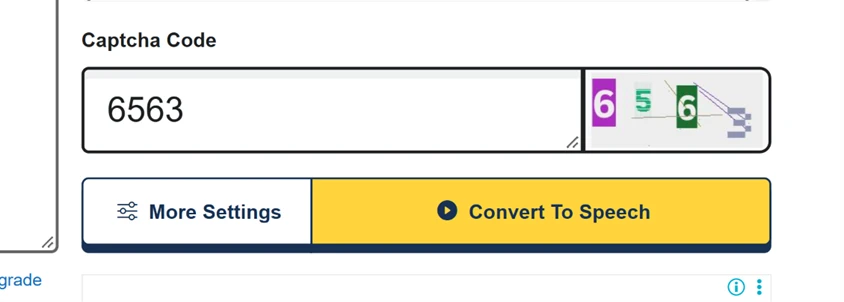
This is the clearest friction in the free version. Most AI tools let you generate and go. Here, a bot check stands in front of every conversion, and the first-time verification adds one more gate before any sound plays. It is a small delay on one clip. Across a batch of twenty, it adds up.
Conversion took a few seconds and returned a finished clip with a waveform and a player.
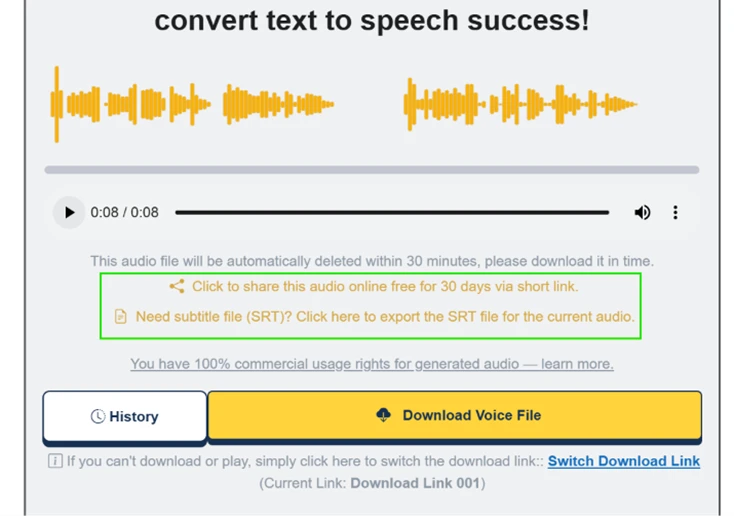
On sound, the honest verdict is a solid 7 out of 10. The voice is clear and the words are right, including the weekday and the time, but it does not reach the lifelike warmth of a premium paid engine. For a YouTube voiceover, an e-learning clip, or a draft narration, it is good enough to publish. For a polished brand ad where the voice carries the whole message, it reads as serviceable rather than human.
Two things on this screen matter beyond the sound. The clip is set to delete within 30 minutes, so you download now or lose it. In its favor, the same screen grants 100 percent commercial-use rights and offers an SRT subtitle export, which is more than many free tools give.
The settings panel is where TTSMaker earns back some goodwill.
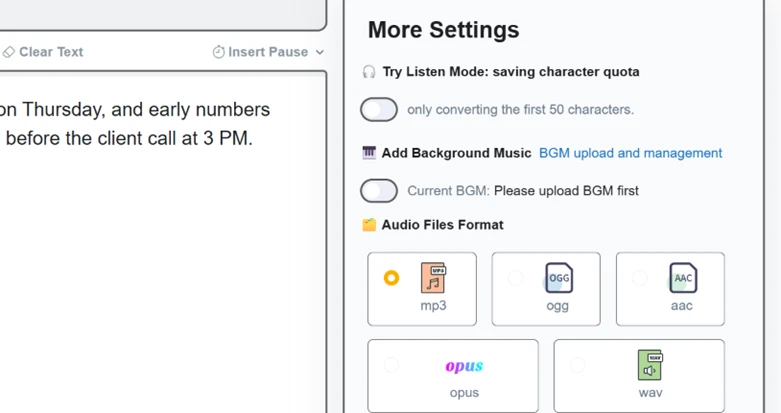
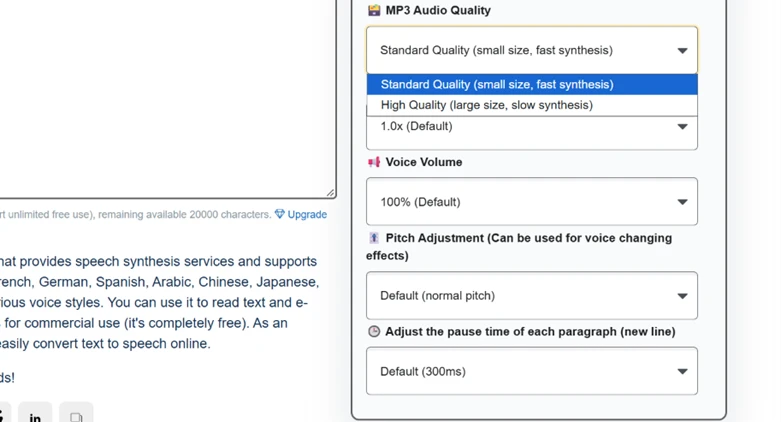
Output is not locked to MP3. You can export OGG, AAC, OPUS, or WAV, upload background music, and switch on a Listen Mode that previews only the first 50 characters to save quota. Deeper down sit an MP3 quality toggle and separate controls for speed, volume, pitch, and the pause between paragraphs.
The feature we did not expect on a free plan was multi-speaker mode, which assigns different voices to different blocks and merges them into one dialogue track.
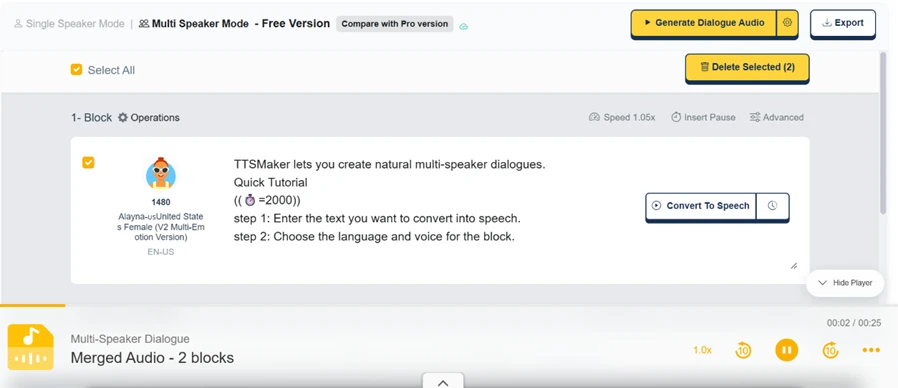
We built a short two-part exchange and it stitched into a single 25-second clip. For a skit, a sample conversation, or a two-host intro, this alone sets TTSMaker apart from most free text-to-speech sites.
The pricing page makes the trade explicit.
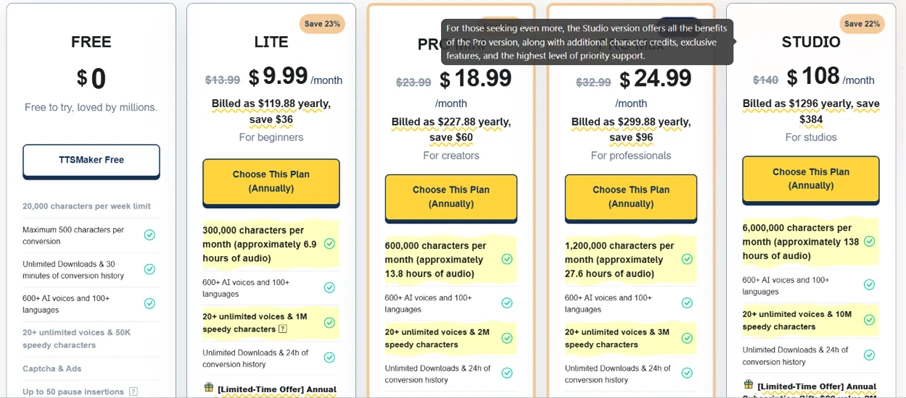
Free gives 20,000 characters a week, capped at 500 characters per conversion, with the captcha and ads baked in. Paid plans start at $9.99 a month for Lite and climb to $108 for Studio, and the step up buys far larger limits, longer history, and relief from the captcha and ads. For light or occasional use the free tier is genuinely usable. For daily production work, the 500-character conversion cap and the bot checks are what push people to pay.
| Dimension | Our test | User signal | Verdict | Composite |
|---|---|---|---|---|
| Voice Quality How natural and clear the speech sounds | 7 | 7 | Good | |
| Language Range How many languages and voices are offered | 10 | 9 | Excellent | |
| Features Depth of formats, controls, and modes | 9 | 9 | Excellent | |
| Ease of Use How quickly a newcomer gets usable audio | 8 | 7 | Good | |
| Friction How clear the path is from text to download | 5 | 4 | Weak | |
| Value What the free and paid tiers give for the cost | 9 | 9 | Excellent |
Toolscopia uses cookies to keep you signed in, remember your preferences, and understand how our reviews get read. Analytics are anonymous. See our privacy policy for the full detail.
Comments 0
Join the discussion and share your perspective.
Sign in to post a comment and reply to other readers.
No comments yet
Be the first to share your perspective on this tool.