
Almost every company now says it uses artificial intelligence. Turning that claim into money is a separate story.
McKinsey's 2025 State of AI survey found that 88% of organizations regularly use AI in at least one business function, up from 78% a year earlier. The same research found that only about 6% of companies qualify as high performers, meaning they can trace more than 5% of their profit to AI. Adoption is common. Payoff is rare.
That gap is the whole reason this guide exists.
The pages below trace one path. We start with what generative AI actually is, move to where it earns money first, build a strategy around that, decide how to source the tool, and finish by proving the return before you spend. By the end you will have a plan you could start on Monday morning.
Start With What Generative AI Is
Business conversations blur four terms that do different jobs. Getting them straight saves money later, because pointing the wrong one at a task is a fast way to burn a budget.
| Term | What it does |
|---|---|
| Large language model | The underlying engine. A model trained on huge amounts of text that predicts language. |
| Generative AI | The capability built on that engine. It creates new content: text, code, images, audio. |
| AI agent | A layer that plans and acts. It decides what to do with generated output and takes steps toward a goal. |
| Automation | Fixed rules running underneath. It executes predefined steps with no creativity or context. |
These layers stack. The model supplies raw capability, generative AI turns it into content, an agent decides what to do with that content, and automation runs the fixed steps beneath. A single customer support tool might use all four at once.
The distinction matters for the next section on use cases, where matching the tool to the task separates quick wins from expensive dead ends.
Why 2026 Is the Year the Pressure Shifted
Regular use of generative AI climbed from roughly a third of organizations in 2023 to 72% in the latest McKinsey reading. The trend line tells the story.
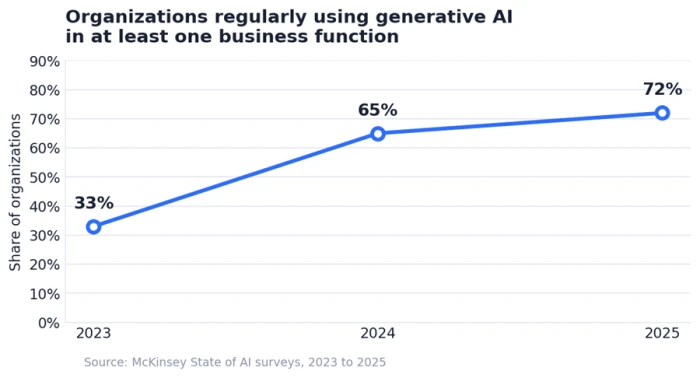
When most of your competitors hold the same tools, owning a tool stops being an advantage. What you do with it becomes the advantage.
Wide use has not translated into wide results. McKinsey found that nearly two-thirds of organizations have not begun scaling AI across the enterprise. Most sit between a working pilot and real financial impact, and closing that distance is what the rest of this guide is about.
The prize is large. McKinsey puts the long-term economic potential of generative AI at $2.6 trillion to $4.4 trillion a year across 63 use cases, concentrated in customer operations, marketing, software engineering, and research. The question is no longer whether to adopt. It is where to point the technology first.
That is where we go next.
Where Generative AI Pays Off First
Value is uneven. Some functions return money in weeks. Others swallow budgets for a year. Across early adopters the pattern is consistent: the fastest wins come from high-volume, repetitive, content-heavy work that eats skilled time without needing skilled judgment.
Operations and internal workflows
This is usually where the return shows up soonest. Good starting targets include:
• Summarizing long contracts, reports, and compliance documents in seconds
• Letting employees query internal knowledge bases in plain language instead of digging through folders
• Drafting recurring reports such as weekly status updates and financial summaries
• Pulling structured data out of messy inputs like emails, forms, and scanned PDFs
A mid-sized team can move one of these into a pilot within weeks, because the data already exists and a wrong answer carries little operational risk. That low downside is exactly why operations makes a strong first project.
Customer support
Support has the clearest evidence behind it. Economists at Stanford and MIT studied 5,179 customer support agents as a generative AI assistant was rolled out, tracking three million chats. Output rose 14% on average. Newer and lower-skilled agents improved 34%, while the most experienced saw close to no change. The assistant spread the habits of the best agents to everyone else.
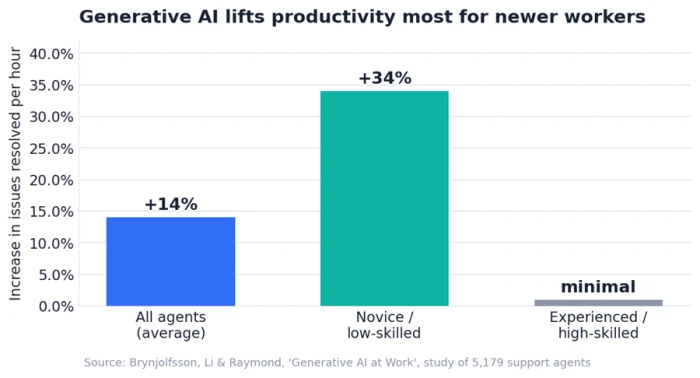
Two side effects strengthen the business case. Customer sentiment improved, and staff stayed in their jobs longer.
Marketing and sales
Campaign work that once filled a week compresses into hours. Segmented email, product descriptions in five languages, first-draft social posts, and multiple ad variants come out at volume, with a person reviewing before anything ships. On the sales side, meeting summaries and CRM data entry get handled automatically, which hands time back to reps.
Software development
GitHub ran a controlled study in which developers completed a coding task with and without its Copilot assistant. Copilot users finished in 71 minutes against 161 minutes for the group without it, a 55% speed gain on that task. The effect shrinks on complex work, so read that number as a ceiling for narrow tasks rather than a blanket promise.
Industry examples
| Industry | Where generative AI earns its keep |
|---|---|
| Healthcare | Clinical documentation, patient query handling, and extracting data from charts and faxes. Privacy rules must be designed in from the start. |
| Financial services | Drafting regulatory reports, interpreting rule changes, and writing portfolio narratives, with human review kept mandatory. |
| Manufacturing and logistics | Predictive maintenance write-ups from sensor data and shorter documentation cycles. |
| Retail | Product descriptions at scale, personalized recommendations, and around-the-clock shopping assistants. |
Knowing what is possible is not the same as knowing where to start. A strategy turns this menu into a sequence, and we build that now.
Build a Strategy Before You Buy a Tool
Most generative AI projects that stall do not fail because the technology broke. They fail because the groundwork was skipped.
Gartner projected that at least 30% of generative AI projects would be abandoned after the proof-of-concept stage by the end of 2025, pointing to poor data quality, weak risk controls, runaway costs, and unclear business value. Every one of those causes is a planning failure, not a technology failure.
Check readiness first
Before choosing any tool, look hard at four foundations:
• Data. Is it clean, accessible, and structured enough to feed a model?
• Infrastructure. Can your environment run these workloads securely and at scale?
• Skills. Can your team write good prompts and judge whether an output is right?
• Governance. Who owns accuracy, and what data is allowed near the model?
Rank use cases by impact and effort
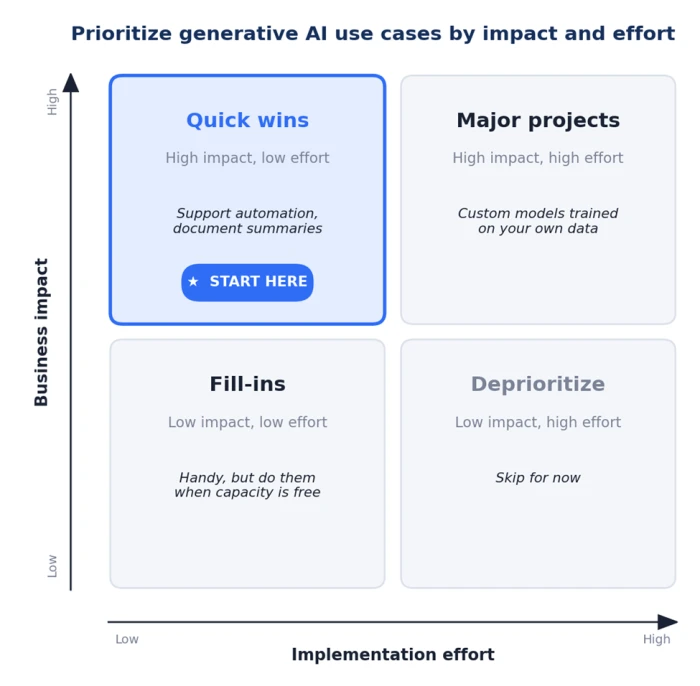
Map each candidate on two axes: business impact, and how hard it is to build. Start in the corner where impact is high and effort is low. Those are almost always the repetitive support and operations tasks from the section above.
Know when not to use it
Generative AI is the wrong tool for several jobs. Skip it for numerical forecasting, where older statistical models win. Keep humans in the loop on high-stakes calls. Keep private or regulated data out of public models. And avoid it where a plain rule-based script would do the same job for less.
Once the first use case is chosen, one decision shapes cost and speed more than any other: how you source the tool.
Sourcing Your First Tool
Three routes exist, and each fits a different profile.
| Path | Best for | Main trade-off |
|---|---|---|
| Buy (off-the-shelf) | Content, marketing, and basic support automation | Fastest to launch, least customizable, limited control of your data |
| Build (in-house) | Proprietary workflows needing full control | Highest accuracy potential, but needs AI talent and strong data plumbing |
| Partner | Teams wanting speed with some customization | Balances speed and control while reducing internal load |
A hybrid route is common. Start with an off-the-shelf tool to prove a use case fast, then add custom pieces through a partner once the return is real. That order keeps you from over-building before you know what the tool has to do.
The costs that hide in the contract
The sticker price is the entrance fee. The bill that decides whether the project pays off is much bigger, and it includes:
• Usage or token fees that scale with how much you run
• Data preparation and cleaning, often the most underestimated line of all
• Integration, testing, and ongoing maintenance
• Compliance reviews and security controls
• Employee training and change management
• Monitoring and periodic retraining once the tool is live
Every one of those costs needs a number on the other side of the ledger. Measuring the return is where the discipline lives, and where we turn now.
Prove the Return Before You Scale
Set a baseline first
Return on investment has to be defined before launch, never reverse-engineered after. Without a starting measurement there is no return to point to, only impressions. Pick a metric tied to the use case and record it before the tool arrives. Capture at least two weeks of normal operation so a busy or quiet stretch does not distort the picture.
| Use case | Baseline metric to record now |
|---|---|
| Support automation | Cost per resolution, tickets resolved per agent per hour |
| Operations | Time per task, manual review hours per week |
| Marketing | Output volume, time from brief to published |
| Document processing | Pages processed per hour, extraction accuracy |
Count more than one kind of return
Returns show up in four places, and a business case reads stronger when it names several:
• Efficiency: hours and labor saved on repetitive work
• Revenue: better conversion, retention, or deal velocity
• Strategic: faster decisions and capabilities you did not have before
• Employee: whether people are more effective in their roles, not simply fewer in number
What early adopters report
Numbers from adopters give a reference point. In a Gartner survey of 822 business leaders, respondents reported these average gains.
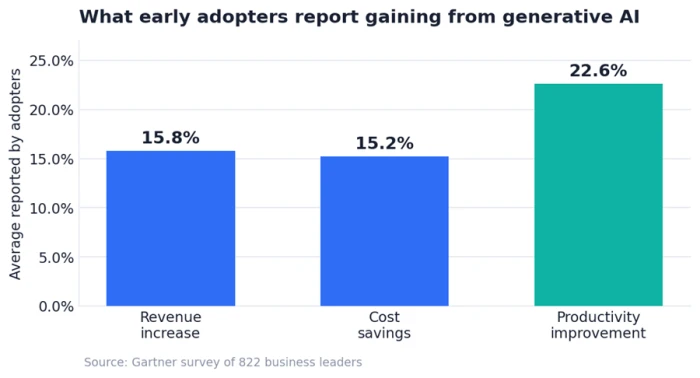
Read these as a ceiling set by motivated early movers, not a guarantee. Your own baseline from the step above is what tells you whether you are hitting them.
Why projects die after the pilot
Recall the Gartner projection from the strategy section: nearly a third of projects abandoned after the pilot. The failures share a pattern, and all of it is avoidable:
• Shipping without governance, so inaccurate or biased output reaches customers
• Scaling before a pilot actually proved the value
• Picking tools by hype instead of fit for the task
• Underestimating the effort to get staff to adopt the new workflow
Keep It Safe and Accountable
Speed without guardrails is how a project lands in that abandoned column. Two areas need attention from day one.
Data and privacy
Public tools carry real exposure for regulated data. Enterprise deployments on private cloud environments, with encryption and access controls, are built to meet rules like HIPAA and GDPR. Design that in at the start rather than bolting it on after a problem appears.
Accuracy and human review
Models produce confident wrong answers. A person should check anything customer-facing or high-stakes, and error rates deserve the same tracking you give to uptime. The teams that trust their output the most tend to be the ones that check it the hardest.
Your First 90 Days
Here is a plan you can start this quarter, built from everything above.
| Phase | What you do |
|---|---|
| Weeks 1 to 3 | Pick one use case in the high-impact, low-effort corner. Record its baseline metric before anything changes. |
| Weeks 4 to 6 | Run a narrow pilot with an off-the-shelf tool. Keep a person reviewing every output. |
| Weeks 7 to 10 | Measure against the baseline. Compare efficiency and revenue effects honestly. |
| Weeks 11 to 13 | Decide. If the numbers clear the cost, plan the next use case and the governance to support it. If they miss, change the use case, not the ambition. |
The companies in that 6% who pull real profit from AI did one thing the rest skipped. They treated the first project as a measurement exercise, then let the results decide what came next.



Comments 0
Join the discussion and share your perspective.
Sign in to post a comment and reply to other readers.
No comments yet
Be the first to share your perspective on this article.