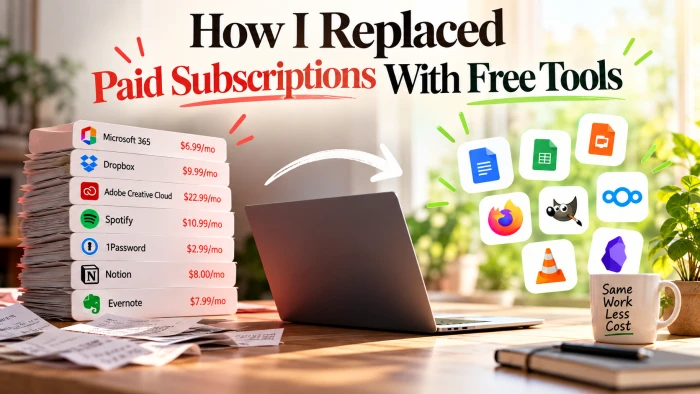
It started with a boring five-minute exercise. I opened my bank statement and highlighted every recurring charge: office software, cloud storage, a design suite, a password manager, a music service, and two note apps I had forgotten I was still paying for. The total came to almost $180 a month. None of it felt expensive on its own, which is exactly how it had crept up on me over a couple of years.
The uncomfortable part was realising how little some of it actually got used. A few tools I opened every single day and would happily pay for again. Others I had not touched in months, yet they kept renewing quietly in the background. That gap, between what I paid for and what I genuinely used, became the whole project.
So I set myself a challenge. I would replace as much of it as possible with free tools, keep only the few that earned their place, and see how much I could claw back without downgrading my actual work. A year later I have cut the vast majority of it. This is the exact process I followed, in order, along with the specific free tools that did the heavy lifting at each stage.
Step 1: Audit every subscription you are paying for
You cannot cut what you cannot see, so the first job is simply to build a complete list. I went through three months of statements rather than just one, because plenty of subscriptions bill annually and would never appear in a single month. For each charge I noted what it was, how much it cost, whether it billed monthly or yearly, when it next renewed, and the column that mattered most, how honestly often I used it.
Then I sorted everything into three buckets: tools I rely on constantly, tools I use occasionally, and tools I had genuinely forgotten about. The forgotten bucket paid for itself immediately, because cancelling those needed no replacement at all. Watch for the sneaky patterns while you are in there: free trials that are quietly converted to paid, two apps that secretly do the same job, and annual plans set to auto-renew on a date you no longer remember.
● Google Sheets. Free with any Google account, and all you need for a proper subscription tracker. Give it columns for the tool, its cost, the billing cycle, the renewal date, and when you last used it, then sort by cost or by use to see what to cut first. A little conditional formatting can automatically flag anything you have not opened in months.
● Rocket Money. Links to your bank and card accounts and automatically surfaces every recurring charge, which is the fastest way to catch the ones hiding in your statements. Detecting subscriptions is free, though the bill-cancellation concierge and a few extras sit behind a paid tier, so lean on it mainly to build your list.
● PocketGuard. A free budgeting app that pulls in your accounts and groups recurring bills so your total subscription spend sits in one place instead of scattered across the month. The core budgeting view is free, with an optional Plus upgrade if you later want deeper controls.
Step 2: Hunt for a free alternative to each one
With the full list in hand, I took each paid tool and searched for a free equivalent by function rather than by brand. The trick is to describe the job you need done, such as edit spreadsheets, manage passwords, or design a poster, and see what people actually recommend. Free does not automatically mean worse, and in several cases the open-source option turned out to be genuinely better once I gave it a fair try.
Two checks saved me from bad swaps. First, does it support your platforms, whether that is Windows, Mac, Linux, mobile, or the browser. Second, can you get your data in and back out easily, because a free tool you cannot export from is just a different kind of lock-in. When something looked promising I ran it alongside the paid tool for a week before cancelling anything. These are the three places I kept coming back to when I needed to find a replacement fast.

● AlternativeTo. Type in any paid app and it lists free and open-source alternatives, ranked by community upvotes, with filters for license and platform. It is the quickest way to see the realistic field of options for almost any tool you can name.
● Slant. Lays each option out in a clear pros-and-cons format so you can weigh trade-offs rather than just scan a list. It is especially useful when two free tools look similar and you need a concrete reason to pick one over the other.
● Toolscopia. A searchable catalog that organizes tools by the task you are trying to accomplish, which makes it easy to stumble onto capable free options you would never have thought to search for by name. Handy as a starting point when you are not even sure what category a tool falls into.
Step 3: Swap out your office suite
This was the biggest single line item, and it turned out to be the easiest to replace. The free office suites read and write the exact same .docx, .xlsx, and .pptx formats, so the people I share documents with cannot tell what I created them in. I moved my everyday writing and spreadsheets over first and kept the paid suite for one final billing cycle purely as a safety net.
The one thing worth checking is complex formatting. A heavily designed document with custom fonts or an intricate spreadsheet full of macros can shift slightly when it moves between suites, so open your most important files once to confirm they survive before you cancel. For everyday documents I never noticed a difference, and I never needed the paid suite again.

● LibreOffice. A full open-source desktop suite with Writer, Calc, Impress, and more, and it opens and saves Microsoft formats without a subscription. It runs entirely offline, which is a real advantage if you would rather your documents did not have to live in the cloud.
● Google Workspace. Docs, Sheets, and Slides are free with a Google account and shine at real-time collaboration, comments, and automatic version history. The free tier includes 15 GB of Drive storage shared across your Google apps, and an offline mode covers you when the connection drops.
● ONLYOFFICE. Free desktop and web editors with some of the strongest fidelity to Microsoft formats I have used, so complex files tend to arrive intact. It makes a good middle ground for any document that LibreOffice happens to trip on.
Step 4: Rebuild your creative toolkit
My creative subscription was the one I was most nervous to drop, because I leaned on it for photo editing, quick graphics, and the occasional logo. Once I looked closely, though, that was really three separate jobs, and each one had a strong free specialist. Splitting a single expensive all-in-one into a few focused free tools actually made my workflow cleaner rather than messier.
Be honest with yourself about the learning curve. The open-source options are powerful, but their menus are arranged differently, so give yourself an afternoon to get comfortable instead of judging them in the first ten minutes. Once the muscle memory catches up, the gap to the paid tools is far smaller than the price difference suggests.

● GIMP. A free, open-source image editor with layers, masks, and retouching that covers the overwhelming majority of what most people open Photoshop to do. The interface takes some getting used to, but plugins and presets can bring it closer to a familiar layout.
● Canva. The free tier handles social graphics, simple documents, and template-based edits with almost no learning curve, which makes it perfect for fast, good-looking output. Some premium templates and elements are paid, but you can build a great deal without ever hitting a paywall.
● Inkscape. A capable free vector editor and my go-to stand-in for Illustrator whenever I need logos, icons, or anything that has to scale cleanly. It exports SVG, PDF, and PNG, so it slots neatly into both web and print work.
Step 5: Handle the business and reporting side
Running even a small side business meant subscriptions for invoicing, light accounting, and turning raw numbers into something presentable. This is the category where I most expected to keep paying, and it is where I was most pleasantly surprised. Between free invoicing, free dashboards, and a tool that builds charts from a plain-language description, I closed out the last of my business subscriptions.
The key was separating the money side from the reporting side. One tool handles invoices and bookkeeping, another turns the resulting data into visuals, and suddenly I no longer needed an expensive suite that tried to do both only adequately. Everything below connects to spreadsheets or exports cleanly, so none of it traps your records.

● Wave. Free invoicing and double-entry accounting built for freelancers and small businesses, with unlimited invoices and no monthly fee for the core features. It only charges standard processing fees if you choose to accept online card payments, so the bookkeeping itself stays free.
● Looker Studio. Google's free reporting tool connects to Sheets, databases, and many other sources and turns them into interactive, always-up-to-date dashboards. You can share a live link with a client or teammate instead of emailing static screenshots that are out of date the moment you send them.
● ChartGPT. Describe the chart you want in plain English and it builds the visualization for you, with no formulas or spreadsheet wrangling required. It is a fast way to get a clean chart when you just need to see or present the shape of your numbers.
Step 6: Lock down notes, files, and passwords
The final cluster was my personal infrastructure: where my notes lived, and how my passwords were stored. These are the tools you least want to switch later, because migrating years of notes or a full set of credentials is painful, so I chose options I would be happy to stay on for the long haul. All three below have free plans that are complete products in their own right, not stripped-down teasers nudging you toward an upgrade.
Data ownership was my deciding factor here. I wanted notes I could export in a standard format at any time, and a password vault built on open, independently audited code, so that I am never trapped if a company changes direction or raises its prices. That single principle made the choices below easy.
● Notion. A genuinely generous free plan that combines notes, documents, and lightweight databases in one flexible workspace. Ready-made templates get you moving quickly, and only heavier team collaboration and some AI features sit behind a paid tier. Obsidian. Free, local-first notes stored as plain markdown files on your own device, so your writing is never locked inside someone else's app. Backlinks and a visual graph connect your ideas, and optional paid add-ons handle sync and publishing only if you decide you want them.
● Bitwarden. A free, open-source password manager that stores unlimited passwords and syncs across unlimited devices at no cost. Its code is public and independently audited, which is exactly what you want from the tool guarding every one of your logins.
The result, and what I kept paying for
Six steps and a couple of weekends later, my $180-a-month habit had shrunk to almost nothing. I will be honest, I did not go all the way to zero. I kept exactly two paid tools that earned their spot, because they save me real hours every week and cutting them would have been a false economy. That is the whole point. The goal was never to be cheap, it was to stop paying for things out of pure inertia.
If you want the short version, it is this. List every charge, sort by how much you actually use each one, cancel the forgotten ones today, and replace the rest one category at a time so you are never overwhelmed. Done in that order, the savings arrive far faster than the effort suggests.
The habit that made it stick: I put a single recurring reminder in my calendar for the same date every year to re-run Step One. Subscriptions creep back in quietly, and a fifteen-minute annual audit is the only thing standing between you and another $180-a-month surprise.
If you only do one thing after reading this, make it Step One. Once you actually see the total, the motivation to work through the rest takes care of itself, and every tool above is waiting, free, whenever you are ready to make the swap.

Comments 0
Join the discussion and share your perspective.
Sign in to post a comment and reply to other readers.
No comments yet
Be the first to share your perspective on this article.