The short answer
Build a multi-angle character sheet once, feed that sheet as a reference to a model that accepts reference images (Nano Banana Pro, Midjourney Omni Reference, or GPT Image), and stay on one model for the whole project. That single workflow fixes most character drift before you write a second prompt. Everything below is how to do it well, which method fits your project, and the free templates that make it repeatable.
You make one image you love. The face is right, the hair sits perfectly, the outfit works. Then you generate the next scene and a stranger walks in wearing similar clothes. This is the most common frustration in AI image generation, and the reason is simpler than most guides admit. Fixing it has less to do with clever wording and more to do with how you set up the job.
What "character consistency" actually means
Character consistency means generating the same person, creature, or mascot across many images without the face, hair, build, or signature outfit changing. Think of it like casting one actor for every scene of a film instead of hiring a new lookalike each time the camera moves.
People usually mean one of three things when they say "keep my character consistent," and the fix differs slightly for each:
● Same identity across scenes: the same face and age whether she is in a cafe or on a mountain.
● Same identity across angles: the front view and the profile clearly belong to one person.
● Same identity across outfits: the face holds even when the wardrobe deliberately changes.
Sorting out which of these you need saves hours, because the hardest one (holding a face across many angles) demands more reference material than a single front-facing portrait can provide.
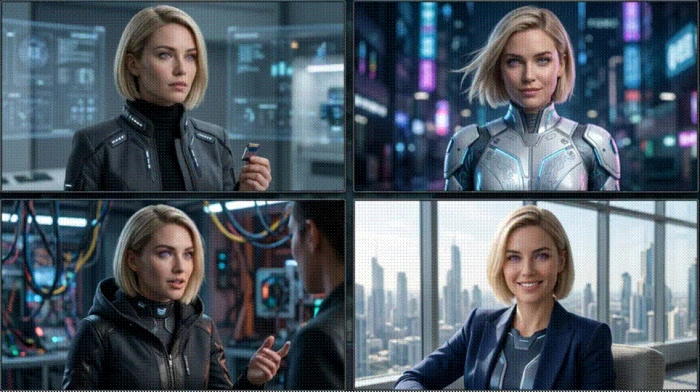
Why your AI character keeps changing (the real cause)
Most image generators are stateless. Each time you press generate, the model starts from fresh random noise and reads your prompt as if for the first time. It has no memory of the character it drew a minute ago. So when your prompt is the only thing describing the character, the model rebuilds a plausible person from scratch every run, and "plausible" is a wide net.
Descriptors define a type, not a person
A phrase like "woman with curly red hair and green eyes" describes a category that millions of faces fit. Stacking thirty descriptors narrows the pool but never narrows it to one specific person, and long prompts start fighting the scene and pose instructions you actually need. That is why word-only prompting drifts fast.
The seed myth
A fixed seed is the most over-recommended trick on the internet, and it is only half true. Reusing a seed makes a single result more repeatable under similar conditions, but the moment you change the pose, scene, or camera angle, the seed stops protecting the face. As research on diffusion models explains, the seed controls the random starting noise; it cannot pin an identity. Treat seeds as a minor stabilizer for near-identical shots, not as a consistency solution.
The six quiet causes of drift
Beyond the two big misconceptions, a handful of specific habits push characters off-model:
● Changing the seed on every run, which invites the model to reinvent the face.
● Low-quality or mismatched references (sunglasses, heavy shadows, cropped faces, or photos from different years).
● Wide shots where the face fills less than about 20% of the frame, leaving little detail to anchor to.
● Switching models mid-project, since each model reads your prompt its own way and the differences compound.
● Letting the chain feed itself: using each new output as the reference for the next, so small errors snowball.
● Relying on text descriptions alone, which is the single biggest cause of all.
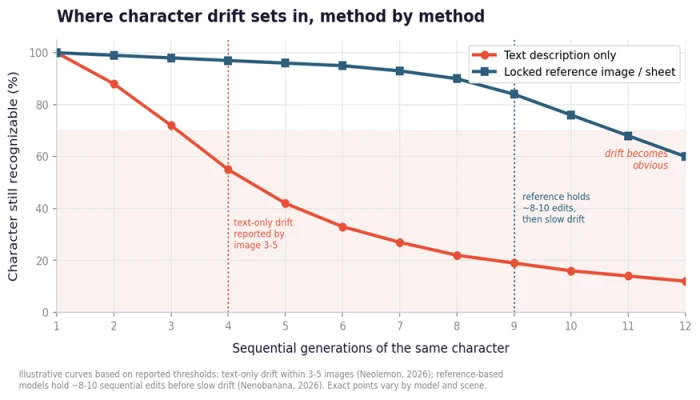
Text-only prompting loses the character within a few images; a locked reference holds far longer before slow drift. Curves illustrate reported thresholds from Neolemon and Nenobanana (2026).
The pattern above matters for planning. General-purpose prompting tends to show noticeable drift within three to five images, while a locked reference image holds identity across roughly eight to ten sequential edits before it begins to wander. Knowing where your method breaks tells you when to re-anchor.
The consistency method ladder: pick the right one for your project
There is no single best method, only the right rung for your fidelity budget and effort tolerance. Four families dominate in 2026. Start at the top and move down only when you need more control.
Reference-based (start here)
You generate or upload one to five reference images and pass them into every new generation. No setup, no training, immediate results. This is the method behind Nano Banana Pro, Midjourney Omni Reference, and reference uploads in GPT Image. For most creators, this is where the journey both starts and ends.
Identity-preservation adapters
These save a character profile the tool remembers across sessions, so you define the character once and tag it in future generations. Dedicated "Characters" features in tools like OpenArt and Mage work this way, as do zero-shot adapters such as InstantID and PuLID in ComfyUI. Good when you return to the same character over weeks.
Trained LoRA (maximum fidelity)
A LoRA learns your character into the model weights from a small dataset, giving the most reliable identity across poses and styles. Practical range is 15 to 30 reference images, and a Flux LoRA trains in roughly 30 minutes on a mid-range GPU. Reserve it for long series where drift is unacceptable, such as a book or a game roster.
Edit-based propagation
Instead of regenerating, you edit an existing image to carry its look into a new one. Flux Kontext-style tools excel here, and this approach pairs with any of the rungs above when you want to change one element while holding everything else steady.
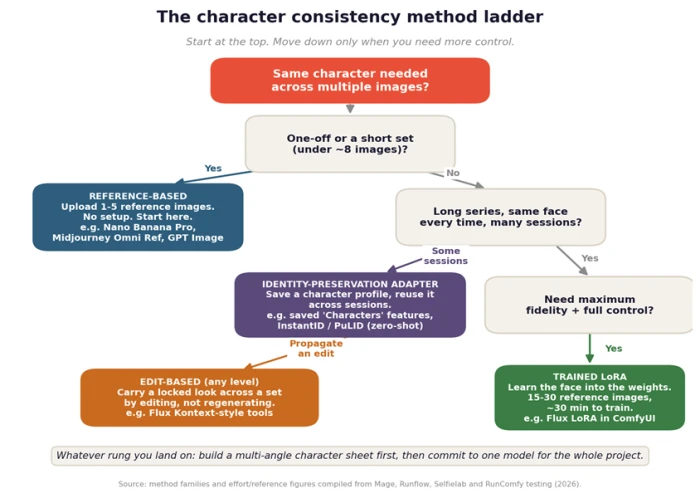
The consistency method ladder. Method families and effort figures compiled from Mage, Runflow, Selfielab, and RunComfy testing (2026).
Here is the same decision as a quick reference:
| Method family | Setup effort | Best for | Main limit |
|---|---|---|---|
| Reference-based | Minutes | Most creators, short sets, quick scenes | Slow drift after ~8-10 edits |
| Identity adapter | Low to medium | Ongoing projects, recurring persona | Tool lock-in; varies by platform |
| Trained LoRA | High (train once) | Long series, books, game rosters | Needs GPU, dataset, ~30 min train |
| Edit-based | Low | Changing one element, propagating a look | Works image to image, not batch text |
Build your anchor: the character reference sheet
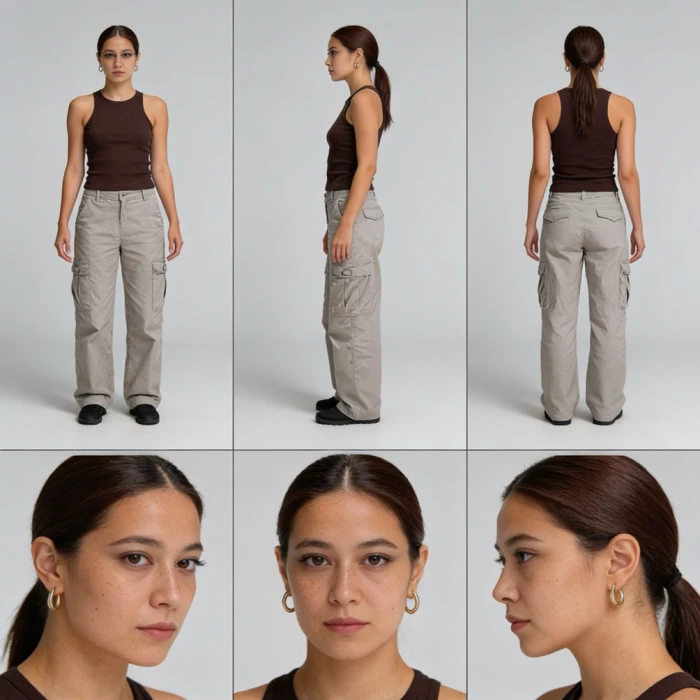
The next step, whichever rung you chose, is to build a stable anchor. Animation studios have used model sheets for a century to keep a character on-model between artists. The same document does the same job for an AI model: every generation gets something concrete to check against instead of reinventing the face from words.
What a character sheet is and why it works
A character sheet, also called a reference sheet or turnaround, is a single image showing one character from several angles (front, side profiles, back) plus close-up portraits, all at the same height and lighting on a neutral background. Multi-angle panels matter because identity is easy to fake from one angle and hard to keep across many. Show the model the profile and the three-quarter view, and you force the character to become coherent in 3D, which removes the model's room to cheat.
The reference-photo checklist
Your sheet is only as strong as the source images. Before you build it, run this check:
● Use a clear, well-lit, front-facing or three-quarter view.
● Keep the background clean and the lighting consistent.
● Use recent photos from the same period so the model locks current features, not a blend of old and new.
● Include a full-body image so posture and proportions are visible.
● No sunglasses, heavy shadows, or cropped faces.
Copy-paste turnaround-sheet prompt
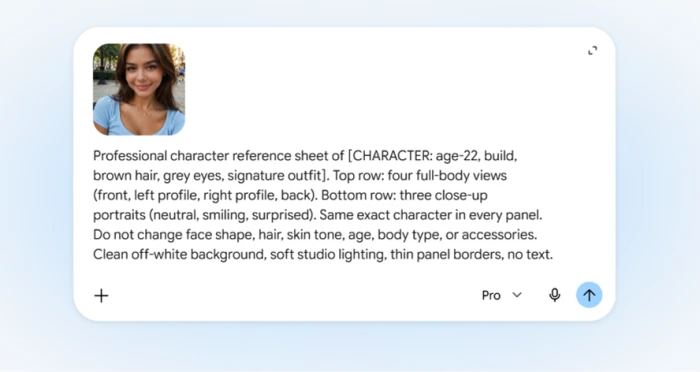
This model-neutral prompt produces the classic layout. Swap the bracketed details for your character:
Professional character reference sheet of [CHARACTER: age, build, hair, eyes, signature outfit]. Top row: four full-body views (front, left profile, right profile, back). Bottom row: three close-up portraits (neutral, smiling, surprised). Same exact character in every panel. Do not change face shape, hair, skin tone, age, body type, or accessories. Clean off-white background, soft studio lighting, thin panel borders, no text.
Why this works
The prompt describes a blueprint, not a portrait. It fixes the layout and the identity in the same breath, then forbids the exact changes models tend to make. Generate several and hand-pick the cleanest sheet before you build anything on top of it.
The prompt-locking method for reference-capable models
With your sheet ready, the day-to-day workflow in chat-style tools like Nano Banana or GPT Image comes down to disciplined prompting.
The locked character block
Write your character description once as a single block of text and paste it at the front of every prompt, because models weight the opening of a prompt most heavily. Change only the scene, pose, and lighting after it. "Woman with curly red hair, green eyes, freckles, sitting in a cafe" holds better than "cafe scene with a woman who has curly red hair."
Iterate, do not restart
When an image is close but not right, refine inside the same thread rather than starting fresh. Telling the model "keep everything the same, make the hair slightly more orange" preserves the identity you already established. Throwing the image out and re-rolling is how you lose the character.
One character, one model, one project
Commit to a single model for the whole project. The best tool is the one you finish with, since switching mid-way is a top cause of drift. Get the character right on one platform, then adapt the winning images if you must move.
Doing it in each major 2026 tool
The method is universal; the buttons differ. Here is how identity locking works across the tools most creators reach for, verified as of September 2026.
Google Nano Banana and Nano Banana Pro
Google's Gemini image models accept direct reference-image uploads and are the default for identity-critical work in 2026. Per Google's launch material, Nano Banana Pro maintains the resemblance of up to five characters in a single workflow. In practice the model holds a face reliably for roughly eight to ten sequential edits before slow drift. Every output carries an invisible SynthID watermark, which does not affect quality or commercial use but does let detection tools identify the image as AI-generated.
Midjourney (V8.2, with Omni Reference)
This is where outdated guides trip people up. The old --cref and --cw parameters belong to the V6 era. On current Midjourney, character work runs through Omni Reference (--oref), controlled by an --ow weight that ranges from 1 to 1,000 and defaults to 100. Note a quirk: attaching an Omni Reference forces the job to render on V7 even though V8.2 became the default version on July 24, 2026, so your output can look slightly different from a plain V8.2 render. Keep --ow near 100 for a recognizable face that still adapts to new poses; Midjourney advises staying below 400 unless a high stylize value is competing with the reference.
The character-weight dial
Lower reference weight lets outfits and poses change while the face holds; higher weight locks the likeness but starts dragging the original pose and lighting along with it. Run the same prompt at a low, default, and moderate weight, then choose the lowest setting that keeps the identity cues you need.
ChatGPT and GPT Image
Inside a single ChatGPT thread you can upload prior images and say "keep the same character from this image," and it holds context for that session. The stronger move is the named character-sheet system: build a face sheet once, attach it to each generation, and keep prompts short. The old DALL-E seed-number trick still circulates, but it is legacy and limited for the reasons covered above.
Flux and ComfyUI (advanced)
For full control, ComfyUI users combine IP-Adapter, InstantID, or PuLID for zero-shot identity, then graduate to a trained Flux LoRA when a project demands absolute consistency. The practical LoRA dataset is 15 to 30 clean images, and FLUX.1-dev is the stronger base because its prompt-following makes trigger words fire reliably. This path needs 8 to 12 GB of VRAM and patience, but it produces the most durable characters.
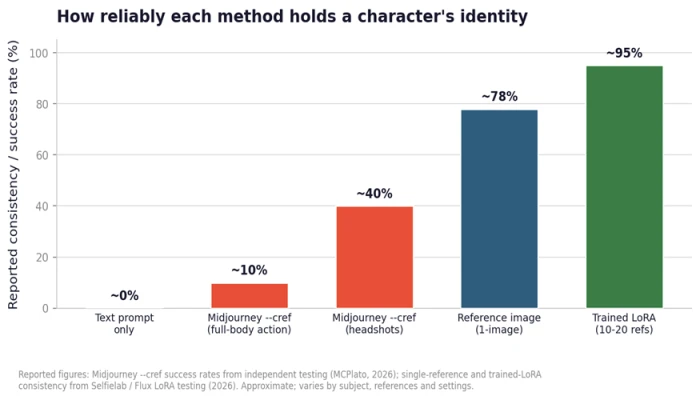
Reported reliability climbs sharply from text-only prompting to reference images to a trained LoRA. Figures from independent testing (MCPlato, Selfielab, 2026); approximate and subject-dependent.
The jump from text-only to a reference image is the single biggest gain most people will ever make. A trained LoRA adds the last stretch of reliability, which is why long-form projects justify the extra setup and casual work does not.
| Tool (2026) | How you lock identity | Holds well for | Watch out for |
|---|---|---|---|
| Nano Banana Pro | Upload up to ~5 references | ~8-10 sequential edits | SynthID watermark on all output |
| Midjourney V8.2 | Omni Reference (--oref, --ow) | One clean face across scenes | Omni forces a V7 render; --cref is legacy |
| GPT Image | In-thread reference + face sheet | A single working session | Loses context across new chats |
| Flux + LoRA | Train on 15-30 images | Long series, any pose | Needs 8-12 GB VRAM and setup |
Carrying your character into video
Identity is hardest to hold in motion, because film trains the eye to track a face across cuts. A wobble you would forgive in a still becomes obvious the moment shots are edited together. The good news is that your image work carries straight over.
The image-to-video handoff
Use your strongest still or your character sheet as the start frame or reference package for the video model. A base portrait defines the character; extra frames maintain continuity between clips. Lock the reference set on day one and do not let each new clip become the reference for the next.
Best video models for consistency (2026)
No single model wins every scene. In hands-on testing across leading models, three separate themselves:
● Kling 3.0: strongest for multi-shot sequences and single-generation continuity.
● Seedance 2.0: excels at identity-lock and cross-session persistence from reference images.
● Veo 3.1: best mix of realism and character retention, with synchronized audio.
One correction for older tutorials: OpenAI discontinued the Sora consumer app in 2026, so it is no longer a default recommendation. Route your locked character into one of the models above instead.
Multi-shot without re-describing
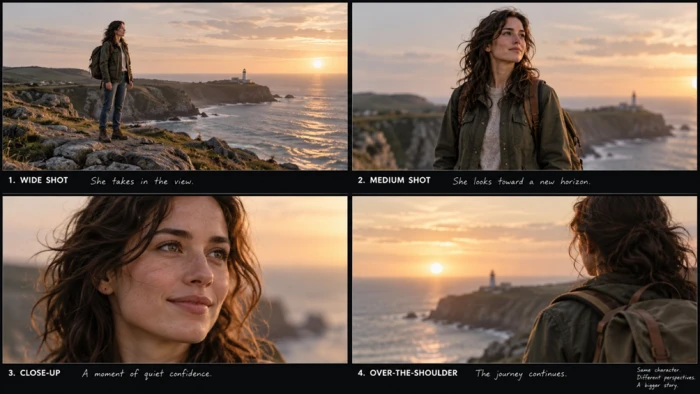
The efficient pattern is to define the character once and inherit it across every shot, varying only camera and framing. Repeating the exact same character description in each prompt is the manual version of the same idea, and it works when a tool lacks a built-in sequence feature.
Multi-character and evolving-outfit scenes
Two or more characters in one frame
When two characters share a frame, models tend to blend their features. Assign each reference a clear role ("face from image one, outfit from image two") so identities stay separate, and composite characters separately when a scene keeps merging them. Reference-based tools that support explicit multi-reference syntax handle this best.
Changing outfits or ages on purpose
Sometimes the wardrobe should change while the face stays fixed. Lock the face and free the rest by lowering the reference weight, or keep two sheets: a face sheet for identity and a separate outfit sheet for wardrobe. Use the face sheet for most generations and add the outfit sheet only when clothing matters.
Test before you commit: the consistency QA pass
The step almost no guide formalizes is quality control. Work your scenes through as low-resolution or still-image tests first, so the character's look is locked before you spend time and credits on final renders. Discovering drift after you have rendered forty shots is the expensive way to learn this.
Run each candidate image against a fixed checklist:
● Hair color and style match the reference exactly.
● Face shape, eye color, and skin tone stay consistent.
● Distinctive features (glasses, jewelry, facial hair) are present or absent as intended, not appearing and disappearing at random.
● Build and proportions hold across the pose change.
Make it a gate, not an afterthought
Treat this checklist as a pass/fail gate between your test renders and your final ones. A character that survives the checklist at low resolution will almost always survive the final render, and the two minutes it costs saves hours of rework.
Use-case playbooks: the fastest path for your project
The method ladder maps cleanly onto real projects. Here is the shortest route for the four most common ones.
Faceless YouTube and short-form persona
You need one recurring protagonist across dozens of clips. Build a character sheet, lock it into a reference-based image model, then hand your best frame to Kling or Veo for motion. Consistency is what lets an audience build visual memory around your channel.
Children's books and comics
Young readers study every page, so drift within three to five pages is a dealbreaker. This is the clearest case for an identity-preservation tool or a trained LoRA, paired with a face sheet and an outfit sheet so the character survives an entire book.
Brand mascot and AI influencer
A mascot that changes face between ads cannot ship. Build the identity once, generate every post from that locked reference, and carry it into video with an image-to-video handoff so the persona never shifts between a still and a clip.
Game and concept-art character sets
For a roster of several characters in many poses, a trained LoRA per character gives the highest fidelity. Studios report large cuts in asset time once the LoRA exists, because every new pose reuses one locked identity instead of re-establishing it.
The one habit that separates consistent work from lucky work
Every reliable workflow shares the same backbone: a stable visual anchor plus a refusal to keep switching tools. The creators who ship consistent characters are not writing better sentences than everyone else. They built a sheet once, committed to one model, and turned identity into a reusable asset instead of a fresh gamble on every prompt. The prompts are disposable. The reference is the thing you protect.
The Bottom Line
Consistent AI characters come from setup, not luck. The creators who hold a face across fifty images aren't writing better prompts than everyone else. They built a reference sheet once, picked one model, and stopped switching tools halfway through.
If you remember nothing else, remember the order of operations: build a multi-angle character sheet, feed it as a reference to a model that accepts reference images, lock your character description at the front of every prompt, and run a quick consistency check before you commit to final renders. That sequence alone removes most of the drift people spend hours fighting.
Match the method to the project. A one-off or a short set needs nothing more than reference uploads in Nano Banana Pro, Midjourney Omni Reference, or GPT Image. A recurring persona is worth an identity-preservation tool. A book, a game roster, or anything where drift is a dealbreaker earns a trained LoRA. And when the work moves to video, hand your strongest still to Kling, Seedance, or Veo rather than starting the identity over.
The tools will keep changing. The principle won't: your reference is the asset, and your prompts are disposable. Protect the first, and the rest gets easier.
Comments 0
Join the discussion and share your perspective.
Sign in to post a comment and reply to other readers.
No comments yet
Be the first to share your perspective on this article.