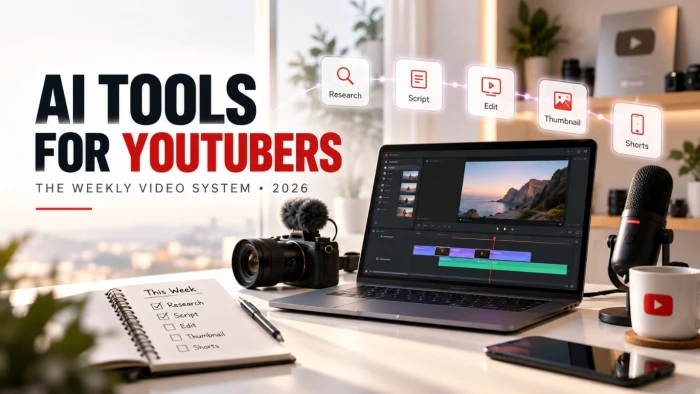
A weekly upload schedule is the hardest promise a YouTuber makes to themselves. One video every seven days sounds manageable until you stack scripting, recording, editing, thumbnail design, and a full life on top of it. This guide is built around that pressure. Rather than ranking apps in a vacuum, it maps the best AI tools for YouTubers to each stage of a repeatable weekly cycle, with real pricing, where each tool saves the most time, and the monetization rules you need to respect while moving quickly.
The short version: most serious weekly creators run a small stack of four to six AI tools that costs between $0 and about $150 a month. That stack turns a multi-day grind into a system you can repeat without burning out.

What AI tools for YouTubers actually mean in 2026
AI tools for YouTubers are software products that use artificial intelligence to speed up or automate parts of making a video: researching topics, writing scripts, generating voiceovers, cutting footage, designing thumbnails, and drafting titles or descriptions. Most creators now combine several of them into one pipeline instead of leaning on a single app.
That shift is the real story. Three years ago, AI tools for YouTube video creation usually meant one editor with an auto-caption button. Today the winning approach is a connected stack, where a research tool feeds a scripting tool, which feeds a voice or video generator, which feeds an editor. The automated end of this is what people call YouTube automation, though the term covers everything from light assistance to fully faceless channels.
The real problem weekly creators are solving
Consistency is what the algorithm rewards and what most creators fail at. The bottleneck is rarely ideas. It is the number of hours a polished video demands versus the hours a person actually has. A single ten-minute video can swallow a full weekend once you count research, a script, a clean recording, an edit, a thumbnail, and the metadata.
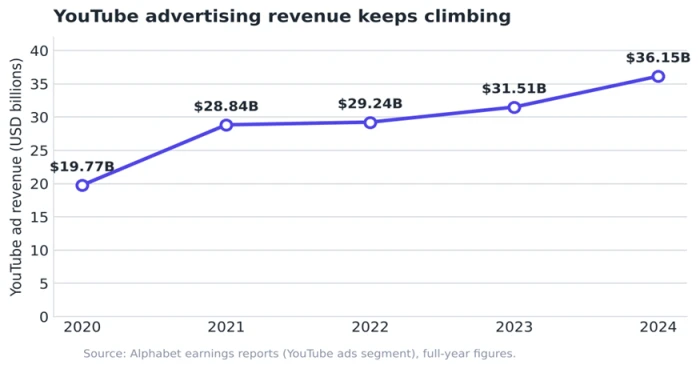
The payoff for solving that bottleneck keeps growing. YouTube's advertising business, most of which flows back to creators through the Partner Program, rose from $19.77 billion in 2020 to $36.15 billion in 2024 on Alphabet's reported figures.
Short-form is pulling in its own wave of attention. Alphabet has said that roughly 70% of channels uploading each month now post Shorts, and by 2025 Shorts were averaging more than 200 billion views a day. A weekly cadence that feeds both long-form and Shorts is how small channels stay in the mix. AI is the lever that makes that cadence survivable.
How these tools were assessed
Every tool below was weighed against what a weekly creator needs, not against a generic feature checklist. Four questions guided the picks:
• Time saved: does it remove a repetitive task or a slow manual step from the weekly cycle?
• Output quality: is the result good enough to publish with light human cleanup?
• Price against value: does the monthly cost make sense for a solo creator or a two-person team?
• Monetization safety: can you use it heavily without drifting into the low-value content YouTube demonetizes?
Pricing was checked against each tool's official pricing page in 2026. Plans change often, so treat the numbers as a starting point and confirm before you subscribe.
The weekly YouTube production cycle, stage by stage
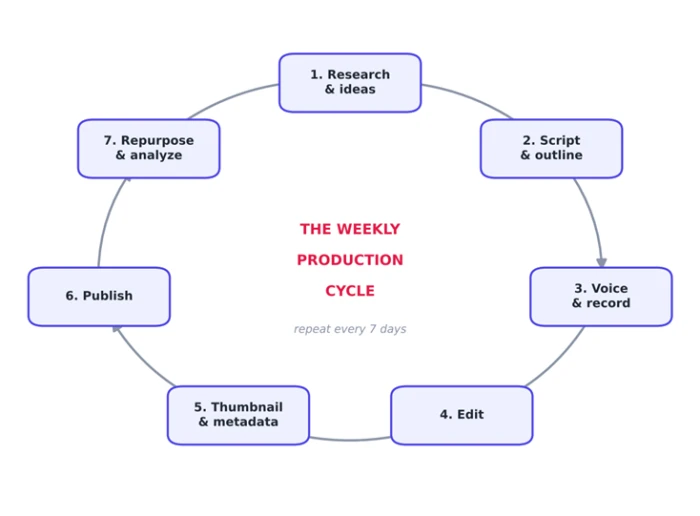
Think of one video as a loop you run every seven days. Each stage has a job, and for each job there is an AI tool that does the heavy lifting. Map your stack to this loop and the week stops feeling like chaos.
1. Research and ideas
Start by deciding what to make, backed by data instead of guesswork. VidIQ and TubeBuddy surface search demand, competitor gaps, keyword scores, and trending formats right inside YouTube. For faster topic exploration, ChatGPT or Perplexity can turn a rough angle into ten sharper ones in seconds. And an AI summarizer lets you digest a rival's twenty-minute upload in about a minute, so you learn what's working before you plan your own.
2. Scripting and outline
A large language model is the fastest scripting partner available. Feed a capable model such as ChatGPT or Gemini your research notes and your channel's voice, and it drafts an outline or a full script you then rewrite in your own words. The rewrite matters. A script you edit heavily reads as yours; a script you paste untouched reads as filler.
3. Voice and audio cleanup
ElevenLabs produces the most natural AI voiceovers on the market, which makes it the default for faceless channels and for creators who hate recording pickups. Its Creator plan runs about $22 a month at the standard rate, with a free tier for testing. If you record your own voice, Adobe Podcast and its Enhance feature clean up room echo and background hiss so a bedroom recording sounds closer to a studio.
4. Video, B-roll, and avatars
For footage you cannot film, generative video tools fill the gap. Runway and Pika, along with Luma Dream Machine, create short cinematic clips from a prompt, useful for visual-essay channels and AI-cinema experiments. For talking-head content without a camera, HeyGen and Synthesia build avatar presenters, while InVideo AI assembles a rough video straight from a script. Any AI video generator still needs a human edit afterward to avoid the uncanny look.
5. Editing
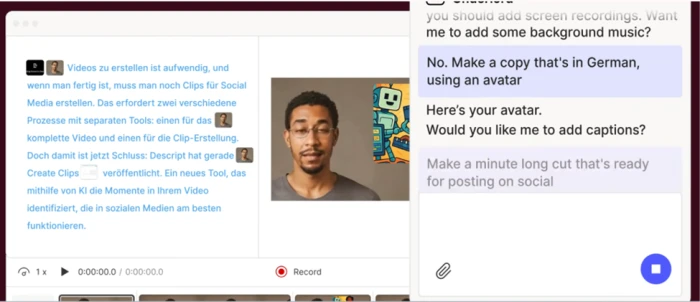
Descript edits video by editing the transcript, so cutting a sentence cuts the footage. Its Creator plan is about $24 a month on annual billing. CapCut covers auto-captions and quick edits from a free plan up to roughly $10 a month for Pro. Gling automatically removes silences and bad takes from raw talking-head footage, which can turn a full day of editing into an afternoon. Editing eats more of the week than any other stage, so this is the first place most creators feel an AI tool earn its cost.
6. Thumbnails and channel art
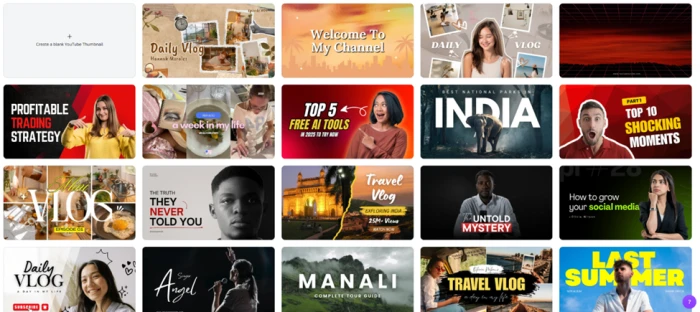
Click-through rate often decides whether a weekly upload lands. Canva (around $15 a month for Pro) gives you AI background removal, text effects, thumbnail templates, and brand kits in one place, while Midjourney generates original backgrounds and concept art. Between them they cover both thumbnails and channel banners, so you are not paying for a separate tool for each.
7. Titles, descriptions, and chapters
Metadata is pure SEO, and AI drafts it in seconds. VidIQ and TubeBuddy generate keyword-aware titles, descriptions, tags, and chapters scored against live demand. Keep a human eye on the title, since a slightly worse keyword with a stronger hook usually wins more clicks than a perfect-match title nobody taps.
8. Shorts and repurposing
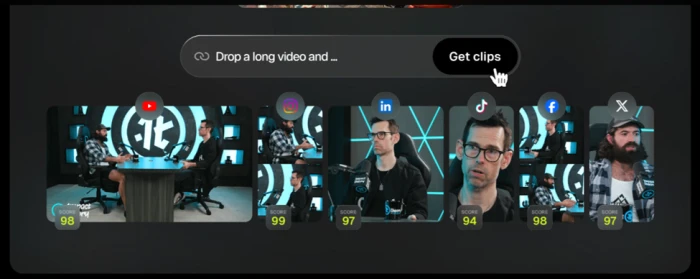
One long video should become several Shorts. Opus Clip scans a long upload, finds the strongest moments, and reframes them into vertical clips with captions. Submagic adds animated captions and b-roll to short clips. Repurposing is the highest-return habit on this list, because it multiplies one week's work into a week of posts.
The AI tools for YouTube at a glance
This table pulls the stack into one view. Prices are entry paid tiers from official pricing pages as of 2026; most tools also offer a free plan for testing.
| Tool | Stage | Best for | From (USD/mo) | Main time-saver |
|---|---|---|---|---|
| VidIQ / TubeBuddy | Research + metadata | Keyword data and titles inside YouTube | Free / ~$8 | Faster topic and title decisions |
| ChatGPT / Claude / Gemini | Scripting | Outlines and first-draft scripts | Free / ~$20 | Cuts blank-page time |
| ElevenLabs | Voice | Natural AI voiceover and narration | Free / ~$22 | No re-recording of pickups |
| Adobe Podcast | Audio cleanup | Fixing home-recorded audio | Free (web) | Studio-grade sound, no treatment |
| Runway / Pika / Luma | Video generation | B-roll and cinematic shots | Free / ~$12 and up | Footage you cannot film |
| HeyGen / Synthesia | Avatars | Faceless talking-head video | ~$29 / ~$18 | Presenter without a camera |
| Descript | Editing | Transcript-based video editing | ~$24 | Edit by deleting text |
| CapCut | Editing | Captions and quick cuts | Free / ~$10 | Auto-captions and effects |
| Gling | Editing | Removing silences and bad takes | ~$15 | Automates the first rough cut |
| Canva / Midjourney | Thumbnails | Click-worthy thumbnails and art | ~$15 / ~$10 | Design without a designer |
| Opus Clip / Submagic | Shorts | Long video into vertical clips | Free / ~$9 and up | Multiplies one video into many |
Recommended weekly stacks by budget
You do not need every tool above. A weekly creator needs one reliable tool per stage, chosen to fit a budget. Three tiers cover almost everyone, and the gap between them is smaller than most people expect.
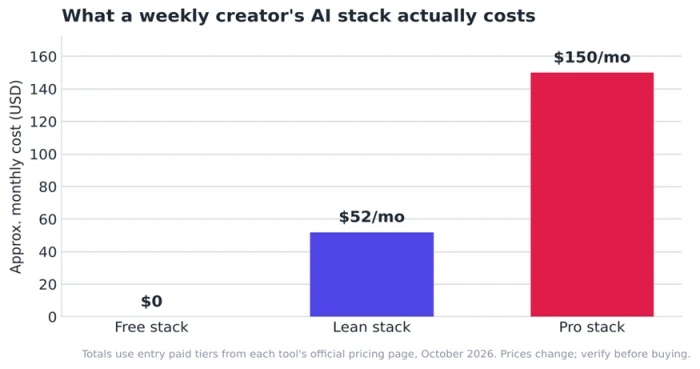
Free stack ($0): CapCut for editing, a free AI chat model for scripts, Canva's free plan for thumbnails, and VidIQ's free tier for keywords. Slower and more limited, but enough to publish weekly and prove the habit before spending anything.
Lean stack (about $52): add a paid chat model for better scripts, CapCut Pro, and ElevenLabs Creator for voiceovers. This is the sweet spot for most channels under 100,000 subscribers.
Pro stack (about $150): layer in Descript, Opus Clip for Shorts, a VidIQ paid plan, and Canva Pro. This buys back the most hours per week and suits anyone treating the channel as a business.
Match the stack to the channel. Faceless channels lean on ElevenLabs plus a video generator. Talking-head creators get more from Descript and Gling. Shorts-first creators should spend their first dollars on Opus Clip.
Your 7-day workflow blueprint
Here is the loop turned into a schedule. Spread across the week, each block stays short enough to fit around a job or other commitments. Adjust the days to your own rhythm; the sequence is what matters.
| Day | Focus | AI tools | Output |
|---|---|---|---|
| Mon | Research and pick the topic | VidIQ or TubeBuddy, plus a chat model | One validated idea and angle |
| Tue | Draft and rewrite the script | ChatGPT or Claude | A finished script in your voice |
| Wed | Record or generate voice and video | ElevenLabs and Adobe Podcast | Raw footage and clean audio |
| Thu | Edit the main video | Descript or CapCut | A publish-ready long-form cut |
| Fri | Thumbnail and metadata | Canva and VidIQ | Thumbnail plus title and description |
| Sat | Publish and cut Shorts | Opus Clip, Submagic | Video live plus 3 to 5 Shorts |
| Sun | Review and plan ahead | YouTube analytics, a chat model | Lessons logged, next topic queued |
Staying monetizable under YouTube's 2026 rules
Speed has a limit, and the limit is YouTube's monetization policy. On 15 July 2025, YouTube renamed its long-standing "repetitious content" rule to "inauthentic content" to describe mass-produced or templated videos more clearly. The rename did not change the standard; it clarified what reviewers already treat as low-value.
The key point for AI users is reassuring. YouTube has stated plainly that it welcomes creators using AI tools and that channels using AI stay eligible for monetization, as long as the content carries original commentary or real entertainment value. The platform also confirmed that the AI-disclosure label does not by itself affect distribution or monetization.
What gets you demonetized is sameness, not AI. Videos built from a template with little variation, or stacks of clips with a generic voiceover and no human insight, are the target. A faceless channel with genuine research and a real point of view is fine.
For the exact wording and current examples, YouTube's own Help Center is the authority worth checking before you scale a high-volume format, under the YouTube Partner Program policies. Treat every AI output as a draft that a human finishes, and the policy stops being a threat.
Mistakes weekly creators make with AI
The tools are easy. The judgment is where channels win or stall. These are the patterns that quietly sink otherwise good creators.
• Over-automating the whole pipeline. When every stage is AI with no human pass, the videos start to feel interchangeable, and viewers notice before the algorithm does.
• Publishing AI scripts untouched. A draft is a starting point. The rewrite is what adds the voice people subscribe for.
• Buying tools instead of building a system. Six subscriptions with no workflow is slower than three tools used in a fixed order.
• Chasing output over taste. AI makes it trivial to produce more. It does nothing to make the content worth watching. That part is still on you.
How to choose your stack
Pick tools in the order your weekly cycle actually breaks down, not by hype. Run through five questions and your stack builds itself:
• Where does your week collapse? Spend first on the stage that eats the most hours, usually editing or thumbnails.
• Are you on camera or faceless? On-camera creators prioritize editing tools; faceless channels prioritize voice and video generation.
• Long-form, Shorts, or both? If Shorts matter, a repurposing tool earns its cost faster than anything else.
• What is your real monthly budget? Start on the free stack, then upgrade only the one stage that is holding the week back.
• Will a human still finish every video? If the answer is no, shrink the stack until it is yes.
That last question is the one that separates channels that last from channels that get flagged. The cheapest part of making a weekly video in 2026 is the production. AI has made voice, footage, editing, and captions nearly free to generate. The scarce input is taste, the human decision about what is worth saying and how to say it. Build the stack to protect that time, not to replace it, and the weekly video stops being a grind and becomes something you can sustain for years.
The Verdict
The best AI tools for YouTubers are the ones that shorten a specific stage of your week, not the ones with the longest feature list. After mapping the full production cycle, a clear hierarchy emerges.
If you only pay for one thing, make it an editor. Editing eats more of the week than any other stage, so Descript (transcript-based cutting) or CapCut (fast, cheap) returns the most time per dollar. Add ElevenLabs next if you run a faceless channel, and Opus Clip next if Shorts are part of your strategy. That three-move order covers most creators under 100,000 subscribers for about $52 a month.
A quick read on where each tool earns its place:
- Best overall for weekly creators: Descript. One tool handles editing, transcripts, and basic audio cleanup, which collapses several steps into one.
- Best for faceless channels: ElevenLabs for voice, paired with a generative video tool for footage.
- Best for growth and SEO: VidIQ or TubeBuddy, since better topics and titles lift every video you publish.
- Best free starting point: CapCut plus a free chat model, enough to prove the weekly habit before spending anything.
- Highest return per dollar: Opus Clip, because one long video becomes a week of Shorts.
The honest caveat: no stack writes a good video for you. These tools remove the manual labor around the idea, but the idea, the angle, and the human judgment still decide whether anyone watches. Buy the tools that protect your time for that part, skip the rest, and keep a person in the loop on every upload. Do that, and a weekly schedule stops being the thing that breaks you and becomes the thing that compounds.

Comments 0
Join the discussion and share your perspective.
Sign in to post a comment and reply to other readers.
No comments yet
Be the first to share your perspective on this article.