
A small agency rarely struggles because the work is bad. It struggles because the work multiplies faster than the team can absorb it. Monday at nine, a four-person shop opens seven client inboxes, three ad accounts, a stack of month-end reports and two proposals due Friday. Nobody new was hired. The workload simply doubled.
AI tools promise relief, and most of them deliver it for a single in-house marketing team. Agencies are a harder case. You are switching between five brand voices before lunch, and the prompt that nails a SaaS client's tone will embarrass you in front of a law firm. This guide ranks the AI tools for agencies that hold up when you are juggling multiple clients, scores each one on the things that break at scale, and ends with three ready-made stacks plus a 30-day rollout plan.

Why AI for agencies is a different problem than AI for marketers
Adoption is no longer the real question. McKinsey's 2025 global survey found that 88% of organisations now use AI in at least one business function, up from 78% a year earlier and 55% in 2023. The climb has been steep, and generative AI has driven most of it.
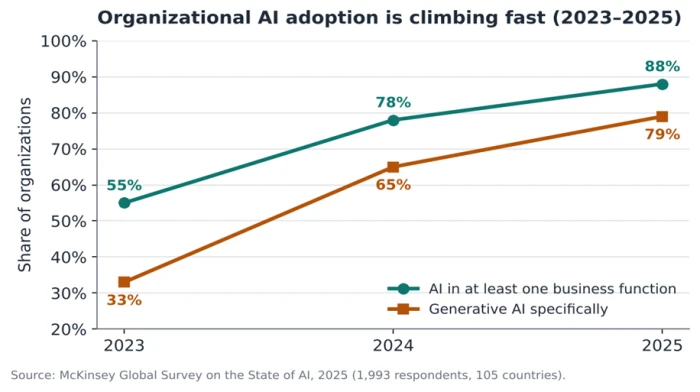
Those numbers hide a trap for small agencies. Running one AI tool for one brand is simple. Running it across eight clients, each with its own voice, files, approval chain and reporting cadence, is a different machine. A solo marketer keeps brand context in their head. An agency cannot, and that gap is where most AI experiments quietly fall apart.
The headaches AI actually has to solve for an agency
• Brand separation: keeping eight voices from bleeding into each other.
• Context switching: the mental tax of jumping between accounts all day long.
• Reporting load: proving value to every client every month without losing a week to screenshots.
• Trust and approvals: clients want to know what a human made and what a model made.
What AI fixes, and what it will not
AI removes the repetitive production drag: first drafts, resizing creative, pulling numbers into a report, drafting the skeleton of a proposal. It does not repair a broken process. McKinsey found that only about 7% of companies have scaled AI across the whole enterprise, which tells you the bottleneck is rarely the model. The bottleneck is the workflow around it. Bolt a smart tool onto a messy account structure and you get faster mess.
There is a second reason your options feel overwhelming. Marketing and sales is already the most AI-saturated function in business, so every week brings a new launch aimed straight at you.
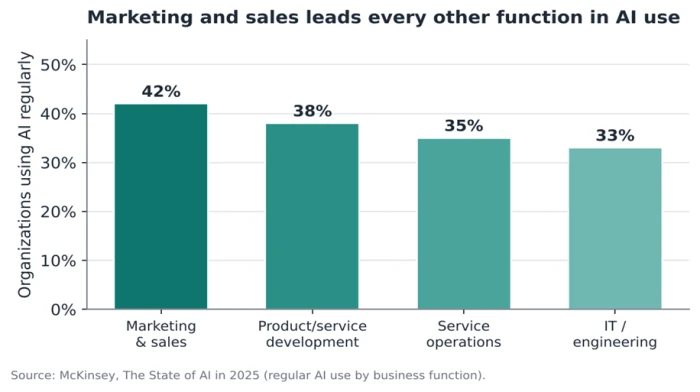
That saturation is the problem you are solving. You have too many tools competing for the same job, not too few. The next step is a filter sharp enough to throw most of them out.
How we evaluated these AI tools
Every tool here was judged on agency fit, not solo-user fit.
Pricing models were checked against vendor pages in October 2026. Exact prices change often, so treat any figure as a starting point and confirm before you buy. Where a product shines for one user but turns awkward across many clients, that is stated plainly. No vendor paid for a place on this list, and the features described are ones the products ship today.
What to look for in an AI tool for a multi-client agency
Before a tool earns a slot in your stack, it has to pass four tests that only matter once you have more than one client.
Workspace and account isolation
Can each client live in its own space with its own brand rules, files, history and settings? Claude's Projects and the client-workspace features in content tools exist for this reason. A shared, single-bucket tool forces you to re-explain context every session and risks one client's data surfacing in another client's deliverable.
White-label and client-ready reporting
If you cannot put your own logo on the output, you are doing manual cleanup before any client sees it. White-label reporting separates a tool that saves real time from one that quietly adds a step to every handover.
Pricing model: per seat versus per client
This is where agency budgets die. A tool at thirty dollars per seat is cheap for a team of four. The same tool priced per client workspace, or metered by AI credits, can triple the moment you add accounts. Many AI products moved to usage-based or credit-based pricing through 2025 and 2026, so read the meter rather than the headline price.
Integrations and data control
A tool that does not connect to the apps you already run becomes another island. Confirm it plugs into your project system, your reporting data and the platforms your clients live on before you commit.
Quick checklist before you buy:
• Separate, lockable workspace per client.
• White-label output with your branding.
• Pricing that scales by seat, not silently by client or credit.
• Native integrations with your current stack.
• A free trial long enough to test it on two real accounts.
The best AI tools for agencies, by client lifecycle stage
Sorting tools by category (content, SEO, social) is how most lists are built, and it is why agencies end up with twelve overlapping subscriptions. A more useful map follows the client itself, from the pitch to the renewal.
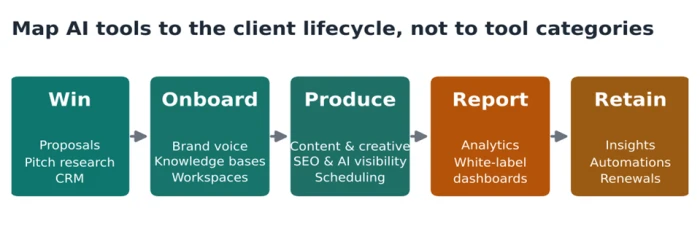
Scored against the four tests above, here is how the leading options compare for multi-client work. The fit score is an editorial assessment for agency use, not vendor data.
| Tool | Best job | Key multi-client feature | Pricing model | Fit score |
|---|---|---|---|---|
| Claude / ChatGPT | Strategy, drafting, client thinking | Claude Projects keep each client's context, files, voice and history separate | Per seat (+ usage) | 4 / 5 |
| Jasper | On-brand content at volume | Saved brand voice profiles per client | Per seat | 4 / 5 |
| Canva | Fast on-brand creative | A Brand Kit per client controls fonts and colours | Per seat / team | 4 / 5 |
| Semrush | SEO research and rank tracking | A separate project per client domain | Per seat, capped by plan | 4 / 5 |
| Surfer SEO | Content optimisation | Shared editor; brief-to-draft scoring | Per seat | 3 / 5 |
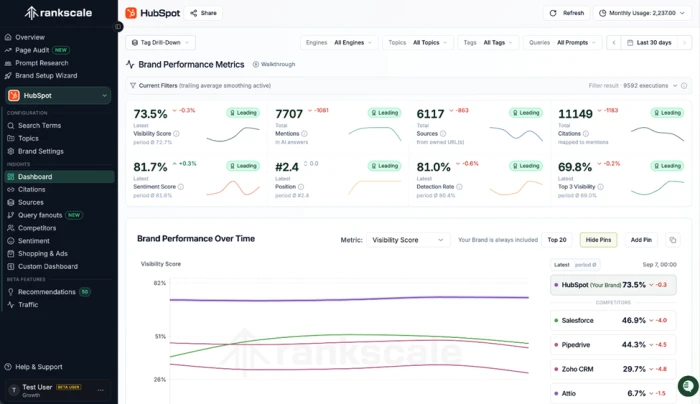
| Rankscale / Peec AI | AI visibility (GEO / AEO) | White-label, multi-client AI-search dashboards | Per workspace / seat | 4 / 5 |
| ClickUp (Brain) | Delivery and internal knowledge | A Space per client with AI summaries | Per seat | 4 / 5 |
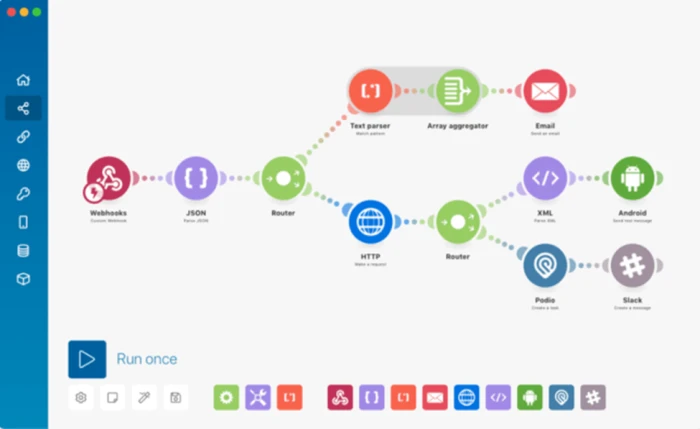
| Zapier / Make | Cross-tool automation | Connects the whole stack across every client | Usage / task based | 4 / 5 |
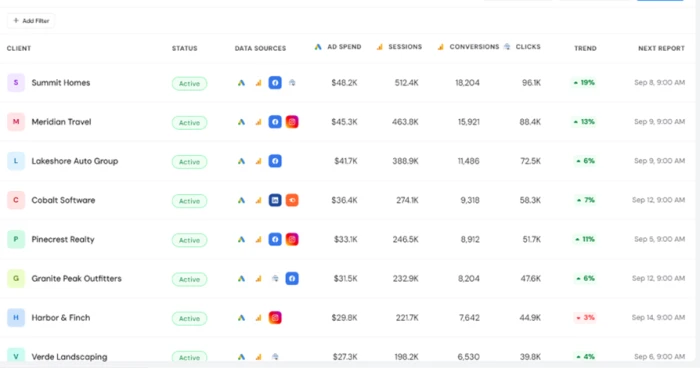
| AgencyAnalytics | White-label client reporting | Branded dashboards, one per client | Per client dashboard | 5 / 5 |
Win the client
Pitches eat the hours you do not bill. A general model like Claude or ChatGPT turns a messy discovery call into a structured proposal outline and researches a prospect's market in minutes. Dedicated proposal automation tools go further, pulling case studies and pricing into a branded document. The payoff here is speed to a first draft, which is often the difference between winning a lead and losing it to a faster competitor.
Onboard and organise
This stage decides whether the rest of your AI stack works. Set up a separate workspace for each client and load it with the brand voice, the style rules and the reference files. Claude's Projects and per-client teamspaces in Notion keep that context sealed off, so a model writing for a fintech brand never borrows the tone of your wellness client.
Produce across every client
Production is where AI earns its keep, and where the sub-tasks split cleanly. Content creation is the most common marketing use of AI, so start there and move outward:
• Content and copy: Jasper holds a saved brand voice per client, which beats a general writer for repeatable, on-brand output.
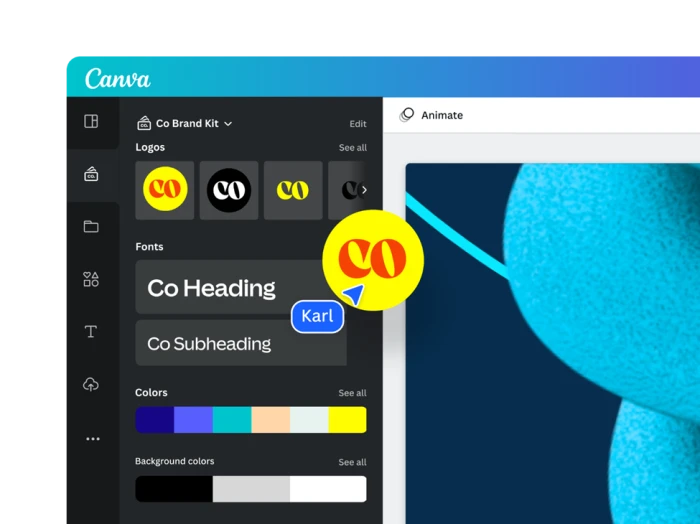
• Creative and design: Canva Brand Kits lock each client's fonts and colours, so one approved idea becomes dozens of on-brand sizes.
• SEO and search: Semrush and Surfer handle keyword research and on-page optimisation across multiple client domains.
• Social scheduling: AI scheduling tools draft and queue posts for several brands from one calendar.
One production job is new in 2026: tracking whether your clients show up inside AI answers. As buyers ask ChatGPT and Gemini for recommendations, AI visibility (also called GEO or AEO) has become a reporting line clients expect. Tools built for agencies, such as Rankscale and Peec AI, monitor that visibility across many clients and package it in white-label dashboards.
Report without losing a week
Month-end is where small agencies bleed time. A white-label reporting tool such as AgencyAnalytics pulls data from the platforms you run, writes plain-language summaries and brands the whole report as yours. The hours you save here are the hours you win back for strategy, the work clients actually pay a premium for.
Automate the glue
The tools above still need to talk to each other. Zapier and Make connect your stack so a won proposal creates a project, a published report pings the client channel and a new lead lands in your CRM without anyone copying and pasting. This is the layer that quietly removes the admin tax from running many accounts at once.
Three ready-made AI stacks (with rough monthly cost)
A stack is only right for your size. The bands below are illustrative planning numbers built from published entry pricing; confirm current rates before committing, since AI pricing shifts often.
Lean agency, two to four people. One general model (Claude or ChatGPT), Canva for creative, and Zapier to connect them. Roughly $70 to $200 a month. Enough to cut production time without creating tool sprawl.
Growing agency, five to fifteen people. Add Jasper for on-brand content at volume, Semrush for SEO, and a white-label reporting tool. Roughly $300 to $800 a month, with reporting and search now handled at scale.
Specialist agency (SEO, PR, creative or recruitment). Lead with the deep tool your niche demands (Semrush or Surfer for SEO shops, an AI-visibility tracker for GEO-focused teams) and keep a lean general-purpose layer around it. Cost tracks the specialist tool, often $200 to $600 a month.
Roll out AI without creating chaos
Buying the tools is the easy part. The agencies that get value move one step at a time instead of switching everything on at once.
| Timeline | Focus |
|---|---|
| Week 1 | Pick one painful, repeatable job (monthly reports or first drafts). Set up one tool for one client only. |
| Week 2 | Build the client workspaces: brand voice, files, approval rules and reference assets for each account. |
| Week 3 | Roll the proven workflow out to every client. Write a one-page house rule for how the team uses it. |
| Week 4 | Measure hours saved against the old way. Keep what paid off, and cancel the rest before renewal. |
Governance and client trust
As AI handles more client work, the risk side grows with it. McKinsey found that organisations now actively manage an average of four AI-related risks, double the two they managed in 2022. For an agency, the practical rules are short: agree with each client on how AI is used, keep client data inside tools that isolate it, and have a human review anything that carries your name. Clients rarely object to AI in the workflow. They object to finding out about it by accident.
What to budget
As a planning rule, a small agency can expect to spend a few hundred dollars a month to low four figures on its AI stack once it covers content, search, reporting and automation. Start at the low end, prove the hours saved, then add tools only when a specific job demands one.
The mistakes that quietly cost small agencies
• Tool sprawl: paying for twelve tools that each do a sliver of the same job. Consolidate to one owner per task.
• Buying on hype: choosing the loudest launch instead of the tool that fits your actual bottleneck.
• No ROI tracking: if you never measure hours saved, you cannot tell which subscriptions to cut.
• Skipping setup: using AI without loading brand voice and client context, then blaming the output for sounding generic.
• Tool hopping: switching platforms every quarter and losing the workflows and prompts your team had finally learned.
The agencies pulling ahead are not the ones with the most AI tools. They are the ones that gave every client job a single clear owner, human or machine, and deleted the rest. Your next client win will come from the hour AI handed back to you, not from the subscription you bought to get it.
The Bottom Line
AI will not make a small agency bigger. It will make a small agency behave like one with twice the headcount, as long as you resist the urge to buy everything. The agencies that win back real hours are the ones that picked one tool per client job, isolated each account properly, and measured the time saved before adding the next subscription.
If you take one action this week, make it this: choose your single worst time sink (month-end reporting for most agencies) and solve only that, for only one client, with one tool. Prove the hours. Then expand. The stack that fits a four-person shop is small on purpose, and that restraint is the advantage, not the limitation.
Verdict: start with a general model for thinking and drafting, add a white-label reporting tool the moment you have more than three clients, and layer in specialist AI (SEO, creative, AI-visibility tracking) only when a client is paying for that outcome. Treat every tool as a hire you have to justify at renewal. The ones that cannot show you the hours they saved do not get renewed.

Comments 0
Join the discussion and share your perspective.
Sign in to post a comment and reply to other readers.
No comments yet
Be the first to share your perspective on this article.