
Most teams do not choose an AI tool. They accumulate one.
Someone trials a writing assistant. A second team expenses a meeting notetaker. Procurement finds out at renewal. Eighteen months later nobody can say which of the seven subscriptions moved a number that anyone reports on.
The research on this is unflattering and consistent. MIT's Project NANDA studied enterprise generative AI deployments for its 2025 report, The GenAI Divide, drawing on roughly 150 leadership interviews, a survey of about 350 employees, and analysis of 300 public deployments. Around 5% of pilots produced rapid revenue acceleration. The rest delivered little or no measurable impact on profit and loss.
Gartner's forecast for the next wave points the same way: more than 40% of agentic AI projects will be cancelled by the end of 2027, driven by escalating costs, unclear business value, or inadequate risk controls. Gartner also estimates that only about 130 of the thousands of vendors marketing agentic AI are the real thing, with the rest rebranding existing chatbots and automation software.
You can read the underlying prediction in Gartner's June 2025 press release on agentic AI cancellations.
Read those findings together and something useful falls out. These are not model-quality failures. They are decision failures, which means the fix is a decision procedure rather than a longer shortlist.
Two ways to read this Buying a $25-a-month tool for yourself? Run Gate 1 and Gate 2 only. That takes about 45 minutes. Buying for a team, or for anything that touches customer data, run all four gates. |
Start by counting what you already have
Before evaluating anything new, look at the stack you are already paying for. Zylo's 2025 SaaS Management Index, built on more than $40 billion of software spend and 40 million licenses under management, puts the average company at 275 applications. Small companies run about 152. Large enterprises run around 660.

The same index found that 53% of licenses sit unused, costing the average organisation around $21 million a year, and that AI-native application spending grew 75.2% in a single year, faster than any other software category. Two-thirds of IT leaders (66.5%) reported unexpected charges caused by consumption-based or AI pricing models.
That last figure matters more than it looks. It means the most common outcome of an AI purchase is not a failed pilot. It is a bill nobody forecast, attached to a tool nobody opens.
The Four-Gate Framework
The next step is to give the decision a shape. Four gates, run in order, each with a stop condition.

The rule that makes this a framework rather than a checklist is that the gates are non-compensatory. A tool cannot pass Gate 4 on the strength of a brilliant Gate 2 score. Averaging weak security against strong output quality is exactly how organisations end up with a capable tool that quietly ships customer records to an unvetted sub-processor.
Gate 1: Fit
Write the job as one sentence
Shopping for "an AI tool" produces nothing usable. Write the job instead, in this shape: who spends how long doing what specific task using what current method.
• "We want AI for customer service." That is a budget line, not a job.
• "Our six support agents spend around 11 hours a week answering password-reset and order-status tickets in Zendesk." That is a job.
The second sentence is simultaneously your search query, your test case, and your success metric. Write it before you open a single vendor site.
Measure the baseline before you shop, not after
Spend two weeks recording volume, time per unit, fully loaded cost per unit, and quality variance for the task as it runs today. Without that baseline you cannot later prove the tool worked, which is a large part of why so many pilots end with no measurable impact to report.
If two weeks is not realistic, take the 20-minute version: time the task three times, take the median, multiply by weekly frequency, apply a loaded hourly rate. Imperfect beats absent.
Check whether you already own it
Netskope Threat Labs data put the average organisation at around seven generative AI applications in use by May 2025, up from 5.6 three months earlier. A meaningful share of what teams want is already sitting inside Microsoft 365 or Google Workspace, or inside the CRM and helpdesk you renewed last quarter. The cheapest AI purchase is the one already on the invoice.
Pick the category before the vendor
Buying the right tool from the wrong category is the most expensive mistake at this gate, and it happens because six quite different products all describe themselves in the same language.
| Category | What it is for | Typical price shape | Where it goes wrong |
|---|---|---|---|
| General assistant | Varied, occasional, language-heavy work | Flat per seat, real free tier | Bought as a workflow fix when the job repeats daily |
| Embedded copilot | AI inside a tool you already run | Add-on per seat | Paid for separately when the base plan already includes it |
| Point solution | One niche job, done weekly | Per seat or per unit | Adds a login and a data silo for a marginal gain |
| Workflow automation | Moving data between systems on rules | Per task or per operation | Bought when the real need is judgement, not routing |
| AI agent | Multi-step work with limited supervision | Per outcome, per task, or hybrid | Bought before anyone defines what it may do unsupervised |
| AI platform | Building and governing several use cases | Committed contract plus usage | Bought for one use case that a point solution would cover |
The agent-washing test
Given Gartner's estimate that most agentic vendors are repackaging older software, three questions separate a real agent from a renamed chatbot:
1. What can this do without a human approving each step?
2. When it is wrong, who catches it, and through what mechanism?
3. Show me the audit trail for one autonomous action, on a real account.
A vendor who cannot answer the third question is selling a demo.

Gate 2: Proof
As discussed above, the job sentence doubles as your test case. Gate 2 is where you run it.
Never evaluate on the vendor's demo
Demos are built around inputs the tool handles well. That is not dishonest, it is simply uninformative. One instruction changes the entire meeting: bring your own file and ask the vendor to run it live. What happens next tells you more than the rest of the call.
Build a golden set of 20 real cases
A golden set is a curated group of real inputs paired with the outputs you would accept. It is standard practice in AI evaluation, and it is almost entirely absent from how software gets bought. Structure it in four buckets:
• 10 typical cases pulled from last month's actual work
• 5 hard cases that a competent human finds slow
• 3 edge cases that break formatting or assumptions
• 2 cases the tool should refuse or escalate rather than attempt
Twenty cases will not give you statistical significance. It will reliably separate usable from not usable, which is the decision in front of you. One warning on quality: in a widely cited study of ten popular machine learning benchmarks, Northcutt and colleagues found an average of at least 3.3% label errors in the test sets, including roughly 6% of the ImageNet validation set. Your hand-built spreadsheet is not cleaner than ImageNet, so have a second person adjudicate anything the first person was unsure about.
Score it blind
Strip vendor branding from the outputs before anyone scores them. Use a fixed four-point rubric: correct, usable with edits, wrong, or dangerous. Two scorers minimum, with disagreements resolved by discussion. Brand halo is real, and it is expensive.

Design the pilot around a written go/no-go
Thirty days is the practical minimum and works for high-volume workflows with fast feedback. Where case types are infrequent or the tool needs tuning cycles, 60 to 90 days is closer to honest, and the first month largely measures stabilisation rather than performance. Phase the rollout: shadow mode, then 20% of volume, then half, then full.
Write the pass thresholds, the owner, and the decision date before day one. Measure outcome rate, time per outcome, quality against the golden set, escalation rate, and cost per outcome. Ignore seats provisioned, prompts sent, and any benchmark score the vendor hands you, none of which describe your workflow. A tool that scores well and sits unopened returns exactly nothing, and given that half of all software licenses go unused, that is the median outcome rather than the unlucky one.
Gate 3: Cost
A tool that clears Gate 2 has earned a serious look at its economics. This is where the sticker price stops being the price.
The pricing model matters more than the number
AI does not have software's cost structure. Every query spends real inference, so cost of goods scales with usage rather than amortising across it. ICONIQ Capital's January 2026 State of AI snapshot, surveying roughly 300 executives at software companies building AI products, projects average AI product gross margins of 52% for 2026, up from 41% in 2024 but structurally below the 80% to 90% that traditional SaaS enjoys.
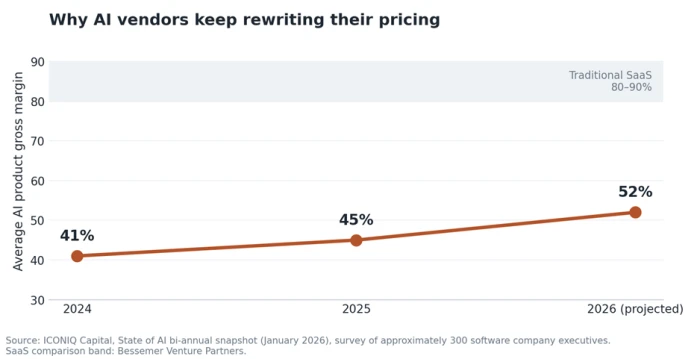
That margin gap is why your contract keeps changing shape. Vendors cannot absorb unlimited usage inside a flat seat fee, so the meter moves toward you. ICONIQ found 58% of companies still paying for AI on seat-based subscriptions and 37% planning to change their pricing model within twelve months. Assume the model you sign is provisional.
The costs that never appear on the pricing page
| Hidden cost | What to budget for |
|---|---|
| Integration build | Connecting to your CRM or data warehouse is one-time engineering work, often the largest year-one line after the license itself |
| Data preparation | Cleaning the knowledge base the tool will read from, which is usually where a stalled pilot actually stalled |
| Overage above plan limits | Ask for your in-tier rate and your overage rate side by side; some vendors charge several times more per unit above the included allowance |
| Enablement and change management | Training and documentation, plus the internal owner's time |
| Governance overhead | Audit log review, prompt review, and handling of personal data |
| Annual commit lock-in | Enterprise plans commonly require twelve-month terms with no monthly exit |
Convert everything to cost per outcome
Four steps. Identify the vendor's billing unit, whether that is a seat, a task, a resolution, or a credit. Estimate your real volume in that unit rather than the vendor's flattering example. Cost it at that volume including likely overage. Then divide by the outcome you actually care about.
Cost per resolved ticket. Cost per qualified meeting. Cost per hour returned to a person. This is the only number that lets you compare a per-seat tool against a per-resolution tool at all, because a product that looks expensive per seat is often cheap per outcome, and the reverse is just as common.
Three questions that reveal pricing confidence Ask for a comparable customer's actual 36-month invoice trajectory, not a case study. Ask what your overage rate is versus your in-tier rate. Ask what the bill looks like if volume triples. Vendors confident in their model answer all three. |
Gate 4: Risk
Gate 4 is where good tools get rejected, and it is the gate solo buyers most often skip entirely. IBM's 2025 Cost of a Data Breach research found 13% of organisations had already experienced a breach of an AI model or application, and that 97% of those breached lacked proper access controls for their AI systems. The failure point is access, not the model.
Tier the risk so the review is proportionate
• Tier 1. Public or low-stakes data, no customer information: a ten-minute check is enough.
• Tier 2. Internal business data, no personal or regulated information: run the seven questions below.
• Tier 3. Customer personal data, regulated decisions, or autonomous external actions: full review, with a named veto holder.
Seven questions to answer before you upload anything
4. Is my input used to train the vendor's models, by default or by opt-in, and where is that stated in the contract rather than the marketing copy?
5. How long is my data retained, and can retention be set to zero?
6. Where is it stored and processed, and can I pin the region?
7. Who at the vendor can access my content, and under what conditions?
8. Which sub-processors and model providers sit behind this product?
9. What access controls exist: single sign-on, provisioning, role-based permissions, audit logs?
10. What happens to my data, my workflows and my configuration when I leave, and in what format?
Question seven is the one buyers regret skipping. Lock-in stays invisible until the day you try to move.

What certifications actually prove
| Standard | What it attests to | What it does not cover |
|---|---|---|
| SOC 2 Type II | Security and related controls operating over a period | Anything about how AI models handle or retain your inputs |
| ISO/IEC 27001 | An information security management system | AI-specific governance or model oversight |
| ISO/IEC 42001 | An AI management system, with accredited certification available | Legal compliance with any specific regulation |
| NIST AI RMF | Voluntary alignment with a US risk framework | Nothing is certified; it is a framework, not an audit |
Ask for the report under an NDA rather than accepting the badge on the website, then read the scope section and the exceptions. A SOC 2 that excludes the AI product is a common and easily missed detail.
Where the rules actually stand
Most buyer guides still cite 2 August 2026 as the date the EU AI Act's high-risk obligations bite. That is out of date. The Digital Omnibus on AI moved Annex III high-risk obligations to 2 December 2027 and Annex I product-embedded AI to 2 August 2028. Article 50 transparency duties applied from 2 August 2026 and are live now, as are the Article 5 prohibitions and the AI literacy duty from February 2025.

The practical translation for a buyer: the delay covers less than the headlines suggested, and the obligations still in force are the ones most likely to touch an ordinary purchase. GDPR applies regardless wherever personal data is processed. None of this is legal advice, and classification under the Act depends on facts specific to each system.
Clauses worth redlining
• No training on customer data, written into the agreement rather than the help centre
• Deletion on termination within a defined window, with written confirmation
• Sub-processor change notification, with a right to object
• Full export of data and configuration, workflows included, in a usable format
• Caps on price increases and on overage rates
• Notice when the underlying model changes, since the product can stay the same while the model beneath it does not
Scoring the finalists and writing your exit
Only tools that cleared all four gates get scored. Weighting turns a debate into a decision.
| Dimension | Solo buyer | Team purchase | Regulated use |
|---|---|---|---|
| Job fit | 25% | 20% | 15% |
| Output quality on your golden set | 35% | 25% | 20% |
| Integration with existing systems | 5% | 15% | 15% |
| Adoption and ease of use | 20% | 15% | 10% |
| Total cost per outcome | 15% | 15% | 15% |
| Security and compliance | 0% (Tier 1 only) | 5% | 20% |
| Vendor viability | 0% | 5% | 5% |
Score independently, then reconcile. Document the evidence behind every score. Resist giving everything a four, since a scorecard with no spread has told you nothing. And remember that Gate 4 failures are disqualifying rather than deductible.
Then write the kill criteria before you sign. Three conditions, agreed in writing, that trigger a re-evaluation: adoption below a stated threshold at 60 days, cost per outcome above your baseline at 90 days, or any Tier 3 incident. Put the renewal review in the calendar 60 days before the renewal date, not after it. Given that AI-native spend is growing faster than any other software category on consumption pricing that surprises two-thirds of IT leaders, the decision to stop is a real decision, and almost nobody writes it down.

What this looks like in practice
The following scenario is illustrative rather than a real customer case, constructed to show how the gates interact.
A 40-person support team has a job sentence and a baseline: 2,400 tickets a month, a measured cost to serve, and 11 hours a week lost to two repetitive ticket types. Three finalists reach Gate 2. On a 20-case golden set scored blind, Tool A is clearly the strongest, including on the two cases that should have been escalated rather than answered.
Gate 3 reorders things. Tool A prices per seat, which at this volume works out substantially worse per resolved ticket than Tool B's per-resolution model, and the overage rate above Tool A's included allowance is multiples of its in-tier rate.
Gate 4 ends it. The vendor questionnaire surfaces a sub-processor in a region the company has not approved, and training on customer inputs is the default, changeable only on a plan tier well beyond the budget. Tool A is rejected despite the highest quality score. Tool B is selected on a 60-day phased pilot with written kill criteria.
A framework that never rejects the best-performing option is a purchasing ritual rather than an evaluation.
Red flags, and when the answer is not to buy
Some signals should end a conversation early:
• The vendor will not run a live test on your data during the demo
• No comparable customer's real invoice trajectory can be produced, only case studies
• Answers about training data or sub-processors stay vague across two calls
• Agentic claims dissolve under the three questions in Gate 1
• A certification is claimed but the report is unavailable even under an NDA
• No changelog, and no evidence of shipping in the last two quarters
And sometimes the correct outcome of a rigorous evaluation is no purchase at all. If the job is still undefined, if 80% of it is covered by something already on the invoice, if the upstream workflow is broken in a way that AI would only scale faster, or if nobody can name the owner in 90 days, then stopping is the decision.
That outcome saves more money than a good purchase does, and it is the one that no vendor guide will ever recommend to you.
Where this leaves you
Everything above is a decision procedure, but what it actually produces is a document.
That is worth saying plainly, because the gates pay off most on the second run. The first pass gets you a tool. The written baseline, the golden set, the scorecard with its spread of scores, the kill criteria and the calendared review date are what let you answer, eighteen months later, why you own this and whether it is still worth owning. Almost nobody can answer that. It is how an organisation reaches 275 applications and 53% unused licenses without anyone making an obviously bad decision at any single point along the way.
So keep the artefacts. The golden set is reusable for the next evaluation in the same category, and re-running it quarterly is the cheapest way to catch a silent model change underneath a product that looks unchanged. The baseline gives you the denominator you will need at renewal, when the vendor arrives with their own numbers. The scorecard tells the next person, who will not be you, what was actually weighed and what was traded away.
Start with one purchase. Not the largest, and not the renewal due next week. Take the next tool someone asks for and write the job sentence: who spends how long doing what, using what method today. Then see how far it gets.
Most of the value here surfaces in that first hour, because the sentence is usually hard to write. When it is, you have found the real problem, and it cost you nothing but the hour.

Comments 0
Join the discussion and share your perspective.
Sign in to post a comment and reply to other readers.
No comments yet
Be the first to share your perspective on this article.