1
AI code generation for apps
Generates app code from prompts, praised for speed but widely criticized for bugs and repeated failures.
AI-assisted “vibe coding” environment for building web apps and sites. Very fast for simple prototypes, but frequent bugs, token drain, and weak support make it risky for serious or non-technical projects.
Independent review — we test tools ourselves and analyze public user reviews. How we test.
Bolt.new can generate simple prototypes, landing pages, and small demo apps quickly, and a minority of users report real commercial projects built on it. However, reviews overwhelmingly highlight unstable behavior, endless bug loops, and heavy token consumption without working outputs. Customer support, billing transparency, and reliability are recurring pain points, especially for paying subscribers. It currently suits experienced, patient technical users treating it as an experimental helper, not anyone needing dependable production results or predictable costs.
Bolt.new is StackBlitz's AI app builder. You describe an app in plain English and it writes the code, installs the packages, runs the dev server and shows you a working preview. The part that separates it from a chat window that hands you code is where that server runs. StackBlitz built WebContainers, a Node.js runtime compiled to WebAssembly that executes inside your browser tab. No cloud VM boots up, no container spins somewhere in Virginia. The npm install in your terminal panel is happening on your own machine, inside Chrome.
That architecture explains both halves of the Bolt experience. The AI gets the filesystem, the package manager, the terminal and the browser console, so it can install a dependency, hit an error and fix it without you touching anything. It also means every prompt ships the whole project tree to the model for context, which is why a request to change some padding can cost more tokens than the original build. Speed and expense come from the same design decision, and you cannot have one without the other.
Generates app code from prompts, praised for speed but widely criticized for bugs and repeated failures.
Can create simple websites quickly; reviewers mention decent styling but generic designs and poor responsiveness.
Token model dominates feedback, frequently labeled expensive, draining, and unpredictably consumed.
Promised repository connection, but many users report OAuth loops, commit failures, and unusable imports.
Offers hosting with SSL; reviews mention outages, certificate issues, and live sites going down.
Includes version history, yet users report stuck rollbacks, spinning loaders, and corrupted prior versions.
Support bot and ticket system exist, but human responses are often slow, incomplete, or absent.
Paid tiers provide more tokens and features; widely reported as overpriced and misleading on rollover.
Interactive UI feels modern and fast initially, but instability and errors grow with project complexity.
I signed up for a fresh free account with no card attached and gave myself one rule for the test. Every screenshot would include the token counter, because the counter is the part of Bolt that nobody photographs and everybody argues about.
The free plan allows 300,000 tokens a day against a monthly ceiling of one million. My question was simple. How far does a day get you on one app?
The test project was ShelfTrack, a home inventory tracker. Small enough to finish in an afternoon, complicated enough to need a login screen and a real database behind it.
I opened Bolt with a full balance and pasted a single prompt describing the whole app.
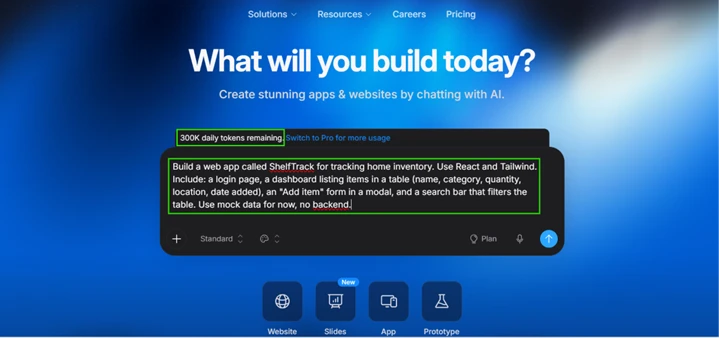
Generation was fast. The file tree filled in, npm pulled packages down in the terminal, and a live preview rendered before I had finished reading Bolt's own description of what it was doing. This is the WebContainer running Node inside the browser tab, and the speed advantage is not marketing.
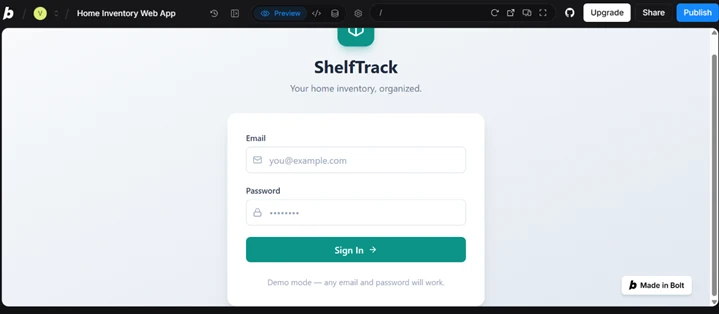
The login screen came out clean, with a note that demo mode would accept any credentials. That was expected, since I had asked for mock data.
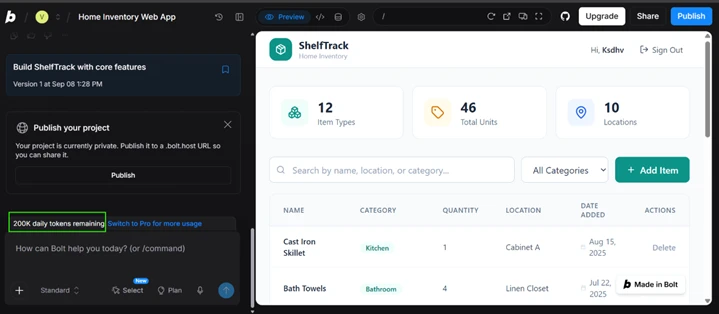
The dashboard arrived populated. Twelve item types across ten locations, forty-six units in total. Search filtered the table. The Add Item modal opened and closed correctly. Version 1 was stamped 1:28 PM.
The counter read 200,000. One prompt had taken a third of the day.
The app looked finished. It was not. I opened the database panel and found an empty pitch for a backend I had assumed came with the build.
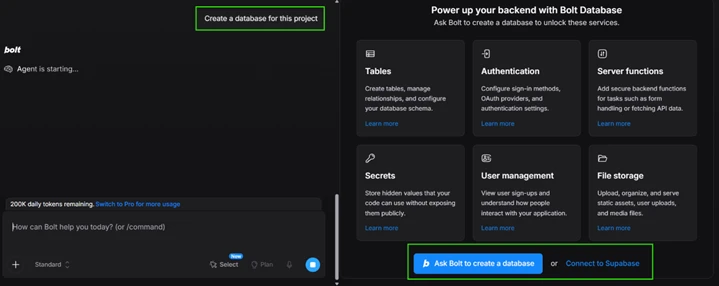
Nothing here is automatic. You either ask Bolt to create a database or you bring Supabase yourself. I asked Bolt.
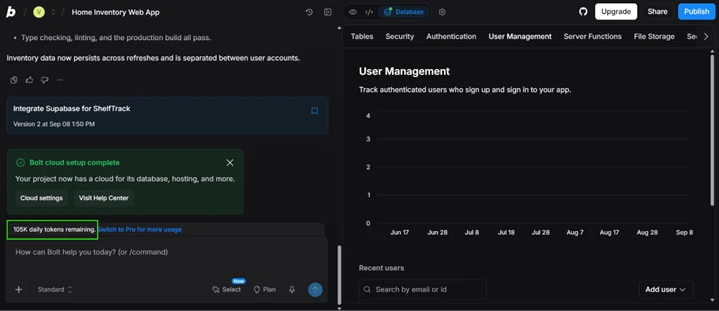
Setup finished at 1:50 PM. Type checking and the production build both passed, which I verified rather than took on trust. The balance had fallen to 105,000.
Ninety-five thousand tokens for one table.
For the next prompt I asked for the smallest change I could think of.
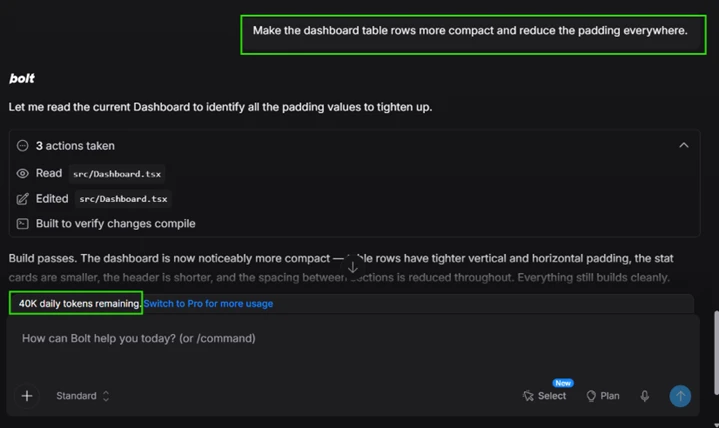
Look at what Bolt logged. Three actions, all against Dashboard.tsx. It read the file, edited it, then compiled to confirm nothing had broken. No new components. No dependency changes.
That cost 65,000 tokens, which is twenty-two percent of a free day spent on row spacing.
The explanation sits in the architecture rather than in the size of the edit. Bolt synchronises the full project tree to the model on every prompt, so the bill tracks how much code exists rather than how much of it you asked to change. A cosmetic tweak on a twelve-file project already costs this much. The same tweak on a fifty-file project costs more, and there is no setting that opts you out of it.
With the database live, I registered a real account and signed in.
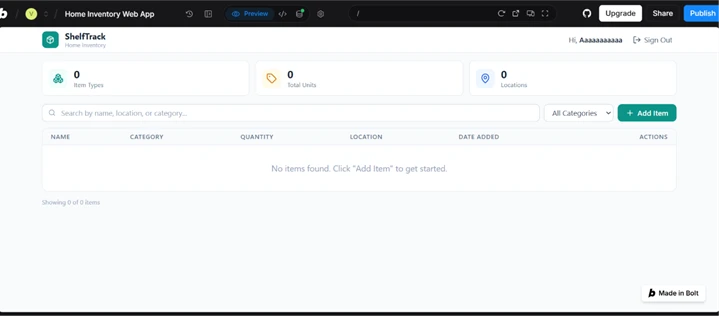
My first assumption was that Bolt had wiped my sample data. It had not, and the distinction matters. The demo inventory had been mock data living in the frontend. Once a real backend took over, my freshly registered account was legitimately empty. The database panel confirmed which of the two had happened.
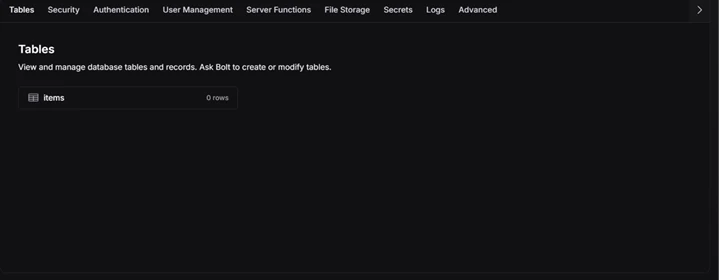
Bolt moved the app onto a real backend without seeding it and without warning that the inventory on screen was about to vanish. Its summary message told me data now persists across refreshes and stays separated between user accounts. Both claims are accurate. Neither mentions that the dashboard I had been looking at for twenty minutes was about to empty itself.
One more thing sits in that panel. It says to ask Bolt to create or modify tables. There is no manual schema editor. Every column you add later goes through the AI and costs tokens, where a normal Postgres dashboard would let you add one for free in four seconds.
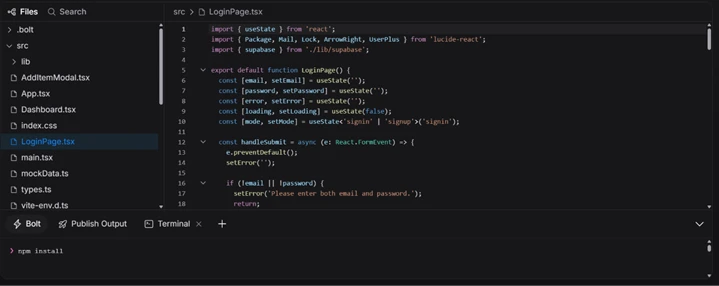
This is the part of the review I expected to be harsher about. The generated code holds up. TypeScript throughout, proper hooks, loading and error states, a signin and signup mode toggle, validation before submit. A React developer could open this and keep building without wanting to start over.
Two details in the file tree still bother me. The file mockData.ts is still sitting there after the migration, unused and unreferenced, left behind as dead weight. And src/ is flat, seven loose files with no components directory.
At this size that structure is harmless. It is also the shape that gets expensive later, because every one of those files gets re-read on every prompt.
The full accounting from a single afternoon on the free plan:
| Prompt | Tokens spent | Balance left | What I got |
|---|---|---|---|
| Initial build | 100,000 | 200,000 | Working app with mock data |
| Add database | 95,000 | 105,000 | One empty table |
| Reduce padding | 65,000 | 40,000 | Tighter row spacing |
Two hundred and sixty thousand tokens. What I had to show for them was a login screen, a dashboard, an empty table and slightly tighter padding.
The daily cap arrived before the app had a single row of real data in it.
| Dimension | Our test | User signal | Verdict | Composite |
|---|---|---|---|---|
| Build Reliability Consistency of working outputs | 7.5 | 6 | Moderate | |
| Ease of Use Learning curve and usability | 9 | 8.8 | Excellent | |
| Value for Money Output relative to spend | 5.5 | 5 | Weak | |
| Token Efficiency Credits used per result | 4.5 | 3.5 | Weak | |
| Customer Support Speed and helpfulness of support | 6 | 4.5 | Weak | |
| Hosting Stability Uptime and deployment reliability | 8.5 | 8 | Good |
Toolscopia uses cookies to keep you signed in, remember your preferences, and understand how our reviews get read. Analytics are anonymous. See our privacy policy for the full detail.



Comments 0
Join the discussion and share your perspective.
Sign in to post a comment and reply to other readers.
No comments yet
Be the first to share your perspective on this tool.