1
Natural language app building
Users describe ideas in plain English and receive working apps or websites, widely praised for accessibility.
Lovable.dev is an AI-driven app and website builder that turns natural language prompts into production-ready software, ideal for non-developers and busy founders who want fast prototypes and polished sites without managing traditional codebases.
Independent review — we test tools ourselves and analyze public user reviews. How we test.
Lovable.dev excels at turning plain-English ideas into working websites and apps quickly, with users praising its intuitive interface, strong UI generation, and ability to handle complex features and backends. It dramatically shortens time to first version for non-technical users and solo builders. However, reviewers describe aggressive and unpredictable credit consumption, billing confusion, and serious concerns about project blocking, security handling, and long-term reliability for critical production workloads. It suits prototypes, MVPs, and smaller commercial projects more than high-stakes enterprise platforms. Best for small businesses, solo founders, and creators who prioritize speed and convenience but can tolerate credit costs and maintain a backup plan.
Lovable is an AI app builder in the category now called vibe coding: you describe the app you want in plain English, and it generates a working full-stack web app and hosts it for you. What it produces runs on real infrastructure, with React code sitting on a live backend that includes a database and user authentication through Lovable Cloud. The Stockholm-based company behind it has grown quickly, with tens of millions of projects built on the platform, and it charges through a credit system rather than a per-seat subscription.
For a reader weighing it, the question is fit. Lovable targets people without an engineering background, such as founders validating an idea or product managers who need an internal tool without waiting on a dev team. It reaches a usable first version in minutes and lets you export the code, so a developer can take over once the project outgrows the chat window. Its sweet spot is early-stage work and demos. Production apps that carry complex logic or sensitive data still need human review before they launch.
Users describe ideas in plain English and receive working apps or websites, widely praised for accessibility.
Generates frontend, backend, authentication, and database, appreciated for handling complex features for non developers.
Frequently praised for clean, responsive interfaces, good layouts, dashboards, and forms.
Alerts on app issues and debugging assistance earn strong praise from technical users.
Highly controversial, with many complaints about fast credit drain and unfinished work.
Security checks are visible, but handling of critical issues and paywalls receives sharp criticism.
One click deployment and hosting appreciated, though some report blocked projects and disappearing apps.
Shopify and connectors mentioned positively, with some complaints about Shopify and Google Merchant issues.
Support sometimes praised for refunds, but also criticized for delays and unresolved serious problems.
I wanted to see how far one plain-language prompt could take me, so I asked Lovable to build a personal recipe manager with a title, an ingredients list, cooking steps, and a cover photo, backed by a searchable homepage grid. Before sending it, I spotted two modes on the composer. Build applies changes directly. Plan talks through the approach with you first, which helps when you want to shape the structure before spending any credits.
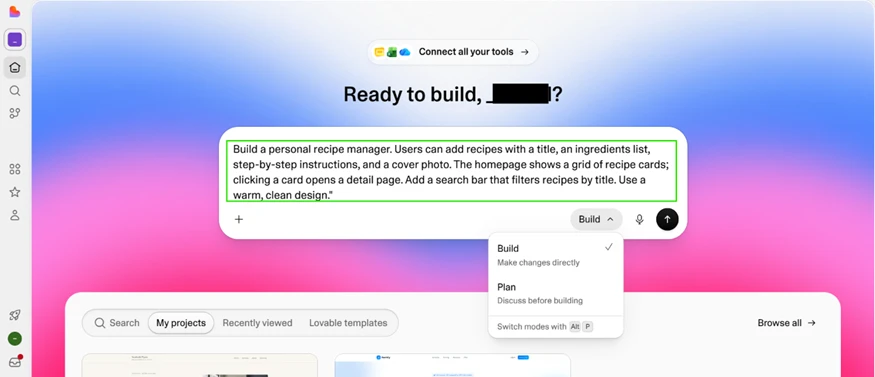
Submitting the prompt did not drop me into a finished site right away. Lovable proposed three design directions and let me preview each. I chose Refined dark mode.

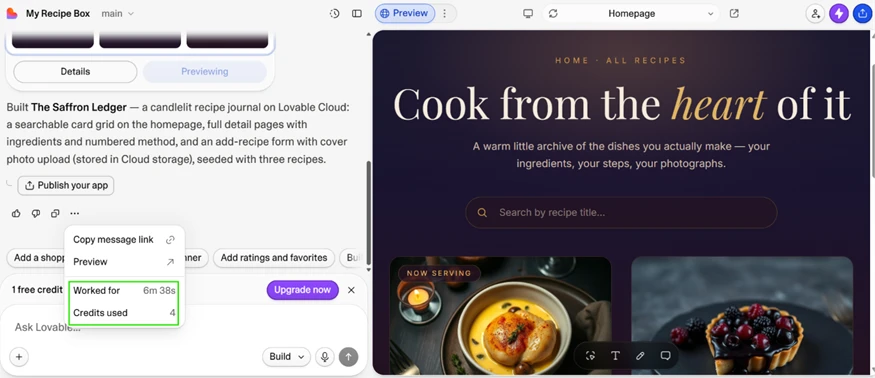
The build finished in six minutes and 38 seconds.
What it produced, a site it named The Saffron Ledger, looked closer to a small product than a starter template. The homepage put a working search field over a grid of recipe cards, and each card opened its own detail page. Lovable had also built an add-recipe form that uploads cover photos to cloud storage, then seeded the app with three sample recipes so nothing sat empty. The panel on the left logged the build time next to the number of credits the run had used.
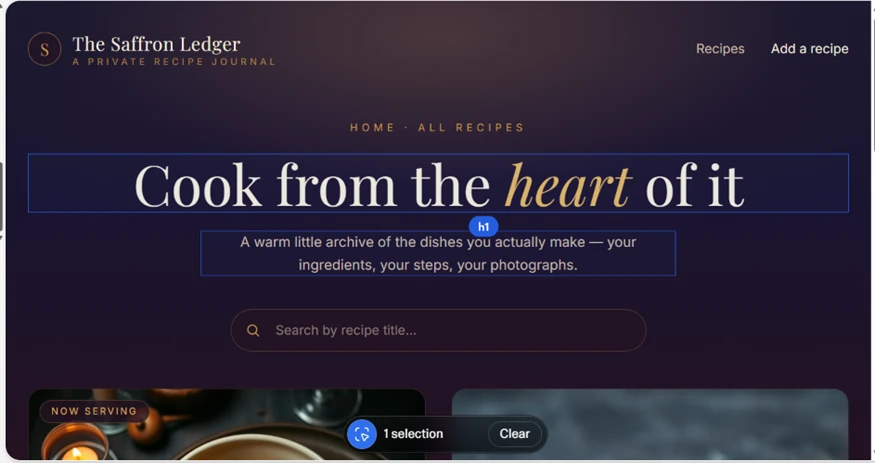
Not every change needs a prompt. I clicked the headline in the live preview and Lovable selected it as an editable element, tagging it as an h1 and letting me adjust it on the canvas. This is direct manipulation, so it does not draw down credits the way an AI edit does.
The feature that sets Lovable apart from front-end-only generators sits in the Cloud tab. My app already had a live database with a recipes table holding three rows, the ones seeded during the build. Around that database were the parts of an actual backend: user accounts with auth settings, file storage, a SQL editor, and edge functions.

This was a full-stack app on managed infrastructure, not a static preview.
I went looking for lock-in and came up short. The editor exposes the full source, real React built on TanStack Router, arranged in a normal file tree.

The in-browser view is read-only until you upgrade, but the Download button worked on the free plan, and the connector panel offers a one-click sync to GitHub as well. The code leaves with me either way, so a move to Cursor or a local setup stays on the table.
Lovable lists 108 connectors in its catalog. Stripe and Shopify handle payments and storefronts, while Slack and Notion cover team workflow. Google's tools are represented, and email APIs such as Resend sit next to developer platforms like GitLab. For a product aimed at non-engineers, that range means most common features can be wired in without leaving the chat window.

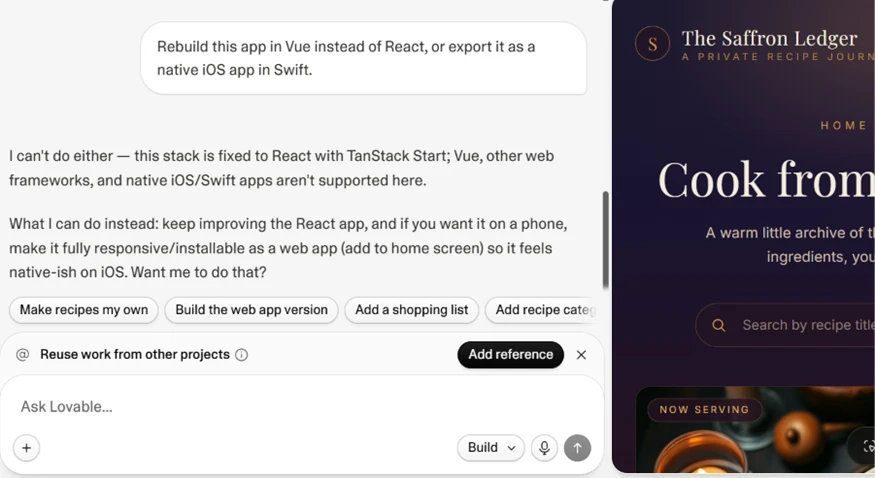
Lovable is upfront about its limits. I asked it to rebuild the app in Vue or export it as a native iOS app in Swift, and it declined, explaining that the stack is fixed to React with TanStack Start and that neither Vue nor native Swift is supported here. It offered to make the current app installable as a mobile web app instead.
The sharper constraint is cost. That first build ate four of the five credits the free plan grants per day, which left me with one. Four credits for a polished result is reasonable value, but a five-credit daily ceiling means serious iteration, debugging most of all, drains the allowance quickly and pushes you onto a paid plan sooner than the free tier first suggests.
| Dimension | Our test | User signal | Verdict | Composite |
|---|---|---|---|---|
| Build Speed Time from idea to prototype | 9.5 | 9.4 | Excellent | |
| Ease of Use Learning curve and usability | 9 | 9.2 | Excellent | |
| Output Quality Design, UX, and functionality | 8.8 | 9 | Excellent | |
| Reliability Stability and uptime experience | 6.5 | 6 | Moderate | |
| Pricing Fairness Credit costs and transparency | 5.5 | 5 | Weak | |
| Support Quality Helpfulness and responsiveness | 6.8 | 6.2 | Moderate | |
| Security Handling Scanning and issue resolution | 6 | 5.5 | Weak |
Toolscopia uses cookies to keep you signed in, remember your preferences, and understand how our reviews get read. Analytics are anonymous. See our privacy policy for the full detail.



Comments 0
Join the discussion and share your perspective.
Sign in to post a comment and reply to other readers.
No comments yet
Be the first to share your perspective on this tool.