1
Text to song generation
Converts prompts and lyrics into full songs, but many reviewers criticize generic composition and ignored directions.
AI music generator that turns text prompts and lyrics into full songs with vocals, pitched mainly at hobbyists and creators. Reviewers report attractive trials, weak reliability, and extremely opaque, cancellation‑hostile subscriptions.
Independent review — we test tools ourselves and analyze public user reviews. How we test.
Mureka AI can sometimes create entertaining AI songs and gives casual users a quick way to hear lyrics turned into music. A minority of reviewers praise soulful voices and fun experimentation. However, the overwhelming pattern is serious concern about billing, hidden annual renewals, and near impossible cancellation. Output quality is frequently described as generic, glitchy, and unresponsive to prompts, with voice cloning and genre control underperforming expectations. It fits only highly cautious hobbyists willing to sandbox billing via PayPal or virtual cards and who treat it as a disposable toy, not a core music tool.
Mureka is an AI music generator built by Skywork AI, a Singapore-based company. You describe a song in plain text, or paste your own lyrics, and it returns a finished track with vocals, instruments, and arrangement in under a minute. The current engine is V9.5, which the platform runs across both its web app and iPhone app.
What sets Mureka apart from rivals like Suno is its control over the voice itself. You can pick from named AI vocalists or clone a specific voice, then shape its gender, texture, and character to build a signature sound. A reference feature also lets you upload a song you like so the output echoes its style.
Mureka works through three creation modes. Easy mode runs on a single prompt, Custom mode opens up lyrics and reference uploads, and Soundtrack mode targets background music. For developers, Skywork publishes an official API and MCP server, so song generation can be wired directly into an app or content pipeline rather than used only through the interface.
Converts prompts and lyrics into full songs, but many reviewers criticize generic composition and ignored directions.
Multiple preset voices available; feedback highlights limited variety and often unnatural, robotic delivery.
Heavily marketed low cost trials frequently criticized for triggering unexpected annual renewals and high charges.
Song generation tied to credits or gold, with complaints about fast depletion, expirations and unclear premium access.
Pro and Premium tiers exist, but users report accidental upgrades, billing confusion and difficulty changing plans.
Browser interface allows publishing and managing songs, yet navigation, layout and deletion controls frustrate many users.
Promised personalized vocals, but reviewers describe poor likeness, off pitch results and unusable cloned voices.
Some functionality around Ableton control mentioned, largely criticized as glitchy and ineffective during testing.
Email, portal and chatbot support options present; sentiment overwhelmingly reports loops, silence and no resolutions.
Mureka opens into three creation tabs. Easy mode is the fastest way in, so I started there. It greets you like a co-producer and drops a single prompt box at the bottom of the screen.
I typed a prompt built for a US audience and kept it detailed on purpose:
"Upbeat country-pop anthem about a summer road trip down Route 66, male lead vocal, radio-ready chorus"
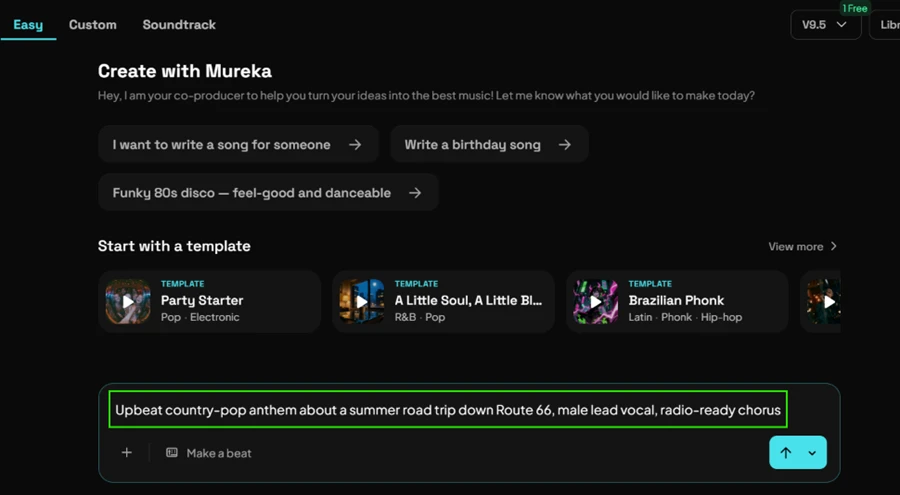
One thing I noticed right away. The credit counter in the corner reads 1 Free. That number sets the tone for the whole free experience, and I will come back to it.
I hit create and Mureka returned two full tracks, both titled Golden Miles, each running 3 minutes 23 seconds. This is the part of the test I expected to go badly. It did not.
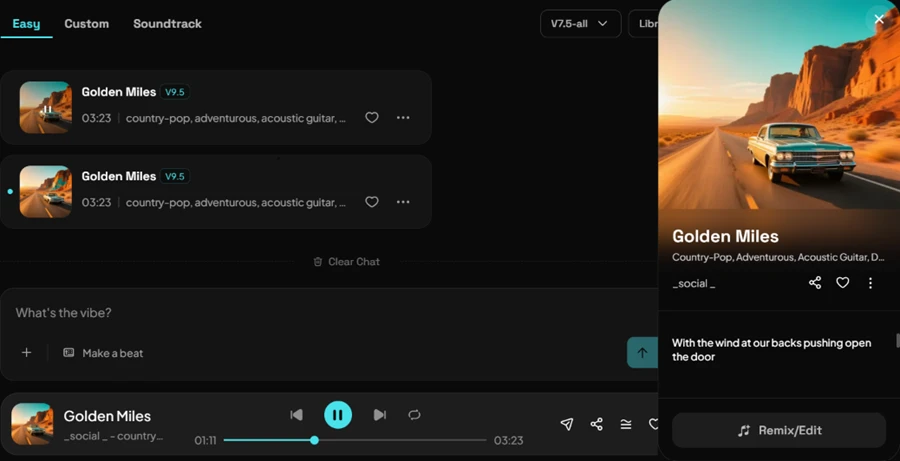
The vocals came through clean. No slurred words, no robotic warble on the held notes, and the chorus landed where a country-pop chorus should land. The arrangement moved through verse and chorus with acoustic guitar sitting under a male lead that stayed on pitch across all 3:23. Mureka even generated matching cover art showing a vintage car on a desert highway, which fit the Route 66 brief better than I expected from an auto-generated image.
For a free generation, this is strong work. If you only judged Mureka by the sound, you would walk away impressed.
The problem starts the moment you want the file. I opened the download menu on my finished track. Everything in it carries a badge.
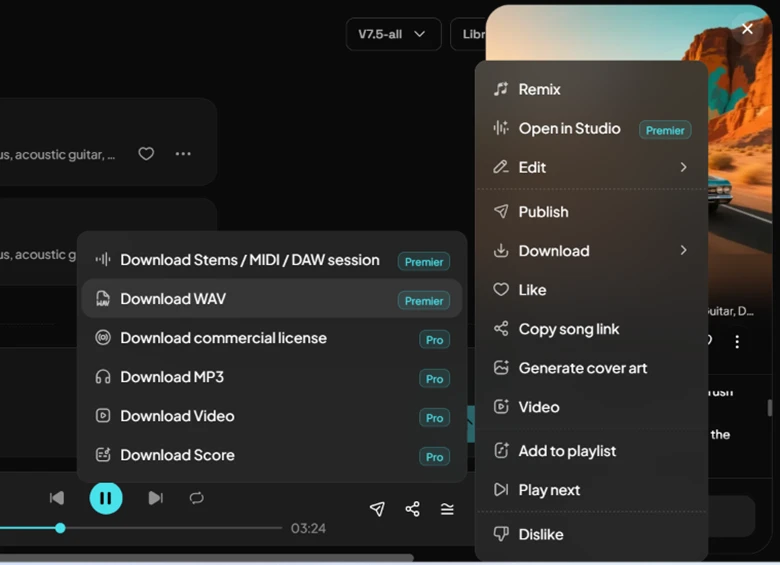
Here is the full breakdown of that menu:
Premier-only exports: Download Stems / MIDI / DAW session, and Download WAV.
Pro-only exports: Download commercial license, Download MP3, Download Video, Download Score.
Read that again. On the free plan there is no way to get the song off the platform. Not even a watermarked MP3. You can listen inside Mureka for as long as you like, but the audio stays locked to the browser.
I checked whether the free plan at least lets you refine a track you like. It mostly does not.
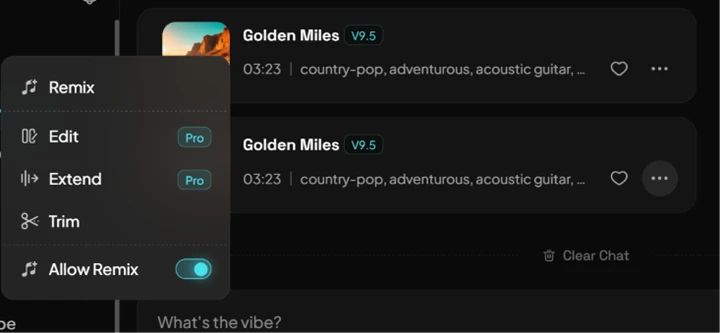
Edit is Pro. Extend is Pro. Trim is free and the Allow Remix toggle is free, which covers the basics and nothing more. If you want to lengthen a track or make real edits, that is a paid action.
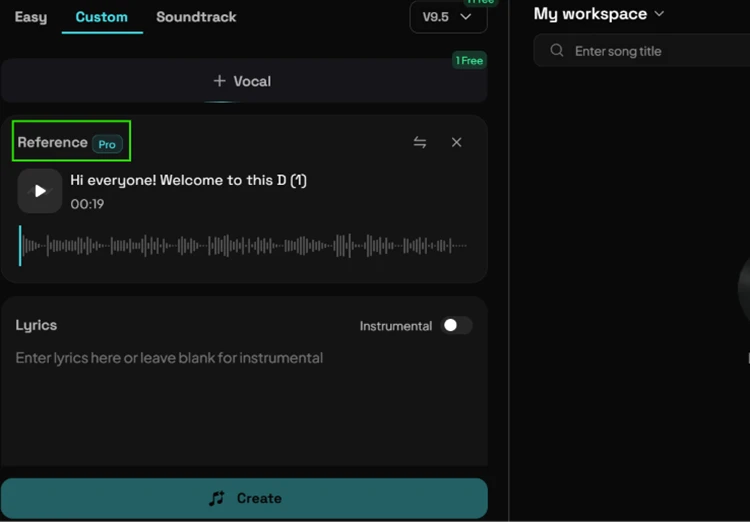
Reference mode tells the same story. This feature lets you upload a song and have Mureka match its style, and it is one of the tool's headline tricks. On the free plan it sits behind a Pro badge before you can even use it.
Since the free plan works as a demo, the pricing page is where the actual decision gets made. It loaded cleanly in USD, which helps if you are comparing against Suno from the States.

There are four tiers, and the credit system is branded as Gold.
Pro runs $10 per month, or an effective $8.25 if you commit to a year at $99 upfront. It grants 5,000 Gold per month, which Mureka rates at up to 500 songs. Premier is the tier most creators will actually need, because WAV and stem exports live there. It costs $30 per month, dropping to an effective $16.59 on the annual plan at $199 upfront, and includes 20,000 Gold for up to 2,000 songs.
The gap between monthly and yearly is worth flagging. Premier monthly at $30 costs almost double its own annual rate. The attractive $16.59 and $8.25 figures Mureka puts in large type both assume you pay for twelve months in advance.
| Dimension | Our test | User signal | Verdict | Composite |
|---|---|---|---|---|
| Music Output Quality Melody, arrangement and coherence | 8 | 7 | Good | |
| Prompt Fidelity How closely songs match prompts | 7 | 6 | Moderate | |
| Billing Transparency Clarity of pricing and renewals | 5 | 4 | Weak | |
| Cancellation Experience Ease of stopping subscriptions | 5.5 | 5 | Weak | |
| Customer Support Speed and usefulness of help | 5 | 4.5 | Weak | |
| Ease of Use Interface, navigation, basic workflow | 8 | 7.5 | Good | |
| Value for Money Perceived return versus cost | 5 | 5 | Weak |
Toolscopia uses cookies to keep you signed in, remember your preferences, and understand how our reviews get read. Analytics are anonymous. See our privacy policy for the full detail.



Comments 0
Join the discussion and share your perspective.
Sign in to post a comment and reply to other readers.
No comments yet
Be the first to share your perspective on this tool.