1
AI song generation from prompts
Creates full songs from text or lyrics, praised for speed and overall musical quality.
Musicful is an AI music and video generator for non‑musicians and creators who want quick, high quality tracks from prompts, plus unusually fast, human email support when billing or account issues appear.
Independent review — we test tools ourselves and analyze public user reviews. How we test.
Musicful delivers impressively high quality AI songs with natural vocals and strong genre range, especially for non professional users. Support is consistently fast, personal, and often goes beyond expectations on refunds and account fixes. However, pricing and plans feel confusing, self service cancellation is unreliable, and policies around credits, trials, and upgrades frustrate some buyers. Technical reliability issues like unfinished renders, poor melody adherence, and watermark limitations also appear. Best suited to creators who value quick song generation and responsive human support more than transparent billing design or granular musical control.
Musicful is an AI generator that produces songs and music videos from the same workspace. You feed it typed descriptions or finished lyrics, and it can even work from a hummed melody, returning a complete track with vocals and a full arrangement in a couple of minutes. The video side is what separates it from most song generators; a finished track can be turned into a rhythm-matched music video without leaving the platform, which positions the tool for social feeds as much as for listening.
It runs in the browser with companion apps on iOS and Android, and an account stays synced between them. Access works on credits; a free tier hands out a starter balance and paid plans refill the pool, with generations and premium extras each carrying their own price. Licensing sits in the fine print: downloads come with a non-exclusive perpetual license that covers commercial use, backed by a certificate, while Musicful keeps ownership of the generated tracks themselves. The company also markets an API, so the same engine powers third-party apps alongside the consumer site.
Creates full songs from text or lyrics, praised for speed and overall musical quality.
Handles Hindi, Urdu, Christian and other genres with accurate pronunciation, strongly praised.
Generates music videos, appreciated but criticized for unavoidable third party watermarks.
Frequently praised for very fast, kind, and solution oriented replies.
Offers recurring plans and lifetime credits, criticized for rollover rules and confusing add ons.
Provides commercial usage rights during active plans, clarified carefully by support agents.
Includes cancellation and downgrade tools, but several users report failures and hidden friction.
Allows uploads, yet often fails to follow user melodies closely, frustrating advanced users.
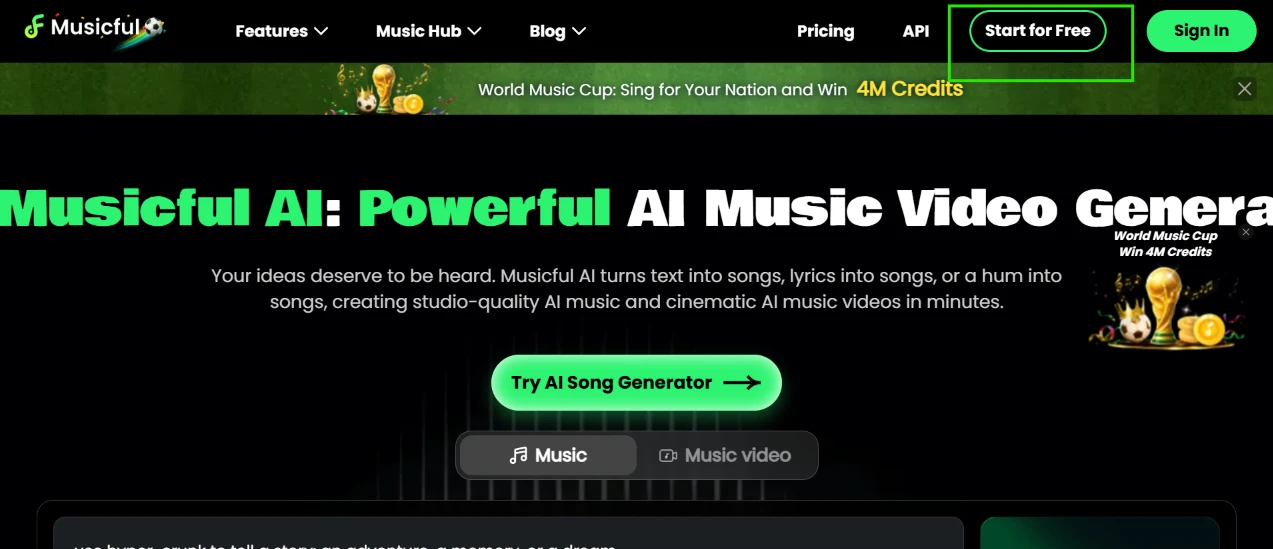
I opened musicful.ai. The header packs in Features, Music Hub, Blog, Pricing and an API link, with Start for Free and Sign In on the far right. A promo banner runs beneath it for a World Music Cup contest dangling 4M credits, and beneath that the headline announces an AI music video generator, though at my window width the final word ran off the edge of the screen. A Try AI Song Generator button anchors the hero, with a toggle under it for Music or Music video.
The pitch promises songs from typed text or your own lyrics, and even from a hummed melody. Contest branding crowds the page before you have done anything, trophy art in the corner and the credits banner up top, and that overflowing headline was my first rough edge before I had even signed in.
I clicked Start for Free.
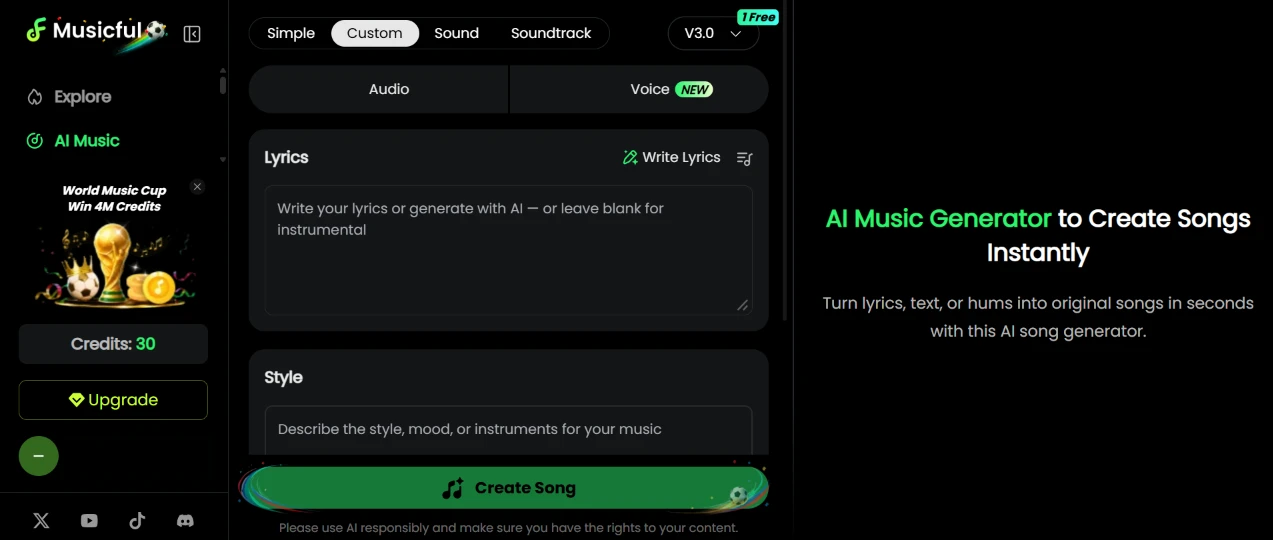
Signing in landed me on the builder, which spreads four creation tabs across the top: Simple, Custom, Sound and Soundtrack. A version selector beside them read V3.0 with a small 1 Free badge pinned to its corner. The form itself holds an Audio or Voice toggle (Voice wears a NEW tag), a Lyrics box you can leave blank for an instrumental, a Style field for describing mood or instruments, and the green Create Song button. My sidebar showed a balance of 30 credits and an Upgrade button, with the same World Music Cup promo squeezed above them.
The 1 Free badge told me the newest model was a taste rather than my default. Under the Create button sits a permanent reminder to use AI responsibly and hold the rights to your content, and it stayed there on every creation screen I visited. Thirty credits felt like enough to work with, so I went straight to writing.
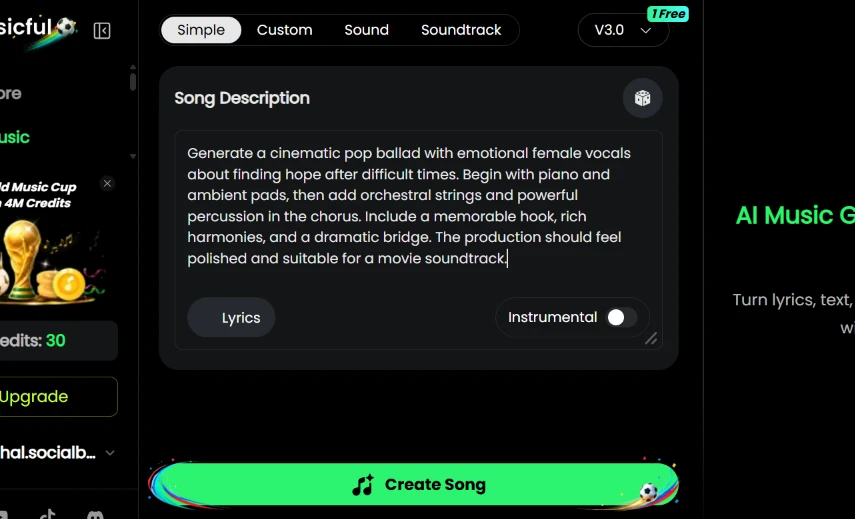
I stayed on the Simple tab, left the Instrumental toggle off and typed my description:
Generate a cinematic pop ballad with emotional female vocals about finding hope after difficult times. Begin with piano and ambient pads, then add orchestral strings and powerful percussion in the chorus. Include a memorable hook, rich harmonies, and a dramatic bridge. The production should feel polished and suitable for a movie soundtrack.
Then I pressed Create Song.
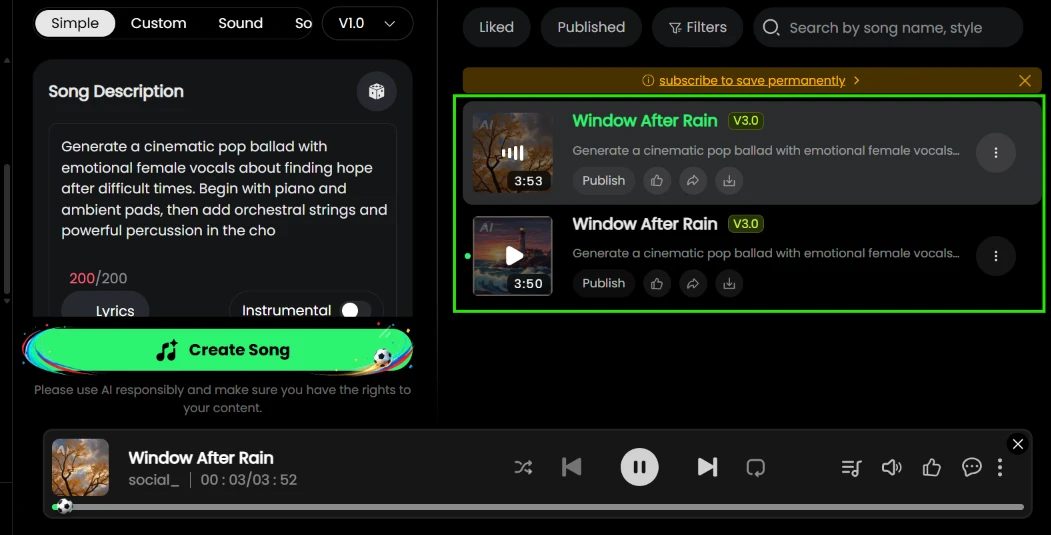
Two versions came back under the name “Window After Rain”, one at 3:53 and one at 3:50, each with its own Publish button, and the player picked the first up on its own. I never typed a title; the tool invented one that fits the mood I described, which is a small touch I liked. Anyone can hear the result through a public link, mine sits at musicful.ai/song/53059135398494214.
Two problems surfaced on this same screen. The description field caps out at 200 characters, and the counter glowed red at 200/200 with my prompt chopped mid-word at “powerful percussion in the cho”, so everything past the chorus line never reached the model, including the entire request for a hook and a dramatic bridge. Above my results, a yellow strip read “subscribe to save permanently”, the quiet way of saying free songs have a shelf life. One more oddity: the version selector had slid back to V1.0, which I read as my single free V3.0 run being spent on this generation.
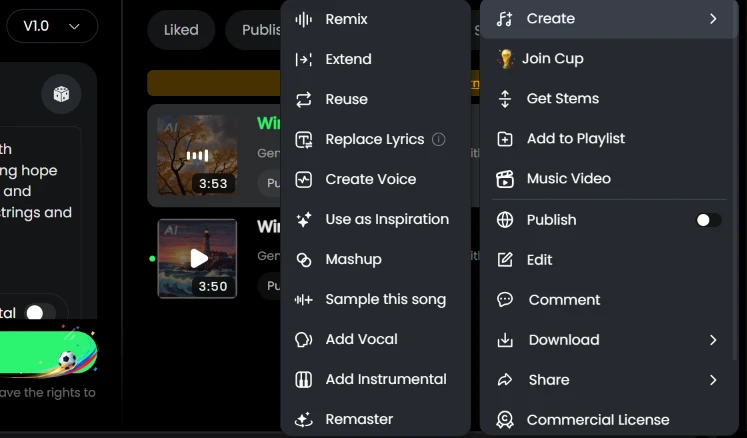
The three-dot menu on a finished track unfolds into two columns. The first runs through Remix, Extend, Reuse, Replace Lyrics, Create Voice, Use as Inspiration, Mashup, Sample this song, Add Vocal, Add Instrumental and Remaster. The second covers Create, Join Cup, Get Stems, Add to Playlist, Music Video, a Publish toggle, Edit, Comment, Download, Share and Commercial License.
That is twenty-two entries and none of them wears a lock or a paid badge, so on the surface the free plan sees the whole menu. Mashup and Sample this song were new to me as one-click options on a generated track. The grab bag quality is the tradeoff; Get Stems and Commercial License sharing a column with Comment took me a second read to parse, and Replace Lyrics carries a small info icon, the only hint of fine print in the list.
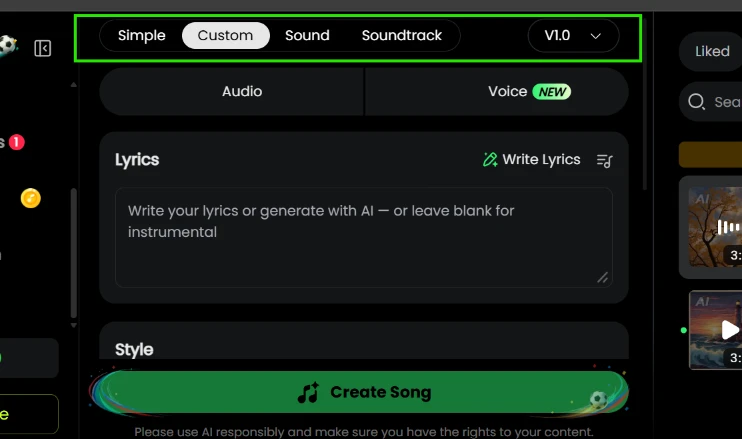
Back in the builder I clicked across the remaining tabs. Custom leads with the Lyrics box, for generating around words you wrote yourself, with a Write Lyrics helper if you want the AI to draft them first. Sound generates audio from a plain description rather than a full song. Soundtrack accepts a video upload and scores it. Above all of this, the Voice option still wearing its NEW tag swaps the output away from Audio.
Four generation modes in one panel is a wider spread than I expected from a song tool, and Soundtrack in particular aims this at video creators. I only generated through Simple in this session, so the other tabs are recorded here as I found them, untested.
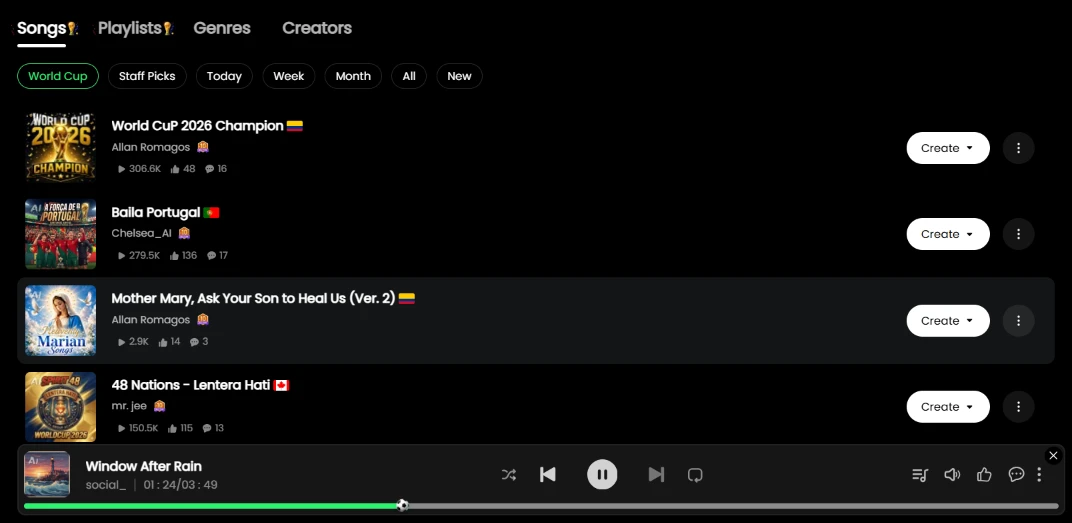
The Explore tab splits into Songs, Playlists, Genres and Creators, with filter chips underneath leading with World Cup ahead of Staff Picks and the time windows. The chart was wall-to-wall contest entries when I visited, led by “World CuP 2026 Champion” at 306.6K plays and “Baila Portugal” at 279.5K, every row flying a country flag. My own “Window After Rain” kept playing in the bar below while I scrolled.
Every listing carries its own Create button, an open invitation to spin your version off someone else's song, which explains how a single contest floods the charts. Discovery here is loud. The contest owns the front page so completely that I could not tell you what the platform's everyday taste looks like.
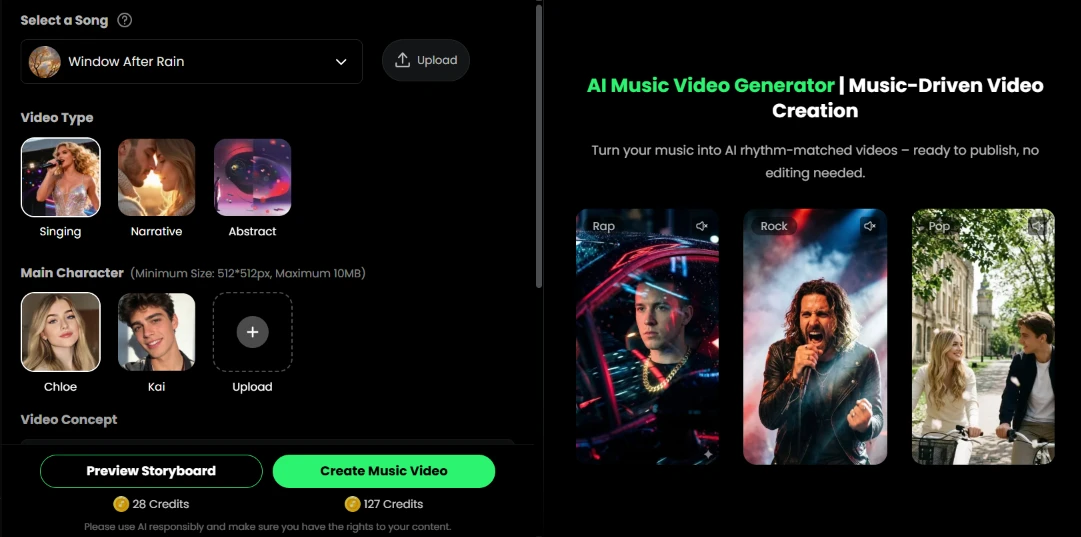
This is the feature the homepage leads with, so I opened it next and found “Window After Rain” already selectable. You choose a video type, Singing or Narrative, with Abstract as a third option, then a main character: the stock faces Chloe and Kai, or an upload of your own at 512x512 pixels minimum and 10MB max. A Video Concept field follows, and the bottom row prices everything out, 28 credits for a storyboard preview and 127 credits for the full render.
For a free account, the homepage's marquee feature is a window display.
My 30-credit balance covers exactly one storyboard preview and sits 97 credits short of a finished video, so I stopped at reading the screen. I will credit the interface for spelling out the character upload limits before you try, which spares a failed attempt.
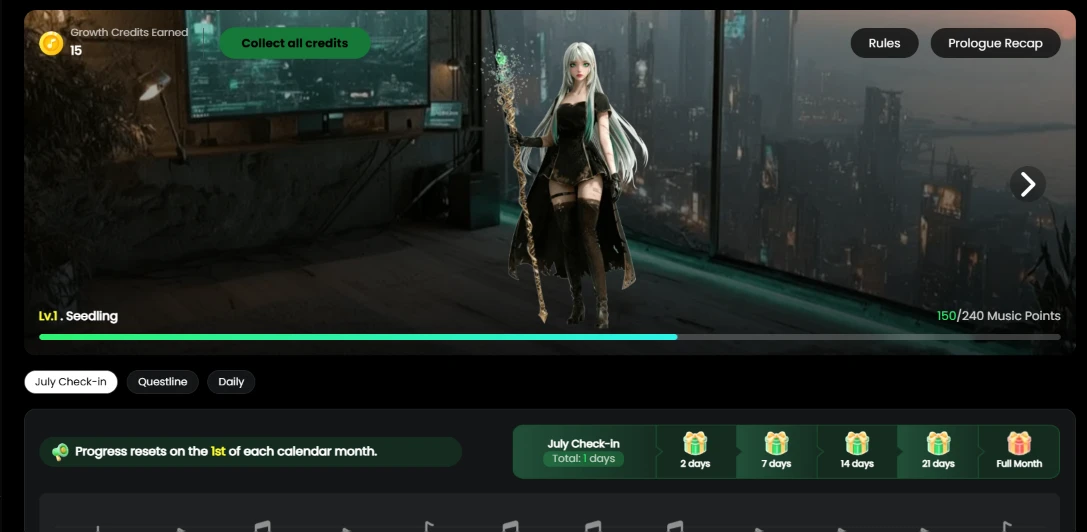
The Growth Center is where free credits live, and it is built like a mobile game. An anime mascot fronts a level bar reading Lv.1 Seedling at 150 of 240 Music Points, tabs cover a July Check-in and a Questline with a Daily tab beside them, and a row of gift boxes unlocks at 2, 7, 14 and 21 days of checking in, plus a full month. A note warns that progress resets on the 1st of each calendar month. I collected 15 credits for showing up.
Fifteen credits for a click is half the price of that storyboard preview, so the loop starts working on you fast. The monthly reset is the sting; grind a level for three weeks and the calendar wipes it.
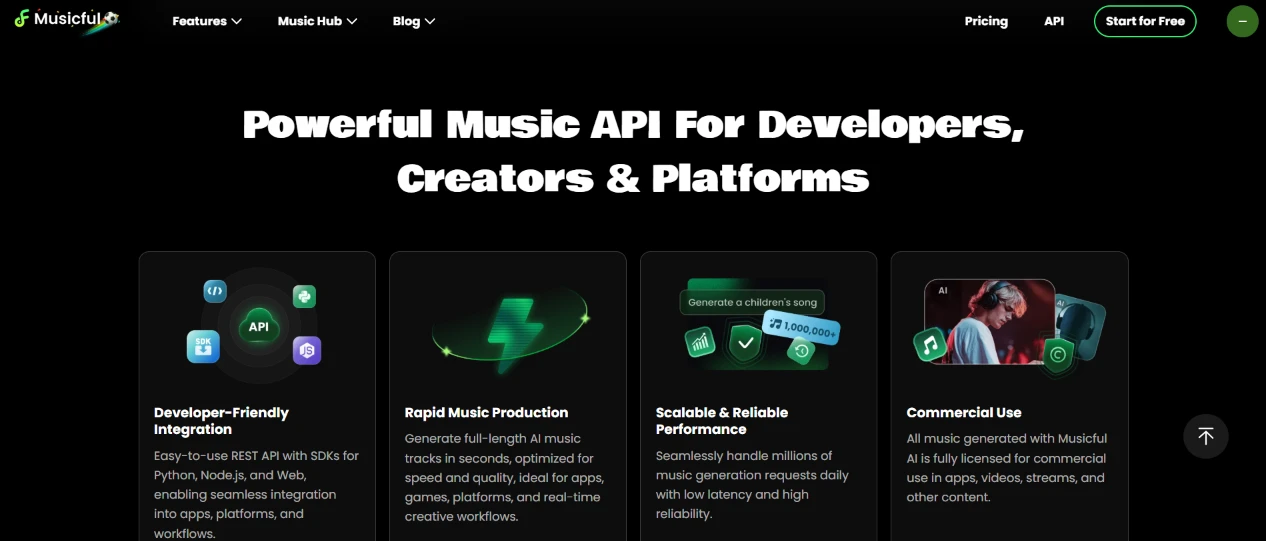
Musicful also sells an API aimed at developers and platforms. The landing page promises a REST interface with SDKs for Python and Node.js, full-length tracks generated in seconds, capacity claims in the millions of daily requests, and commercial licensing on everything produced through it.
A free account cannot touch any of this, so it stays a description rather than a test. Its presence does explain the ambition; this platform wants to live inside other apps as much as in front of me.
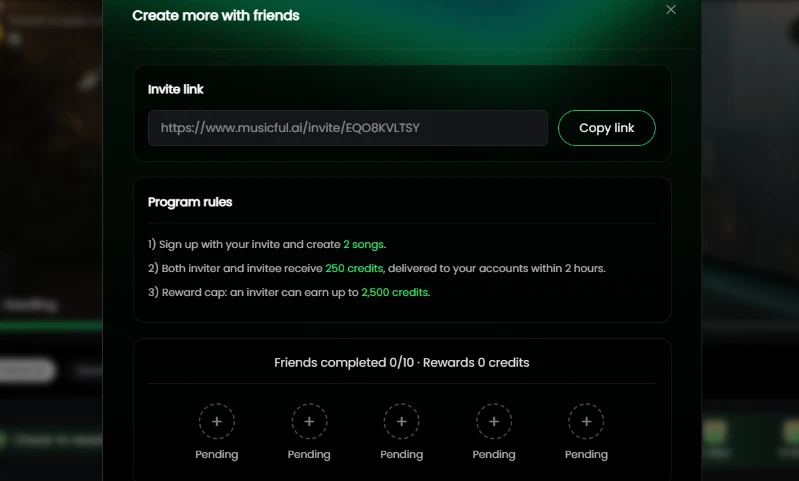
The last thing I opened was the referral modal, titled “Create more with friends”. It hands you an invite link and the program rules: a friend signs up through it and creates 2 songs, then both accounts receive 250 credits within 2 hours, capped at 2,500 credits per inviter. My tracker read 0 of 10 friends completed, a row of empty Pending circles staring back.
The math is generous next to the check-in trickle, since one converted friend pays out more than sixteen daily logins. It is also the only credit source that needs other people, and those Pending circles turn that need into a scoreboard. The cap lands at ten friends, and that is where my session ended, out of screens to open and still 97 credits short of a music video.
| Dimension | Our test | User signal | Verdict | Composite |
|---|---|---|---|---|
| Music Quality Realism, mix, genre range | 9 | 9.4 | Excellent | |
| Ease of Use Interface and workflow simplicity | 8 | 8.7 | Good | |
| Control and Customization Granular control over outputs | 6 | 6.5 | Moderate | |
| Pricing Transparency Clarity of plans and billing | 4.5 | 4 | Weak | |
| Customer Support Speed and helpfulness of support | 9.5 | 9.7 | Excellent | |
| Reliability and Stability Rendering success and uptime | 6.5 | 6 | Moderate | |
| Value for Money Perceived value versus cost | 7.5 | 7 | Good |
Toolscopia uses cookies to keep you signed in, remember your preferences, and understand how our reviews get read. Analytics are anonymous. See our privacy policy for the full detail.



Comments 0
Join the discussion and share your perspective.
Sign in to post a comment and reply to other readers.
No comments yet
Be the first to share your perspective on this tool.