1
AI song generation from lyrics
Creates full songs from user supplied lyrics, often praised for creativity and emotional impact.
AI music generator for turning lyrics and prompts into full songs. Capable of impressive results, but plagued by billing glitches, unusable credits, and essentially nonexistent support, so only suited to very patient experimenters.
Independent review — we test tools ourselves and analyze public user reviews. How we test.
Suno can generate surprisingly engaging songs from simple lyrics or prompts, and several reviewers describe the musical output as impressive and creatively satisfying. However, the experience is heavily undermined by severe billing issues, unreliable subscriptions, and almost nonexistent customer support. Many paying users report locked or downgraded accounts, lost credits, and ignored refund requests. Technical bugs, prompt ignorance, and degraded audio quality further erode trust. This platform currently suits hobbyists and indie creators who value experimentation over reliability, and who are prepared to accept financial and service risk.
Suno is an AI music generator that turns a written prompt into a complete song. You describe the track you want, in plain language or through detailed style tags, and the system produces the full package: lyrics, vocals, instrumentation and cover art, typically within a minute or two per generation. What separates Suno from most rivals is vocal synthesis; its songs arrive sung rather than landing as instrumental beds.
The company behind it was founded in Cambridge, Massachusetts in 2022 by a team of machine learning engineers, and the tool opened to the public in late 2023, picking up millions of users since. It runs in a browser and on mobile apps. Access works on a credit system; a free tier hands out daily credits good for a handful of songs, while paid subscriptions add bigger credit pools and commercial rights over what you make. Free-plan songs are limited to non-commercial use, so anyone planning to publish or monetize output needs a subscription.
Creates full songs from user supplied lyrics, often praised for creativity and emotional impact.
Accepts detailed style instructions, but reviewers report frequent prompt ignoring and mismatched arrangements.
Uses credits for each generation; many users complain about wasted or disappearing credits.
Paid tiers promise more credits and features, but activation and renewal frequently fail.
Previously advertised custom voice feature; removal and weak vocal controls draw strong criticism.
Extend and edit functions exist, yet often produce glitches, bad joins, or unusable segments.
Accessible across devices, but many subscribers experience login errors and blocked app access.
Handles monthly and annual renewals, widely criticized for opaque terms and difficult cancellation.
Email based support exists on paper, but users overwhelmingly report ghosting and unresolved cases.
I tested Suno in a single sitting and took a screenshot at every step. This walkthrough follows those screenshots in the exact order I captured them.
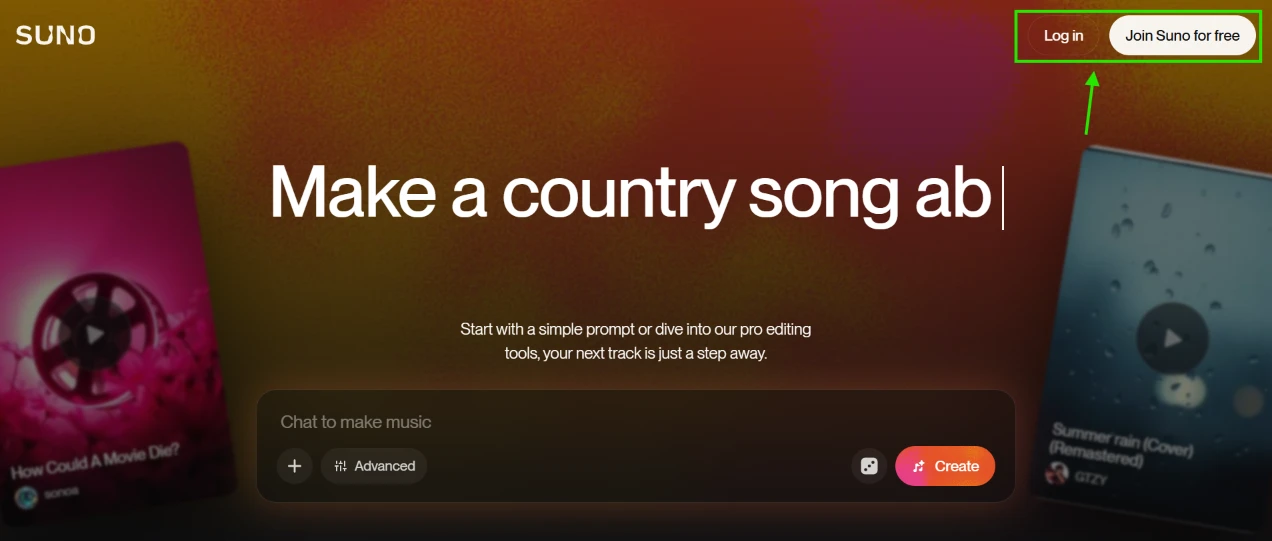
I started logged out on the homepage. Everything here funnels you toward one central prompt bar, where placeholder text types itself out as if someone else were at the keyboard; I caught it mid-sentence at “Make a country song ab”. Tilted cover art from community tracks frames both sides, and the top right corner holds Log in and Join Suno for free. Inside the bar itself sit a plus button and an Advanced toggle, with the orange Create button waiting on the right.
The pitch lands in about two seconds because the interface is the pitch: a chat box that outputs songs. I signed up without typing anything, since generating needs an account anyway, and moved on.
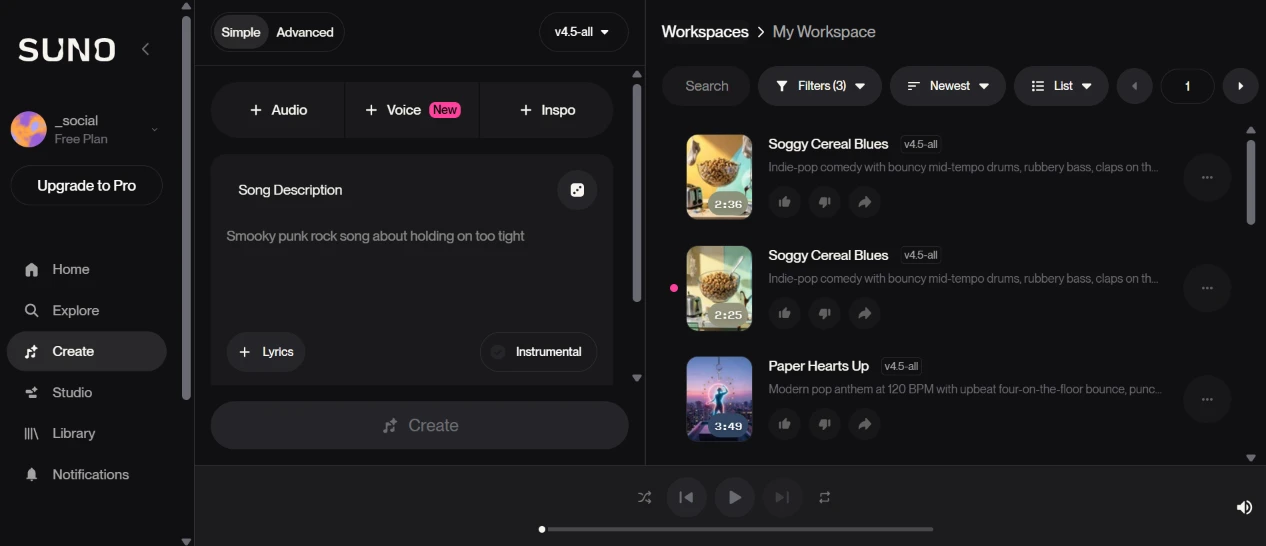
Logging in dropped me onto the create screen, which splits into two working panels. The left half is the builder, with Simple and Advanced tabs up top, a model selector reading v4.5-all, a Song Description box, a Lyrics button and an Instrumental toggle underneath. The right half is My Workspace, already holding my earlier throwaway tests, two takes of “Soggy Cereal Blues” and one “Paper Hearts Up”. A player bar stays pinned along the bottom, and the sidebar shows my account sitting on the Free Plan with an Upgrade to Pro button parked directly under my name.
I ended up spending most of the session on this single screen, which says plenty about the layout. The detail that made me pause was the sample text inside the description box, a “Smooky punk rock song about holding on too tight”. I stared at “Smooky” for a good ten seconds trying to decide whether it was a typo or a vibe.
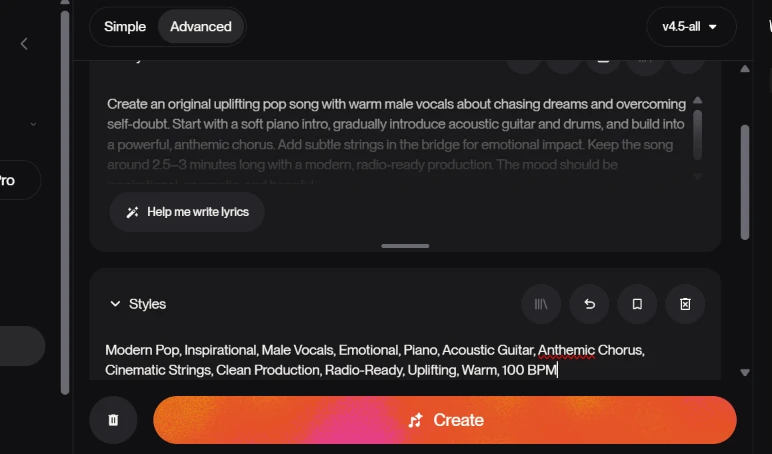
I switched to the Advanced tab and pasted my full prompt into the description field:
Create an original uplifting pop song with warm male vocals about chasing dreams and overcoming self-doubt. Start with a soft piano intro, gradually introduce acoustic guitar and drums, and build into a powerful, anthemic chorus. Add subtle strings in the bridge for emotional impact. Keep the song around 2.5-3 minutes long with a modern, radio-ready production. The mood should be inspirational, energetic, and hopeful.
Then I filled the Styles field underneath with my tag string:
Modern Pop, Inspirational, Male Vocals, Emotional, Piano, Acoustic Guitar, Anthemic Chorus, Cinematic Strings, Clean Production, Radio-Ready, Uplifting, Warm, 100 BPM
A “Help me write lyrics” button sits under the description for anyone who wants the words generated separately. I skipped it, my prompt already carried the concept.
Two small things bit me on this screen. The description box fades long prompts out at the bottom edge, so the tail of mine dissolved into a gradient and I had to scroll inside the box just to proofread my own writing. And the Styles field runs a spell checker that red-underlined “Anthemic”, an ordinary word in music writing, which made me second-guess a correct tag for no reason.
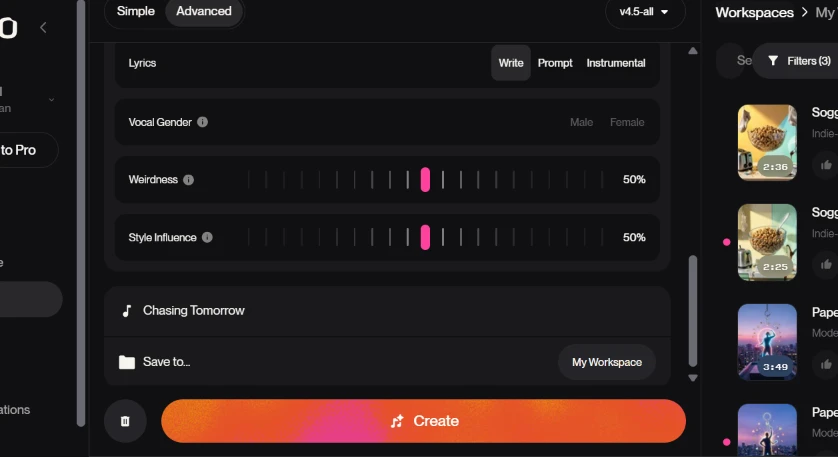
Scrolling the panel further exposed the finer controls. The Lyrics row switches between writing your own words and two hands-off modes, Prompt and Instrumental. Vocal Gender is a simple Male or Female toggle. Below that sit two notched sliders, Weirdness and Style Influence, both resting at 50% by default. I titled the song “Chasing Tomorrow” and left the save destination on My Workspace.
Then I hit Create, with both sliders untouched on purpose, because 50% felt like an honest baseline for a first run.
Nothing on this screen blocks you. Every control ships with a working default, so the gap between pasting my prompt and pressing Create stayed under a minute. My one note is that the sliders drag along tick marks instead of accepting a typed number, painless at the midpoint, fiddlier the day you want exactly 65%.
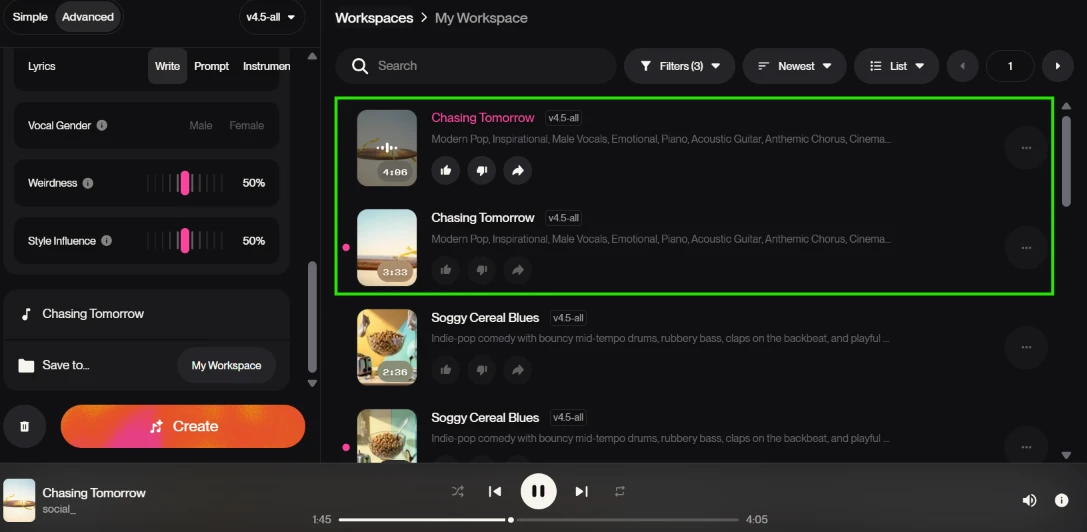
Create ran and returned two versions of “Chasing Tomorrow”, stacked together at the top of My Workspace, one at 4:06 and one at 3:33, both wearing the full tag string I entered. I hit play on the first and the bottom bar picked it up, ticking along at 1:45 of 4:05.
Two takes per generation is my favorite default in the product, since every prompt becomes an instant A/B comparison. It also surfaced the first clear miss of the session. My prompt asked for a 2.5-3 minute song, and the takes came back at 4:06 and 3:33, so the closer one overshot the ceiling by 33 seconds while the other blew past it by more than a minute. The style tags transferred onto the results exactly as written; the duration instruction is the one that visibly failed. If length matters to you, budget for cropping afterwards rather than trusting the prompt.
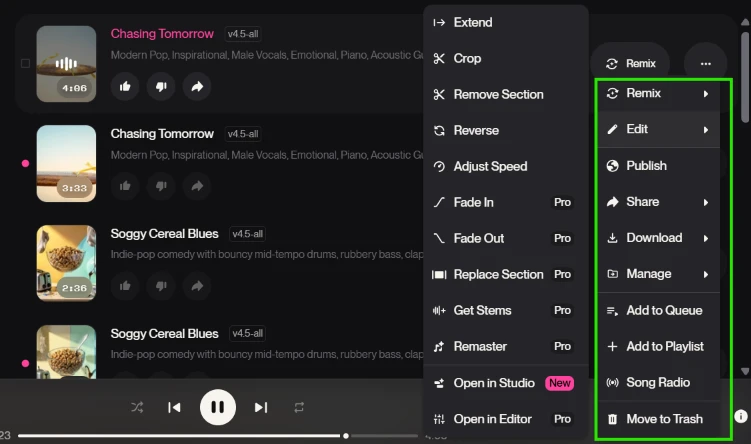
With a finished track in hand, I opened its menus to see what happens after generation, and there are two layers of them. The context menu holds the audio surgery. Extend, Crop, Remove Section, Reverse and Adjust Speed are open on my free account, and then the Pro badges begin: Fade In, Fade Out, Replace Section, Get Stems and Remaster all sit behind the paywall, along with Open in Editor, while Open in Studio wears a New badge instead. The overflow menu to the right handles everything else, running through Remix, Edit, Publish, Share, Download, Manage, Add to Queue, Add to Playlist, Song Radio and Move to Trash.
The free versus paid split follows a logic once you stare at it, structural cuts stay free while finishing touches like fades, stems, remastering and section replacement cost money. Download living in the free tier surprised me; I had assumed exports would be the first thing gated. The downside is density. That is over twenty entries across two stacked menus, and on my first pass I read the whole list twice before spotting the option I wanted.
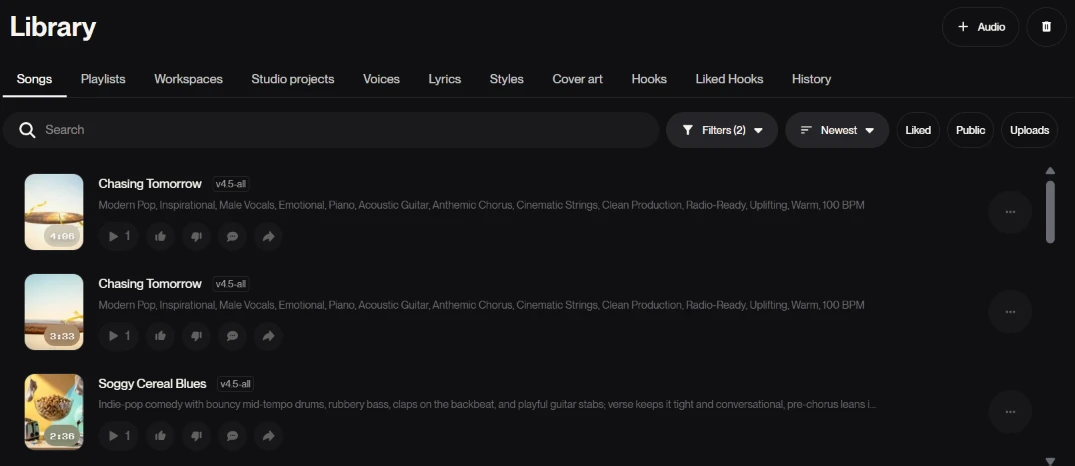
Next I opened the Library, the archive of everything generated on the account. Eleven tabs stretch across the top, starting at Songs and ending at History, with collections like Voices, Lyrics, Styles and Cover art in between. Both takes of “Chasing Tomorrow” sat on top with the “Soggy Cereal Blues” tests below them, and each row carries its play count, thumbs up and down buttons, a comment icon and the complete style string it was generated from.
That visible style string is the quiet win of this page. The moment a generation lands, its exact recipe is right there in plain text, ready to copy into the next attempt. The tab count cuts the other way; eleven sections for an account holding five songs is heavy, and I could not have told you what Hooks or Liked Hooks meant without clicking in.
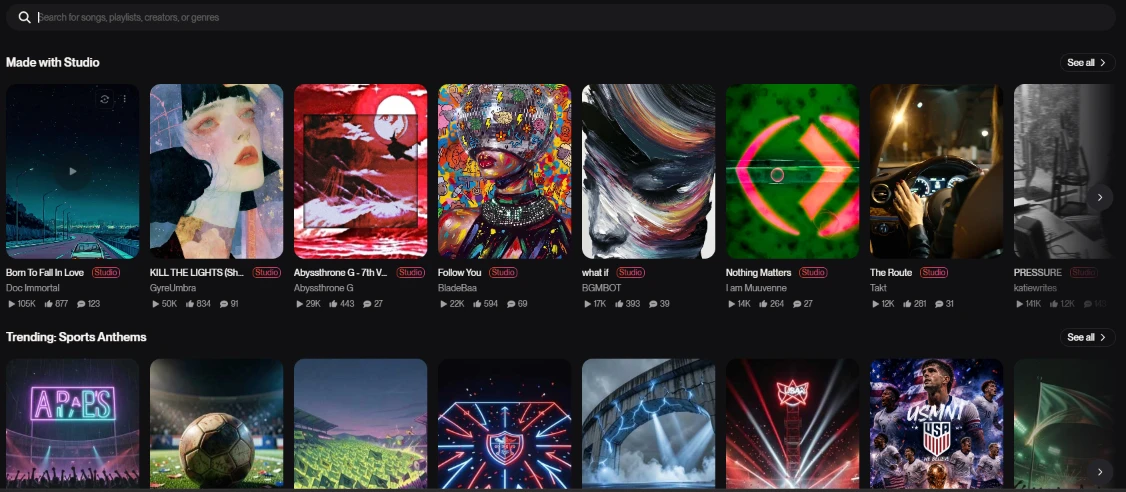
The Explore tab is the community's front window. A search bar up top accepts songs, playlists, creators or genres. A “Made with Studio” shelf leads the page and a “Trending: Sports Anthems” shelf follows it, with play counts on the first shelf alone running between 12K and 105K.
This page behaves like a streaming storefront, and barely like part of a tool at all.
It still earned its place in my session as calibration. Sampling the front shelf, where “Born To Fall In Love” sat at 105K plays, told me what the engine sounds like when a prompt fully lands, and that reset the bar I held my own two takes against.
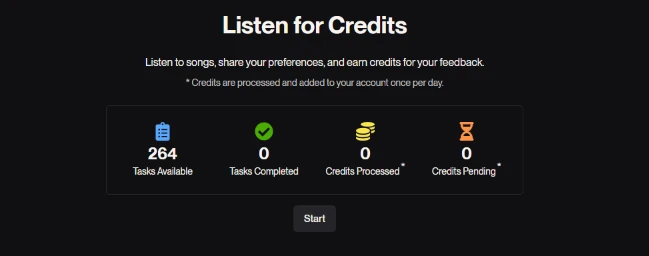
Then I opened the earning page, titled “Listen for Credits”. The deal is straightforward, you listen to community songs and rate what you hear, and the platform pays you in credits. My dashboard read 264 tasks available with zeros across every other column, since I had not touched a single task yet. A line of small print underneath notes that credits get processed and added to the account once per day.
Being paid in generation currency for feedback is a clever loop; my ratings feed their quality signals while the credits fund my next batch of songs. The once-a-day settlement is the catch. You can grind tasks all afternoon and the balance will not move until tomorrow, and that detail lives in a footnote instead of the headline.
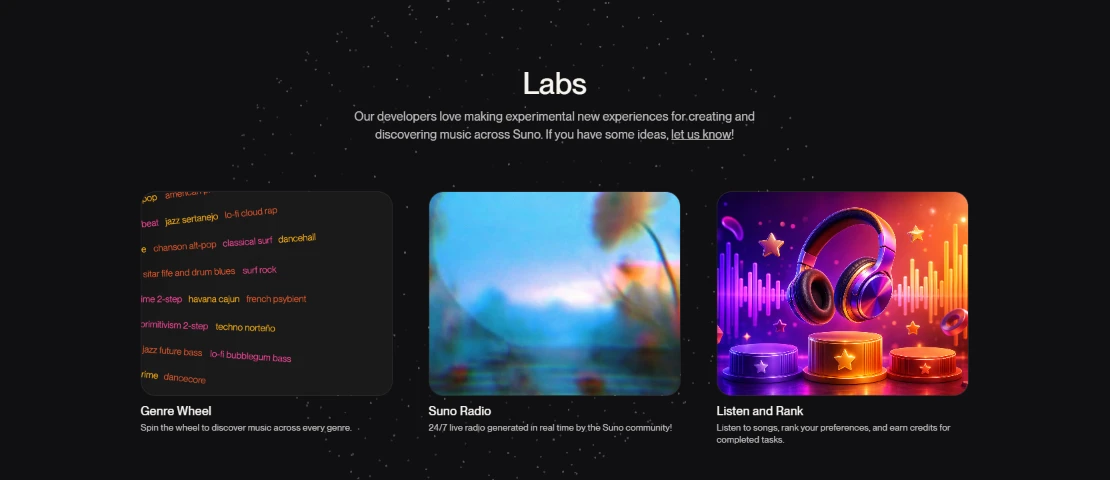
My last stop was Labs, the experiments corner, introduced by a note that the developers build new experiences here and take suggestions. Three cards make up the page. Genre Wheel spins across a sprawling cloud of micro-genres, and the visible tags alone sold it to me, entries like techno norteño and lo-fi bubblegum bass. Suno Radio streams a 24/7 live channel generated in real time by the community. The third card, Listen and Rank, turned out to be the same credit-earning task set I had just left on the previous page.
Genre Wheel is the one I will come back to, because spinning into a random micro-genre generates song ideas faster than any blank prompt box. The duplication is the sour note, Listen and Rank showing up both as a Labs card and as its own earnings page was the only spot in the whole session where the product repeated itself at me.
| Dimension | Our test | User signal | Verdict | Composite |
|---|---|---|---|---|
| Music Output Quality Overall song and vocal fidelity | 9 | 8.8 | Excellent | |
| Prompt Accuracy How well prompts are followed | 8.8 | 8.6 | Excellent | |
| Ease of Use Interface clarity and workflow | 5 | 7.8 | Moderate | |
| Billing Reliability Accuracy of charges and renewals | 7.9 | 7.7 | Good | |
| Customer Support Speed and helpfulness of assistance | 7.3 | 7.1 | Good | |
| Service Stability Uptime, login, and generation reliability | 7 | 6.8 | Moderate |
Toolscopia uses cookies to keep you signed in, remember your preferences, and understand how our reviews get read. Analytics are anonymous. See our privacy policy for the full detail.



Comments 0
Join the discussion and share your perspective.
Sign in to post a comment and reply to other readers.
No comments yet
Be the first to share your perspective on this tool.