1
24/7 Live Receptionists
Human agents answer calls around the clock, widely praised for professionalism and friendliness.
Smith AI is a virtual receptionist and AI call-handling service that combines live agents and AI to answer, route, and qualify calls for busy law firms, clinics, and small businesses that cannot staff a full front desk.
Independent review — we test tools ourselves and analyze public user reviews. How we test.
Smith AI delivers consistently strong call answering quality, responsive support, and clear value for firms that would otherwise miss leads or overload in-house staff. Longtime users, especially law practices, report reliable 24/7 coverage, helpful onboarding, and effective spam and lead filtering. The most serious drawbacks center on billing rigidity, hard-to-exit contracts, cancellation friction, and some AI configuration or call quality issues for niche scenarios. Best suited to small businesses and professional firms that prioritize never missing a call and can invest time upfront to define call flows and monitor billing.
Smith AI is a US-based call answering and customer engagement service that sits between a traditional answering service and a pure AI chatbot. Founded in 2015 by Aaron Lee, it handles inbound phone calls, web chats, and text messages for businesses that cannot staff a front desk around the clock.
What separates it from standard answering services is the hybrid model. Calls can be handled by an AI receptionist or by North America based live agents, and the two hand off to each other mid-conversation. The agents work from custom playbooks tied to your business, so they qualify leads, book appointments, screen spam, and route callers the way a trained in-house receptionist would.
The customer base leans heavily legal. Most of its reviews come from law firms and legal service providers, though it also serves finance, healthcare, and home services. Integrations with CRMs like Clio, HubSpot, and Salesforce push every call summary straight into the systems a business already runs.
Human agents answer calls around the clock, widely praised for professionalism and friendliness.
Customizable AI answers common questions and captures intake, effective but occasionally repetitive or confusing.
Supports law firm intake and lead qualification, strong generally but weaker for niche practice areas.
Filters spam and sales calls, often appreciated, though misconfiguration and spam-number issues appear.
Routes calls by type, time, or group, often praised for flexibility and fitting firm workflows.
Books consultations directly into calendars, saving time and reducing missed appointments.
Delivers detailed call summaries quickly, enabling efficient follow-up and revenue capture.
Dedicated specialists guide setup and ongoing tweaks, frequently highlighted as exceptionally supportive.
Per-call pricing seen as reasonable by many, though some complain about overages and upsells.
I ran the signup myself instead of taking Smith Ai’s word for how the free plan works. The goal was simple. Reach the dashboard on the $0 tier, test the AI receptionist on a few live calls, and report back what a US small-business owner actually sees. I got further than I expected in some places and hit a wall in others.
The first screen asks for a business name and a mobile phone number. Nothing moves forward until the phone field is filled. I left it blank on purpose to check, and the form threw a hard “Phone Number is required” error. A note under the field tells you to use a personal number rather than your business line, which felt odd for a tool whose entire job is answering your business line.
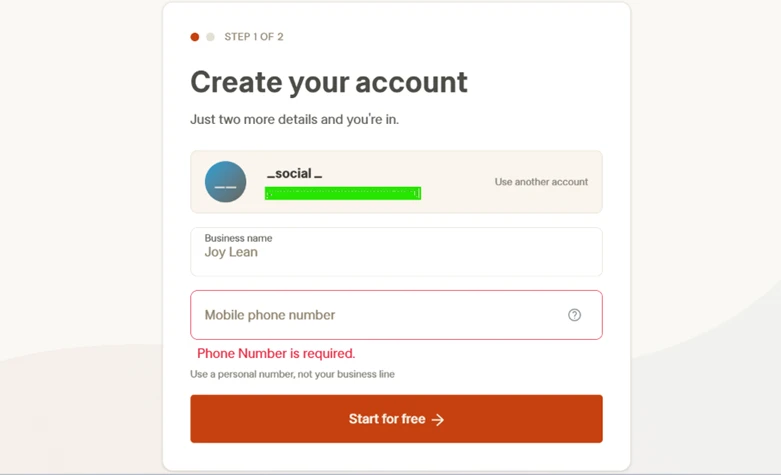
This is step one of two, so the barrier appears before you have seen anything the product does. For a privacy-minded owner, handing over a personal cell before the first call is friction worth knowing about upfront.
Step two was the part I liked. Smith AI drops you onto a “Meet your AI Receptionist” screen with a sample greeting already written in your business name. Three preset voices sit under it, and a “Hear your AI” button previews each one. I listened to all three. Ava and Sierra both read as polished and natural, and Nolan covers the male option.
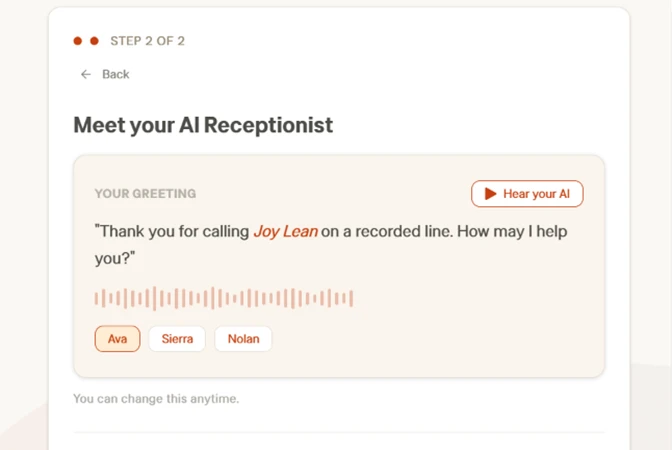
The greeting speaks your business name back to you, and the speaking speed is adjustable later. This is personalization you can see and hear in under a minute, and it is the clearest thing Smith AI does well during onboarding.
After the voice screen, the flow moved to plan confirmation. The right side of the page lays out what $0/mo includes: 25 AI receptionist calls, 24/7 answering, spam screening, lead qualification, bilingual English and Spanish answering, plus test tools like Quality Studio and 50 simulated calls a month. On paper, generous for a free tier.
Then the catch. The same page demands full card details, down to the security code, before it will let you continue. Below the card fields sits a line stating that by subscribing you authorize Smith AI to charge you under its terms until you cancel.
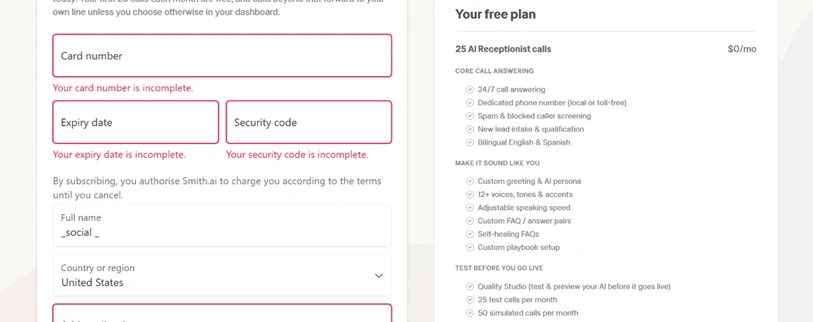
This is the single most important thing I found during the whole test. The $0 tier is not a no-commitment trial. You cannot reach the dashboard without putting a valid card on file and agreeing to a charge authorization first.
I wanted to see what the card step actually does, so I entered test details and submitted. The result is below. The order summary on the right reads “Due today $0.00”, and the form still returned a red “Payment failed. Your payment was not successful. Please check your card details and try again.”
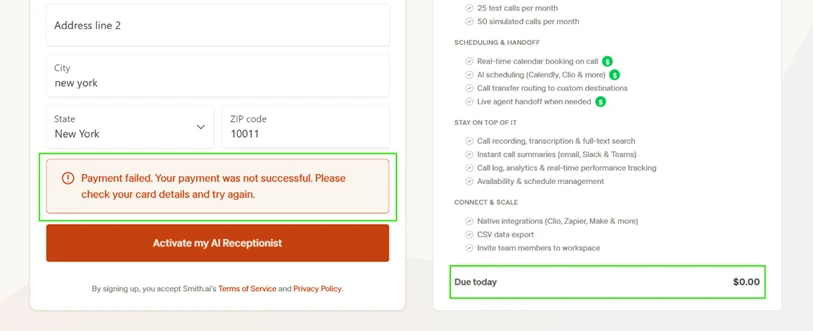
So nothing was being charged, and the signup still stopped. Smith AI runs a card verification on the free plan even when the amount due is zero. My invalid card failed that check, and without one that passes it, the account never activates. That is where my test ended, because I was not willing to hand over real card details for a plan I only wanted to trial.
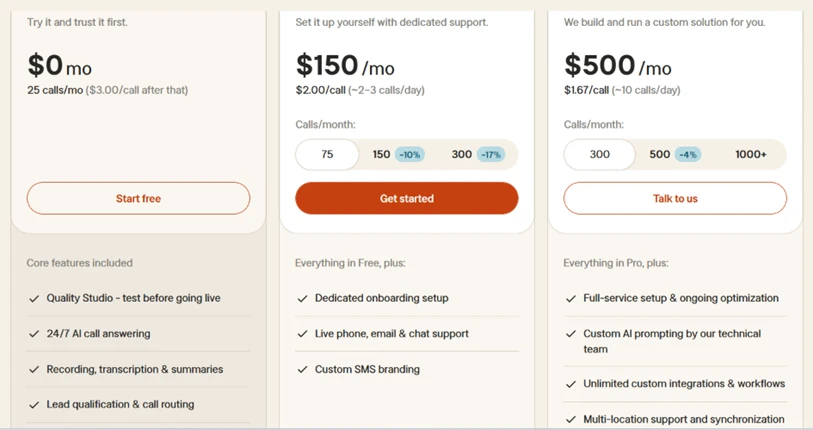
Two pricing structures live under the Smith AI name, and they are easy to mix up. The AI receptionist line runs from $0 for 25 calls up to $500 a month for 300 calls, with a $150 tier for 75 calls in between. Overage drops from $3.00 a call on the free tier to $1.67 on the top tier.
The human receptionist line is a separate product with live agents answering every call, and it costs far more. Starter is $300 a month for 30 calls, and the top published tier reaches $2,100 a month for 300 calls. A middle Basic plan sits at $810 for 90 calls. Overage on these runs between $8.50 and $11.50 per call.
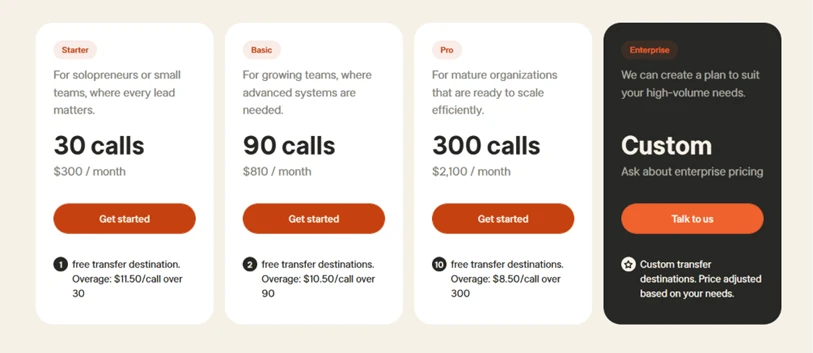
Seeing both side by side explains why Smith AI’s reviews read so differently depending on who wrote them. A solo operator testing the AI tier and a law firm paying for human agents are using products that share a brand name and little else.
| Dimension | Our test | User signal | Verdict | Composite |
|---|---|---|---|---|
| Call Handling Quality Accuracy, tone, script adherence | 9 | 9.2 | Excellent | |
| AI Performance Understanding, routing, adaptability | 7.8 | 7.5 | Good | |
| Ease of Setup Onboarding speed and clarity | 9.1 | 9 | Excellent | |
| Value for Money Perceived fairness of pricing | 8.4 | 8.2 | Good | |
| Reliability and Uptime Coverage consistency and reliability | 9 | 8.8 | Excellent | |
| Customer Support Responsiveness and resolution quality | 8.3 | 8 | Good | |
| Billing and Policies Clarity of terms and flexibility | 7 | 6.5 | Moderate |
Toolscopia uses cookies to keep you signed in, remember your preferences, and understand how our reviews get read. Analytics are anonymous. See our privacy policy for the full detail.



Comments 0
Join the discussion and share your perspective.
Sign in to post a comment and reply to other readers.
No comments yet
Be the first to share your perspective on this tool.