1
Lyrics to full song generation
Turns written lyrics into complete songs, widely praised for capturing tone and emotion.
AI music creation platform that turns written lyrics into full songs with vocals and instrumentation, aimed at songwriters, poets, and non‑musicians who want studio style tracks without hiring producers or booking studio time.
Independent review — we test tools ourselves and analyze public user reviews. How we test.
Songer excels at turning plain lyrics into full songs with expressive vocals, clear instruments, and fast generation in many genres. Most reviewers highlight how easy it is to use, how quickly they finished long held ideas, and how strong support feels. Weak spots include inconsistent results for advanced users, limited control over some arrangement details, and pricing concerns around credits and subscriptions. It suits writers who care more about creative throughput than surgical production control. Best for lyricists, hobbyists, and independent artists who want radio ready demos without heavy technical work.
Songer is an AI music creation platform that turns a plain-language description, a theme, your own lyrics, or even a loose vibe into a finished song. You pick the genre, style, and mood you are after, whether that is pop, rock, or hip-hop, and the system builds the full track for you: instrumentation, vocals, and lyrics all included. The pitch is speed and simplicity, with the site claiming a song can come together in under sixty seconds, so you spend your time shaping ideas rather than wrestling with production software.
What sets it apart is how the workflow protects your wallet and your rights. You can generate and preview up to 100 songs for free, keep spinning up fresh variations until one clicks, and only spend credits when you unlock and download the track you want to keep. Unlocked songs can be exported in multiple formats, and ownership transfers fully to you. That covers commercial use, publishing, and distribution on platforms like Spotify and Apple Music, with no royalties or licensing hurdles attached.
Turns written lyrics into complete songs, widely praised for capturing tone and emotion.
Large genre range lets users experiment across rock, gospel, swing, hip hop, and more.
Choice of male or female vocals praised, though free tier randomness frustrates some.
Previews are free, but unlocking full tracks consumes credits, sometimes seen as expensive.
Reuse request and regenerate flows help iterate without extra tokens, positively highlighted.
Higher tier offers stems for DAW editing, applauded though some stems can be messy.
Max users can view and change lyrics before generation, strongly praised by advanced users.
Supports multiple languages like Spanish, appreciated for broad creative access.
Clear rights to created music give users confidence for streaming and commercial use.
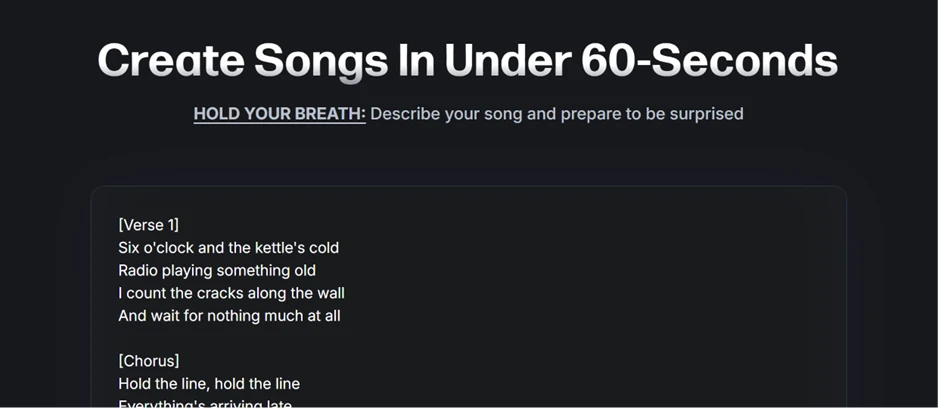
The landing page is one large text box sitting under a headline that promises songs in under 60 seconds. I pasted six sections of lyrics straight into it. No sign-up wall appeared, no product tour, no onboarding sequence. The path from arriving at the site to writing a prompt takes about four seconds.
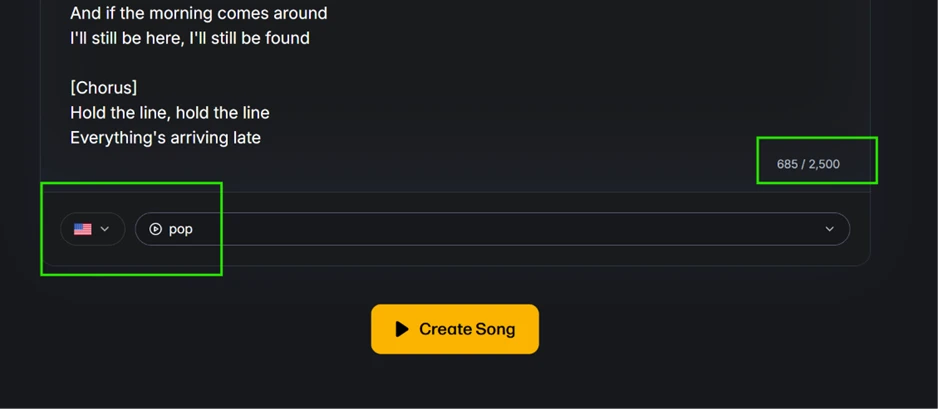
Below the box are the controls that shape the output. A counter tracked my lyrics at 685 characters against a 2,500 character ceiling on the free tier. The genre field accepted "pop" as a tag, and the flag icon beside it sets the language of the vocal.
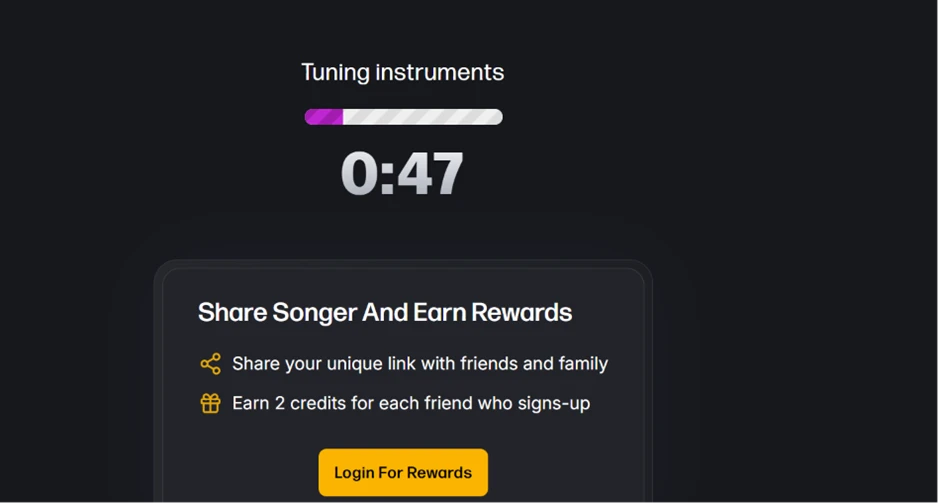
This is where the marketing and the product part ways. Songer advertises songs in under 60 seconds. My generation was still displaying "Tuning instruments" at the 47 second mark, with the progress bar roughly one fifth full. The full run took noticeably longer than the headline number suggests.
The waiting screen also doubles as a promotional surface. A referral panel loaded underneath the timer, offering 2 credits for every friend who signs up, alongside a login prompt.
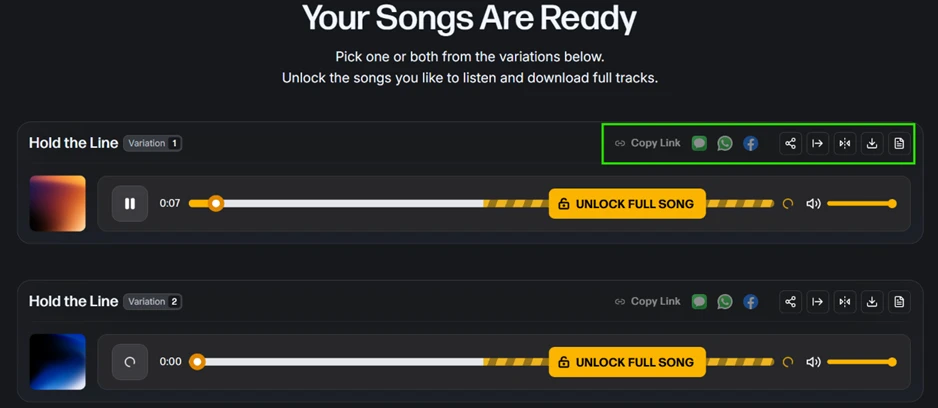
A single prompt produced two complete variations. That was the most pleasant surprise of the session, since a free run on most competing tools returns one track.
Both play as previews only. The player shows a hatched section marking where the locked portion of the track begins, and an UNLOCK FULL SONG button covers the middle of the timeline. Every editing tool sits behind that button. The share icons in the top right are live before unlocking, which produces an odd situation: I could post a track to Facebook or WhatsApp that I was not permitted to download.
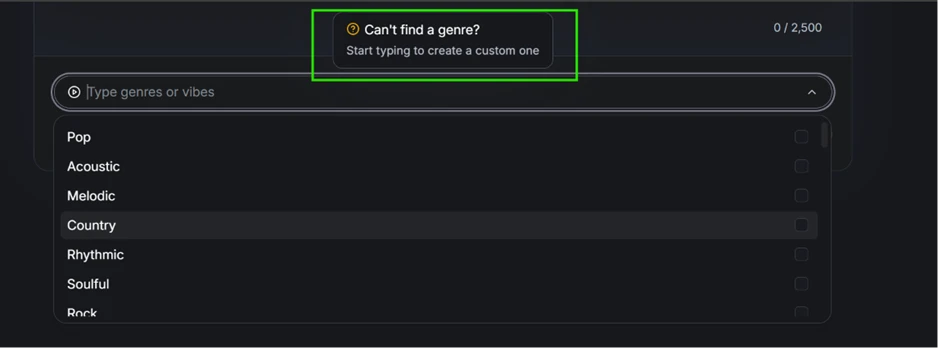
The genre dropdown offers a short preset list covering Pop, Acoustic, Melodic, Country, Rhythmic, Soulful and Rock. A tooltip above it invites you to type your own if nothing fits, which turns a closed menu into an open field.
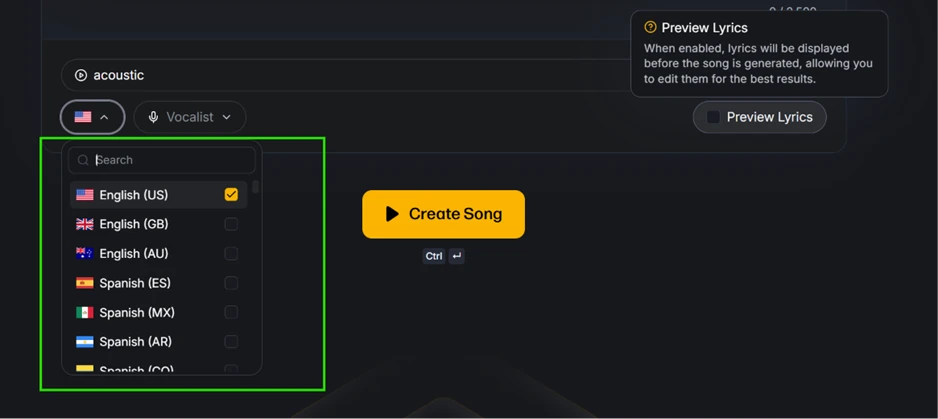
The language selector is deeper than I expected and corrects a complaint that circulates in user reviews about accent control. English is split into three regional entries, one of which is British, and Spanish into four, with the list continuing past the fold. Two further controls sit alongside it: a Vocalist dropdown, and a Preview Lyrics toggle whose tooltip explains that lyrics appear before the song is generated so they can be edited first. Songer documentation lists Preview Lyrics as a premium tool. On my logged-out screen the toggle carried no lock icon.
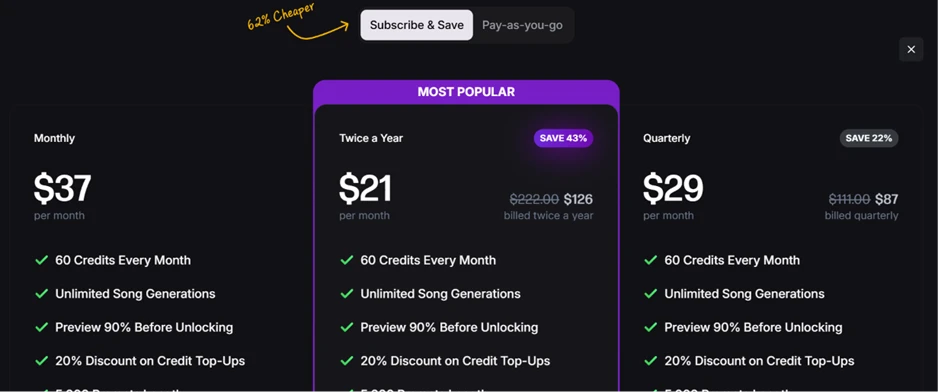
Two payment routes are offered. Subscriptions run at $37 per month, $29 per month billed quarterly at $87, or $21 per month billed twice a year at $126, discounted from $222. Each tier carries the same package: 60 monthly credits, unlimited generations, a 90 percent preview before unlocking, a 20 percent discount on top-ups, and a 5,000 character prompt length against the 2,500 characters I had for free.
The pay-as-you-go tab sells 60 credits for $59, which works out at $0.98 per credit, or 150 credits for $99 at $0.66 per credit. Both packs explicitly list full commercial rights.
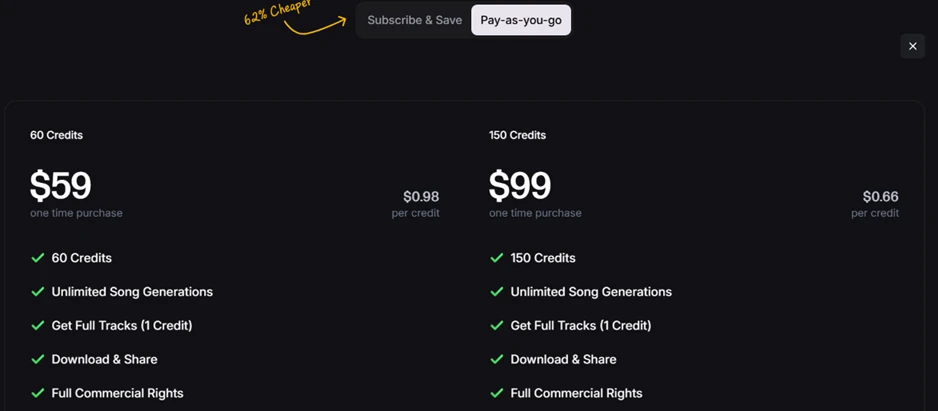
A hand-drawn arrow on both tabs claims subscribing is 62 percent cheaper. Running the numbers: the twice-yearly plan delivers 720 credits across a year for $252, which is $0.35 per credit. Against the $59 pack at $0.98, that is a 64 percent saving, so the claim survives. Against the $99 pack at $0.66 it drops to 47 percent, and the monthly plan at $0.62 per credit sits 37 percent below the same pack. The advertised figure holds only when the cheapest subscription is measured against the most expensive credit pack.
| Dimension | Our test | User signal | Verdict | Composite |
|---|---|---|---|---|
| Output Quality Vocal and instrumental fidelity | 9.2 | 9.4 | Excellent | |
| Ease of Use Learning curve and workflow | 9 | 9.3 | Excellent | |
| Creative Control Control over style and structure | 7.8 | 7.5 | Good | |
| Value for Money Perceived pricing fairness | 8 | 7.6 | Good | |
| Customer Support Helpfulness and speed | 9.1 | 8.8 | Excellent | |
| Reliability Consistency and technical stability | 8.2 | 8 | Good | |
| Advanced Features Stems and pro workflows | 8 | 7.9 | Good |
Toolscopia uses cookies to keep you signed in, remember your preferences, and understand how our reviews get read. Analytics are anonymous. See our privacy policy for the full detail.



Comments 0
Join the discussion and share your perspective.
Sign in to post a comment and reply to other readers.
No comments yet
Be the first to share your perspective on this tool.