1
AI generated background music
Generates simple backing tracks; beginners praise ease, professionals criticize quality and repetition.
AI music generator for creators who need quick background tracks for videos or presentations, but reviews expose serious concerns about billing practices, refunds, and overall reliability that overshadow its convenience for many users.
Independent review — we test tools ourselves and analyze public user reviews. How we test.
SOUNDRAW can quickly generate simple background tracks that some users find easy to use for videos and presentations. However, the overwhelmingly dominant feedback highlights unclear subscription terms, aggressive auto renewal, difficult cancellations, and frequent refund disputes. Many reviewers also criticize audio quality, genre accuracy, and repetitive output, plus occasional technical issues. This service may only suit casual creators with very basic needs who fully understand and monitor the billing terms, and who accept limited musical control.
SOUNDRAW is an AI music generator built for creators who need royalty-free instrumental tracks without hiring a composer or buying stock licenses one by one. Instead of typing a prompt, you set parameters like genre, mood, theme, length and tempo, and the engine returns a batch of original tracks shaped to those choices.
What sets it apart from a stock library is control after generation. Every track opens into a mixer where you adjust energy section by section and toggle individual instruments, so one track can serve several different scenes.
The catalogue spans more than 30 genres, from Hip Hop and Lo-Fi to Orchestra and Phonk, with lengths from 10 seconds to five minutes. The music is trained on compositions from SOUNDRAW’s own producer team, which keeps the output clear of the copyright questions that follow scraped-data tools.
One boundary worth knowing upfront: SOUNDRAW produces instrumentals only. There are no vocals or lyrics, making it a fit for background scoring rather than full songs.
Generates simple backing tracks; beginners praise ease, professionals criticize quality and repetition.
Downloads require payment despite free usage claims, causing frustration over paywall communication.
Discounted annual contracts billed monthly; widely criticized as confusing and predatory at cancellation.
Genre categories and keywords feel limited; some styles, like country, reportedly miss expectations.
Users can edit and create variations; casual users like this, advanced users want more granular control.
Accessible in browser, but several reviewers mention crashes, lag, and an unfinished user experience.
AI chatbot and ticket system exist, but responses are often slow, unclear, or absent.
Marketed for royalty free use, yet multiple users report copyright claims on generated tracks.
SOUNDRAW does not work from a text prompt. There is no box where you describe a song. Instead you pick parameters, so my "prompt" here is a set of selections rather than a sentence.
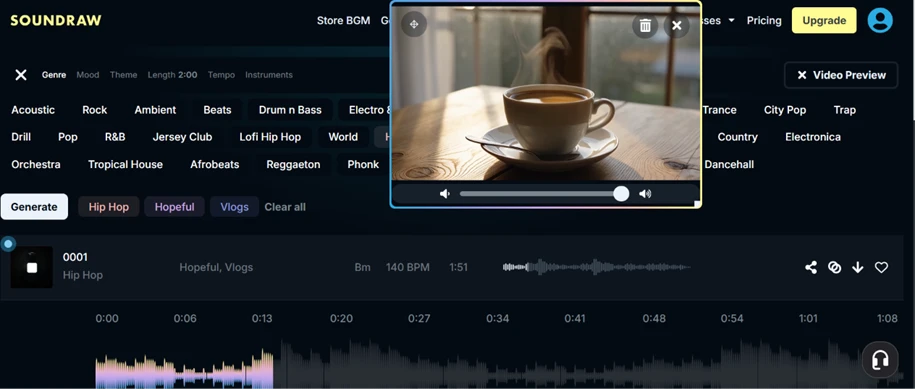
I opened Generate Music and set Length to 2:00, then picked Genre: Hip Hop, Mood: Hopeful, and a Theme of Vlogs. The three chips sitting above the Generate button (Hip Hop, Hopeful, Vlogs) confirmed my choices before I committed to anything.
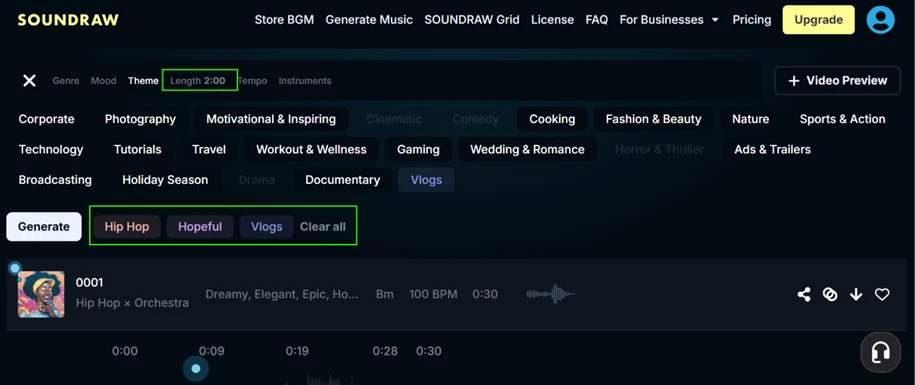
The whole setup took me under a minute. No timeline, no mixing board on this first screen, no music theory. For anyone who has opened a traditional DAW and felt lost, this is the opposite experience.
One click returned a full stack of tracks, not a single result. My list filled with over a dozen variations, every one tagged Hopeful, Vlogs and labelled Hip Hop.
The detail that surprised me sat in the metadata. The tracks were not clones of each other. Track 0001 came back at 150 BPM in B minor, while 0002, 0003, 0004 and 0005 landed at 130 BPM across different keys like A and F#, and 0006 dropped to 100 BPM. So the engine gave me genuine variety in tempo and key from one selection, which matters when you need a few options for different scenes.
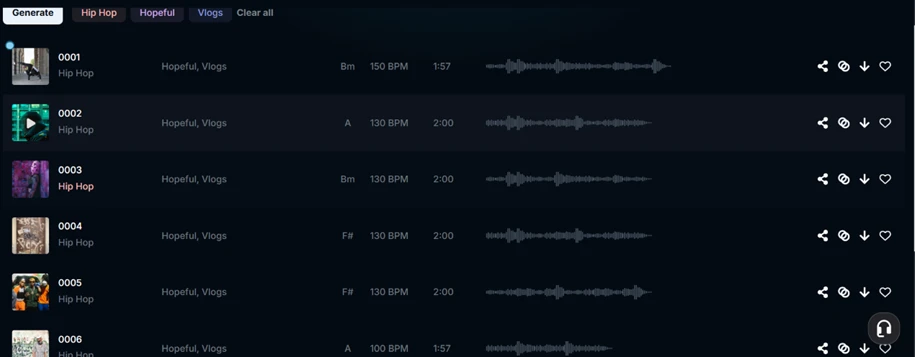
This is where SOUNDRAW earns its keep for volume work. I did not have to re-enter anything to get alternatives.
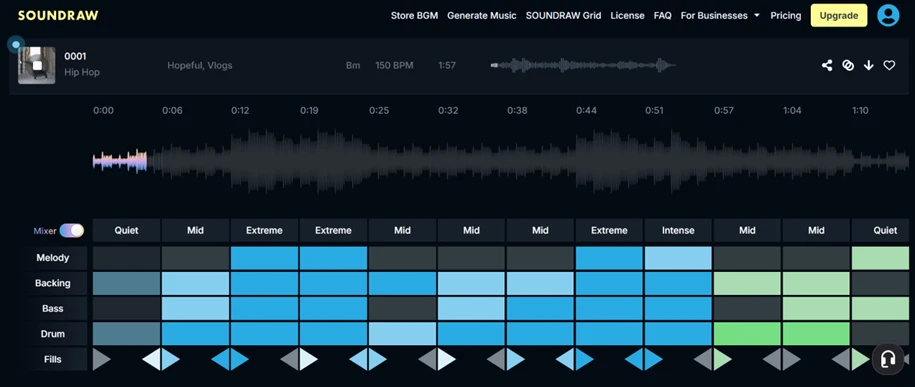
I clicked into track 0001 to see how deep the control went, and this is the part of the tool I rate highest.
The Mixer lays the song out as a grid. Each section across the timeline carries an energy label running from Quiet through Mid to Extreme and Intense, and every instrument row (Melody, Backing, Bass, Drum, Fills) can be switched on or off per section. I could pull the energy down for an intro, push it up for a mid-section, and strip the drums out of a quiet passage without regenerating the track. That level of section-by-section shaping is rare in tools built for non-musicians.
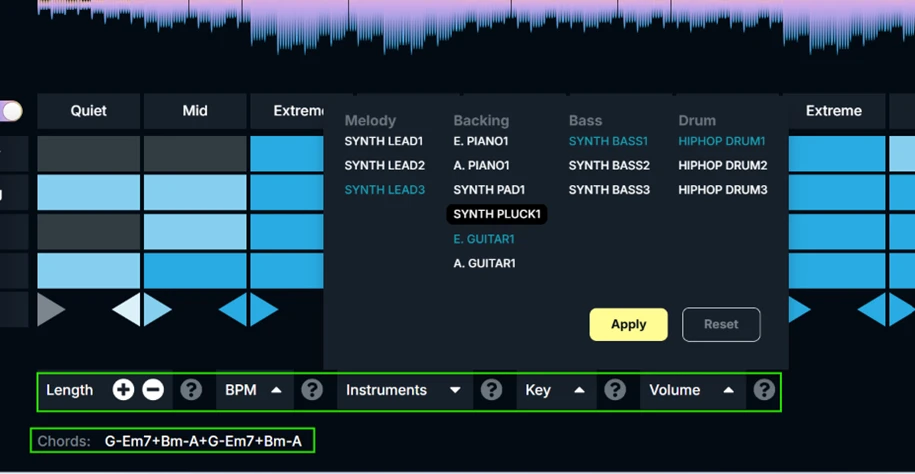
Then I opened the instrument picker and the control went a layer deeper. Each part offers real choices. Melody carries Synth Lead 1 through 3, Backing has options like E. Piano, A. Piano, Synth Pad, Synth Pluck and guitars, and Bass and Drum each hold their own variants. A bottom bar exposed Length, BPM, Key and Volume controls.
The chord progression was printed right there: G-Em7+Bm-A+G-Em7+Bm-A. I did not expect SOUNDRAW to show me the actual chords, and for anyone who wants to re-play or extend the idea elsewhere, that is a useful piece of information to have on screen.
The Video Preview button let me drop a sample clip over my track and hear the two together. I played a coffee-shop style vlog scene while the Hip Hop bed ran underneath at 140 BPM. Judging a background track in isolation is guesswork, so previewing it under moving footage before committing is a practical touch.
Everything above was free. Generating, customizing, swapping instruments, previewing against video. Then I hit Download.
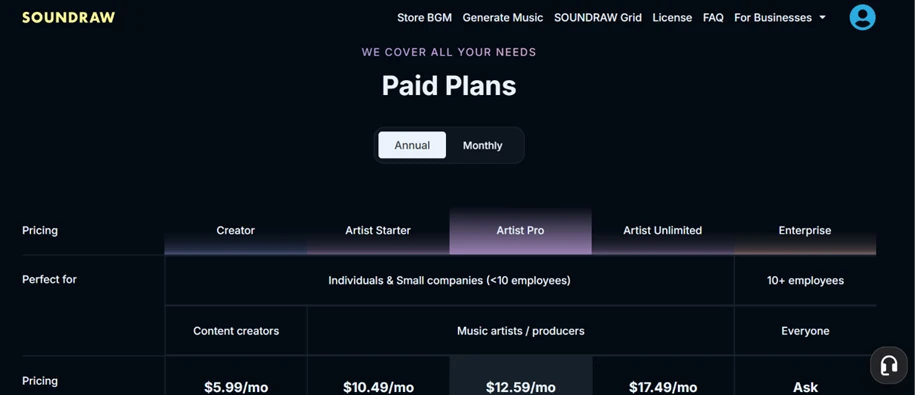
The download action pushed me straight to the Paid Plans page. Nothing exports from the main Generate Music tool without a subscription. The tiers ran Creator at $5.99/mo, Artist Starter at $10.49/mo, Artist Pro at $12.59/mo, Artist Unlimited at $17.49/mo, and Enterprise on request, billed annually. So the free experience is build-and-preview only. The file itself is the paywall.
This is the single biggest catch to flag for anyone expecting a free download from the generator.
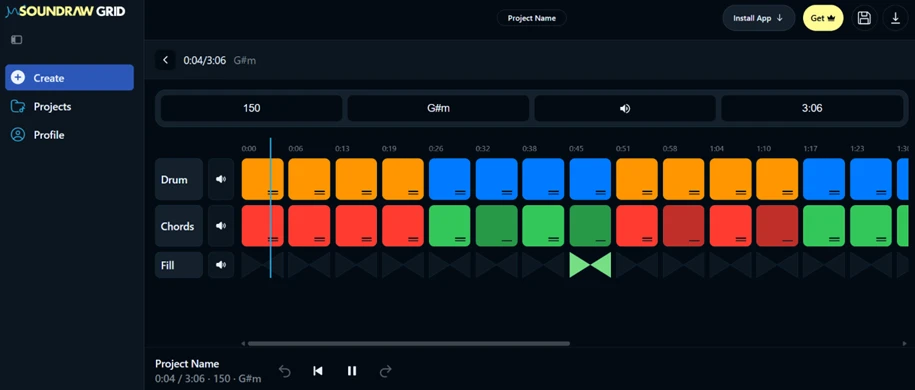
SOUNDRAW Grid is a separate product from the mood-and-genre generator, and it behaves differently. Grid is a beatmaking surface where drums, chords and fills sit on their own colour-coded grid, with tempo and key controls across the top. I built a short Hip-Hop idea here at 150 BPM in G#m.
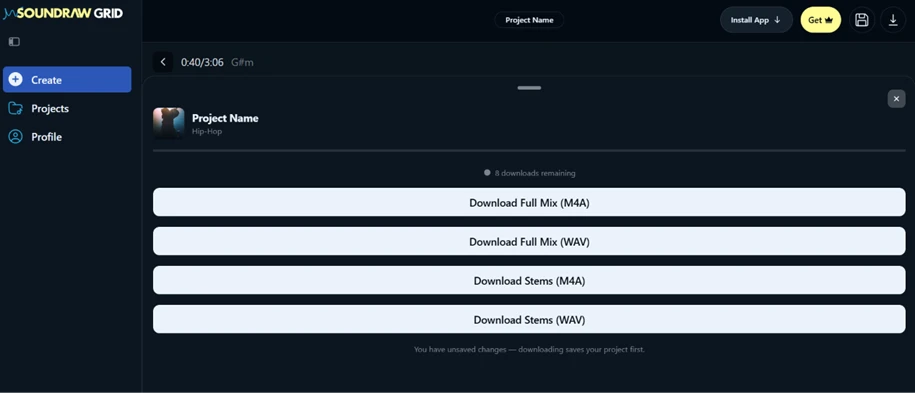
Grid gave me what the main tool would not. Its free tier carries download credits, and my project showed 8 downloads remaining with four export choices ready to use. I could pull a Full Mix as M4A or WAV, or Stems as M4A or WAV, and the Grid credits reset each month.
If free export is the whole point of your visit, Grid is the door, not the main generator. Keeping the two products distinct in your head saves a lot of confusion, because they share a brand and nothing else about the download experience.
| Dimension | Our test | User signal | Verdict | Composite |
|---|---|---|---|---|
| Music Quality Variety, creativity, genre accuracy | 8 | 7 | Good | |
| Ease of Use Learning curve and daily usability | 9 | 8 | Excellent | |
| Billing Transparency Clarity of pricing and renewals | 7 | 6 | Moderate | |
| Reliability and Performance Crashes, lag, and technical stability | 8 | 7 | Good | |
| Customer Support Speed, helpfulness, issue resolution | 7 | 6 | Moderate | |
| Licensing and Rights Copyright safety and usage rights | 9 | 8 | Excellent |
Toolscopia uses cookies to keep you signed in, remember your preferences, and understand how our reviews get read. Analytics are anonymous. See our privacy policy for the full detail.



Comments 0
Join the discussion and share your perspective.
Sign in to post a comment and reply to other readers.
No comments yet
Be the first to share your perspective on this tool.