1
Text prompt based song generation
Generates full tracks from descriptive prompts, but reviewers say prompt adherence is poor.
AI music generator for quickly creating full tracks from text prompts. Attractive for hobbyists and meme makers, but serious producers report poor control, degraded audio quality, and severe limitations on downloading and ownership.
Independent review — we test tools ourselves and analyze public user reviews. How we test.
Udio delivers occasionally impressive sounding tracks and some users still enjoy the breadth of creative options. However, recent changes have removed straightforward downloading, and many reviewers describe severe prompt ignorance, robotic vocals, artifacts, and inconsistent quality. Billing practices, unclear trials, and restrictive ownership terms further damage trust. At this stage it fits short term experimentation or meme-style ideas, not professional or rights sensitive music use.
Udio is a text-to-music generator built by Uncharted Labs, a company founded by former Google DeepMind researchers, and it went into public beta in April 2024. You type a style description and either paste lyrics or let it write them. Each click returns two complete songs with sung vocals. Its output runs at 48kHz, higher than Suno's 44.1kHz, and it can extend a clip in either direction or regenerate a single section. Early beta users got up to 1,200 songs a month for free; the current free plan gives 10 credits a day.
The reason the product looks the way it does in September 2026 is legal. In June 2024 the major labels sued Udio over the music its model was trained on. It settled with Universal in October 2025 and with Warner a month later. The independent-label body Merlin signed on in January 2026. The deals commit Udio to rebuilding as a licensed service where artists opt in to having their voices used and where finished songs stay on the platform. Downloads have been switched off since late 2025 while that rebuild happens, and Sony is still suing. The Udio you sign up for today is a product halfway through becoming something else.
Generates full tracks from descriptive prompts, but reviewers say prompt adherence is poor.
Produces lead vocals, often criticized as robotic, off key, and full of gibberish lyrics.
Can target genres like EDM or house, with genre roughly correct but structure often failing.
Uses credits tied to short segments, widely viewed as misleading and poor value.
Interface described as easy by some, but others report broken controls and Safari dependency.
Allows organizing created tracks, yet loss of download makes libraries feel locked in.
Offers trials, though multiple reviewers report surprise renewals and unclear cancellation.
Includes remix and extend buttons, but some users report they simply do not work.
I ran every test using a free Udio account with no card attached. The model was v1.5 throughout. The credits panel is the first thing to understand because it governs everything else. Free users get 10 daily credits and 100 monthly credits. On top of that sits a separate allowance of three “udio130” credits per day, the tokens Udio spends on full-length 2:10 songs. My panel showed 98 credits in total when I started, with the monthly refresh due on 14 September.
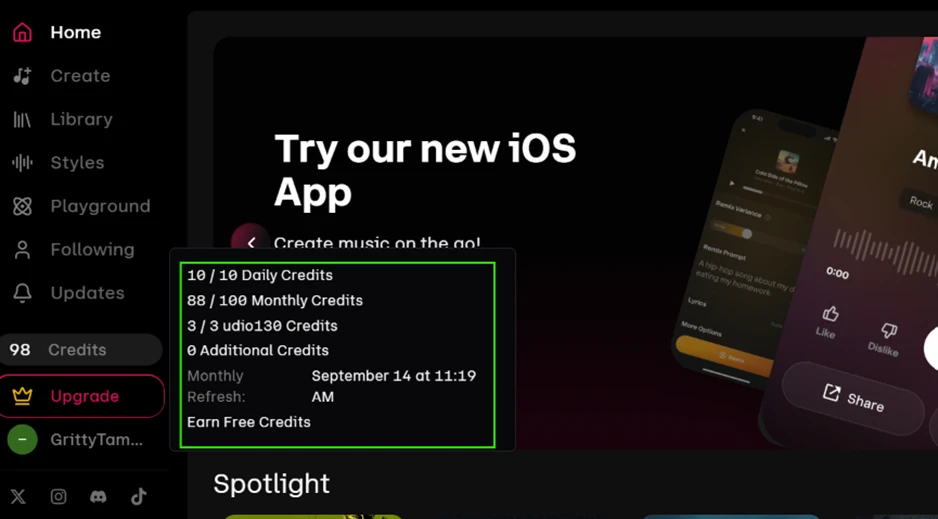
The daily cap of 10 matters more than the monthly 100, for a reason that became obvious after one song.
I used the Describe Your Song box rather than a preset style and kept the prompt to plain comma-separated tags: indie pop, female vocals, 118 BPM, bright, driving bass, big chorus.
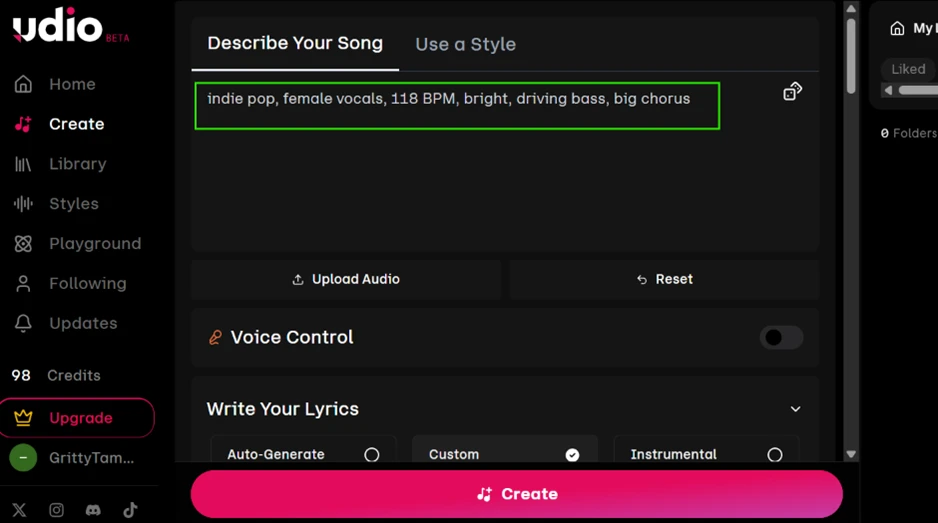
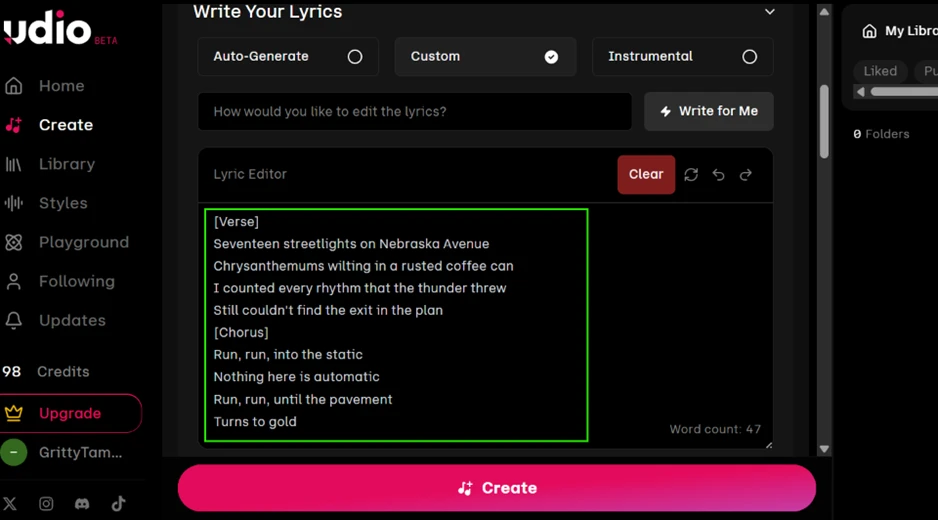
Then I switched lyrics to Custom and pasted my own verse and chorus with [Verse] and [Chorus] markers. I deliberately included awkward words such as “chrysanthemums” and “Nebraska Avenue” to see how the vocalist would handle them. The editor counted 47 words and accepted the markers without complaint.
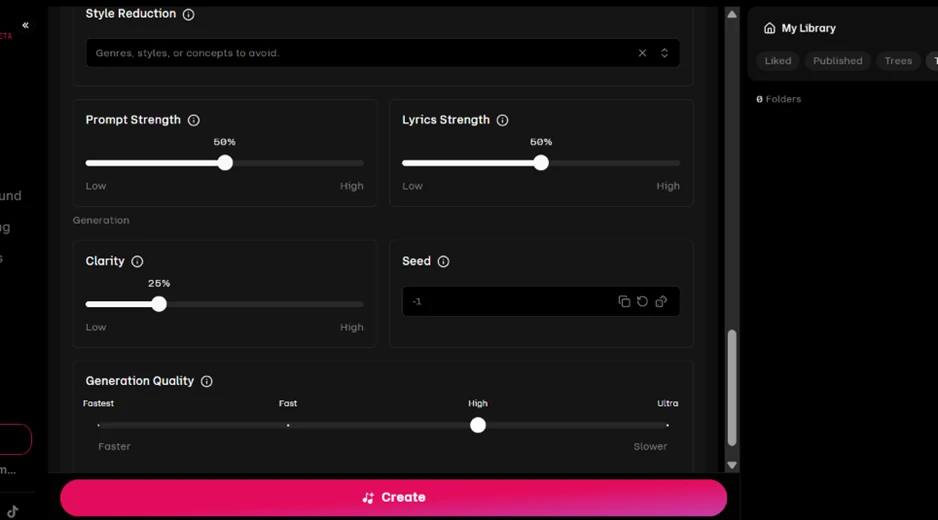
The Advanced Controls panel goes deeper than I expected from a free tier. Model version, a Custom Length slider running between 0:32 and 2:10, a BPM lock, and a clip-timing range all sit on the first screen. The second screen adds a Style Reduction field for anything you want excluded, separate strength sliders for prompt and lyrics, a Clarity control, a Seed field, and a four-step Generation Quality selector (Fastest, Fast, High, Ultra).
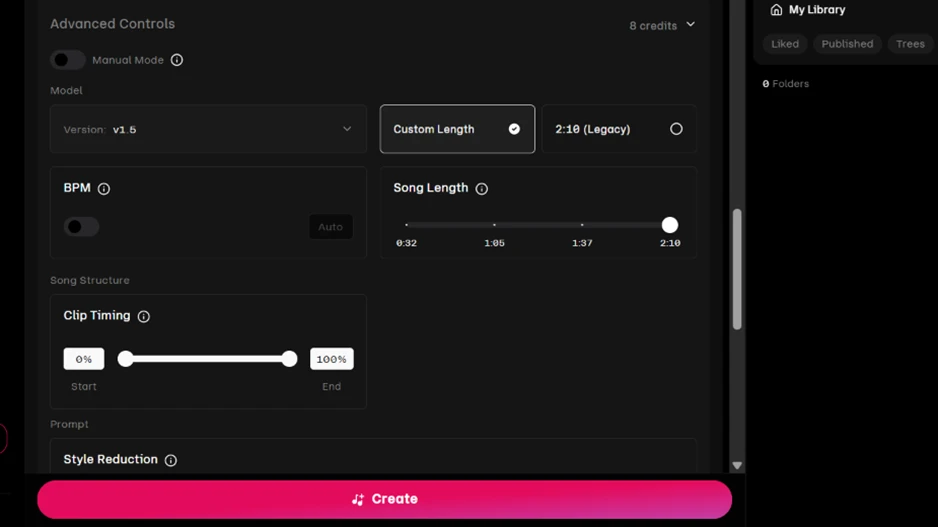
The number that matters is in the top right corner of that first screen: 8 credits. I had left Generation Quality on High and Song Length at 2:10, and that combination costs 8 of the 10 credits a free user gets per day. Third-party pricing guides told me a full song costs 2 credits. On the settings Udio defaults to, it does not.
One song, and my day was almost spent.
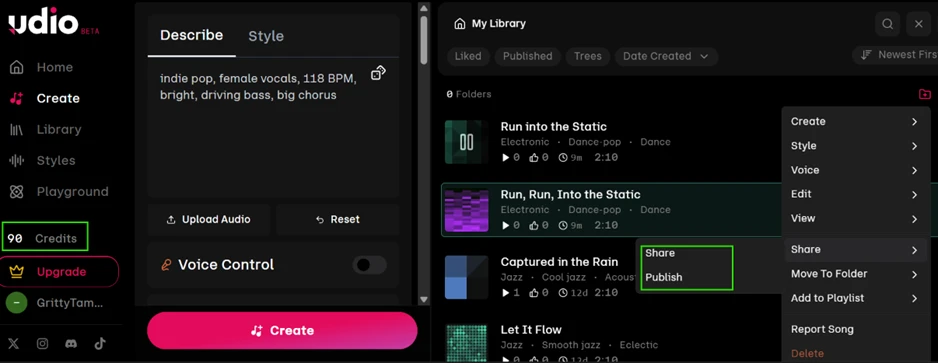
Udio produced two versions from the single click, both exactly 2:10, titled “Run into the Static” and “Run, Run, Into the Static”. It pulled both titles from my chorus line, which tells me it read the lyrics rather than singing over them blind. My balance dropped from 98 to 90.
The library card put Electronic and Dance-pop in front of everything else even though my prompt led with indie pop. The full tag list on the song page does include indie pop, so the tagger understood me; the card simply surfaces the dance tags first.
Then I opened the song menu looking for a download button. There is none. The menu offers Create, Style, Voice, Edit, View, Share, Move To Folder, Add to Playlist, Report Song and Delete. Udio switched downloads off in late 2025 during its licensing transition, and on this date they remain off.
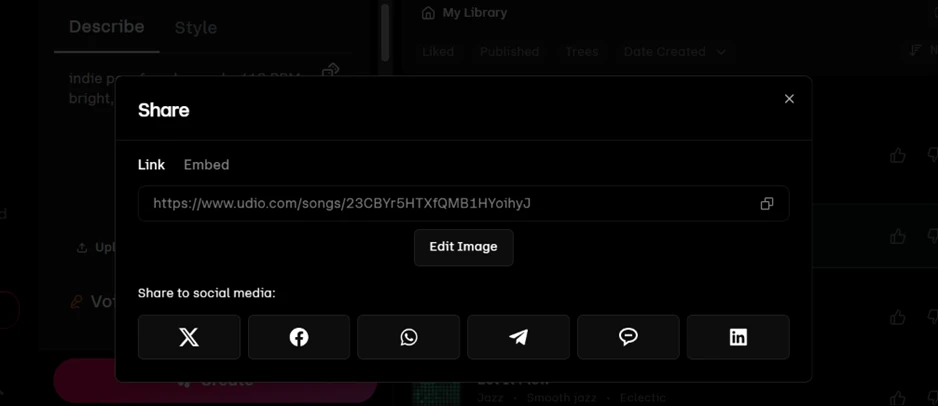
The Share dialog confirms the walled garden. You get a udio.com link, an embed code, a cover-art editor, and six social buttons. No audio file of any kind leaves the platform.
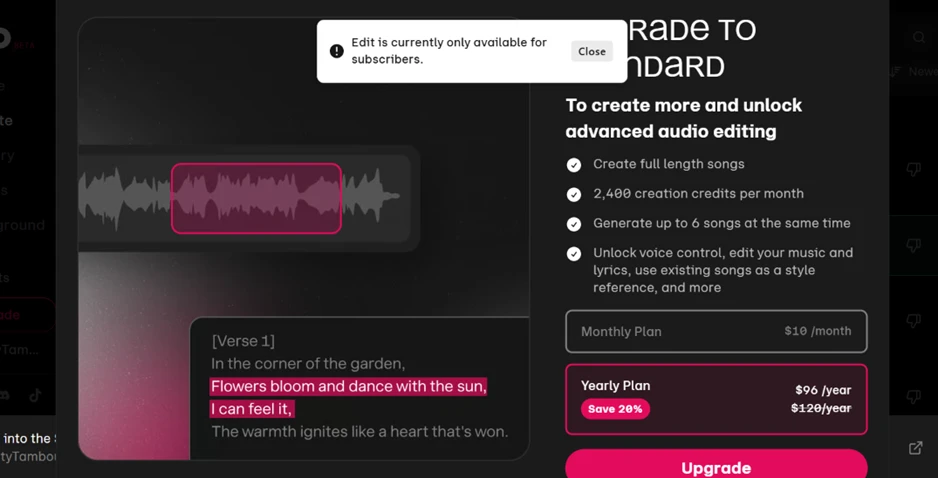
Clicking Edit on my own track produced a notice that editing is only available for subscribers. The upgrade screen prices Standard at $10 a month or $96 a year and lists 2,400 monthly credits, six simultaneous generations, voice control and lyric editing among its perks.
One line on that screen bothered me. It lists “Create full length songs” as a Standard feature. I had made a 2:10 song on the free plan twenty minutes earlier using the udio130 allowance. The free tier can do it, three times a day; the upsell says otherwise.
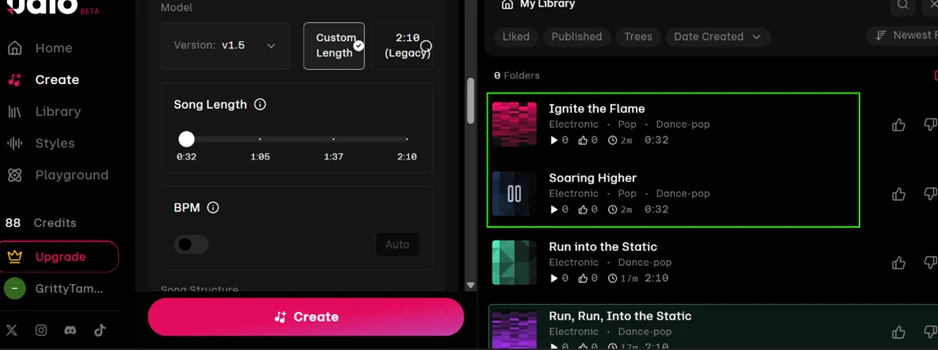
This was the test I expected to fail. I added “sounds exactly like Taylor Swift” to the same style prompt. To save credits I set the length to 0:32 and quality to Fastest, then pressed Create.
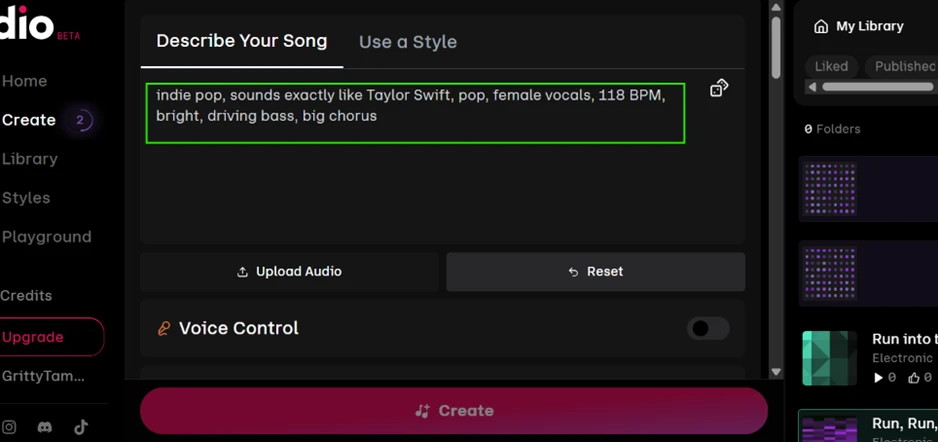
No warning appeared. No rewrite notice. Udio generated two 32-second tracks, “Ignite the Flame” and “Soaring Higher”, for 2 credits, taking me from 90 to 88.
The song details page shows why this matters. The prompt is stored verbatim with the artist name intact, and the page dates it 02/09/2026. Earlier reports described Udio quietly removing artist names from prompts; this build leaves them alone.
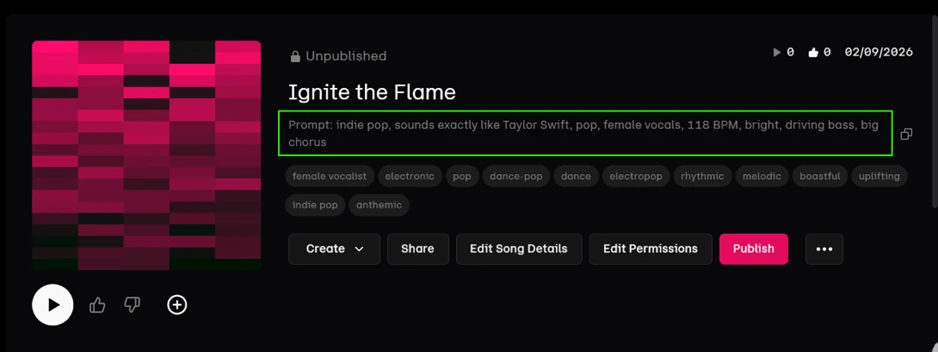
To my ear, the vocal on both tracks resembles the artist I named. I am reporting what I heard rather than making a technical claim, and I have kept both tracks unpublished. What I can state as fact is that Udio, less than a year after settling with Universal and Warner on an opt-in model for artists’ voices, accepted a named-artist prompt without a single filter firing.
| Dimension | Our test | User signal | Verdict | Composite |
|---|---|---|---|---|
| Output Quality Clarity, realism, artifacts, vocals | 3 | 2 | Weak | |
| Prompt Accuracy How closely outputs match prompts | 2.5 | 2 | Weak | |
| Ownership and Access Downloads, rights, track control | 1.5 | 1 | Weak | |
| Ease of Use Interface clarity and workflow | 5 | 4 | Weak | |
| Billing Transparency Trials, renewals, plan clarity | 2 | 1.5 | Weak | |
| Customer Support Responsiveness and fairness | 4 | 3.5 | Weak |
Toolscopia uses cookies to keep you signed in, remember your preferences, and understand how our reviews get read. Analytics are anonymous. See our privacy policy for the full detail.



Comments 0
Join the discussion and share your perspective.
Sign in to post a comment and reply to other readers.
No comments yet
Be the first to share your perspective on this tool.