You have a stack of recordings waiting to become text, or an interview sitting on tomorrow's calendar. You type "Parakeet AI vs TurboScribe" into Google and expect a clean head-to-head between two rivals. Then the results get murky, because the two tools in that search box are not fighting over the same job.
One of them waits quietly while you upload a file and hands back a transcript. The other sits inside your live call and feeds you answers while you are still speaking. Picking the better one starts with knowing which moment you are actually in.
This guide takes that difference first, then walks through how each tool held up in hands-on testing and what it costs, before matching each one to the kind of user it suits. By the last section you will not be asking which tool wins. You will know which one belongs in your week.
Two tools, two separate jobs
Start with a plain description of each, because the names give almost nothing away.
TurboScribe is a transcription service. You feed it an audio or video file, it runs that file through OpenAI's open-source Whisper model on its own servers, and it returns text that is ready to read and edit. Nothing happens live. You record first and upload second. Reading the result is all that is left to do.
Parakeet AI works in the opposite direction. It is a real-time interview assistant. You open it beside a video call on Zoom, Google Meet, Microsoft Teams, or a coding platform like LeetCode. It listens as a question is asked, transcribes it on the fly, and drops a drafted answer onto your screen while you are mid-conversation. The transcript is a by-product here. The help in the moment is the point.
| At a glance | TurboScribe | Parakeet AI |
|---|---|---|
| Core job | Turn recordings into text | Coach you through a live call |
| When it works | After the event, on a saved file | During the event, in real time |
| Main user | Podcasters, researchers, content teams | Job seekers in live interviews |
| What you get | An editable transcript and captions | On-screen answers, plus a saved transcript |
| Engine | OpenAI Whisper | A switchable model (the testing named Gemini and GPT options) |
Hold that split in your head, because it explains nearly every other difference below, from the price tag to the accuracy scores.
Where the confusion comes from
So why do people line these two up at all?
Both sit under the same label: AI transcription. Both turn speech into text. Tool directories and search engines file them on the same shelf, and once two names share a shelf, shoppers assume they compete.
There is a second tangle worth cutting through. Parakeet is also the name of a well-known open-source speech model from NVIDIA that powers many on-device transcription apps. That NVIDIA Parakeet is a different thing from Parakeet AI, the interview assistant at parakeet-ai.com, which is the product this comparison is about. If you landed here hunting for a raw engine to self-host, the interview copilot is not it, and the next two sections will make that plain.
With the setup cleared up, it is time to meet each tool properly, starting with the one most people picture when they hear the word transcription.
TurboScribe: the recording workhorse
TurboScribe keeps its promise narrow and keeps it well. Upload a file, choose how carefully you want it processed, and wait a couple of minutes.
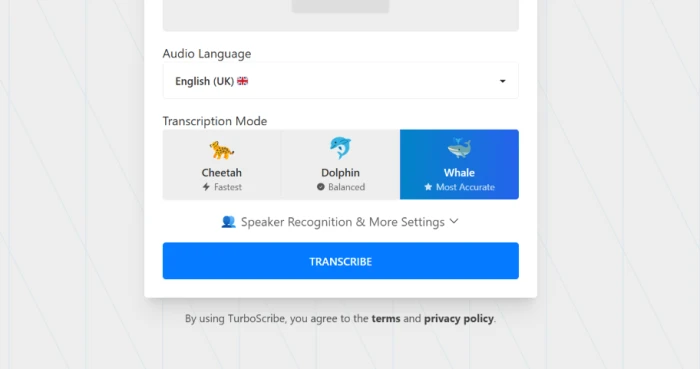
That "how carefully" choice is one of its nicer touches. The tool offers three processing modes. Cheetah is the fastest pass, for when speed beats polish. Dolphin balances speed against quality. Whale is the slow, careful option for audio you cannot afford to get wrong.
Once a file is done, you get a timestamped transcript you can click through and edit, with exports to PDF, DOCX, TXT, or SRT. Paid users can switch on speaker labels, and run translation or a ChatGPT-style summary over the finished text. For video people, the SRT output drops straight into a captioning workflow.
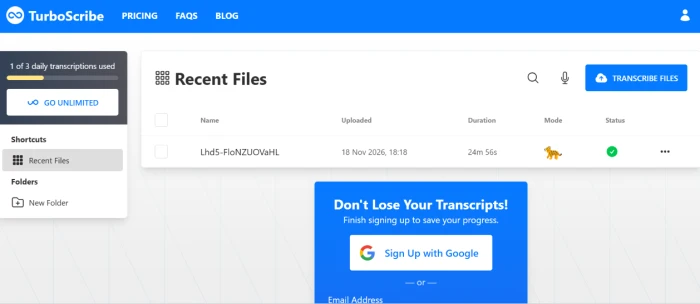
Testing is where the honest picture shows up. On a clean, single-speaker recording, an 18-minute lecture, the output held up well against the source audio and finished in roughly two minutes. On a noisy 47-minute file, the free plan capped processing at the 30-minute mark and the transcript began looping repeated lines and leaving gaps where the speech got muddy.
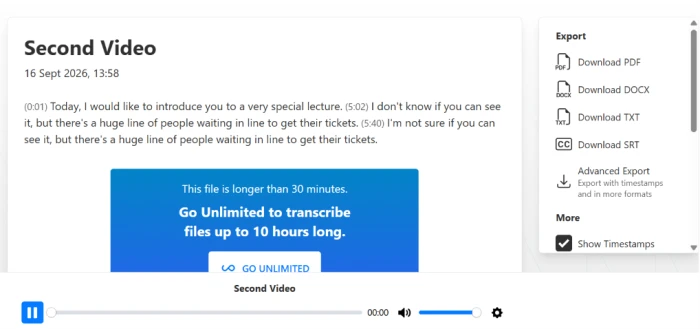
The lesson is simple. TurboScribe rewards clean input and struggles with messy rooms, which holds for every Whisper-based tool, not a flaw unique to this one. Feed it a decent microphone and it rarely lets you down. As we will see when pricing comes up, that free-plan cap is one of the few hard walls you hit.
Parakeet AI: the live interview copilot
Parakeet AI is built for a tenser moment. You are on an interview, a question lands, and you have a few seconds to sound competent. The tool transcribes the question as it is spoken and drops a drafted answer onto your screen, laid out as short bullets you can glance at and put into your own words.
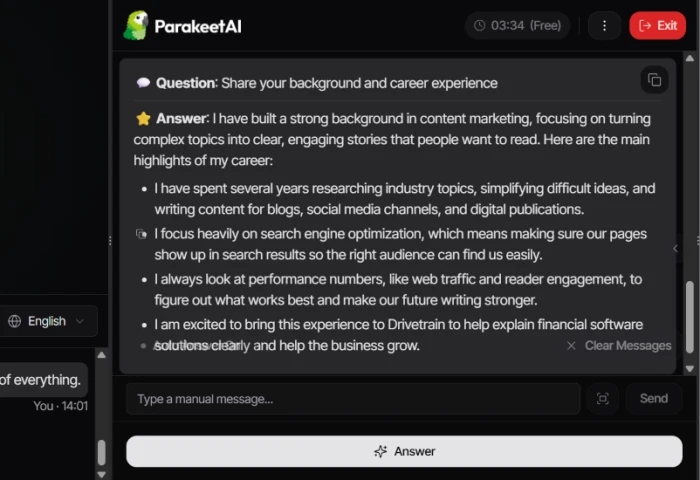
Around that core sit several extras. A mock interview mode lets you type in a company and a job description, then rehearse against a large question bank. The test account listed 4,922 practice questions. You can upload your CV so the answers reflect your real background rather than guesswork. You can adjust the length and tone of each answer mid-call, and pick which underlying model runs. The call language can even switch on the fly without breaking the session, and an Auto Answer mode will respond to each question hands-free.
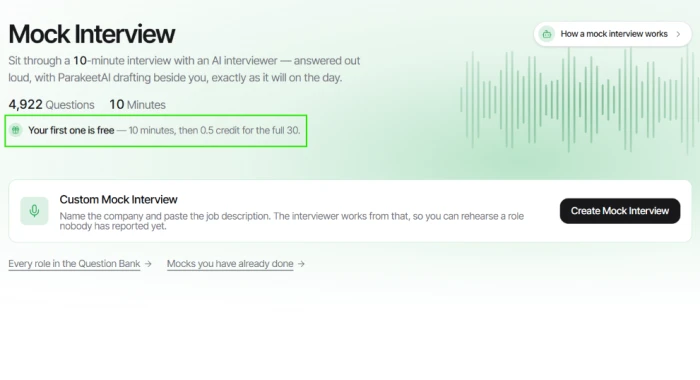
In testing, the live transcription itself scored well. Questions and answers were captured accurately and timestamped, ready to download afterward through a post-call notes view. The answers read as fluent and on topic.
The catch arrived when no CV was attached. Working from a job description alone, the drafts turned generic, the kind of safe filler any candidate could recite. Response times wobbled too, snappy in some sessions and laggy in others. And reading answers off a second screen carries its own tell: your eyes drift, and testers flagged that as a real detection risk. That last point feeds straight into the accuracy question we turn to next.
Accuracy, measured honestly
Accuracy means two different things across these tools, which is exactly why a single score would mislead you.
For TurboScribe, accuracy is about how faithfully the transcript matches the recording. On clear audio it is strong, with both user reports and testing pointing to reliable output even through accents or low volume. On overlapping speakers or background noise it slips, the looping and gaps noted earlier.
For Parakeet AI there are two accuracies to track at once. The transcription of the live call rated high in testing, close to TurboScribe on clean speech. The answer quality is the softer spot: good with context from your CV, generic without it, and occasionally off-topic when a question gets unusual.
| What you are measuring | TurboScribe | Parakeet AI |
|---|---|---|
| Transcript faithfulness | Strong on clean audio, weaker on noisy | Strong on the live call |
| Background noise | Struggles once it gets loud | Depends on your mic and connection |
| Answer or summary quality | Summary tool is basic | Good with a CV loaded, generic without |
| Speaker labelling | Available, but inconsistent | Built around one live conversation |
Neither tool is more accurate in the abstract. TurboScribe is more accurate at the job it actually does. Parakeet AI is accurate enough at transcription while doing a job TurboScribe never attempts. Cost usually settles arguments like this, so look at what each one asks you to pay.
Pricing: two models that barely resemble each other
The money works as differently as the tools.
TurboScribe sticks to two tiers:
• Free: 3 transcripts a day, 30 minutes per file, one upload at a time, with a small promotional line added to any exported file.
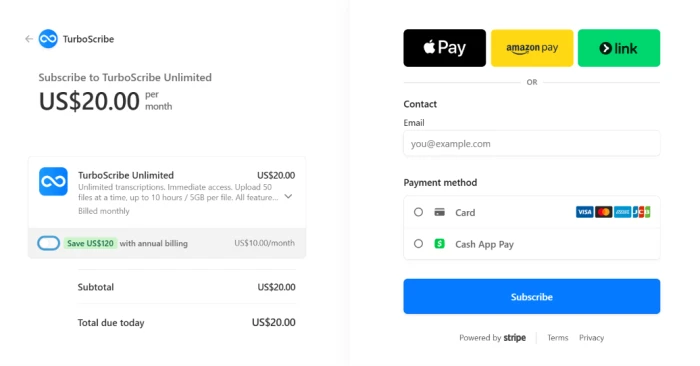
• Unlimited: 10 USD a month billed yearly (120 USD a year), or 20 USD paid month to month. That lifts files to 10 hours or 5 GB, allows 50-file batches, and removes the watermark.
That is the whole menu. No per-minute meter, no seat counting on the paid plan. For anyone processing audio often, a flat 10 USD a month undercuts the per-hour pricing most rivals run.
Parakeet AI runs on credits instead, and its prices shift more often, so treat the figures below as the shape rather than the final word and check the site before buying. A live session spends credits by time, around half a credit per 30 minutes. You can buy a small credit pack for a single interview, or move to a subscription when you are deep in a job hunt. A one-off lifetime option also surfaces at checkout for heavy users. Credits do not expire, which softens the sting of buying ahead.
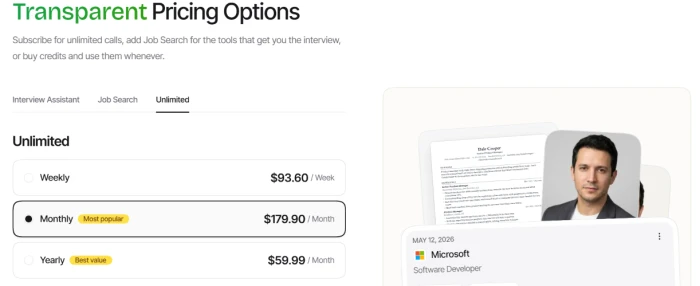
Checked in late 2026, Parakeet credit packs have started near 11.80 to 38 USD, while its unlimited subscriptions have run well past 179 USD a month. For one interview that is cheap insurance. For a three-month search it climbs quickly.
| Cost shape | TurboScribe | Parakeet AI |
|---|---|---|
| Pricing model | Flat subscription | Credits, subscriptions, plus a lifetime option |
| Free option | 3 files a day, 30 min each | Short free trial sessions of 10 minutes |
| Entry paid price | 10 USD a month billed yearly | Credit pack from 11.80 - 38 USD |
| Best value for | Frequent, ongoing transcription | One or two high-stakes interviews |
Put plainly, TurboScribe is a predictable monthly bill for people who transcribe regularly. Parakeet AI is a short-term purchase for a stressful few weeks. Price is not the only fine print, though, and a handful of practical details decide whether either tool fits your situation at all.
The details that trip people up
Language coverage comes first. TurboScribe transcribes in roughly 98 languages and translates across 134 or more, though users have flagged weak spots, with Punjabi output and script selection among the complaints. Parakeet AI supports dozens of languages too and lets you swap mid-call, which is unusual and handy for a multilingual interview.
Privacy is the second detail, and it cuts against TurboScribe for sensitive work. Everything runs in the cloud on its servers, with no offline or on-device mode. For a public podcast that is a non-issue. For a confidential client recording, it deserves a pause. Parakeet AI is cloud-based as well, with a twist of its own: the entire product leans on not being noticed during a call, and that is the exact thing testers found hardest to guarantee.
Then there is support and trust, where both tools show scars. TurboScribe's customer support rated low in review testing, and its public Trustpilot score sits around 2.6 out of 5, with recurring complaints about billing and refunds. Parakeet AI's weakest marks were reliability and mobile performance during timed assessments. Check your bank statement after signing up for either one, and keep the cancellation steps handy.
Which carries the question back to where it began.
So which is better? Pick by the moment you are in
Better depends on the moment, exactly as promised at the top.
Reach for TurboScribe when you already have recordings to process. Podcast episodes, lecture captures, research interviews on tape, video that needs captions: this is its territory, and at 10 USD a month for unlimited clean-audio transcription, little else matches the value. Give it good audio and it will hold up.
Reach for Parakeet AI when the event has not happened yet and you want help getting through it live. An interview tomorrow morning, a weekend mock run to steady your nerves: that is what it was built for. Load your CV so the answers carry your real background, and treat the on-screen drafts as a safety net rather than a script to read word for word.
If you came here convinced you had to choose one, the truer answer is that most people never do. These are tools for two different days. The transcription workhorse earns a permanent slot once you work with audio for a living. The interview copilot earns a few intense weeks of your attention, then steps aside when the job search ends. Working out which day you are living in right now is the entire decision.
Comments 0
Join the discussion and share your perspective.
Sign in to post a comment and reply to other readers.
No comments yet
Be the first to share your perspective on this article.