1
Large AI model repository
Extensive collection of checkpoints and LoRAs, frequently praised for variety but criticized for uneven quality.
Model sharing and image generation site for AI artists and hobbyists, with many community models and NSFW content, but aggressive monetization, bans, and moderation controversies dominate recent user experiences.
Independent review — we test tools ourselves and analyze public user reviews. How we test.
Civitai offers a large catalog of AI models, LoRAs, and workflows that some creators find helpful, especially when exploring AI art for free. However, reviews consistently highlight abrupt monetization changes, bidding for stronger models, and image generation that lags behind alternatives. Far more serious are recurring reports of sudden bans after payment, poor or absent support, inconsistent NSFW enforcement, and a hostile moderation and community culture. Given the volume and severity of negative experiences, this platform currently suits only highly cautious, experimental users who are not relying on it for income or critical work.
Civitai is where the open-weight image generation community keeps its files. Checkpoints, LoRAs, and other model types get uploaded by the people who trained them, and roughly five million monthly users pull them back down. The files matter less than what travels alongside them. Every upload arrives with example images carrying full generation metadata, so you can read the prompt, sampler, step count, and seed that produced a result before committing to a 6GB download. No other host does this at scale.
The site has since grown past hosting. You can generate images and video in the browser or train a LoRA on Civitai's own servers with no local GPU, paying for either with Buzz, an internal currency you earn through daily activity or buy outright. In May 2025 Visa and Mastercard cut off card payments over the platform's content problems. The response, launched in April 2026, was two front doors: civitai.com locked to PG content with card processing intact, and civitai.red carrying everything else. Same account and same model database behind both.
Extensive collection of checkpoints and LoRAs, frequently praised for variety but criticized for uneven quality.
Comment sections enable discussion and help, appreciated by some but linked to harassment in several reviews.
Significant NSFW catalog, with complaints about hypocrisy, partial wipes, and unclear enforcement boundaries.
Image generation now costs site currency, criticized by prior free users who disliked the paywall change.
Bidding required for stronger models, viewed negatively as another monetization layer by neutral and negative reviewers.
Site customizability and ComfyUI workflows receive positive mentions from users building specific AI art pipelines.
Downvotes and visibility for model owners create accountability, but reports describe retaliation and victim blaming.
Policy enforcement described as opaque, with reports of instant bans, censorship, and inconsistent standards.
The create panel hides nothing. Aspect ratio presets print their pixel dimensions on the button face, so the 1:1 option reads as 1024x1024 instead of a bare label you have to decode. Output format sits next to a quality toggle. Opening the Advanced section brings up a CFG Scale slider with numeric entry alongside Steps, plus a Seed field that switches between Random and a value you type yourself. Anyone arriving from a local Automatic1111 or ComfyUI install will recognise every control in roughly the position they expect it.
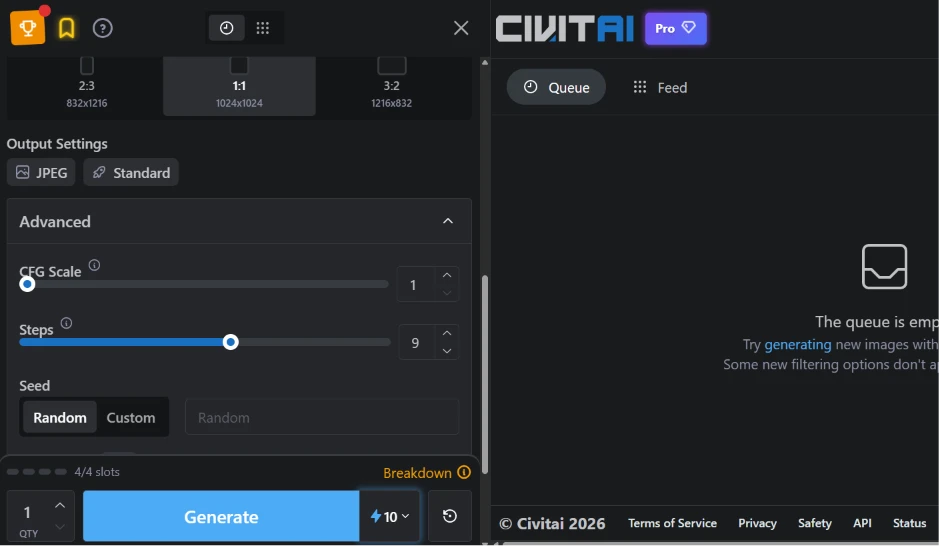
The price sits on the button. Ten Buzz for one 1024x1024 image, visible before you commit.
That one decision does more for user trust than any amount of documentation. The slot counter beside it works the same way, showing 4/4 capacity with a Breakdown link rather than making you discover your limit by hitting it.
The defaults reward a closer read. CFG Scale at 1 and Steps at 9 look broken by SD1.5 standards, but the selected checkpoint is Z Image Turbo, a distilled architecture that converges in single-digit steps. Civitai tunes these per model instead of shipping one global default, which quietly saves new users from a first result that looks like noise.
The prompt I ran:
(masterpiece, best quality, ultra detailed, photorealistic, 8k, RAW photo), beautiful young woman, detailed eyes, natural skin texture, soft smile, cinematic lighting, golden hour, shallow depth of field, sharp focus, highly detailed face, realistic hair, HDR, DSLR, bokeh, volumetric lighting

The result holds up. Skin texture avoids the plastic sheen that dogged earlier SDXL merges, and the depth-of-field falloff reads as optical rather than painted on. Hair renders without the melted clumping that still shows up in plenty of community checkpoints. Nine steps and ten Buzz.
The prompt itself says something about the platform. Tokens like "masterpiece" and "RAW photo" are holdovers from SD1.5-era prompt engineering and carry close to zero weight on a distilled turbo model. They survive because Civitai propagates them. Every model page ships its example images with full generation metadata attached, and every user who copies that metadata forward carries the dead tokens with it. The metadata feature is the single best thing on the site and also its main vector for cargo-cult prompting.
A finished image opens into twelve follow-on actions in one dropdown.
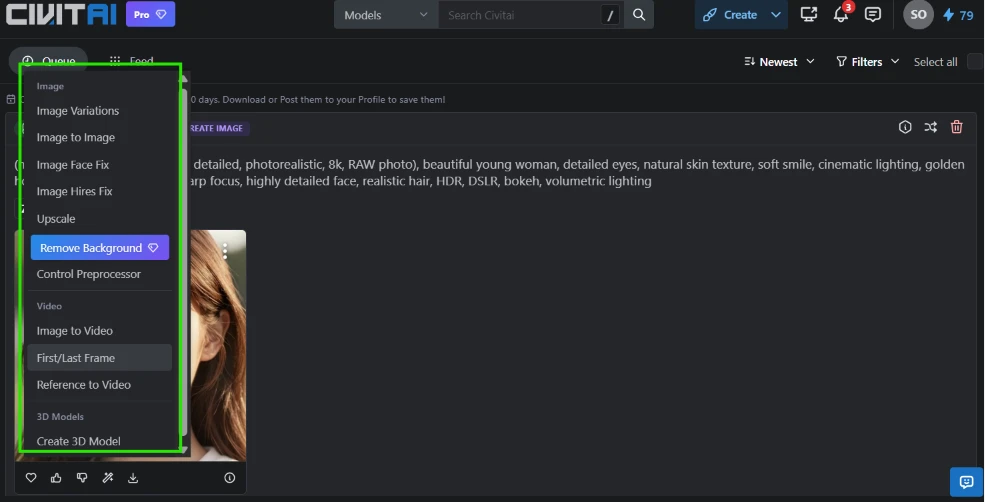
The image group covers variations, img2img, a dedicated face fix, hires fix, upscaling, background removal, and a ControlNet preprocessor. Below it sits a video group whose entry points include first/last frame interpolation and reference-to-video conditioning. A 3D model option closes the list. Hosted competitors typically give you upscale and variations, then stop.
One detail undercuts it. Remove Background carries a Pro badge while sitting in the same list as the free actions, with nothing to indicate what it costs until you click.
The trainer is what keeps people on the platform who could otherwise run everything locally.
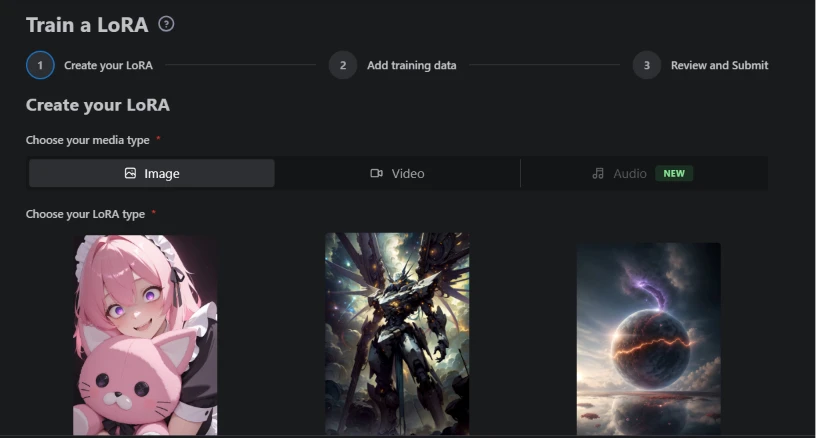
It opens as a three-stage wizard. Media type comes first, and the options now reach past images into video and audio. Preset cards below narrow the LoRA type before you upload anything. For someone without a 24GB card, this is the gap between reading about LoRA training and actually doing it.
No cost estimate appears at stage one. You get through media type and LoRA type and upload a dataset before the platform tells you what the run will charge, which is the same pattern as the background removal button.
Video is where the economics stop making sense.
I loaded the same prompt into text-to-video with Kling Video selected, then stepped through the version buttons and watched the price on the Generate button change.
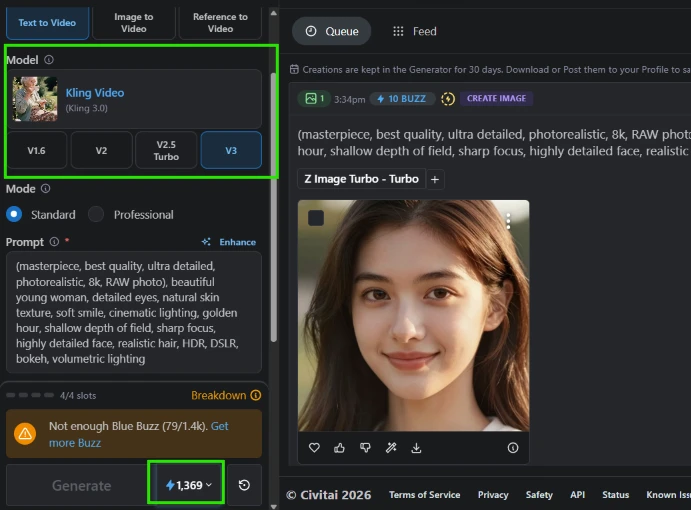
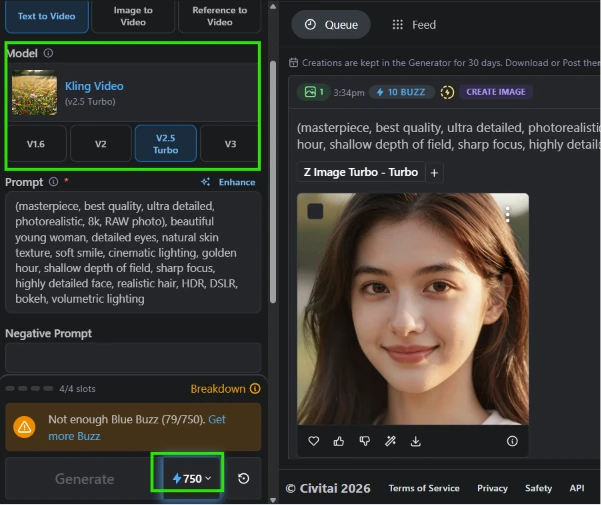
V3 costs 1,369 Buzz. V2.5 Turbo costs 750. Nothing in the interface accounts for the extra 619, and the figure only surfaces after you select a version, so discovering the spread means clicking all four options and reading the button each time. There is no comparison view, no duration estimate attached to the price, and no note explaining what the newer model does differently.
Scale that against still images. A single V3 clip costs the equivalent of roughly 137 generations at 10 Buzz each. Against my balance the warning read "Not enough Blue Buzz (79/1.4k)."
I searched "food." The header reported 884 results.
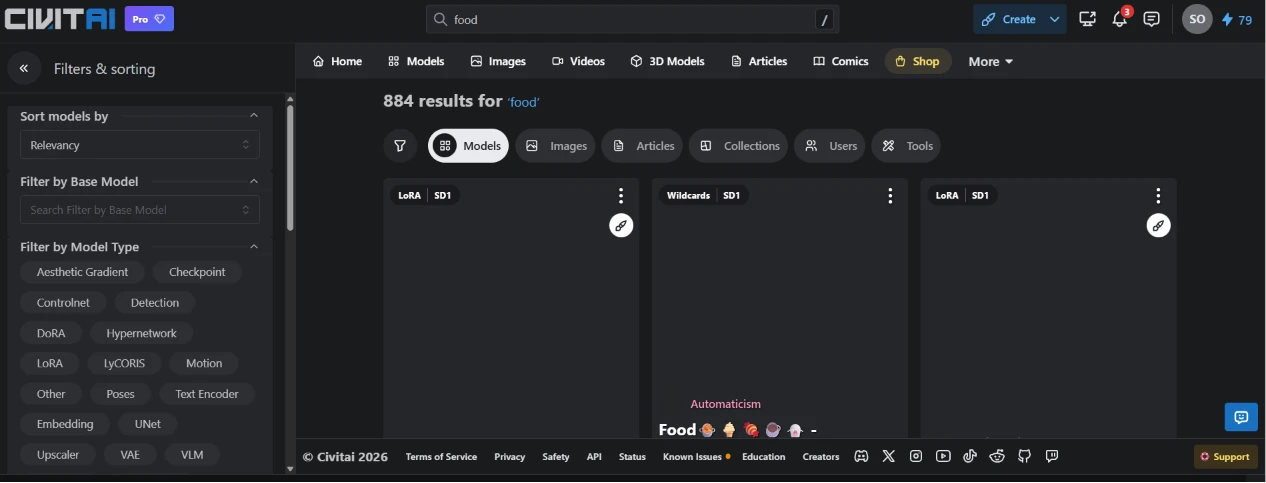
Six minutes later the grid still looked like this. Model type badges had loaded, so the query itself resolved, but not one preview thumbnail had appeared. The sidebar meanwhile offers a base model filter alongside seventeen model type chips covering everything down to VLM, DoRA, and Aesthetic Gradient.
The filtering apparatus is more thorough than anything a competitor ships. It was filtering a grid that never arrived.
Civitai is at least open about this. The footer carries a Known Issues link with its status dot lit, which is more candour than most platforms offer and also a signal that this is not a one-off.
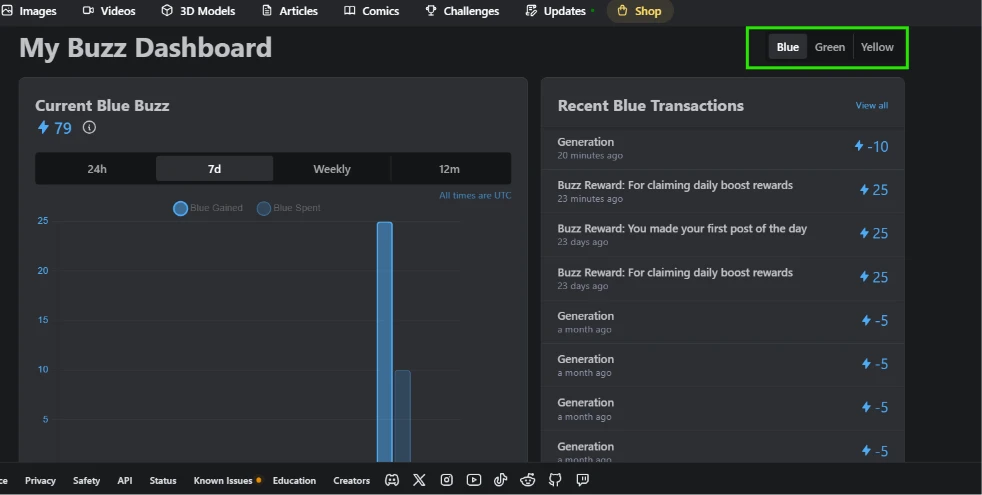
The dashboard splits across three tabs, one per currency. Working out what you can afford means cycling through all of them rather than reading a single number, and the currencies are not interchangeable.
The ledger is the useful part. Rewards land at 25 Buzz apiece, one for claiming the daily boost and one for making the first post of the day. Call it 50 a day for consistent engagement.
At that rate, funding one Kling V3 clip through free earning alone takes 27 days. Twenty-seven days of daily activity for a single video.
The history also shows generations charged at 5 Buzz a month ago against 10 Buzz twenty minutes before I took the screenshot. Model selection explains part of that spread. The practical consequence is that no flat per-image rate exists, so the Generate button is worth reading every time rather than once.
The free tier works for images and nothing above them. A 79 Buzz balance covers seven generations, which is enough to test a checkpoint before downloading it, and downloading stays free. Every capability past that line sits behind a currency you accumulate at 50 a day or buy outright.
| Dimension | Our test | User signal | Verdict | Composite |
|---|---|---|---|---|
| Model Variety Breadth of models and styles | 9.5 | 9.5 | Excellent | |
| Image Quality Realism and prompt fidelity | 9 | 8.5 | Excellent | |
| Fairness of Pricing Perceived value and stability | 4.5 | 3.5 | Weak | |
| Creator Tools LoRA training, video pipeline, post-generation actions | 9.5 | 8.5 | Excellent | |
| Moderation and Community Conduct, governance, harassment handling | 5.5 | 4 | Weak | |
| Customer Support Responsiveness and issue resolution | 4 | 3 | Weak | |
| Trust and Safety Security and ethical standards | 4 | 2.5 | Weak |
Toolscopia uses cookies to keep you signed in, remember your preferences, and understand how our reviews get read. Analytics are anonymous. See our privacy policy for the full detail.



Comments 0
Join the discussion and share your perspective.
Sign in to post a comment and reply to other readers.
No comments yet
Be the first to share your perspective on this tool.