1
AI image generation
Praised for image quality and consistency, though a few users report prompts not being followed.
AI image and video generation platform aimed at creatives and professionals who care about strong output quality, generous token systems, and unusually responsive human support, but must navigate complex billing, credits, and some reliability and policy quirks.
Independent review — we test tools ourselves and analyze public user reviews. How we test.
Customer support is the standout strength here, with countless reports of fast, empathetic, often policy-bending resolutions across billing, access, and technical issues. Core image and video generation quality is rated highly by most long term users. However, several reviews flag confusing pricing and credit rules, default options that burn credits faster than expected, and occasional glitches or stricter safety blocks. Best suited to creative professionals and serious hobbyists who value responsive human support and strong visual output, and who are willing to learn the billing and token system carefully.
Leonardo AI is a generative AI platform for producing images, video, and design assets from text prompts, and it has taken a very different path from most image generators. The company was founded in December 2022 in Sydney, Australia, with an original focus on solving visual asset production bottlenecks for game developers, and it was acquired by Canva in 2024. Rather than functioning as a one-shot art generator, Leonardo positions itself as a full creative workshop. It runs a mix of first-party models, including its flagship Phoenix, alongside third-party models, and thousands of community fine-tuned models are available in its library, covering everything from anime and illustration styles to architectural rendering and product photography. The platform's core promise is control and repeatability: creators can iterate on a look, lock in a style, and produce consistent assets at volume instead of gambling on a single impressive output.
That philosophy shows up in the feature set. Users can upload their own images and train a custom model that generates new work in that same visual style, which is useful for teams that need output matching a specific game, brand, or design language. The built-in Canvas handles inpainting, outpainting, and upscaling without leaving the platform, while a real-time generation mode updates the image as you type. Paid tiers extend into video generation and 3D texture creation for game and design projects, plus API access for developers who want to automate workflows. The free plan includes 150 tokens per day with no credit card required, which makes it one of the more generous entry points in the category. The result is a tool that appeals less to casual prompt-and-post users and more to game developers, illustrators, and creative teams who need stylistically consistent images at volume.
Praised for image quality and consistency, though a few users report prompts not being followed.
Viewed positively, with some emphasizing unlimited videos but warning about costly audio defaults.
Frequently mentioned as generous yet complex, with confusion around token banks and deductions.
Support often fixes billing mistakes and refunds, but some complain about repeated charges or difficulty.
Universally highlighted as kind, fast, and thorough, often exceeding expectations and standard policies.
Several users mention downgrades or sync issues that support resolved quickly and transparently.
Appreciated for capability; some needed guidance to handle transparent backgrounds and token use.
Criticized by some free users for ignored faces and perceived credit traps.
Noted as increasingly strict, with some long term users frustrated by frequent prompt denials.
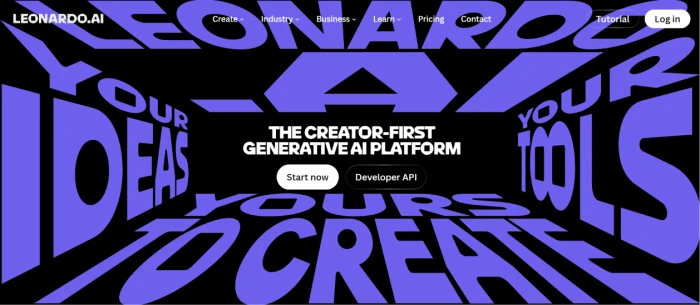
Leonardo AI's front page features a bold and visually striking design that highlights its brand identity. The homepage showcases the tagline "The Creator-First Generative AI Platform" at the center, along with clear Start Now and Developer API call-to-action buttons. A top navigation bar provides access to Create, Industry, Business, Learn, Pricing, Contact, Tutorials, and Log In. The oversized purple typography surrounding the page creates a modern, creative aesthetic that reinforces Leonardo AI's focus on empowering users to generate AI-powered visual content.
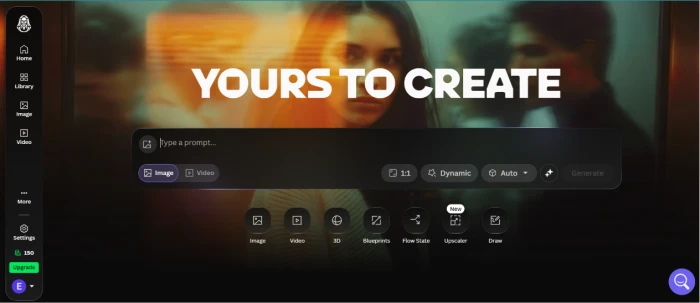
Leonardo AI's homepage features a sleek, dark-themed interface with a prominent "YOURS TO CREATE" banner and a central prompt box where users can generate AI-powered images or videos. A left sidebar provides quick access to Home, Library, Image, Video, Settings, and other tools. Below the prompt are shortcuts to features like 3D, Blueprints, Flow State, Upscaler, and Draw, along with options to adjust aspect ratio, generation mode, and AI model. The clean, intuitive layout makes it easy for users to start creating AI-generated content quickly.
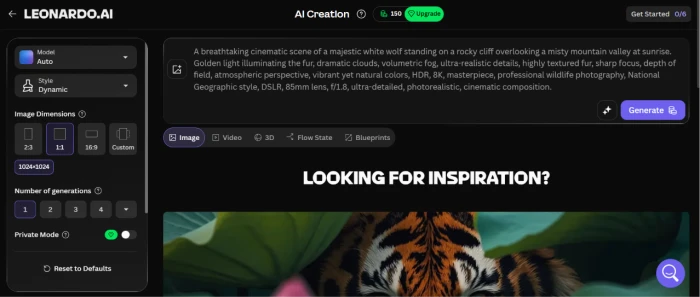
The screenshot demonstrates Leonardo AI's image generation workflow. I entered a detailed text prompt describing "A breathtaking cinematic scene of a majestic white wolf standing on a rocky cliff overlooking a misty mountain valley at sunrise. Golden light illuminating the fur, dramatic clouds, volumetric fog, ultra-realistic details, highly textured fur, sharp focus, depth of field, atmospheric perspective, vibrant yet natural colors, HDR, 8K, masterpiece, professional wildlife photography, National Geographic style, DSLR, 85mm lens, f/1.8, ultra-detailed, photorealistic, cinematic composition. On the left panel, users can customize settings including the AI model, image style, aspect ratio (1:1), resolution (1024×1024), number of generations, and privacy options before clicking the Generate button.
The generated image closely matches the prompt, depicting a realistic white wolf illuminated by golden sunrise light atop a rugged cliff. The scene features dramatic clouds, soft atmospheric fog, and a breathtaking mountain landscape, showcasing Leonardo AI's ability to transform detailed text descriptions into high-quality, photorealistic artwork with impressive accuracy.

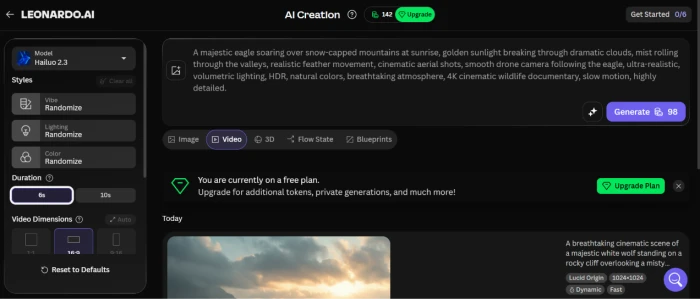
The screenshot demonstrates Leonardo AI's AI video generation workflow using the Hailuo 2.3 model. i have enters a detailed prompt describing A majestic eagle soaring over snow-capped mountains at sunrise, golden sunlight breaking through dramatic clouds, mist rolling through the valleys, realistic feather movement, cinematic aerial shots, smooth drone camera following the eagle, ultra-realistic, volumetric lighting, HDR, natural colors, breathtaking atmosphere, 4K cinematic wildlife documentary, slow motion, highly detailed.Users can further customize the output by selecting the video duration (6 or 10 seconds), aspect ratio, visual styles, and other generation settings before clicking the Generate button.
After processing the prompt, Leonardo AI produces a cinematic AI-generated video that closely follows the provided description. The result showcases a realistic eagle flying gracefully above mountain peaks, illuminated by warm sunrise light and surrounded by dramatic clouds and atmospheric mist. This example highlights Leonardo AI's ability to transform detailed text prompts into high-quality, visually engaging AI videos with smooth motion and impressive realism.
Video Result: click here to check the generated video by Leonardo AI
The screenshot showcases Leonardo AI's Flow State feature, which is designed to streamline the creative process by generating visually consistent designs from a detailed text prompt. In this example, I described a sculptural modernist public building with a wooden bamboo slat façade, futuristic minimal design, dynamic camera angle, and sky backdrop. Additional style options such as randomized vibe, lighting, shot type, and color theme help produce unique yet cohesive results, while users can also customize the image dimensions before generating the output.
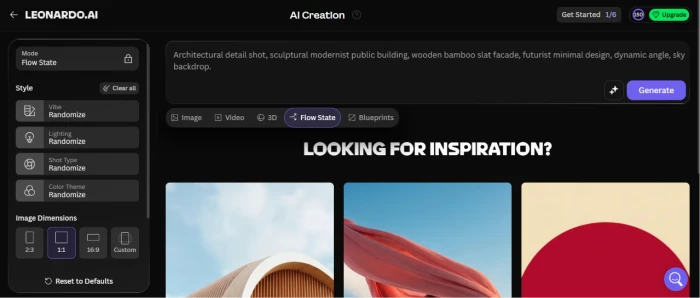
The generated image accurately reflects the prompt, featuring a striking contemporary building with elegant vertical wooden slats, a minimalist architectural style, and dramatic golden-hour lighting. Captured from a dynamic perspective, the result emphasizes clean lines, warm tones, and realistic textures, demonstrating how Leonardo AI's Flow State can rapidly transform architectural concepts into polished, high-quality visual designs while maintaining creative consistency.

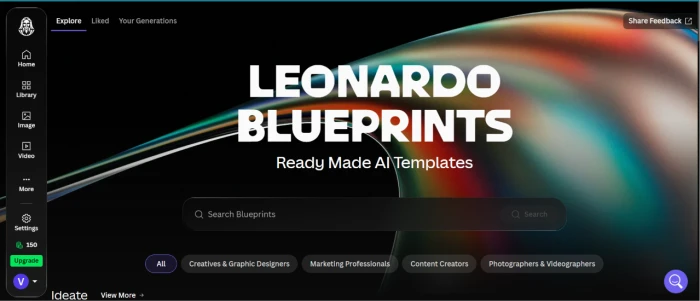
The screenshot highlights Leonardo Blueprints, a feature that provides ready-made AI templates for creating high-quality content with minimal setup. The page features a clean, dark-themed interface with a prominent "Leonardo Blueprints – Ready Made AI Templates" banner, a search bar for finding templates, and category filters such as Creatives & Graphic Designers, Marketing Professionals, Content Creators, and Photographers & Videographers. Users can also browse Explore, Liked, and Your Generations tabs to discover and manage templates.
Blueprints simplify the content creation process by offering pre-configured prompts and generation settings tailored to specific use cases. Instead of building prompts from scratch, users can select a blueprint that matches their needs, enabling faster and more consistent AI-generated images and designs. This makes Leonardo Blueprints especially useful for beginners, marketers, designers, and content creators looking to streamline their creative workflow while achieving professional-quality results.
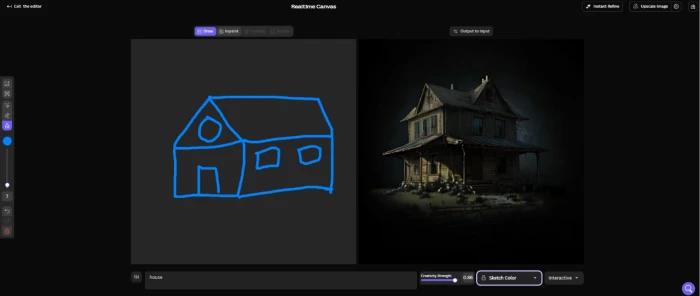
The screenshot showcases Leonardo AI's Realtime Canvas (Draw) feature, which transforms simple hand-drawn sketches into detailed AI-generated artwork in real time. In this example, I created a basic outline of a house using simple blue strokes and enters the prompt "house." The interface includes drawing tools, brush controls, creativity strength settings, and refinement options, allowing users to customize how closely the AI follows the sketch.
The generated result converts the rough drawing into a realistic two-story house with detailed architecture, textured materials, lighting, and shadows. Despite the simplicity of the original sketch, Leonardo AI produces a polished, atmospheric image that captures the overall structure while adding creative details and realism. This demonstrates how Realtime Canvas enables artists, designers, and beginners to quickly transform rough concepts into high-quality visual artwork with minimal effort.
The testing process evaluated Leonardo AI's key features, including image generation, video generation, Flow State, Blueprints, and Realtime Canvas. The platform's intuitive interface made it easy to create content using detailed text prompts and simple sketches.
Image and video generation produced high-quality, realistic results that closely matched the prompts, while Flow State delivered consistent, professional-quality designs. Leonardo Blueprints simplified content creation with ready-made templates, and Realtime Canvas successfully transformed basic sketches into detailed artwork in real time. The platform also offers flexible pricing plans suitable for beginners, professionals, and teams.
Overall, the testing showed that Leonardo AI is a powerful, user-friendly generative AI platform capable of producing high-quality visual content efficiently, making it an excellent choice for designers, artists, marketers, and content creators.
| Dimension | Our test | User signal | Verdict | Composite |
|---|---|---|---|---|
| Customer Support Speed, empathy, resolution quality | 9.5 | 9.8 | Excellent | |
| Output Quality Image and video results | 8.7 | 8.5 | Excellent | |
| Reliability Errors, stability, uptime | 7.5 | 7 | Good | |
| Pricing & Value Cost versus utility delivered | 8 | 7.6 | Good | |
| Billing Transparency Clarity of plans and charges | 7.4 | 7.2 | Good | |
| Ease of Use Interface and workflow learning | 8 | 8.2 | Good | |
| Policy & Safety Experience Prompt filters and privacy controls | 7.2 | 6.8 | Good |
Toolscopia uses cookies to keep you signed in, remember your preferences, and understand how our reviews get read. Analytics are anonymous. See our privacy policy for the full detail.



Comments 0
Join the discussion and share your perspective.
Sign in to post a comment and reply to other readers.
No comments yet
Be the first to share your perspective on this tool.