1
Script to video generation
Quickly converts scripts into short videos, praised for speed but criticized for misaligned visuals.
AI text to video and text to speech tool that quickly turns scripts into short videos with natural sounding voices. Great for beginners and social content, but serious billing and support concerns appear repeatedly in reviews.
Independent review — we test tools ourselves and analyze public user reviews. How we test.
Fliki delivers fast script to video creation with realistic AI voices and a beginner friendly interface, which many users rely on for shorts and simple projects. However, reviews highlight repeated issues with unauthorized charges, withheld affiliate payouts, and very slow or absent support responses. Workflow limitations around credits, text to video constraints, and glitches also appear for more advanced use. Best suited to casual or early stage creators experimenting with short social videos who can tolerate billing risk and minimal support.
Fliki is a browser-based tool that turns written input into finished videos. You give it a script, a blog URL, a PowerPoint file, or a rough idea, and it writes the narration, picks or generates the visuals, adds a synced voiceover with captions, and hands you a draft in a scene-based editor. Its standout asset is the voice library: over 2,000 AI voices across 80+ languages, which is why so many faceless YouTube channels and multilingual marketing teams use it. As of 2026 it also bundles third-party video models like Veo 3.1, Kling 3, and Sora, and Seedance sits alongside them, so you can generate AI footage per scene instead of relying only on stock clips.
The part most descriptions skip: Fliki is metered. Every generated minute of voiceover, every AI image, and every second of AI footage draws from a monthly credit pool, and different voices and models drain it at different speeds. Understanding that meter matters more than any feature list, because it decides what the tool actually costs you. My testing below shows exactly how fast it runs.
Quickly converts scripts into short videos, praised for speed but criticized for misaligned visuals.
Voices described as natural, expressive, and realistic, especially for child voices and multiple languages.
Interface often called easy and intuitive, suitable for new creators and simple class or channel projects.
Free and paid plans rely on credits, criticized for strict limits and fast depletion.
Supports many languages including Malay, appreciated by users needing global voice coverage.
Affiliate scheme mentioned for withheld commissions and suspended accounts without clear explanation.
Good fit for shorts and quick social clips, but struggles more with longer or complex videos.
Live preview editing praised for helping adjust content quickly during creation.
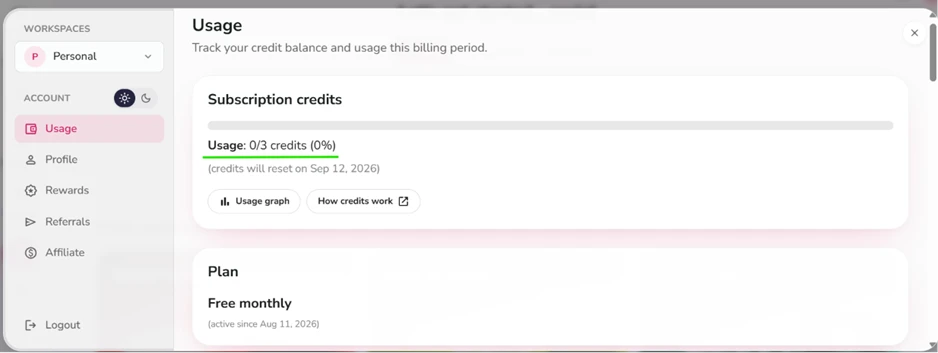
I tested Fliki on a brand new account created on August 11, 2026. The free monthly plan hands you 3 credits that reset every 30 days, and I wanted to see how far they stretch before the tool forces a choice between stopping and paying.
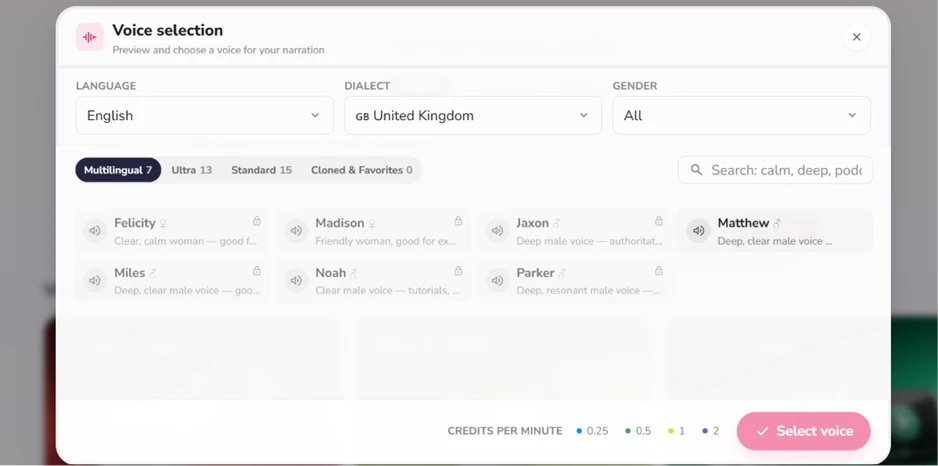
Before generating anything I opened the voice picker. Fliki advertises more than 2,000 voices, and the UK English screen alone listed 35 of them across its Multilingual, Ultra, Standard, and Cloned tabs. Most carried a lock icon on my plan. The detail that caught my eye sat at the bottom of the panel: voices are priced by color. A blue voice costs 0.25 credits per minute of narration while a purple one costs 2, so a premium voice drains the balance eight times faster than a basic one. The pricing page never mentions this.
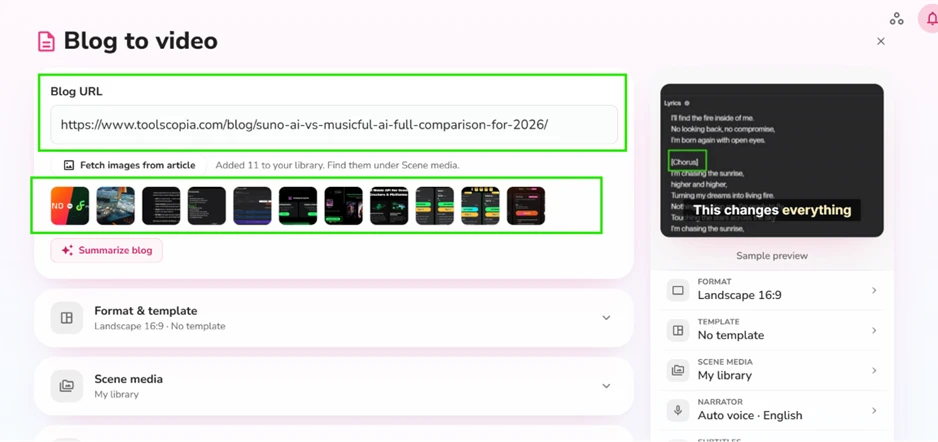
My first test was the Blog to Video tool. I pasted the URL of my own article comparing Suno and Musicful, clicked Fetch images from article, and Fliki pulled all 11 images from the post into my media library. That fetch is a smart touch, since the video can reuse your own screenshots instead of leaning on stock clips.
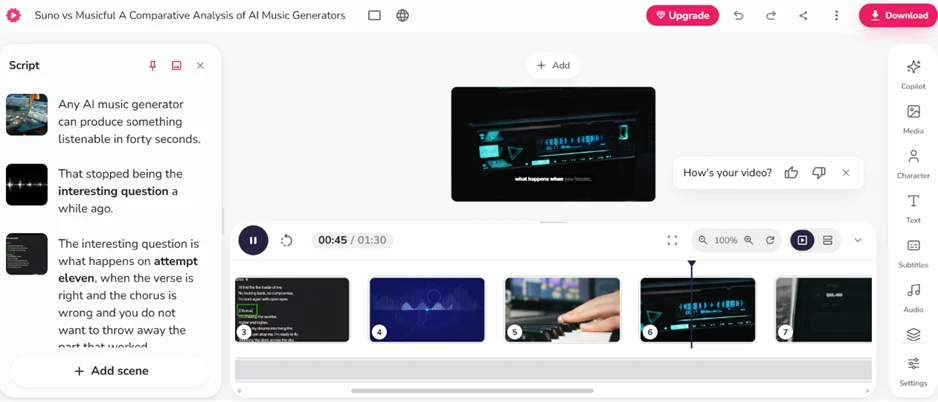
Generation finished in under five minutes, matching the on-screen estimate. The output surprised me. Fliki had read the article, written a fresh narration script rather than copying my paragraphs, split that script into scenes, and paired each scene with an image from my post or a stock clip. The draft opened in the editor ready to play, with captions already synced.
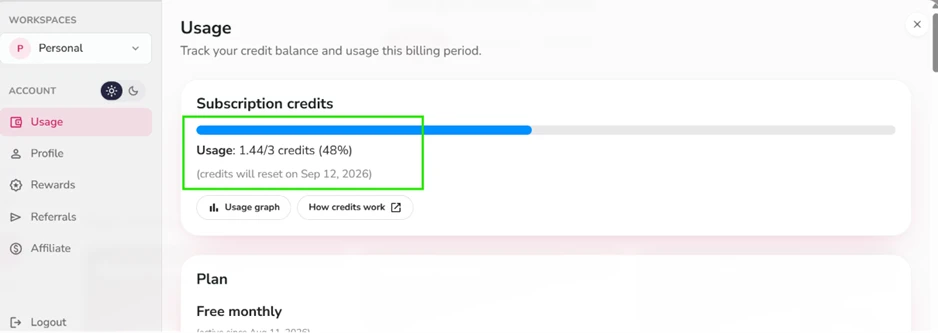
Then the bill arrived. One video consumed 1.44 credits, 48 percent of the month's total.
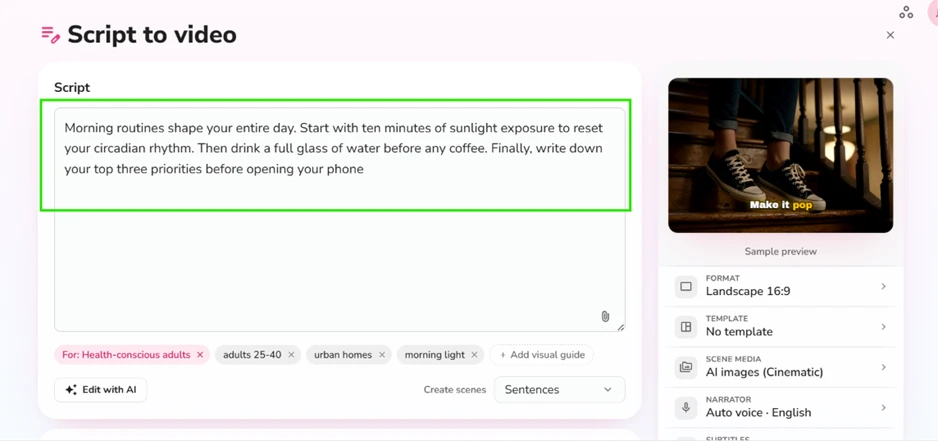
For the second test I typed a four-sentence script about morning routines and switched Scene media to AI images in Cinematic mode. Fliki also accepts audience and mood tags, so I added labels like adults 25-40 and morning light.
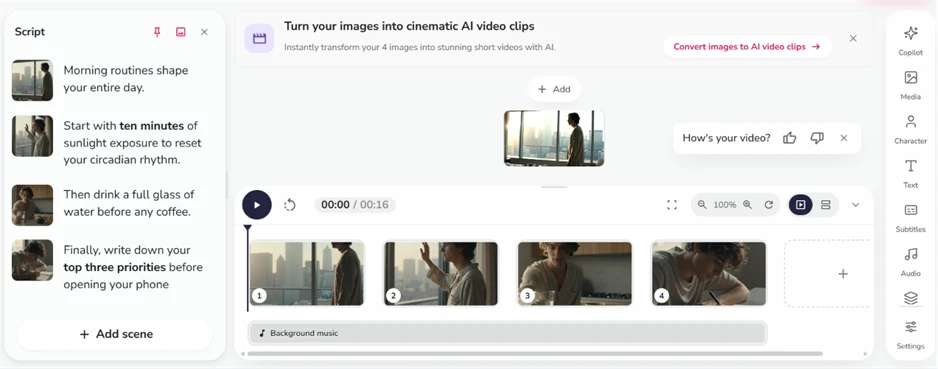
This produced the best output of my session. Each sentence became its own scene, and the generated images tracked the script closely: a man at a sunlit window for the circadian rhythm line, a glass of water in a kitchen for the hydration line, a figure writing in a notebook for the priorities line, and the same character carried across all four shots. Nothing felt like filler. The catch is that AI image generation is its own expense, billed at 0.05 to 1.5 credits per image depending on the model, which is part of why this 16-second clip cost what it did.
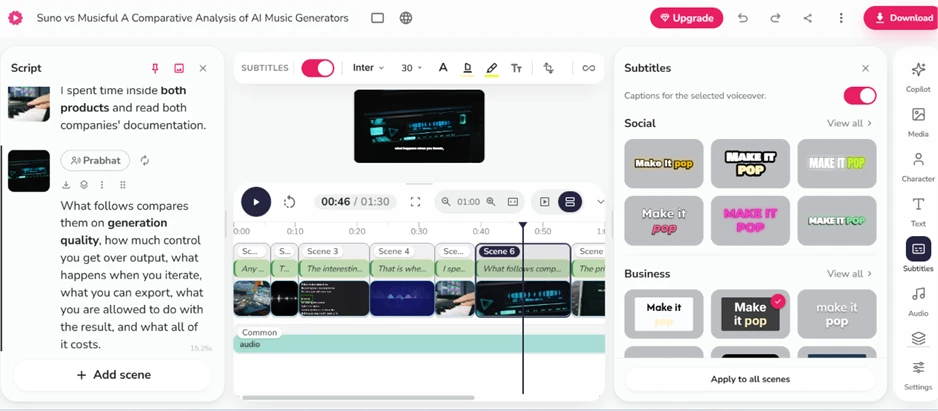
The subtitle system deserves its reputation. Captions were transcribed and synced with zero input from me, and the Subtitles panel offers preset styles sorted into Social and Business categories, with one button that applies a style to every scene.
Look at the timeline in the same screenshot, though, and the editor's ceiling becomes visible. Fliki gives you a single row of scenes plus a shared audio track. You can trim scenes, reorder them, swap a clip, or regenerate a voiceover. You cannot stack a second video layer, keyframe motion, adjust clip speed, or cut on an exact frame the way CapCut's free web editor allows. It is a scene arranger, and calling it a video editor oversells it.
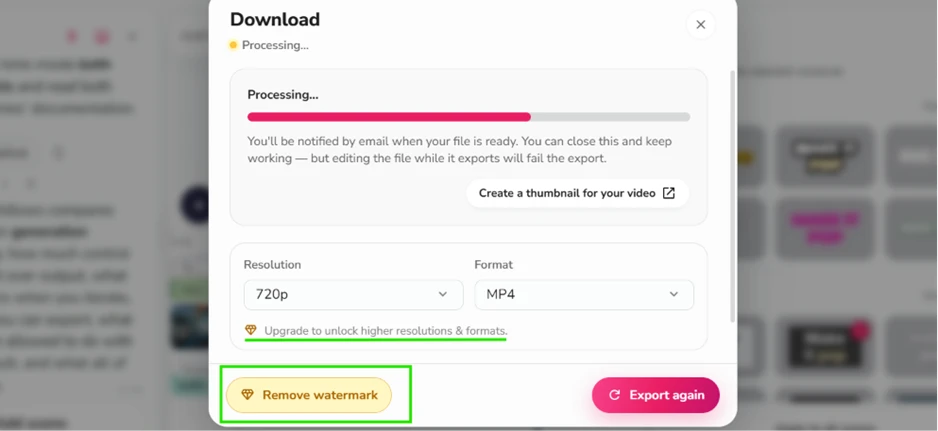
The download dialog stacks the free plan's limits in one place. Resolution tops out at 720p with an upgrade link for anything higher, and a yellow Remove watermark button sits next to Export. Several reviews I read while researching this article claim free exports run at 1080p. My account says otherwise.
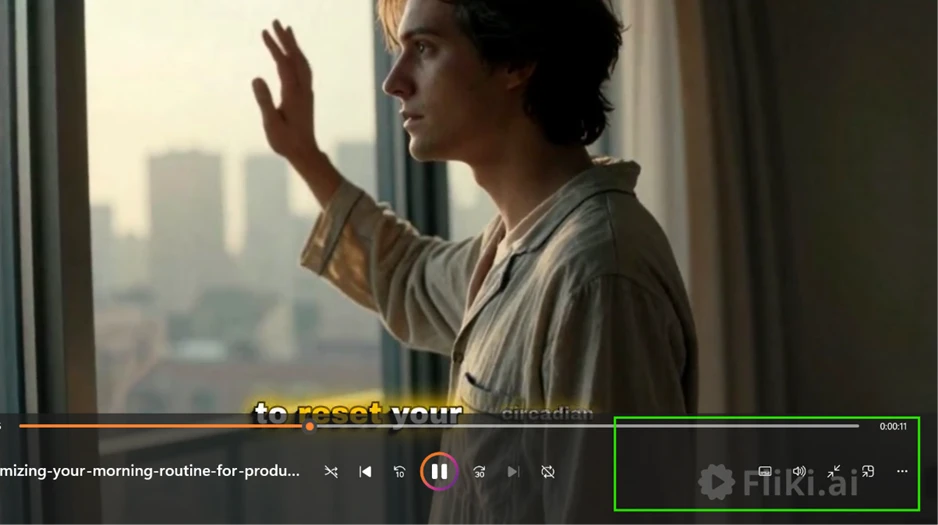
The watermark itself lands in the bottom right corner of the finished file. It is small, but it is on every frame.
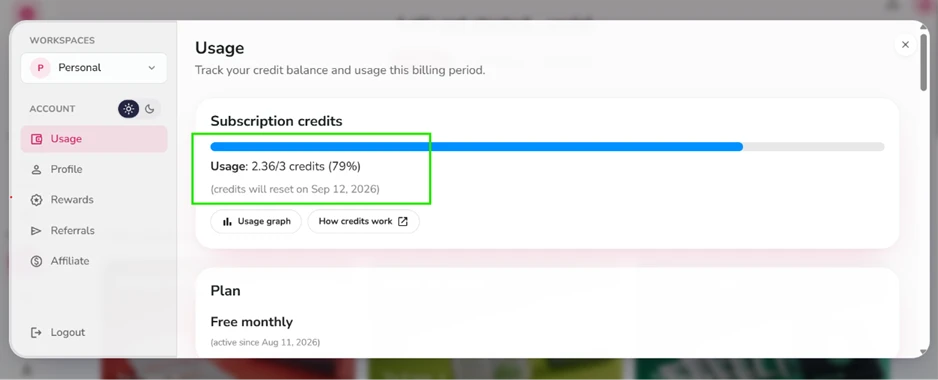
Two short videos. That was my whole session, and it burned 2.36 of 3 credits, 79 percent of the month, before I had touched avatars or generated a single second of AI video footage.
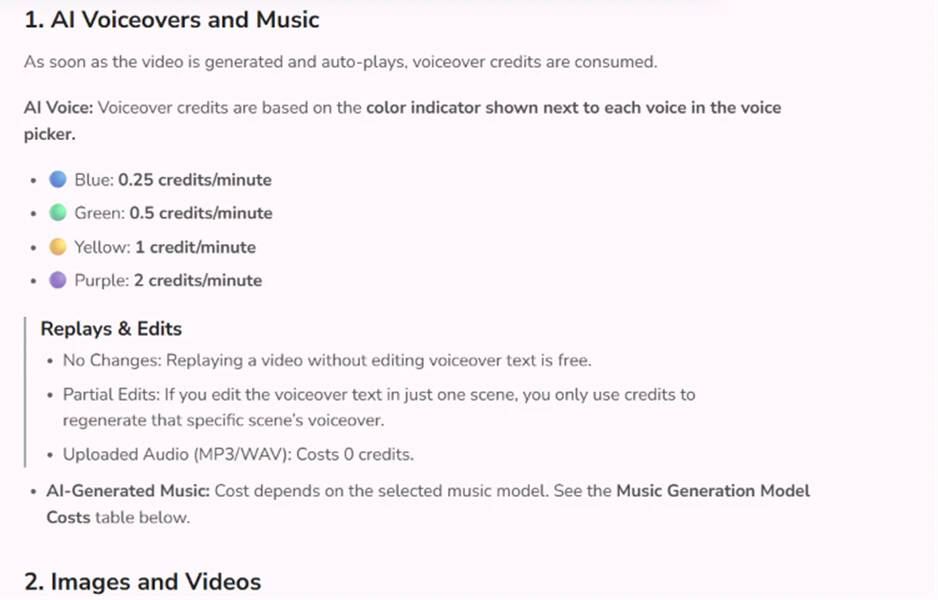
Fliki's own documentation explains where it all goes. Replaying a video without edits is free, and uploading your own MP3 costs nothing. Everything generative runs the meter: voiceovers bill per minute by voice tier, AI images bill per image, AI video clips bill at 0.1 to 6 credits per second, and avatar footage bills at 0.25 credits per second with a 2-credit minimum.
At the top AI video rate, a full month of free credits equals half a second of footage. That math defines who the free plan is for. It is a demo, good for roughly two short videos a month, and every quality upgrade you reach for, a nicer voice, a sharper image model, a higher export resolution, an avatar presenter, spins the meter faster. Fliki works. The question your budget has to answer is how often.
| Dimension | Our test | User signal | Verdict | Composite |
|---|---|---|---|---|
| Video Output Quality Visual relevance and rendering reliability | 5 | 5 | Weak | |
| Voice Quality Naturalness across available AI voices | 8.5 | 9 | Excellent | |
| Ease of Use Learning curve and workflow simplicity | 8 | 8.5 | Good | |
| Billing and Pricing Fairness Charges, refunds, and credit value | 2.5 | 2 | Weak | |
| Customer Support Speed and effectiveness of help | 2 | 1.5 | Weak | |
| Reliability and Stability Crashes, glitches, and account issues | 4 | 3.5 | Weak |
Toolscopia uses cookies to keep you signed in, remember your preferences, and understand how our reviews get read. Analytics are anonymous. See our privacy policy for the full detail.



Comments 0
Join the discussion and share your perspective.
Sign in to post a comment and reply to other readers.
No comments yet
Be the first to share your perspective on this tool.