1
AI image generation
Produces mixed quality outputs, often misreading prompts, with some users reporting 80 percent unusable results.
Subscription based AI photo and video editor used by creators for quick edits, upscaling, and animations, but burdened by confusing trials, strict auto renewal rules, expiring credits, and inconsistent AI output quality.
Independent review — we test tools ourselves and analyze public user reviews. How we test.
Fotor delivers accessible photo editing, AI upscaling, and video features that many hobbyists and small teams find easy to use and fairly priced. However, reviews repeatedly cite confusing free trials, aggressive auto renewal, and a rigid refund policy, alongside expiring credits and frequent upgrade prompts. AI generation quality is inconsistent, with some users praising animations and others calling 80 percent of outputs unusable. It suits users who will exploit the tools heavily, track billing dates carefully, and can tolerate policy friction more than those who just want to experiment briefly.
Fotor is a browser-based editing suite built by Everimaging, rebuilt in recent years around AI rather than the filter presets it launched with. The original photo editor still sits at the core, now joined by AI image generation, AI video, background removal, upscaling, and a design module aimed at social posts and thumbnails.
What sets it apart from a single-purpose app is how it handles the AI. Instead of training its own engines, Fotor plugs in named third-party models such as Nano Banana Pro for images and Seedance for video, then meters everything through one shared credit pool. A single subscription covers the full stack, and credits flow to whichever feature you point them at.
The pricing lands well below most Western competitors, which is the draw for hobbyists and small operators who value output speed over studio-grade control.
Two traits define it. Nothing installs, since the whole suite runs online, and the free tier is set up as a usable editor rather than a locked trial.
Produces mixed quality outputs, often misreading prompts, with some users reporting 80 percent unusable results.
Praised for expressive clips and animations, but affected by safety flags, glitches, and occasional failed generations.
Widely appreciated for quick edits, uncropping, and upscaling, though advanced upscaling sometimes subtly alters faces.
Includes monthly credits and rewards; many reviewers criticize expirations, low allocations, and constant upsell pressure.
Previously valued for challenges and sharing, now criticized for missing events and stricter, opaque moderation.
Heavily criticized; many reports of unexpected annual charges, difficult cancellations, and rare full refunds.
Polarized feedback, ranging from outstanding, personalized help to unhelpful bots and inflexible billing decisions.
Simple for many users, but others report memory heavy behavior, crashes, and unstable performance on some devices.
I opened the photo editor with an AI image I had generated earlier using the prompt “A breathtaking futuristic city floating above the clouds.” The left rail carried Adjust, Effects, Beauty, and Frames, with AI Upscaler, Magic Eraser, BG Remover, and Image to Video pinned across the top. Sliders for Relight, Basic Adjust, Fine Tune, and Color responded without lag.

The download panel gave me JPG or PNG with a quality estimate of 3.19 MB. For a plain edit, a crop and a brightness tweak, the file came down clean with no watermark. This is the part Fotor earns credit for. Basic editing is free in the way the word is supposed to mean.

The first catch sits before the file reaches your computer. Hitting Download threw up a sign-in screen asking me to continue with Google, Facebook, Apple, or email. Nothing leaves Fotor without an account, even a watermark-free basic edit.

The batch editor let me load a stack of images and showed a 7/50 counter at the top. Every thumbnail past the first wore a padlock, and the tooltip spelled out the limit: process up to 50 images at once after upgrading. The 50 is a shop window. Free processing stops at one.

This is where the free plan draws its line. The background remover cut the floating city off its backdrop and dropped in a transparent canvas, clean edges and all. Then it stamped a large “fotor” logo across the result and parked the clean export behind Pro.

AI Upscaler told the same story. It took a 1104 by 724 car photo up to 2208 by 1448, and the extra resolution was real. Same logo, same paid export.

AI Art Effects turned a cycling photo into a tidy line drawing using the Line Drawing preset. The output was worth keeping. Keeping it cost money.
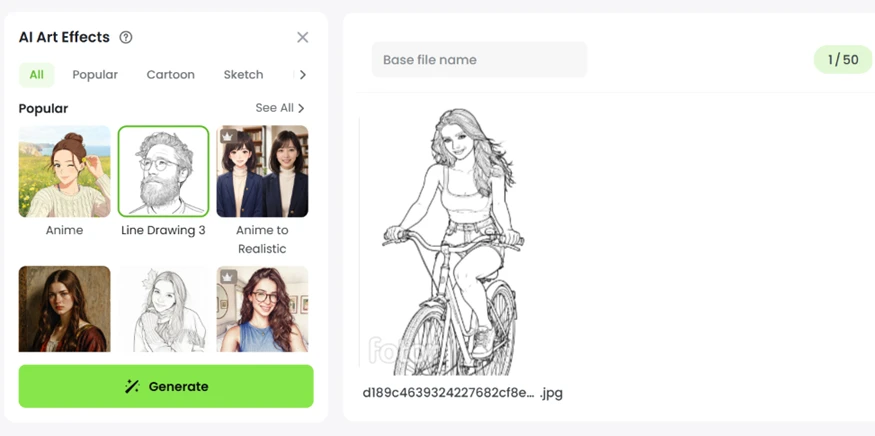
Across the three tools the rule never changed. You generate for free and preview the result, then you pay to download it.
The pricing page explains the economics. Paid plans run from $3.99 a month for Pro up to $20.99 for the Max tier, billed yearly, with Pro+ sitting at $5.83. Everything is credit-based. Pro hands you 100 credits a month, which Fotor’s own math puts at roughly 6 Nano Banana Pro images or 2 Seedance videos.

For anyone planning to lean on the AI tools, that ceiling arrives faster than the monthly price suggests.
| Dimension | Our test | User signal | Verdict | Composite |
|---|---|---|---|---|
| Output Quality Images and videos produced | 7 | 7 | Good | |
| Ease of Use Learning curve and navigation | 8 | 8 | Good | |
| Value for Money Perceived fairness of pricing | 7 | 6 | Moderate | |
| Billing Transparency Clarity of trials and renewals | 5 | 5 | Weak | |
| Customer Support Speed and fairness of help | 7 | 8 | Good | |
| Reliability and Performance Crashes, queues, responsiveness | 8 | 8 | Good |
Toolscopia uses cookies to keep you signed in, remember your preferences, and understand how our reviews get read. Analytics are anonymous. See our privacy policy for the full detail.


Comments 0
Join the discussion and share your perspective.
Sign in to post a comment and reply to other readers.
No comments yet
Be the first to share your perspective on this tool.