1
AI idea to deck generation
Quickly turns prompts into multi card presentations, praised by some but often criticized for repetitive and shallow layouts.
AI-based presentation and website builder that turns prompts into decks or sites quickly. Strong first-draft output for some users, but many report unreliable AI behavior, export issues, and aggressive, inflexible billing policies.
Independent review — we test tools ourselves and analyze public user reviews. How we test.
Gamma.app can produce quick, visually acceptable drafts and some users are genuinely happy with its presentation capabilities. Across these reviews however, the dominant pattern is unreliable AI that ignores instructions, breaks templates, and struggles with formats like A4 or PowerPoint. Billing practices, strict refund windows, and subscription auto renewals are heavily criticized, alongside slow or unhelpful support. It is best treated as an experimental draft generator for low stakes presentations, not as a dependable core tool for business critical work or long term contracts.
Gamma is an AI generator for presentations, documents, and web pages that builds a full draft from a single text prompt. You describe what you need, and it returns a styled, ready-to-edit result in seconds instead of a blank canvas.
What separates it from PowerPoint or Google Slides is the starting point. Traditional tools hand you an empty slide and expect you to design. Gamma writes the structure, picks a layout, and drops in matching visuals, then lets you refine with an “Edit with AI” command rather than manual formatting.
The format is the other distinction. Instead of rigid 16:9 slides, Gamma builds flexible cards that reflow to fit any screen, which is why the same file works as a scrollable web page or a deck. It also generates its own images and charts inside the editor.
The practical appeal is speed for non-designers. Someone with no design background can turn a rough idea into a polished first draft faster than they could outline it by hand, which is the main reason people reach for it over a classic slide tool.
Quickly turns prompts into multi card presentations, praised by some but often criticized for repetitive and shallow layouts.
Provides preset themes, yet many reviewers say every deck looks similar and themes change or disappear unexpectedly.
Generates images for slides, widely criticized as inaccurate, generic, disturbing, or dropping in quality after upgrading.
Creates brochure style sites some find beautiful, but indexing, internal links, and basic embeds often fail.
Allows export, but many report overflowed content, broken layouts, missing data, and corrupted characters.
Uses credits for generations and edits, with users complaining about opaque consumption and aggressive plan changes.
Email and chat support produce rare standout experiences, but most reviewers describe slow, circular, or bot like responses.
Handles monthly and annual plans with strict refund rules and auto renewals, heavily criticized as inflexible and opaque.
Offers custom themes and template uploads, yet often ignores original formatting or downgrades professional designs.
I ran Gamma through a full build to see how far it gets. The test topic was remote work trends in the United States for 2026, a subject with enough hard data to put the AI under real pressure. Here is what showed up at each step, both the parts that impressed me and the parts that did not.
I started on the create screen with a brand-new account. The credit counter in the top corner read 400, the full free allowance. My prompt was a single line with no formatting and no outline attached: Remote work trends in the United States for 2026.
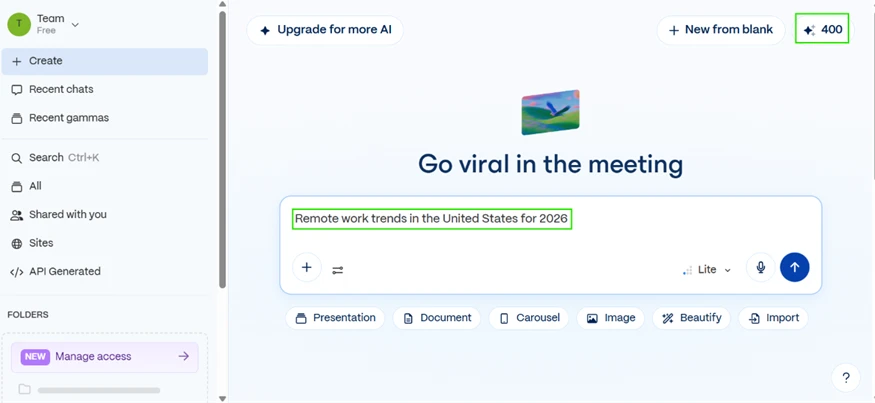
The format options sat right under the box, so choosing a presentation over a document or a carousel took one click.
Before generating anything, Gamma opened a short setup form. It asked who the deck was for and what it should emphasize. I chose Business leaders and executives and clicked Create outline.
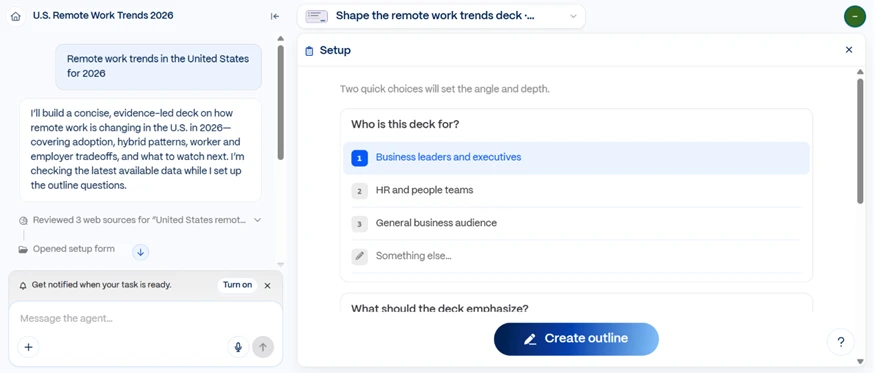
This step is easy to overlook, and it is one of the reasons the output landed well. Most free AI deck builders skip straight to slides. Gamma narrows the angle first, which pushed my result toward an executive briefing instead of a flat summary.
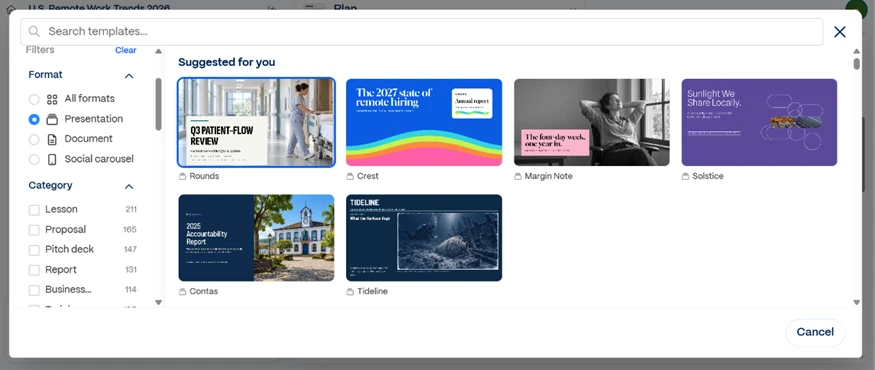
A template browser appeared next with a row of suggested layouts. For a free account the selection was broad, and the format filter on the left sorted them quickly. I picked a clean editorial look and continued.
The outline came next, and this is the part I watched closely. Gamma laid out an eight-slide structure and let me edit every heading and bullet before a single slide existed. One detail earned a note in my test log: it cited a real source for the data, pulling the hybrid-work figures from Gallup.
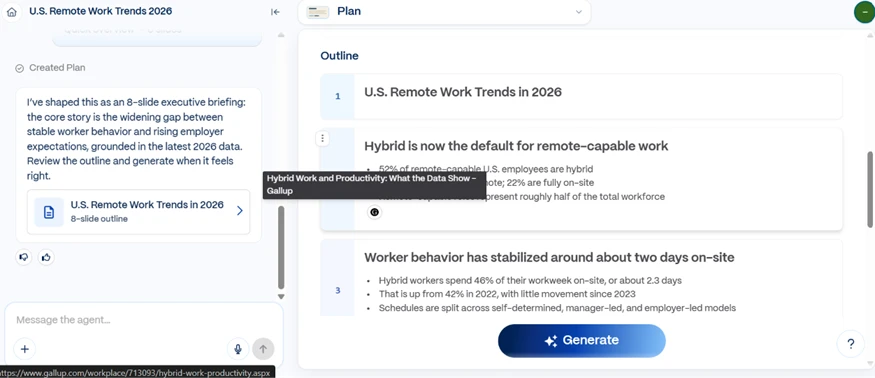
Nothing was locked. I could rewrite the structure here and only then hit Generate.
The finished deck built in seconds and ran eight slides. The opening slide took a 52% statistic for hybrid-capable employees and turned it into a labeled donut chart.
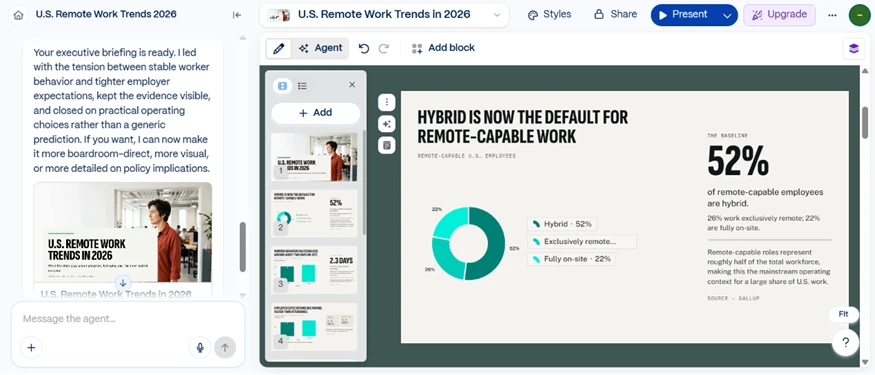
The design held together well. Type stayed consistent from slide to slide, and the chart was clean enough to drop into a real meeting. The source line sat at the bottom of the slide, tied to the same Gallup data from the outline. For a one-line prompt and no manual design work, this is Gamma at its best.
To test editing, I added a blank slide into the middle of the deck. Gamma dropped a Generate with AI box onto the new slide, complete with template choices and quick prompt chips.
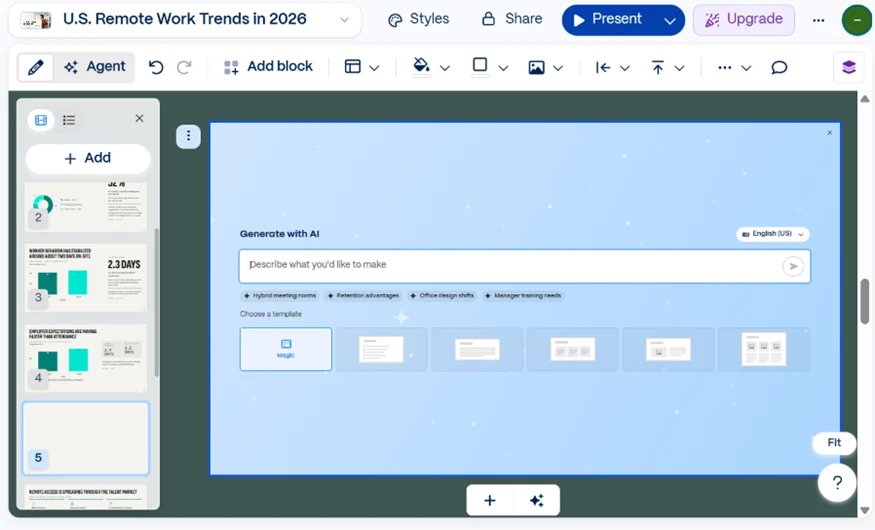
Adding content in the middle of a finished deck took no effort. The free plan still feels generous at this stage.
Export is where free AI tools usually reveal their ceiling, so this was the test that mattered. The Share panel gave me four ways out: PDF, PowerPoint, Google Slides, and PNG images.
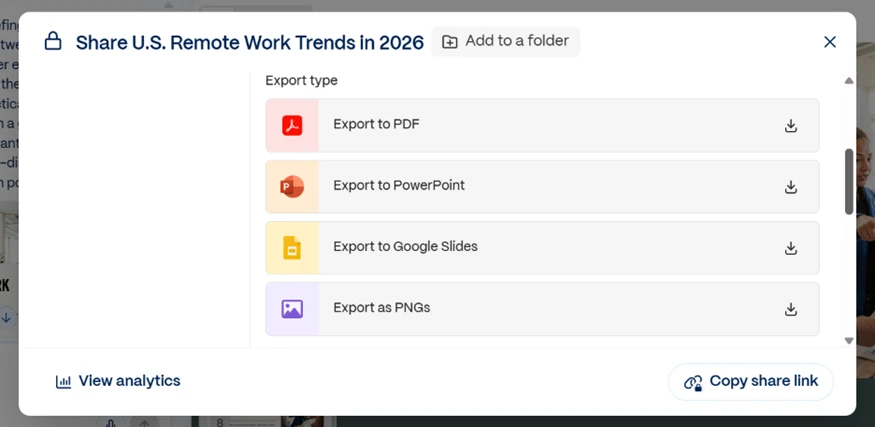
Four export routes on a free account is a strong showing. The problem only appears once the file is open.
I exported to PowerPoint and opened the file in Microsoft PowerPoint. Two things went wrong.
First, a Made with Gamma badge sat in the corner of the slide. Free exports carry that branding, and clearing it is a paid upgrade.
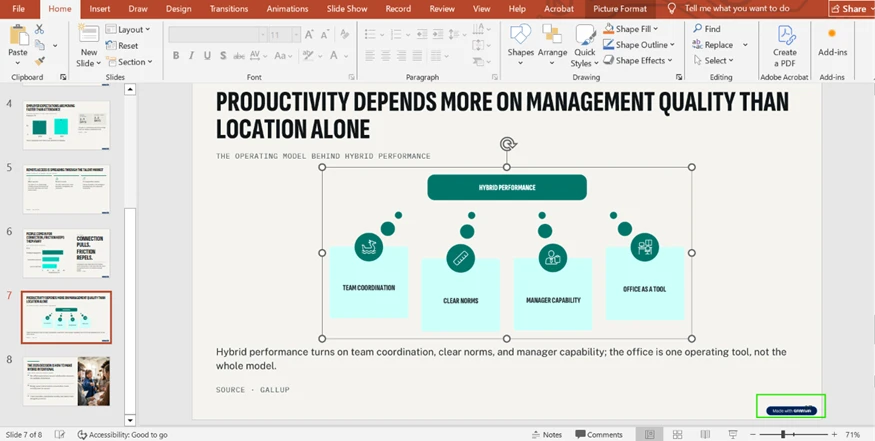
Second, and this is the one that affects real work, a diagram that was built from separate editable blocks inside Gamma arrived as one flat image. The proof is in the ribbon at the top of the screenshot. PowerPoint switched to the Picture Format tab, which only shows up when an image is selected. The whole four-box graphic was a single picture rather than live shapes.
That breaks the edit-after-export workflow. You cannot nudge a box or recolor one label without rebuilding the entire graphic by hand. Either the slide ships exactly as Gamma made it, or you start over in PowerPoint.
By this point the counter had dropped from 400 to 372. The eight-slide deck cost 28 credits. Those free credits do not refill each month, so 400 is the whole budget. At 28 a deck, that works out to roughly fourteen full presentations before the AI stops responding.
I spent the remaining credits on the image generator. The prompt asked for a premium social post built around the line AI Won't Replace You, But Someone Using AI Might, with a dark futuristic background and bold modern type.
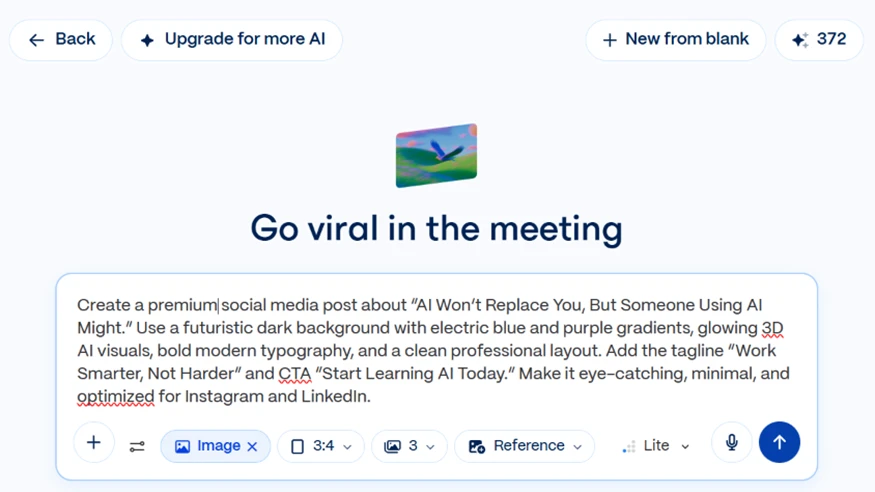
This exposed the weakest corner of the tool. Across three generated versions, the typography collapsed. The headline came back as REPLAC, PEPLACE, MING, and SOMEZ OISI instead of the clean words in the prompt, and one figure rendered as a twisted, mangled shape rather than a person.

The backgrounds and the color work actually looked sharp. The text baked into the images was unusable for anything meant to sit in front of an audience.
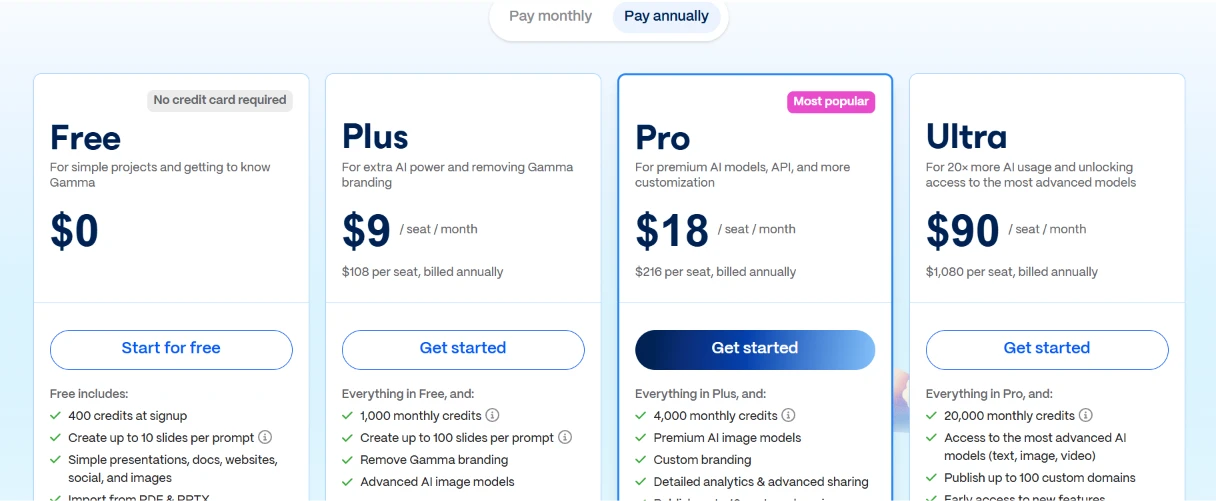
Gamma runs on four tiers. The prices below are the annual-billing rates per seat, so paying month to month costs more.
Free: $0. This is the plan I tested. You get 400 credits at signup, and those credits do not refill, so it is a one-time pool rather than a monthly allowance. Each prompt builds up to 10 slides, and you can import from PDF and PPTX. Every export carries the “Made with Gamma” badge I ran into during testing.
Plus: $9 per seat per month, billed annually ($108 a year). The upgrade that matters here is the branding. Plus strips the Gamma watermark, which on its own justifies the cost for anyone sending decks to clients. You also move from a one-time 400 credits to 1,000 credits every month, and the slide cap per prompt climbs to 100.
Pro: $18 per seat per month, billed annually ($216 a year). Gamma marks this as its most popular tier, and the credit math explains why. 4,000 monthly credits is four times the Plus allowance for double the price. Pro adds custom branding and premium image models, with detailed analytics and advanced sharing on top.
Ultra: $90 per seat per month, billed annually ($1,080 a year). This is the heavy-usage tier at 20,000 monthly credits. It unlocks the most advanced models, now including video alongside text and image. It also lets you publish up to 100 custom domains and hands you early access to new features. The price is steep for a presentation tool, so it earns its keep only for teams producing content at real volume.
Here is how I read the ladder. Free is a trial rather than a long-term plan, because the 400 credits run out and never come back. At roughly 28 credits a deck from my testing, that pool covers about fourteen presentations total. Plus at $9 is the genuine entry point, and watermark removal is the thing you are actually paying for. Pro is where the credit-per-dollar value peaks for regular users. Ultra only makes sense once video generation and custom domains become part of your workflow.
| Dimension | Our test | User signal | Verdict | Composite |
|---|---|---|---|---|
| AI Output Quality Accuracy and usefulness of generations | 8.5 | 8.1 | Good | |
| Design and Layout Control Template fidelity and formatting control | 7.5 | 7.1 | Good | |
| Reliability and Performance Speed, uptime, and bug frequency | 8 | 7.8 | Good | |
| Customer Support Speed and effectiveness of help | 7 | 6.6 | Moderate | |
| Billing and Trustworthiness Refunds, renewals, and policy fairness | 6.6 | 6.2 | Moderate | |
| Ease of Use Learning curve and everyday usability | 9 | 9 | Excellent | |
| Value for Money Perceived worth relative to price | 7.6 | 7.4 | Good |
Toolscopia uses cookies to keep you signed in, remember your preferences, and understand how our reviews get read. Analytics are anonymous. See our privacy policy for the full detail.



Comments 0
Join the discussion and share your perspective.
Sign in to post a comment and reply to other readers.
No comments yet
Be the first to share your perspective on this tool.