1
SuperNinja coding agent
Frequently praised for building full web apps and scripts, though some report buggy PHP and Python outputs.
AI assistant and agent environment focused on coding, research, and content creation. Shines for developers and tech practitioners but polarizes users on pricing, reliability, and how “autonomous” its SuperNinja agents really are.
Independent review — we test tools ourselves and analyze public user reviews. How we test.
NinjaTech AI delivers strong value for hands-on builders, especially developers using SuperNinja for full‑stack code, automation, and deep research. Many reviewers describe it as a daily driver that replaces freelancers and accelerates complex projects. However, aggressive pricing changes, opaque credit usage, inconsistent coding reliability for some languages, and strict image moderation significantly hurt trust. SuperNinja’s autonomy also falls short of the marketing for several users. It is best suited to technically comfortable users who can debug, tune prompts, and tolerate a learning curve in exchange for productive agent workflows.
Ninja AI is an all-in-one AI platform from NinjaTech AI, a Silicon Valley company founded in 2022 by Babak Pahlavan, whose previous AI assistant startup was acquired by Google. You reach it at myninja.ai. The pitch is consolidation: instead of paying for separate subscriptions to ChatGPT, Claude, and a handful of other tools, you get access to models from OpenAI, Anthropic, Google, Meta, and DeepSeek under one monthly bill.
What separates it from a plain chatbot is SuperNinja, its autonomous agent. Give it a task and it can plan the steps, search the live web, write and run code in its own virtual machine, generate images, and produce finished documents without you steering every move.
The plan structure is also different. Rather than a flat monthly cap, Ninja runs on credits that you spend per task, so a heavy research job and a quick question cost different amounts.
Frequently praised for building full web apps and scripts, though some report buggy PHP and Python outputs.
Highlighted as excellent for comprehensive research, answering many keywords and questions in one run.
Users like switching between external LLMs and in house agents from a single interface.
SuperNinja can read, write, organize files, commit to GitHub, and host internal test servers.
Widely criticized as unpredictable and poor value after migration from older task based plans.
Appreciated by some for refining prompts, but others find it hit or miss and credit consuming.
Voice mode tied into text workflows, improving report drafting once early bugs were fixed.
Option to prohibit training and delete responses is praised, though users request full incognito mode.
Output quality considered acceptable, but strict moderation frustrates some creative and political use cases.
My first test was a money question with a right answer: whether a freelance consultant earning $120k in California should run an LLC or elect S-corp taxation. I set the mode to Agent and left the SuperNinja level on Standard, the only free tier. The Pro, Expert, and Max levels all sit behind a lock.
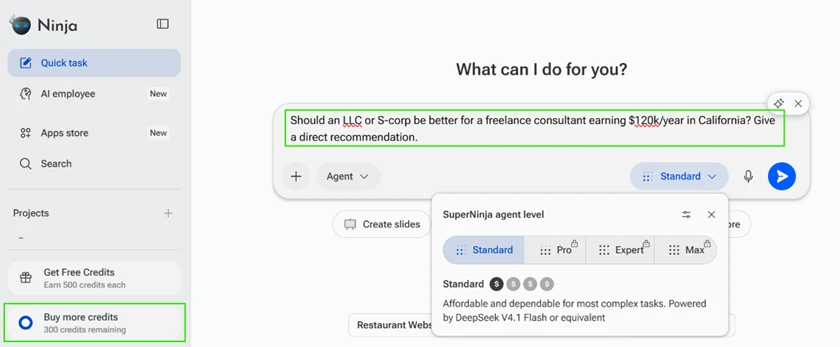
What impressed me was that it did not answer from memory. It ran a live web search, pulled back 19 results from real tax and CPA sources, then told me it was verifying the 2026 self-employment figures and QBI thresholds before committing to a recommendation.
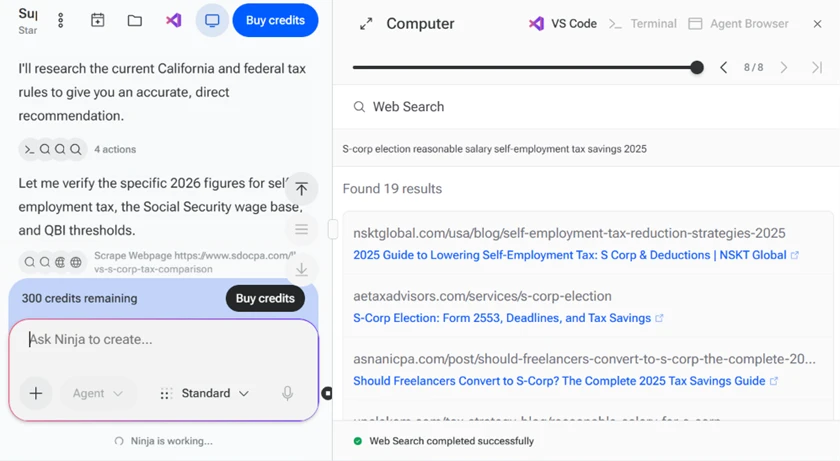
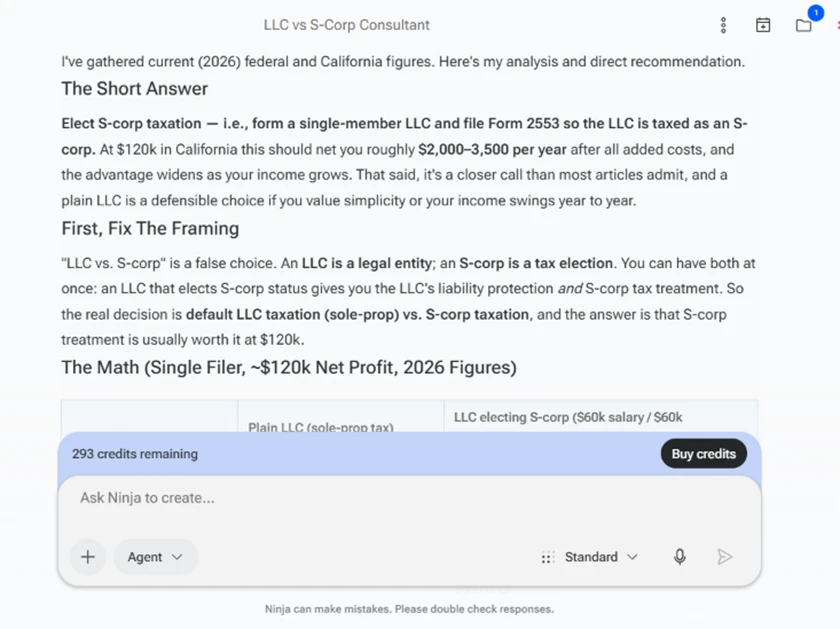
The final answer was better than most human-written blog posts on the topic. It called out that "LLC vs S-corp" is a false framing, since an LLC is a legal entity and S-corp is a tax election, then gave a direct recommendation with a dollar range of roughly $2,000 to $3,500 saved per year at that income. It also flagged that a plain LLC is a defensible choice if I valued simplicity. That is a nuanced answer, and the whole task cost 7 credits.
Here is the catch most users will hit without warning. I asked about the 2026 US federal EV tax credit rules in the default Chat mode rather than Agent mode.
The answer came back honest but limited. Ninja told me directly that it was working from training knowledge and could not pull live pages while in chat mode, so I should confirm dates with the IRS myself. It then handed me a "Sources To Verify" list of IRS and Cornell Law links to check on my own.
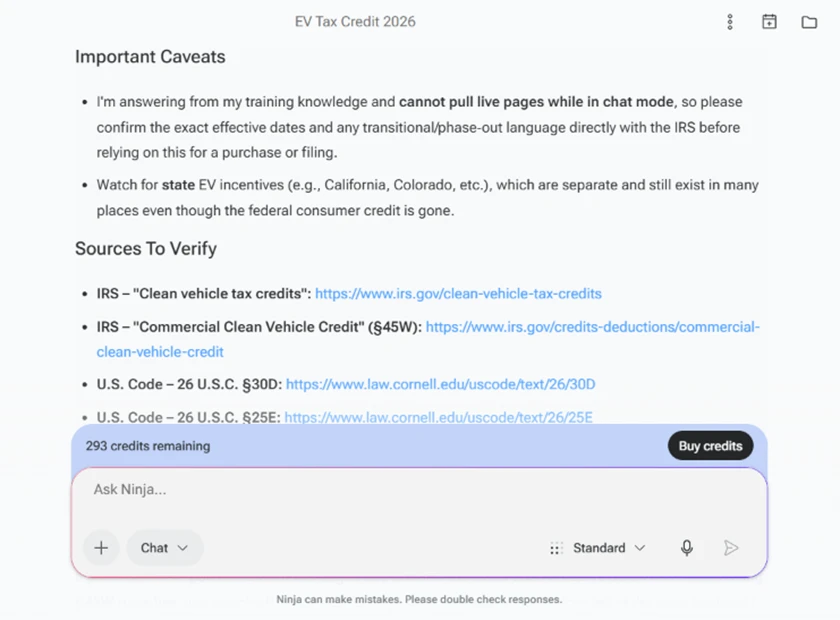
So the same tool gives you two different experiences depending on a mode toggle most people will not think about. Pick Agent and it researches for you. Stay on the default Chat and it gives you a library-card answer plus homework. For a casual American user asking a quick factual question, that gap matters.
I switched to image generation, which runs on GPT Image 2.5 on the free plan. Instead of feeding it a detailed brief, I wanted to see how it handled a vague instruction, so I told it to choose the subject itself.
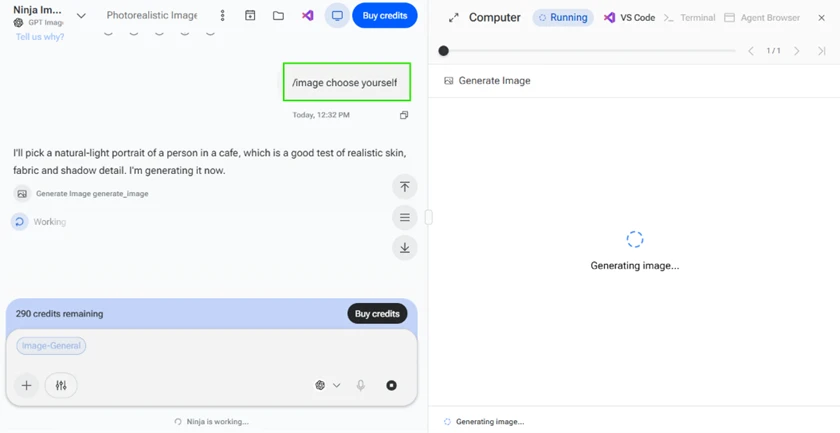
It picked a natural-light cafe portrait, reasoning out loud that this was a good test of realistic skin, fabric, and shadow. The output backed up the confidence.

The skin texture, the knit sweater, and the soft window light all read as a real photograph. For a free image credit, this is a strong result.
The follow-up test was an edit. I asked Ninja to remove the background and give me a transparent PNG. This is where the agentic side shows its hand in a way I did not expect.
Rather than running a one-click filter, Ninja spun up a virtual machine, installed a segmentation library, and ran actual code to produce a true transparent PNG. It even told me the standard image-edit tool could not guarantee real transparency, so it went the harder route.
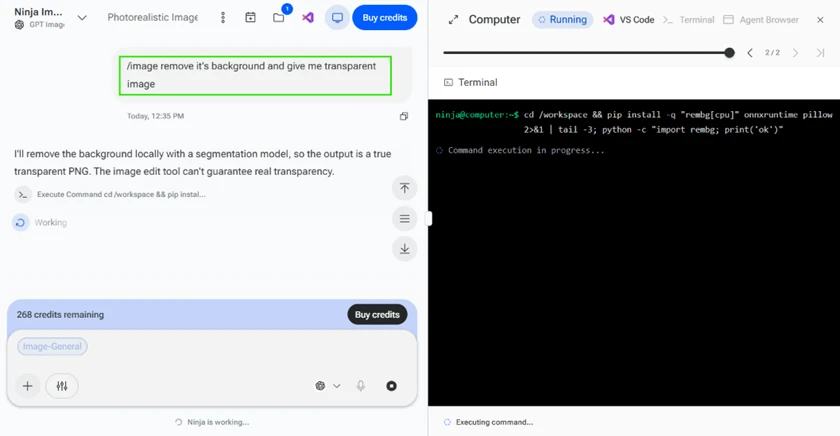
The method was clever. The result was not clean. Looking at the cutout at full size, the hair edges are rough and there is visible fringing around the fingers and the cup. It is usable as a rough draft, but I would not drop this into a client deliverable without cleanup in another tool.

Ninja's free plan is not measured in "tasks per day." It is a credit wallet, and the usage log is where the honest cost picture lives. I pulled mine after one afternoon.
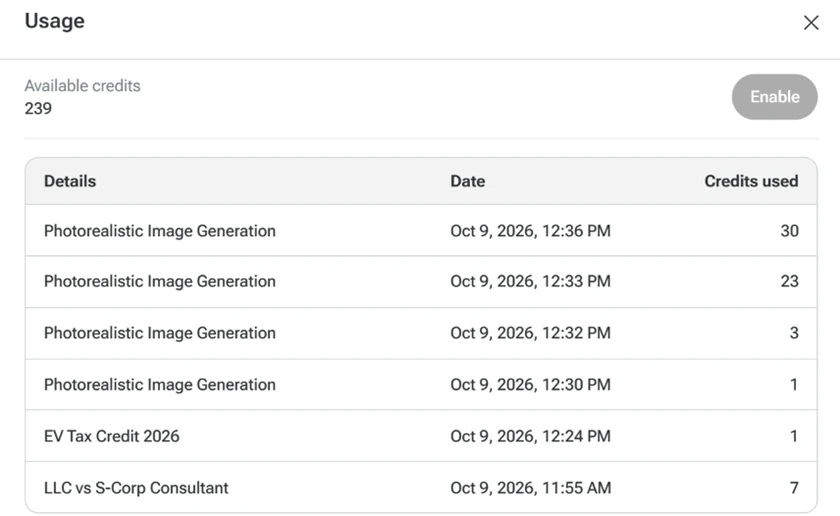
The numbers tell you where your credits go:
· The LLC research task, with live web search, cost 7 credits.
· The EV tax answer in Chat mode cost 1 credit.
· Image generation ranged from 3 credits to 23 credits for similar-looking "Photorealistic Image Generation" jobs.
· The background removal, with its VM and code run, was the most expensive single action at 30 credits.
Two things stand out. First, there is a wide, unpredictable swing on images. The same labeled task cost 3, then 23, then 30 credits in one session, so you cannot budget your image work around a fixed number. Second, and worth flagging for anyone testing the free tier, one of those 1-credit rows was the request Ninja refused. I asked for an image inside Chat mode, it declined and told me to switch to Agent mode, and it still charged a credit for the refusal.
Text is cheap here. Images drain the wallet fast and inconsistently. After one afternoon of light testing I was already down from 300 to 239.
For readers deciding whether the free credits are enough, the paid tiers set the ceiling.
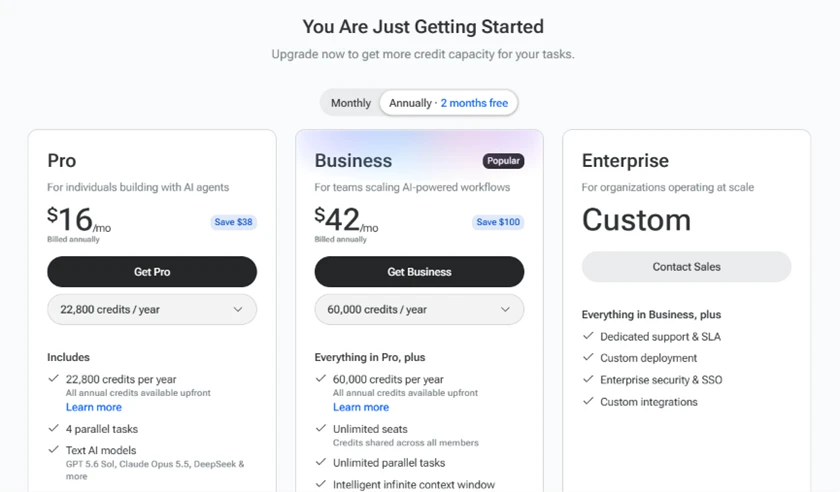
Pro runs $16 a month on annual billing and gives 22,800 credits a year, which works out to roughly 1,900 a month, plus 4 parallel tasks and the text models like GPT 5.6 Sol and Claude Opus 5.5. Business jumps to $42 a month for 60,000 credits with unlimited parallel tasks. Those are the annual rates, so monthly billing costs more, and all the credits land upfront rather than metering out month by month.
Mapped against my measured costs, Pro's monthly allowance covers around 270 text answers, or as few as 63 image-heavy tasks if they land at the 30-credit end. If your work is mostly research and writing, Pro is generous. If you lean on image generation, even the paid credits move faster than the headline number suggests.
| Dimension | Our test | User signal | Verdict | Composite |
|---|---|---|---|---|
| Coding Assistance Code quality and debugging help | 8 | 7.6 | Good | |
| Agent Autonomy Multi step execution depth | 6.5 | 6.2 | Moderate | |
| Ease of Use Interface and learning curve | 7 | 7.4 | Good | |
| Value for Money Perceived fairness of pricing | 5.8 | 5 | Weak | |
| Customer Support Responsiveness and resolution quality | 8.5 | 8.8 | Excellent | |
| Reliability Stability, speed, and consistency | 6.8 | 6.5 | Moderate | |
| Content Generation Research, writing, and images | 7.4 | 7.2 | Good |
Toolscopia uses cookies to keep you signed in, remember your preferences, and understand how our reviews get read. Analytics are anonymous. See our privacy policy for the full detail.






Comments 0
Join the discussion and share your perspective.
Sign in to post a comment and reply to other readers.
No comments yet
Be the first to share your perspective on this tool.