1
Text humanization for AI drafts
Widely praised for making AI text smoother and more natural without distorting original meaning.
GPTHuman AI cleans up stiff AI drafts and makes them read more naturally. It suits students, bloggers, and freelancers who need faster, more human sounding writing without losing core ideas.
Independent review — we test tools ourselves and analyze public user reviews. How we test.
GPTHuman AI delivers noticeably more natural, readable text, especially for students and writers smoothing AI generated drafts. Many reviewers say detectors flag content less and praise its gentle, non intrusive edits. However, a minority report buggy runs, low word limits for the price, and occasional slangy or unprofessional phrasing. Support can be slow when issues occur. Best suited to students, bloggers, and freelance writers who want faster cleanup of AI text and can still proofread the final output.
GPTHuman AI is a paid web tool that rewrites AI-generated text so it reads as human-written and slips past detectors like Turnitin, GPTZero, and Originality.ai. You paste text into a humanizer, pick a tone tier ranging from Standard up to PhD, set a stealth-versus-readability slider, and it returns a reworded version with a Human Score attached.
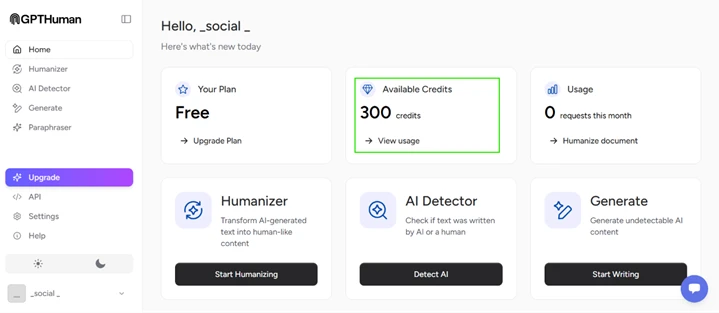
The pricing model is worth understanding before you sign up. It runs on credits at roughly one credit per word, and the free plan gives you 300 credits total, so about 300 words across your entire account, not per day. Short inputs under 250 characters are rejected outright.
Alongside the humanizer sit an AI detector, a paraphraser, and a content generator, though the detector is locked behind a paid upgrade. The core promise is undetectable rewriting, which puts the tool squarely in academic-integrity territory for the students who make up much of its audience. My testing below checks whether that promise actually holds.
Widely praised for making AI text smoother and more natural without distorting original meaning.
Frequently highlighted for improving readability and flow of essays, blogs, and academic work.
Many students report assignments passing institutional AI detectors after processing.
App can detect AI sounding language, positively noted by reviewers using it as a checker.
Some appreciate that edits refine text instead of completely changing tone or structure.
Heavily criticized by some for low limits relative to cost and workload needs.
Support staff receive both praise for helpful agents and criticism for slow responses.
One reviewer calls it the best free humanizer, suggesting at least some free tier access.
I ran GPTHuman on its free plan, which starts you with 300 credits and charges roughly one credit per word. That budget is small enough that I planned each test before spending it, starting with the easy cases and working toward the ones most likely to break the tool.
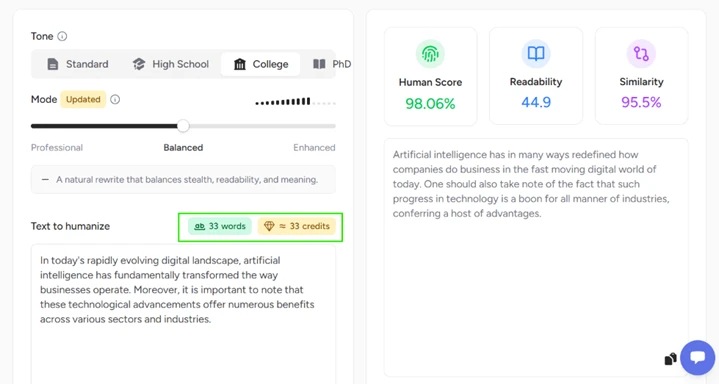
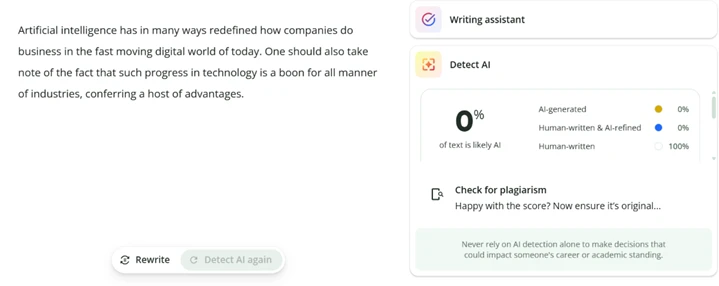
My first input was a generic AI paragraph about businesses and technology. GPTHuman rewrote it into cleaner sentences and returned a Human Score of 98.06 percent, readability of 44.9, and similarity of 95.5 percent. At 33 words it cost 33 credits, which sets the tone for the whole free tier.
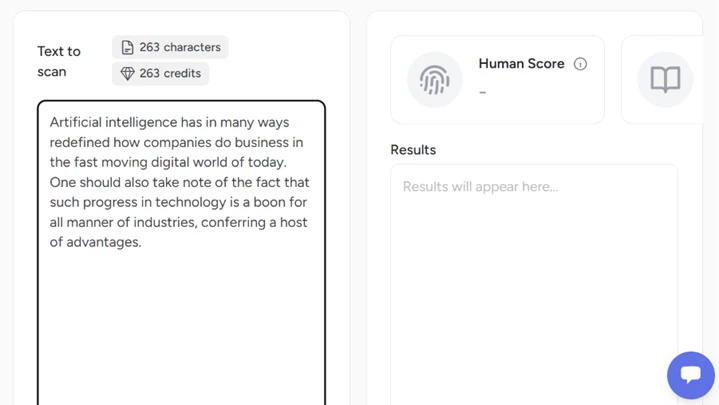
The built-in detector was locked behind a paid upgrade, so I could not use the tool to grade itself. I verified the output in two free detectors that American students and writers already use.
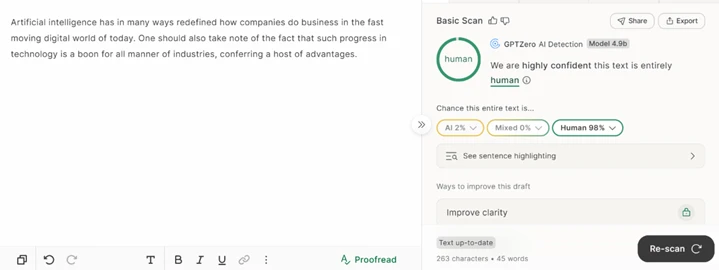
GPTZero returned 98 percent human. QuillBot returned 100 percent human, 0 percent AI. Both independent checks agreed with GPTHuman on natural prose.
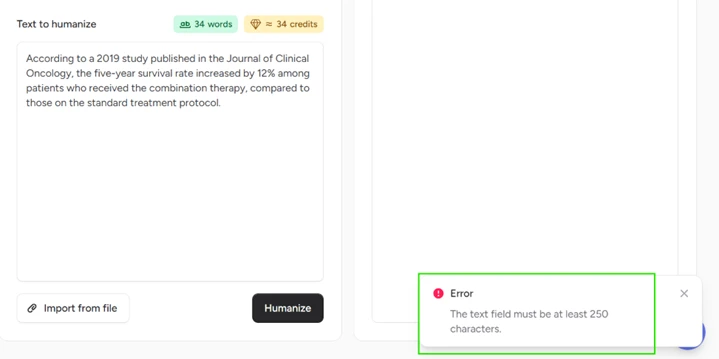
Next I pushed a medical citation packed with numbers to see whether the rewrite would corrupt any of them.
The first attempt never ran. GPTHuman refused any input under 250 characters, so short precise passages cannot be tested at all on the free plan.
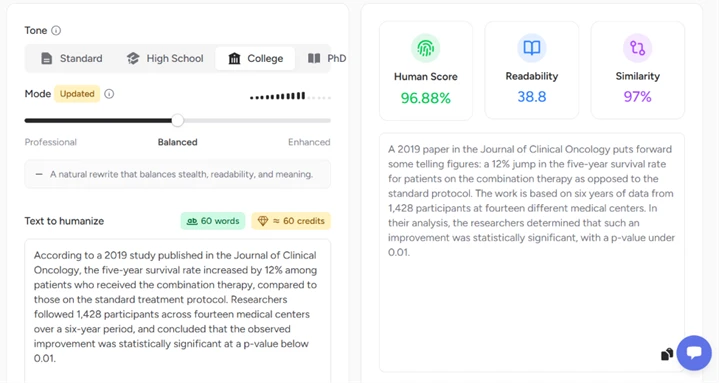
I expanded the passage past that floor and ran it. Every data point survived: the 2019 journal reference, the 12 percent survival figure, the 1,428 participants, the fourteen medical centers, the six years of data, and the p-value below 0.01. Human Score came back at 96.88 percent. Readability dropped to 38.8, which fits the denser subject matter rather than any failure in the rewrite.
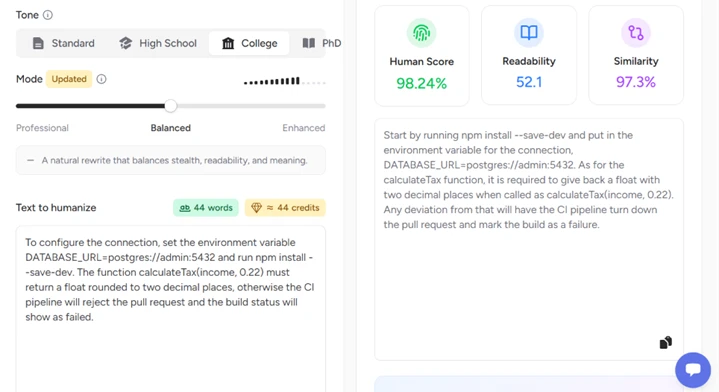
The last input was a block of technical instructions with code tokens, a database URL, a port number, and a function signature. GPTHuman preserved all of the syntax exactly and scored the output at 98.24 percent human. It did reorder the two setup steps, putting the install command before the environment variable that the original listed first, which matters for anyone following the text as a real procedure.
Then I ran that same technical output back through QuillBot. It came back 100 percent AI-generated, 0 percent human.
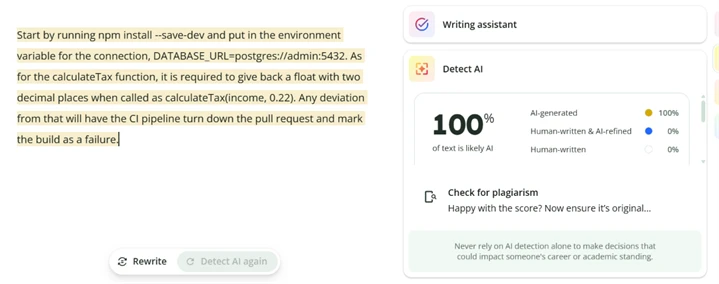
This is the clearest result of the whole test. GPTHuman says 98 percent human, an independent detector says 100 percent AI, and the two verdicts sit on the same piece of text. The pattern across my samples is consistent rather than random: plain prose cleared both external detectors, while code-heavy content was caught immediately. The likely reason is that the syntax GPTHuman correctly left untouched is itself the strongest machine signal, so the tool cannot disguise it without breaking it.
Across four paid tests I spent about 165 credits and found one real failure, one hard limit at 250 characters, one paywalled detector, and strong performance on ordinary writing. The tool works on the prose most people will feed it, and its stealth claim collapses the moment the text carries code.
| Dimension | Our test | User signal | Verdict | Composite |
|---|---|---|---|---|
| Output Quality Naturalness and readability | 8.5 | 9 | Excellent | |
| Detector Compatibility Performance against AI detectors | 8 | 8.5 | Good | |
| Ease of Use Learning curve and usability | 8.5 | 9 | Excellent | |
| Reliability Stability and error frequency | 6.5 | 6.5 | Moderate | |
| Customer Support Speed and helpfulness | 6.5 | 6 | Moderate | |
| Value for Money Limits versus pricing | 6 | 5.5 | Weak |
Toolscopia uses cookies to keep you signed in, remember your preferences, and understand how our reviews get read. Analytics are anonymous. See our privacy policy for the full detail.



Comments 0
Join the discussion and share your perspective.
Sign in to post a comment and reply to other readers.
No comments yet
Be the first to share your perspective on this tool.