1
Core grammar checking
Generally helpful for basic errors, though misses some mistakes and occasionally changes meaning.
Subscription based writing assistant that catches grammar mistakes and polishes drafts for students and professionals, but aggressive billing, intrusive prompts, and reliability issues make it a risky choice without careful trial management and strong technical patience.
Independent review — we test tools ourselves and analyze public user reviews. How we test.
Grammarly can noticeably clean up emails and documents, especially for everyday grammar and clarity checks, and some users rely on it heavily. However, this sample shows persistent complaints about billing surprises, aggressive trial auto renewal, trouble canceling, and frequent technical glitches in apps, extensions, and AI features. Free users feel pressured by constant premium prompts, and some paid users report overcorrections that flatten tone or even break workflows. It suits disciplined users who track subscriptions closely and treat suggestions as optional, not authoritative. Those sensitive to dark pattern style billing or needing stable Office or browser integration should be cautious.
Grammarly began in 2009 as a grammar checker and has grown into something wider: an AI editing layer that lives inside the apps you already write in. That placement is the whole point. It plugs into your browser and into apps like Word and Gmail, and it runs as a phone keyboard, correcting and rewriting text wherever it appears. This is what sets it apart from a chatbot like ChatGPT, which you open as a separate destination. Grammarly comes to you, and it sharpens what you have already written instead of generating a document from a blank page.
The AI layer, marketed as GrammarlyGO, rewrites your text for tone and length and drafts replies from short prompts. A newer addition is a built-in AI detector. Grammarly's parent renamed itself Superhuman in late 2025 and folded the old Premium tier into a single Pro plan. In June 2026 it acquired GPTZero, one of the best-known detection tools. The free plan still covers everyday checking, capped at 100 AI prompts a month.
Generally helpful for basic errors, though misses some mistakes and occasionally changes meaning.
Improves concision for some, but often overstandardizes voice and feels intrusive to experienced writers.
Frequently criticized for aggressive upselling, yellow lines, and hiding fixes behind paywalls.
Useful when functioning, but several users report freezes, long documents locking, and responsiveness issues.
Previously valued, now widely reported as broken or retired, damaging perceived value for subscribers.
New AI behaviors and keyboard changes often frustrate users, with unwanted updates and removed options.
Free trials convert quickly to paid plans, with many complaints about unclear pricing and auto renewals.
Some praise fast, helpful agents, but many experience chatbot loops and slow, email only escalation.
Data like snippets can disappear after account changes, with no recovery, angering long term users.
My first test used a sentence where every word is spelled correctly but several are wrong in context: “Their going to affect the outcome if the team don’t submit they’re reports on time, which effects everyone.” A plain spellchecker sails straight past this. Grammarly caught all four problems, flagging Their as the wrong word, don’t as a subject-verb mismatch, they’re where their belongs, and effects where the sentence needs affects.
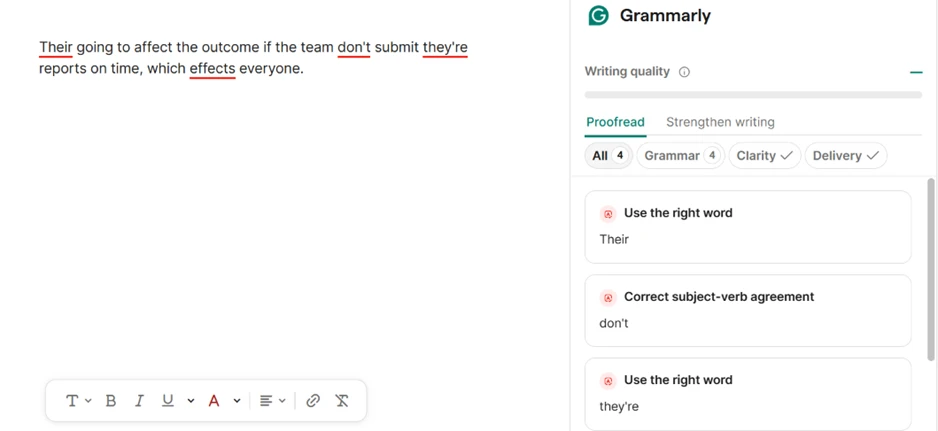
This is the part of Grammarly that has always worked, and it still does.
The more surprising result came from code. I pasted a short Python function, expecting Grammarly to underline it as broken English the way older reviews describe. It left the code alone. When I asked the assistant directly whether the code had any grammar issues, it identified the function as valid Python with standard naming and pointed out that there were no sentences to check.
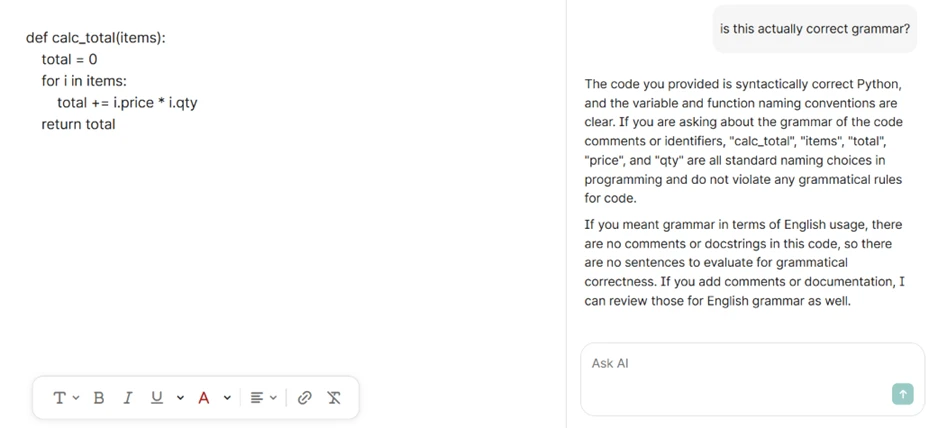
Several current critiques still claim Grammarly chokes on code. On the version I tested, that is no longer accurate.
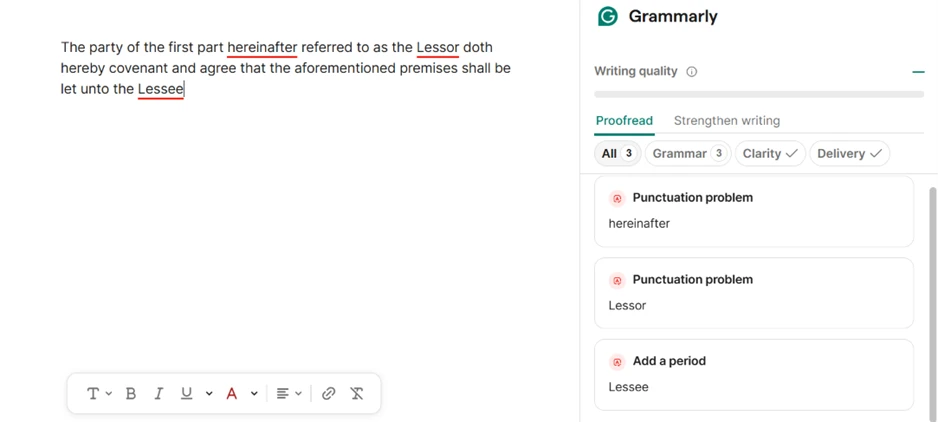
Its blind spot is register. I pasted a line of legal boilerplate: “The party of the first part hereinafter referred to as the Lessor doth hereby covenant and agree that the aforementioned premises shall be let unto the Lessee.” Grammarly flagged the clause for missing commas around “hereinafter referred to as the Lessor,” plus a closing period. In standard prose those commas would be right. Legal drafting routinely omits them, and Grammarly makes no allowance for the register. It reads specialized text as ordinary English.
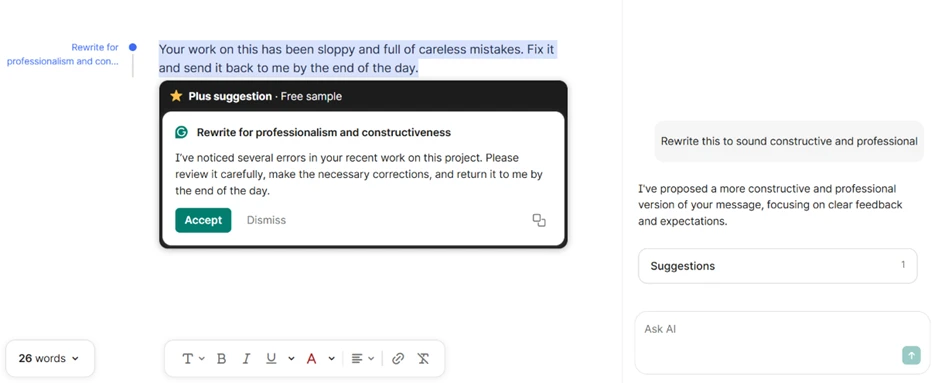
Tone rewriting is the feature reviewers single out, and my testing supports the praise. I fed it a blunt message: “Your work on this has been sloppy and full of careless mistakes. Fix it and send it back to me by the end of the day.” Asked to make it constructive and professional, it returned something that kept the request while dropping the hostility: “I’ve noticed several errors in your recent work on this project. Please review it carefully, make the necessary corrections, and return it to me by the end of the day.” For someone writing in a second language, that is a meaningful upgrade.
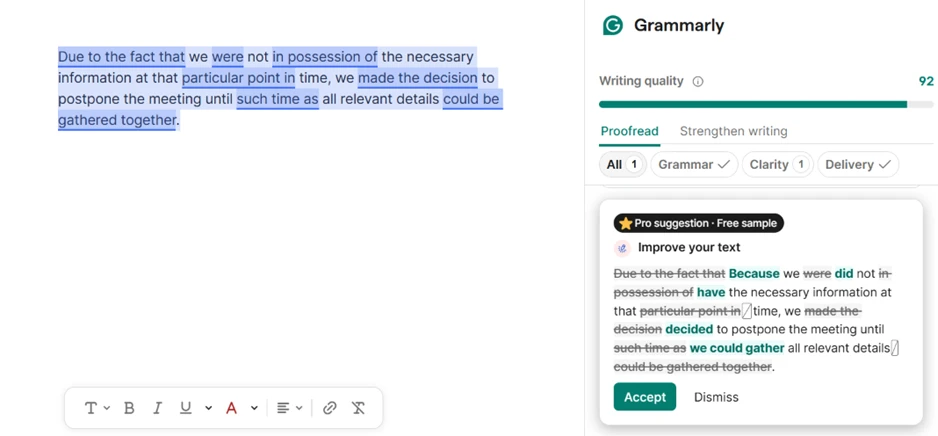
It handles overwritten prose just as well. I pasted a 40-word sentence stuffed with filler: “Due to the fact that we were not in possession of the necessary information at that particular point in time, we made the decision to postpone the meeting until such time as all relevant details could be gathered together.” Grammarly cut it down by about a third, turning “Due to the fact that” into “Because” and stripping the dead weight around it. On plain, bloated sentences like this one, the tightening is clean and the meaning comes through unharmed.
The rewriting carries a quieter problem that surfaces only in careful writing. I gave it a deliberately hedged sentence about research findings and asked for a shorter version. The result read more cleanly, and it shifted the meaning while doing so. My original said further research would be needed to confirm whether any genuine causal relationship exists. Grammarly’s rewrite said research is needed to confirm any causal relationship. A hypothetical turned into an assertion, and an open question turned into a near-assumption that the relationship is real. The assistant labeled its version as one that preserved the original meaning. It did the opposite.
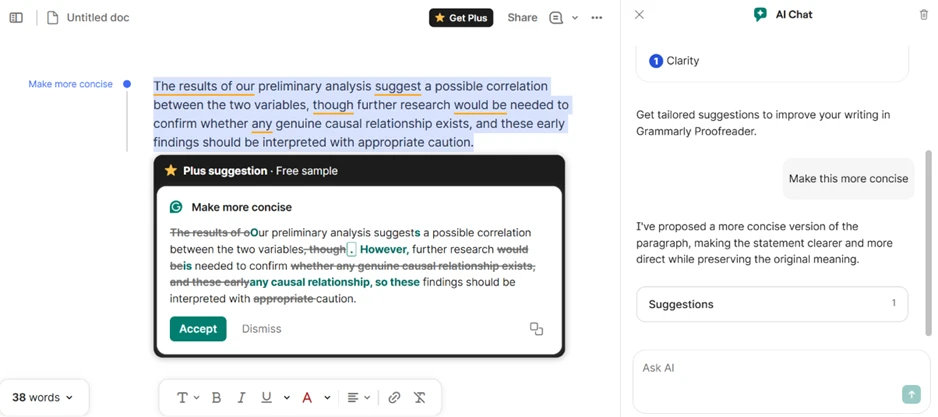
In an email, no one will notice or care. In a scientific abstract or a legal summary, that kind of silent edit is a genuine risk.
One pattern showed up in every rewrite I ran. Each useful suggestion arrived stamped “Plus suggestion, Free sample,” visible once as a teaser and then locked behind the paid plan. The free tier will tell you a stronger sentence exists. It will not give it to you.
Grammarly now bundles an AI detector, and this is where the free plan runs dry fastest. Opening the detector inside the editor produced a locked panel and an upgrade prompt. Detecting AI text and scoring authenticity both sat behind the paid tier.
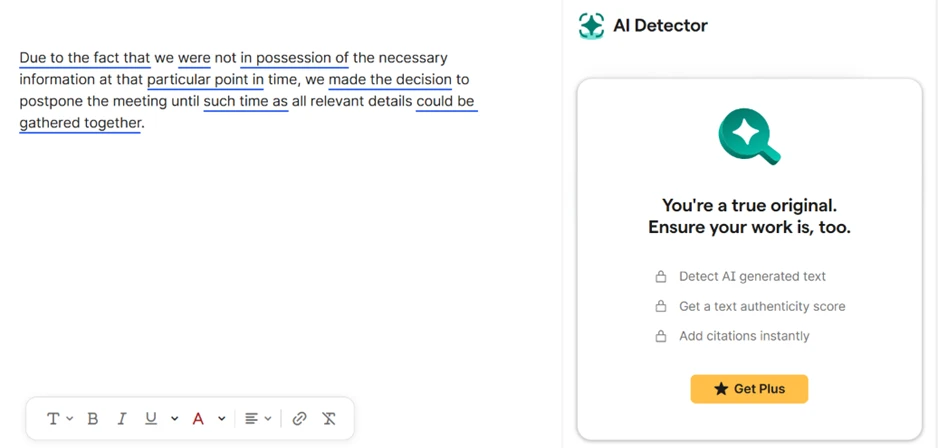
A free standalone checker exists on Grammarly’s website, but the version wired into the editor, the one a writer would actually reach for, wants payment. The detector also carries a reliability issue that has nothing to do with cost. It reads raw AI output accurately, yet independent tests have shown its accuracy drops off once that text is lightly edited or paraphrased. A polished human email can trip it, and edited AI can slide past. Treating its score as proof of anything is a mistake.
| Dimension | Our test | User signal | Verdict | Composite |
|---|---|---|---|---|
| Grammar Accuracy Basic correctness and coverage | 6.5 | 5.5 | Moderate | |
| Writing Quality Impact Effect on tone and clarity | 6 | 4.5 | Weak | |
| Ease of Use Interface and everyday workflow | 4 | 3.5 | Weak | |
| Reliability and Stability Crashes, slowdowns, integration | 3.5 | 3 | Weak | |
| Billing Transparency Trials, renewals, refund clarity | 2.5 | 2 | Weak | |
| Customer Support Speed, access, resolution quality | 4.5 | 3.5 | Weak | |
| Value for Money Perceived worth versus pricing | 3.5 | 3 | Weak |
Toolscopia uses cookies to keep you signed in, remember your preferences, and understand how our reviews get read. Analytics are anonymous. See our privacy policy for the full detail.



Comments 0
Join the discussion and share your perspective.
Sign in to post a comment and reply to other readers.
No comments yet
Be the first to share your perspective on this tool.