1
Cinema Studio video model
Praised for cinematic look, realistic motion, and strong short form video output.
Creator focused AI platform for generating cinematic videos, images, and social content. Excellent output, rich tools, but complex interface, strict billing rules, and confusing credit policies demand careful, committed users.
Independent review — we test tools ourselves and analyze public user reviews. How we test.
Higgsfield delivers impressive visual quality, strong cinematic controls, and a deep toolkit that serious creators find inspiring and often indispensable. Customer support is frequently praised as fast, human, and solution oriented. However, subscription renewals, credit expiry, and refund refusals generate heavy frustration, and the interface can feel overwhelming or inconsistent. It suits creators willing to invest time learning a complex platform and who are comfortable managing strict billing and policy constraints.
Higgsfield AI is a generative media platform that puts several of the leading image and video models under one roof. The lineup includes Seedance 2.0, Nano Banana Pro, GPT Image 2, and Gemini Omni Flash, sitting alongside Higgsfield's own tools like Soul and Cinema Studio. The company was founded by Alex Mashrabov, who previously ran generative AI at Snap, and it first drew attention in 2024 for camera motion presets that gave AI video some directorial control.
Since then it has grown from a video generator into a full creative suite. Cinema Studio targets filmmaking with camera and lens control. Marketing Studio produces creator style ad content for brands. An agent layer called Supercomputer plans multi step jobs across all of it, and plugins carry the same tools into After Effects and other editing apps. There is even an MCP connection that lets Claude drive the platform from outside.
Everything runs on credits. Each generation carries a price set by the model and settings you pick, which is why the account balance matters so much in the walkthrough that follows.
Praised for cinematic look, realistic motion, and strong short form video output.
Gives granular control over compositions, but some users report slowness and failed generations.
Hosts many leading AI engines in one place, valued by power creators.
Supports complex app builds and conversations, with occasional stuck sessions resolved by support.
Considered great value by some, but others complain about slow queues and hidden toggles.
Seen as fair by some heavy users, but many criticize high costs and fast credit burn.
Popular with Instagram style creators automating daily content.
Example prompts and tutorials appreciated, help reduce the steep learning curve.
Model filters and policy enforcement cause false positives and contentious suspensions.
I set aside an afternoon to test Higgsfield and screenshot every step. This is the session in the order it happened.
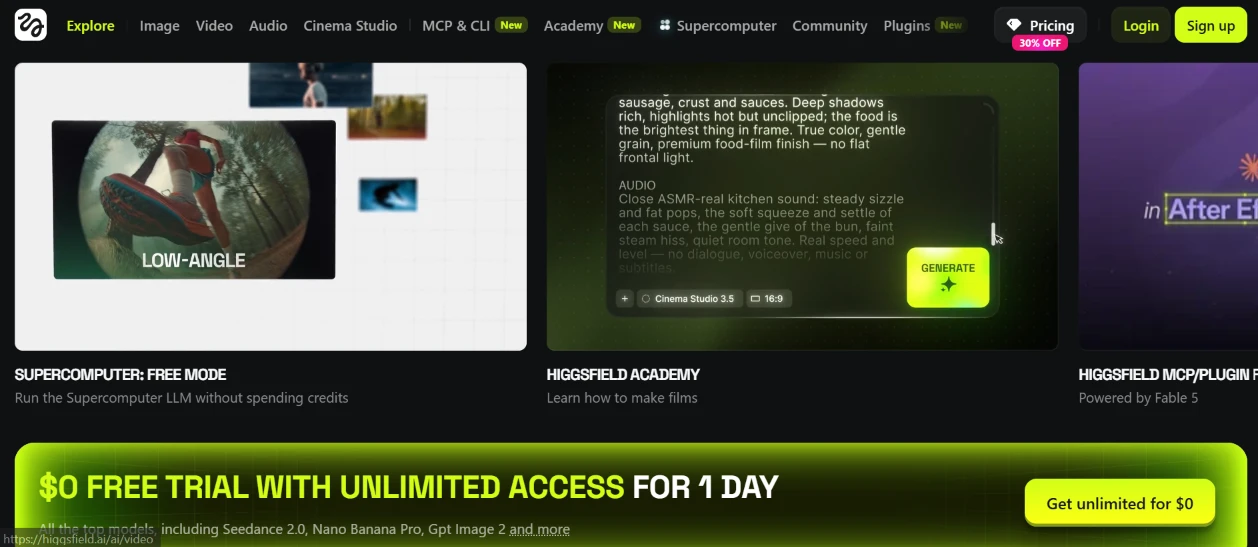
I opened higgsfield.ai logged out. The top navigation alone signals how much is packed into this platform: Explore, Image, Video, Audio, Cinema Studio, an MCP & CLI tab marked New, Academy, Supercomputer, Community, Plugins. Under it, promo cards rotate. One pushes a free Supercomputer mode that runs without spending credits, and another links to Academy, the built in film school. A third card advertises the After Effects plugin, powered by Claude Fable 5.
The loudest element is the lime banner at the bottom: a $0 free trial with unlimited access for one day. It names Seedance 2.0 and Nano Banana Pro among the included models, with GPT Image 2 tucked into the fine print. The Pricing button carries a 30% off tag. My plan at this point was simple: sign up for that free access and start generating.
First impression before login: the page sells hard. Every card glows and half the nav items wear a New badge, with the trial banner positioned as the first thing you click. It worked on me.
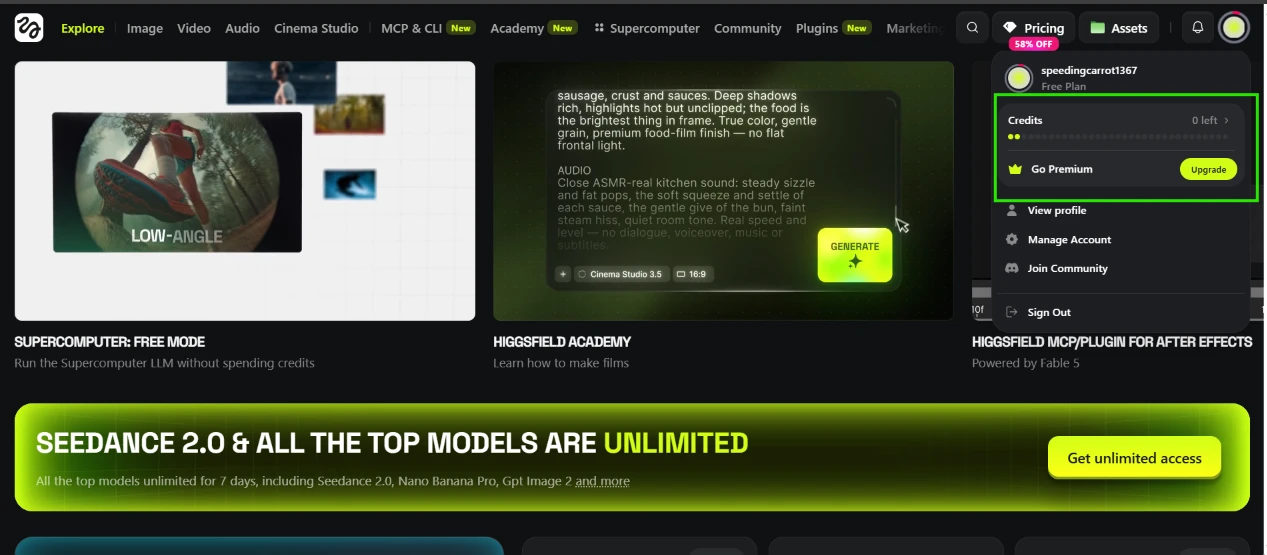
I created an account and opened the profile dropdown, expecting a starter allowance. The panel showed my username, speedingcarrot1367, a Free Plan label, and a credit counter reading 0 left.
Zero. Nothing to spend anywhere on the site.
Two things changed after login. The Pricing discount jumped from 30% to 58% off, and the bottom banner swapped the one day $0 trial for a pitch about seven days of unlimited access to the top models. Same homepage, different pressure. The free trial I had signed up for never appeared in my account, and every Generate button on the platform now pointed back at the Upgrade button sitting in that dropdown.
This soured the session more than anything that followed. A free plan that starts and stays at zero credits is a paywall wearing a free plan label. Since I could not run a single generation, I shifted from testing features to exploring them, and the rest of this piece walks through each product area and notes what it claims to do for an account that cannot press Generate.
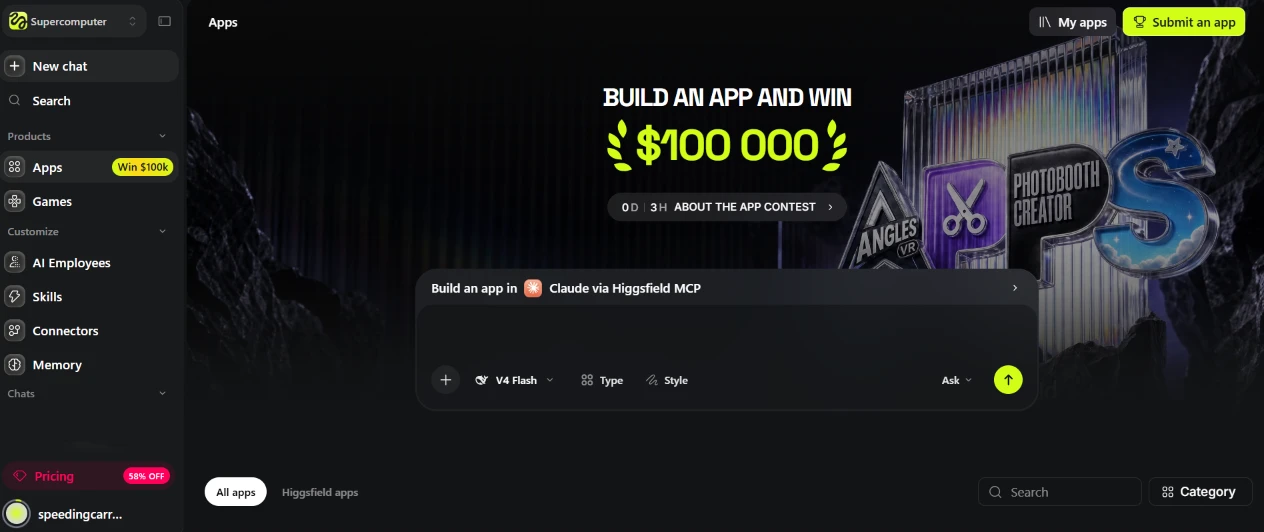
Inside the Supercomputer section sits an Apps area, and a banner across it announces an app building contest with $100,000 on the line. The countdown read 0 days and 3 hours when I arrived, so I caught it in the final stretch. Below the banner is a prompt box labeled Build an app in Claude via Higgsfield MCP, with a model picker set to V4 Flash plus Type and Style buttons.
The left sidebar is laid out like an agent workspace. A New chat button up top, a Products group holding Apps and Games, then a Customize group with AI Employees, Skills, Connectors, Memory. The idea, as Higgsfield describes it, is that you type a plain sentence and the agent plans the build, showing the credit cost for approval before anything renders. The wider Apps library holds more than 80 small single purpose tools, lipsync and face swap utilities and the like.
I could click into the prompt box and type, but with a zero balance there was no point pressing Ask. What I could do was browse the gallery underneath, which splits into All apps and Higgsfield apps tabs with search and category filters. That browsing is free, which made it the only working part of this page for me. The Claude connection is the interesting bit: app building here runs through MCP rather than some in house code model.
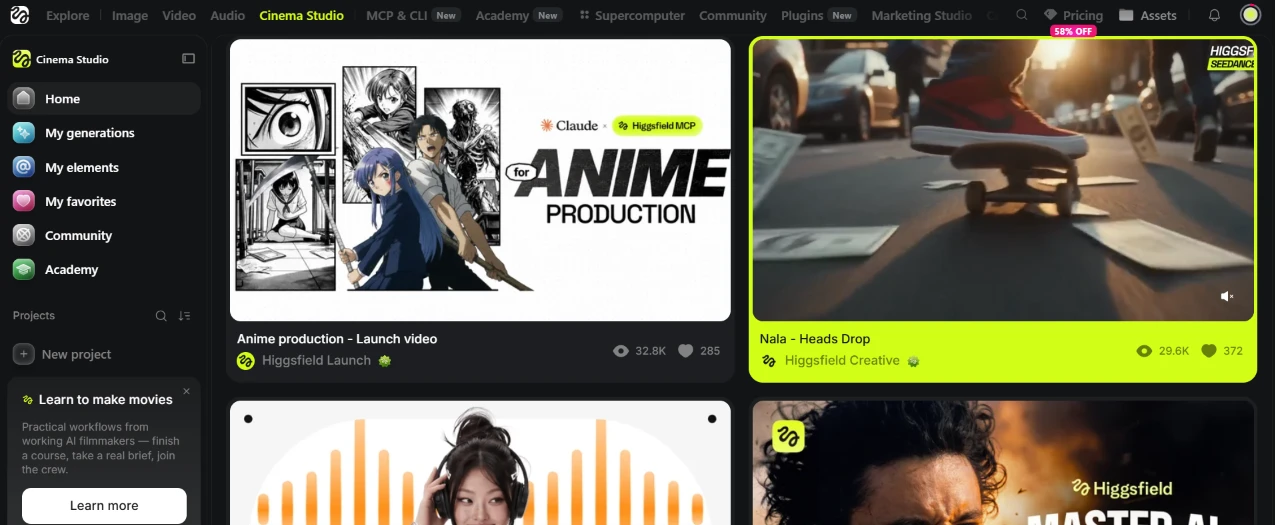
Cinema Studio opens into a project home with its own sidebar: Home, My generations, My elements, My favorites, Community, Academy. A New project button sits under the Projects search, and a promo card in the corner sells a filmmaking course that ends with a real brief and a crew.
My generations page was empty and destined to stay that way, so the Community feed carried the visit. The top item was an anime production launch video made with Claude and the Higgsfield MCP, sitting at 32.8K views. Beside it, a clip called Nala - Heads Drop from Higgsfield Creative showed 29.6K views and 372 likes, wearing a Seedance tag.
On paper, this studio is the deep end of the platform. Version 3.5 advertises per shot camera control, lens and focal length choices, genre presets, and an AI Director that handles technical setup for people who have never lit a scene. Shared projects support live collaboration, with a team generating inside one project chat.
Touring a film studio through glass is a strange experience. The community output looked polished at feed level and the interface felt organized. Every door I tried still led to the upgrade screen.
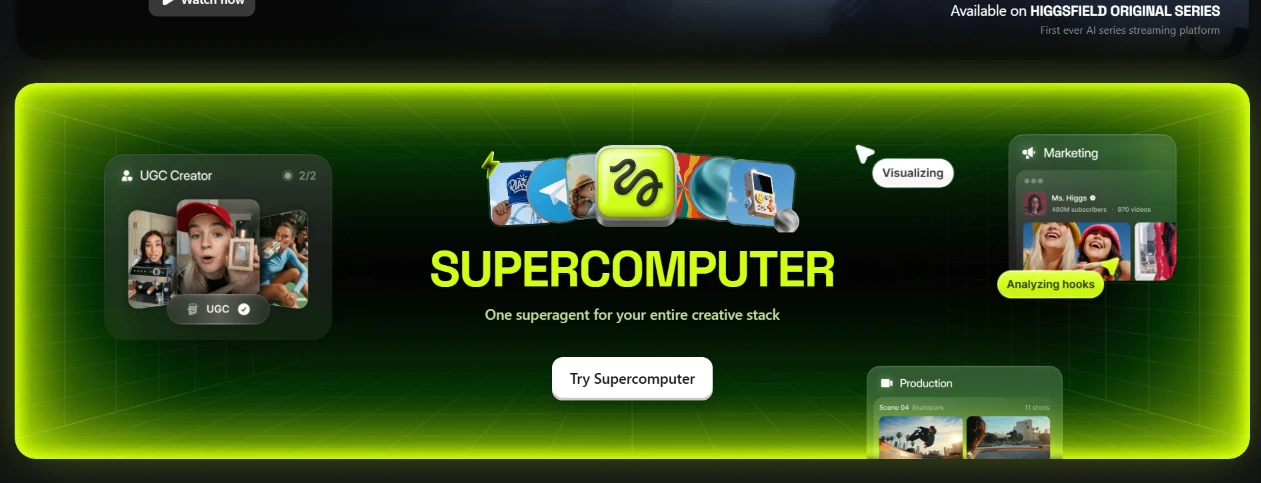
Scrolling on, I hit the Supercomputer banner: one superagent for your entire creative stack, with a Try Supercomputer button in the middle. Floating around the headline are little product windows, a UGC Creator card, a Visualizing label, a Marketing card fronted by an AI creator named Ms. Higgs with 480M subscribers and 970 videos under her name, and a Production card broken into scenes. A strip above mentions Higgsfield Original Series, described as the first AI series streaming platform.
The promise behind the button: write a brief in normal language, and the agent decides which model handles each job, since the whole model lineup shows up as auto. Spend approval happens before rendering starts.
The 480 million subscriber count on a fictional creator made me laugh out loud. The design language here is confidence bordering on parody, and since the Try button routes a broke account straight to pricing, confidence was the only thing I could evaluate.
I moved on.

Marketing Studio greets you with a wall of vertical clips under a line about what creators and brands are making with it. The grid reads like a TikTok feed: a group singing karaoke under neon, a woman holding up a striped tumbler, another unfolding a star print sweater in her bedroom, a fourth posing in orange sunglasses and a leather top. One clip carries the username byzantinetiger1459 and 408 likes.
None of these people exist, and that is the entire pitch. The studio runs on Seedance 2.0 and targets commercial content, including a URL to video flow where a product link goes in and ad creatives come out in multiple formats.
Here is my honest reaction as someone who was hunting for AI tells: at thumbnail size I found none. The lighting, the bedroom clutter, the handheld framing, the slightly awkward product grip, every detail reads like a phone video from a mid tier creator. This grid did more to convince me the underlying models work than any banner on the site. The 58% discount badge followed me here too, parked in the top corner.
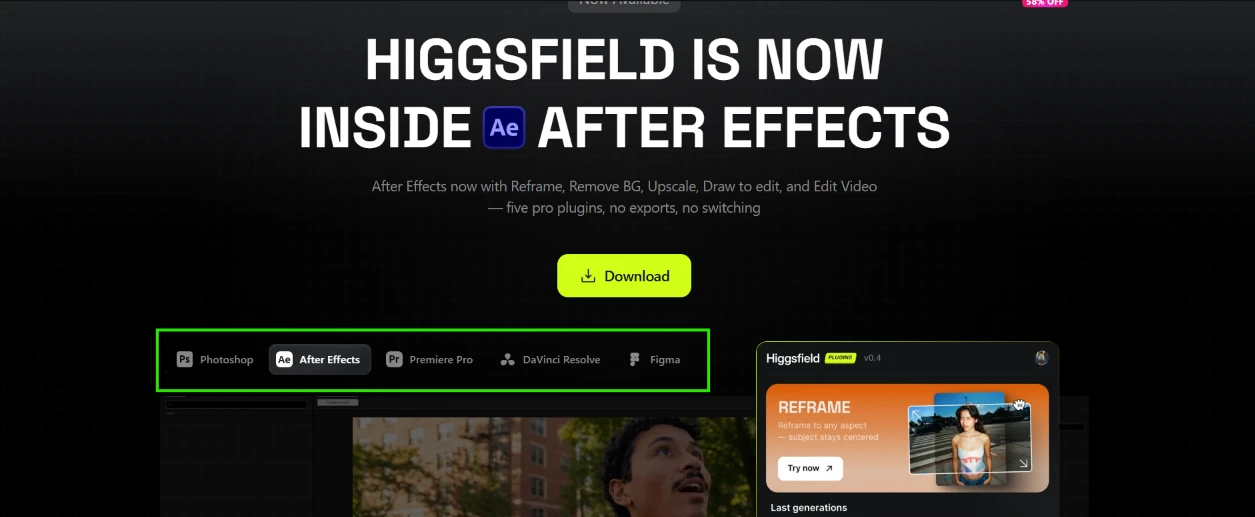
Next, Plugins. The page leads with a full width headline announcing that Higgsfield now lives inside After Effects. The subline lists five tools shipping in that panel: Reframe, Remove BG, Upscale, Draw to Edit, and Edit Video, framed as five pro plugins with no exports and no app switching. A tab row underneath covers the other hosts: Photoshop, After Effects, Premiere Pro, DaVinci Resolve, Figma.
To the right sits a screenshot of the actual panel at version 0.4, with Reframe promoted on top. The promise there is reframing footage to any aspect ratio while the subject stays centered, which is the tedious part of adapting one edit for several platforms.
A v0.4 label on a public download is at least honest about maturity. I pressed Download but skipped the install, because the panel bills against the same account balance, and mine reads zero. By this point the pattern of the whole platform had settled in: every surface is browsable, every action is metered.
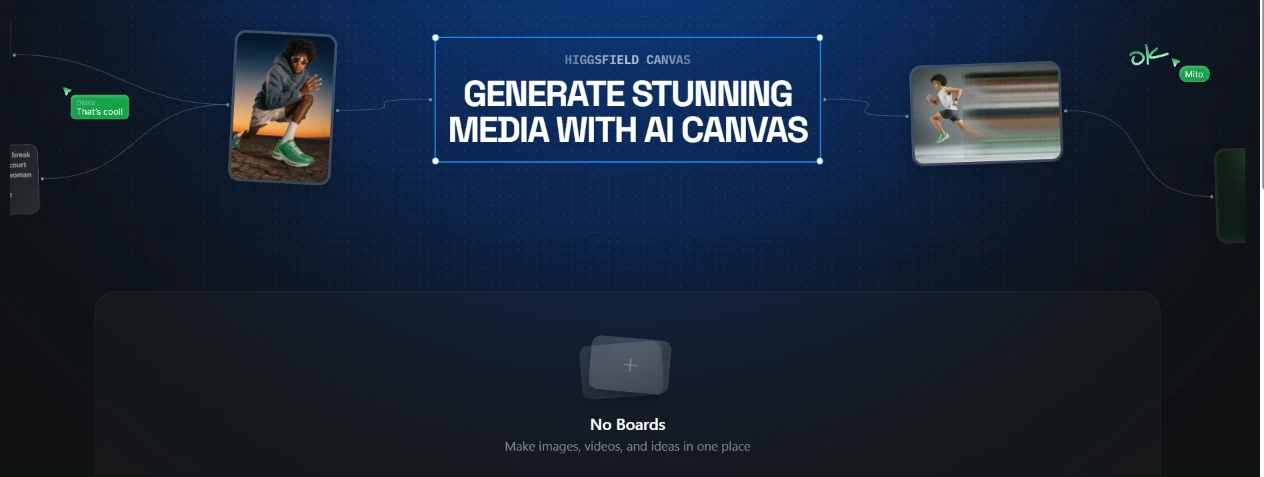
Higgsfield also has a Canvas, a node based board for chaining generations. The promo image shows two outputs, a guy in a hoodie and a runner smeared with motion blur, wired together with connectors, while small comment bubbles from collaborators hang beside the nodes. Below the promo, my own workspace displayed an empty state: No Boards, with a subtitle about keeping media and ideas in one place.
Anyone who has touched ComfyUI or a Figma style whiteboard will recognize the shape of this. Outputs become cards and cards chain into pipelines, with teammate comments pinned inline.
My board stayed empty, of course.
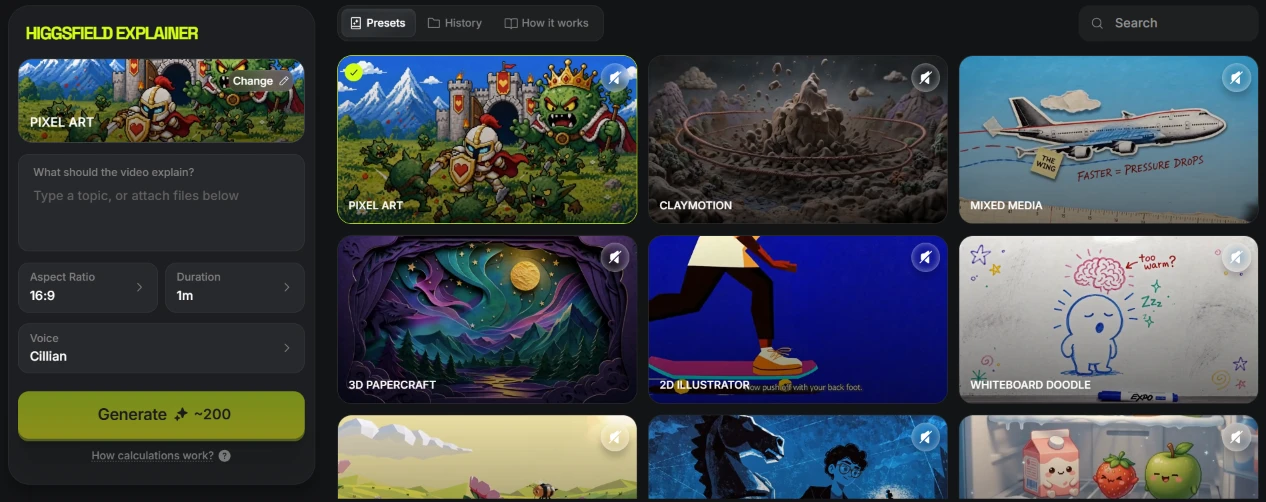
The last stop was Higgsfield Explainer, and it gave me the clearest view of per generation pricing on the whole site. The left panel is a plain form with four controls: a topic field asking what the video should explain, an aspect ratio set to 16:9, a duration set to one minute, a voice picker showing Cillian. Under the form, the Generate button states its price: roughly 200 credits for that one minute video, with a small link explaining how the calculation works.
The right side is a preset wall, and it is the most fun surface I found all day. Pixel Art was selected on my screen, a knight squaring up against a Bowser style boss on a mountain path. Around it sat Claymotion, Mixed Media, 3D Papercraft, 2D Illustrator, Whiteboard Doodle, with more styles below the fold. Each preset is a complete visual identity for the finished explainer, and tabs along the top hold History and How it works.
So the closing math on my account: one explainer costs about 200 credits and my balance sits at zero, with no refill coming on the Free Plan. The form was the closest I got to generating anything all session. I typed a topic into the field anyway. Then I looked at the Generate button for a bit and closed the tab.
| Dimension | Our test | User signal | Verdict | Composite |
|---|---|---|---|---|
| Output Quality Visual realism and consistency | 9 | 9.2 | Excellent | |
| Ease of Use Interface clarity and learning | 6.5 | 6 | Moderate | |
| Value for Money Perceived fairness of pricing | 6.8 | 6 | Moderate | |
| Customer Support Speed and helpfulness of support | 8 | 8.5 | Good | |
| Billing Transparency Clarity of renewals and credits | 5.5 | 4.8 | Weak | |
| Reliability and Stability Bugs, stuck jobs, false flags | 7.2 | 6.8 | Good |
Toolscopia uses cookies to keep you signed in, remember your preferences, and understand how our reviews get read. Analytics are anonymous. See our privacy policy for the full detail.



Comments 0
Join the discussion and share your perspective.
Sign in to post a comment and reply to other readers.
No comments yet
Be the first to share your perspective on this tool.