1
AI image upscaling
Frequently praised for turning tiny or blurry images into clear high resolution versions, sometimes up to 16 times size.
Img2Go is an online image toolkit focused on AI upscaling, compression, colorization, and quick edits, ideal for people who need fast, good looking results without complex software.
Independent review — we test tools ourselves and analyze public user reviews. How we test.
Img2Go delivers impressive image quality, especially for AI upscaling, compression, and colorization, and most reviewers find it fast, free friendly, and very easy to use. The service is widely used for daily workflows and even professional design tasks. However, a recent workflow update frustrated at least one long term user, the AI image generator disappoints, and some features feel limited on the free tier. It suits users who care more about quick high quality transformations than highly customizable or advanced creative controls.
Img2Go is a browser-based image platform built by the team behind Online-Convert, and its AI layer is the newer half of the product. Instead of installing software, a person opens a tool in the browser and the processing happens on Img2Go’s servers.
The AI side pulls several jobs under one roof. It handles image upscaling, background removal, colorization of old photos, image restoration, similar-image creation, and face blurring for privacy. An AI photo editor takes a plain text instruction and applies the change, while a separate AI art generator produces original pictures from a written description across many visual styles.
What sets the AI apart from a standard editor is intent. A resize tool follows fixed math, but these features make a judgment about the pixels, filling in detail during an upscale or deciding where a subject ends during a cut-out.
Files can be pulled in from a device or a cloud account, and most tools run without an account, which keeps the AI features open to casual users rather than locked behind a signup.
Frequently praised for turning tiny or blurry images into clear high resolution versions, sometimes up to 16 times size.
Users highlight excellent compression ratios with almost no visible quality loss, helpful for email and web sharing.
Colorization of old or monochrome photos receives strong praise for accurate, pleasing colors and easy automatic mode.
Basic editing such as resizing and quick tweaks described as easy, fast, and suitable for everyday website work.
Conversion from video to GIF noted as reliable and consistently meeting expectations for simple animation tasks.
Free access repeatedly appreciated, including offers like 10 free upscales and teacher or student friendly options.
New AI generator criticized for poor alignment with prompts and suspicion about source images.
Users like running tasks in browser with no account creation, IDs, or captchas required for many tools.
I ran Img2Go through four real jobs without creating an account or logging in once. Each tool opened straight to a workspace and accepted my files right away. Here is what came out of each one, and where the free tier started to push back.
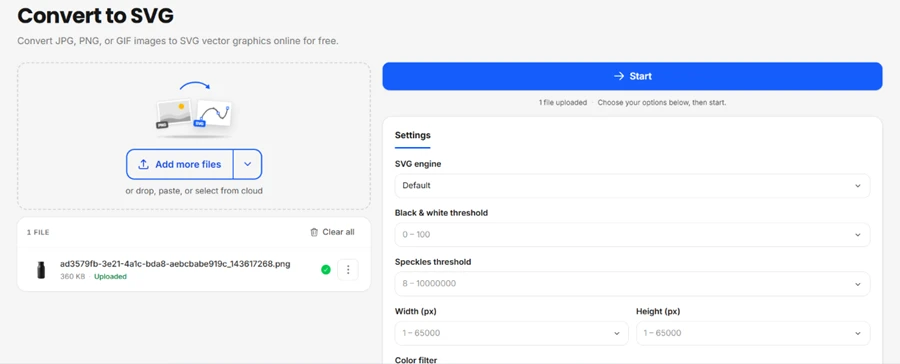
My first job was turning a 360 KB PNG into an SVG vector. The converter kept its controls in the open. An SVG engine selector, a black and white threshold, a speckles threshold, width and height fields, and a color filter all sat in the settings panel before I pressed Start.
The trace came back clean for a flat graphic, which is exactly where this kind of conversion earns its keep. A detailed photo would be the wrong input for it.
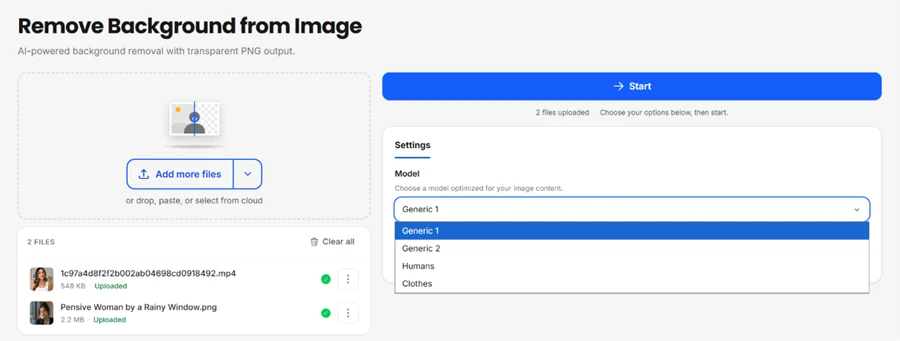
Next I loaded two files into the background remover, a 2.2 MB portrait PNG and a 548 KB MP4, then opened the model menu. It gave me four picks: Generic 1, Generic 2, Humans, and Clothes. The tool adapts to the subject instead of running one blanket model.
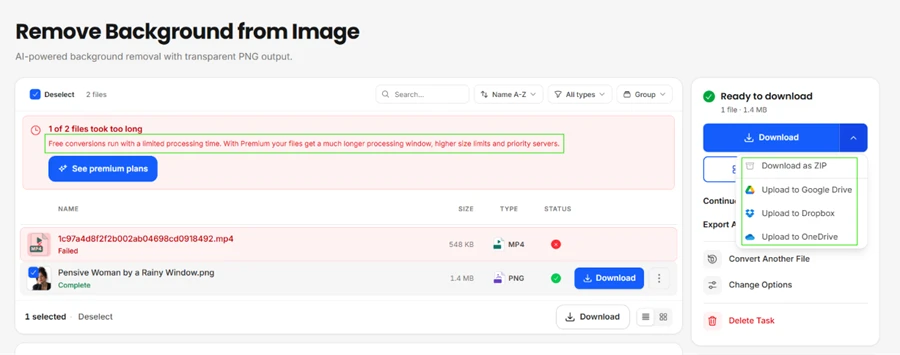
Processing split the two files apart. The portrait finished in seconds and handed back a 1.4 MB transparent PNG. The MP4 failed with a red warning that one of the two files took too long, and Img2Go spelled out why: free conversions run on a limited processing window, while premium opens a longer window with higher size limits on priority servers.
The cut-out itself held up. Hair edges stayed intact against the transparency grid, with no halo around the loose strands.

Getting the result out stayed easy with no account attached. Img2Go offered several exits: direct download, ZIP, Google Drive, Dropbox, and OneDrive.
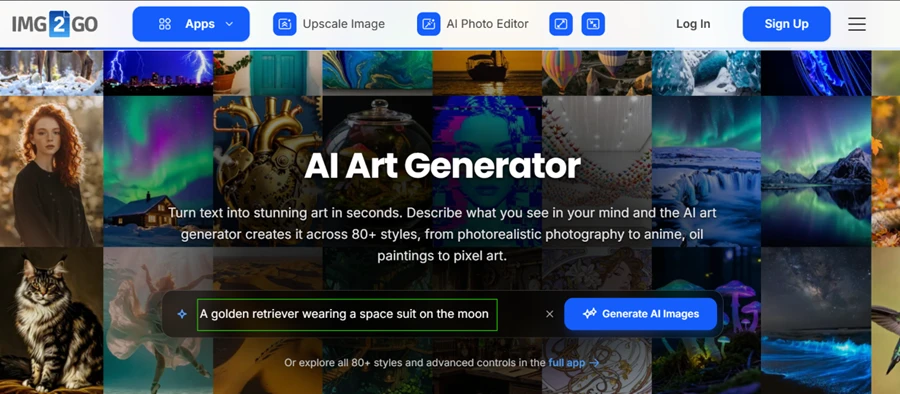
The AI art generator ran fully in the browser while the Log In and Sign Up buttons sat untouched in the corner. I gave it one prompt: A golden retriever wearing a space suit on the moon.
It queued four images together and showed a live progress state around eleven seconds in.
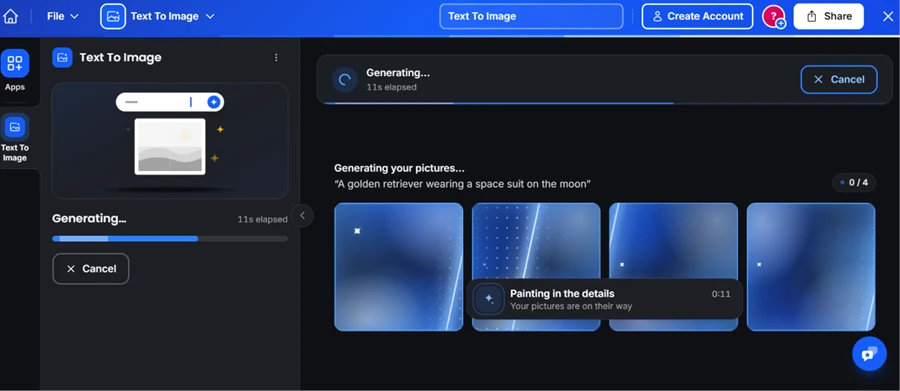
The four results came back coherent. The retriever read correctly in a proper space suit, and the lunar backdrop stayed consistent across all four frames, with none of the melted faces or spare limbs that cheaper generators throw out.
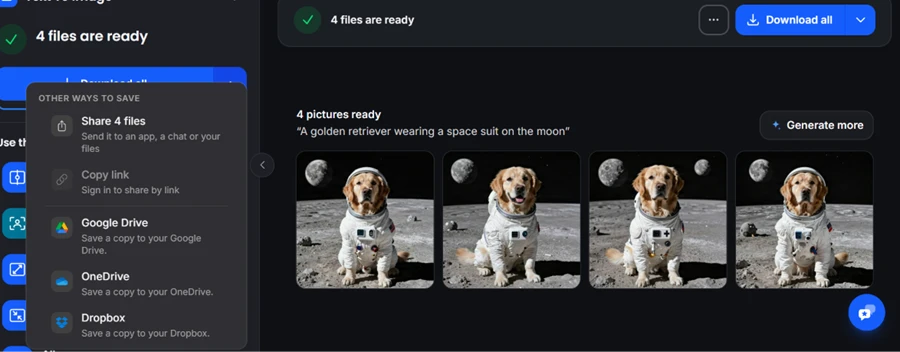
Saving matched the rest of the suite, with a share sheet and the same cloud destinations I had seen on the earlier tools.
The pricing page confirmed what the testing had already shown me. A genuine $0 Free plan exists and covers most apps, so the tools I used are not a time-limited trial that expires on me.
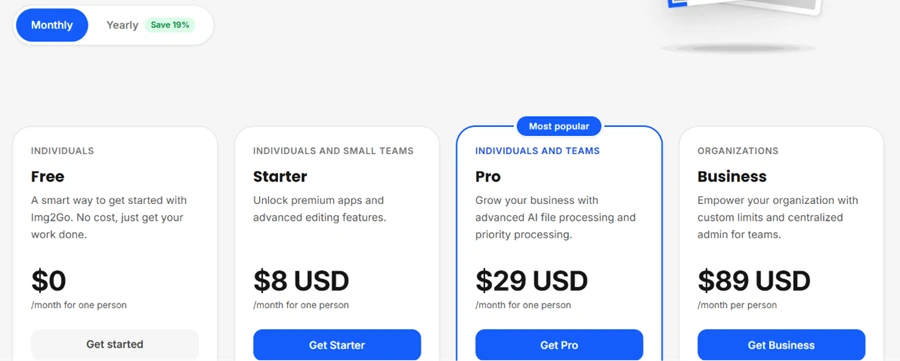
The ceiling is not the feature list, it is processing time and daily AI usage, which is the exact wall my MP4 hit. Paid tiers run Starter at $8 and Pro at $29 a month, with Business at $89 per user for organizations that need higher limits and priority handling.
| Dimension | Our test | User signal | Verdict | Composite |
|---|---|---|---|---|
| Output Quality Sharpness, fidelity, artifacts | 9.2 | 9.4 | Excellent | |
| Ease of Use Learning curve and workflow | 8.8 | 9.2 | Excellent | |
| Value for Money Free tier usefulness and pricing | 9 | 9.5 | Excellent | |
| Feature Breadth Range of tools available | 8.4 | 8.8 | Excellent | |
| Performance Speed Processing and download times | 8 | 8.3 | Good | |
| Reliability Bugs, updates, consistency | 7.8 | 8 | Good | |
| AI Generator Quality Prompt match and originality | 4.5 | 3.5 | Weak |
Toolscopia uses cookies to keep you signed in, remember your preferences, and understand how our reviews get read. Analytics are anonymous. See our privacy policy for the full detail.



Comments 0
Join the discussion and share your perspective.
Sign in to post a comment and reply to other readers.
No comments yet
Be the first to share your perspective on this tool.