1
Credit based usage model
Pricing tied to credits per generation and edit, heavily criticized as confusing and expensive.
AI-driven video creation platform for marketers and creators that promises fast, credit-based video generation, but reviews report confusing pricing, heavy credit drain, weak outputs, and highly mixed experiences with support and reliability.
Independent review — we test tools ourselves and analyze public user reviews. How we test.
InVideo AI offers an ambitious AI video workflow with agents, scripting, and automation, and a minority of reviewers praise fast creation and attentive human support. However, most users report unusable videos, poor adherence to prompts, and very slow or glitchy generation. The credit system is widely described as opaque, expensive, and prone to draining balances before a single finished export, with strict refund policies compounding frustration. This platform currently suits only experienced, budget-flexible users who can absorb experimentation costs and are comfortable pushing through support to resolve billing issues.
InVideo AI is a text-to-video generator built around a single idea: you describe the video you want in plain English, and an agent assembles the whole thing for you. Instead of dragging clips across a timeline, you type a prompt like "60-second video on quick breakfast ideas," and the tool writes a script, picks stock footage or generates AI visuals, adds an ElevenLabs voiceover, drops in music, and burns captions.
What separates it from a plain video editor is the conversational layer. You refine the output by talking to it ("shorten the intro," "swap the third clip"), so the learning curve stays close to zero for anyone who has never edited video.
The company behind it is InVideo, based in India, and the 2026 version bundles access to generation engines like Sora 2 and VEO 3.1 on paid tiers.
It targets one job specifically: high-volume short content for YouTube, social media, and faceless channels. It is a speed tool for solo creators, not a replacement for a professional editor who needs frame-level control.
Pricing tied to credits per generation and edit, heavily criticized as confusing and expensive.
Agents handle prompts and revisions, but many reports mention glitches and misleading cost guidance.
Auto builds multi scene storyboards; some like the speed, many say it devours credits quickly.
Can generate narration, but reviews describe inconsistent accents and poor timing with on screen text.
Chooses visuals automatically, often criticized for irrelevant clips and obvious visual artifacts.
Exports gated by storage caps, confusing many users when downloads fail despite remaining credits.
Multiple reviewers praise specific agents for fast, courteous help and occasional refunds or credits.
Plans with bundled credits and extra packs, frequently called misleading on real project capacity.
Different AI modes for generation, with Alpha features reported to wipe credits during unstable runs.
The landing screen sells InVideo as a platform for serious creatives, leaning on three promises: an agent that carries your style and brand decisions across scenes, a workspace where each video keeps its own scripts and assets, and output in more than 50 languages. It reads well. The test was whether the free tier delivers any of it.

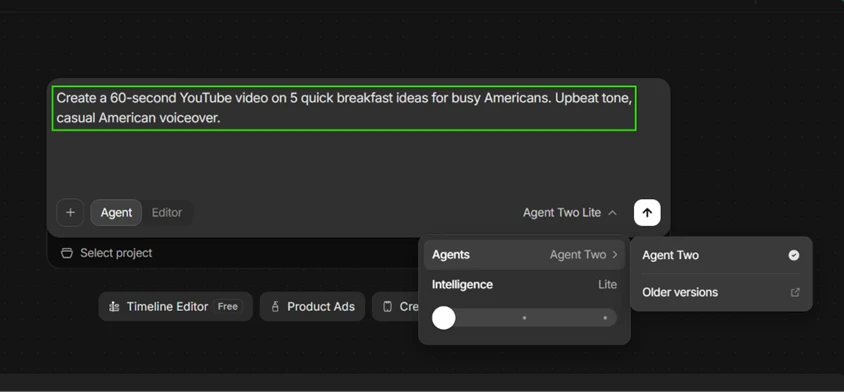
I typed a plain instruction: a 60-second YouTube video on five quick breakfast ideas for busy Americans, upbeat tone, casual American voiceover. The free plan runs on "Agent Two Lite," the lower intelligence setting. You can see the dropdown pinned to Lite with no way to move the slider up without paying.
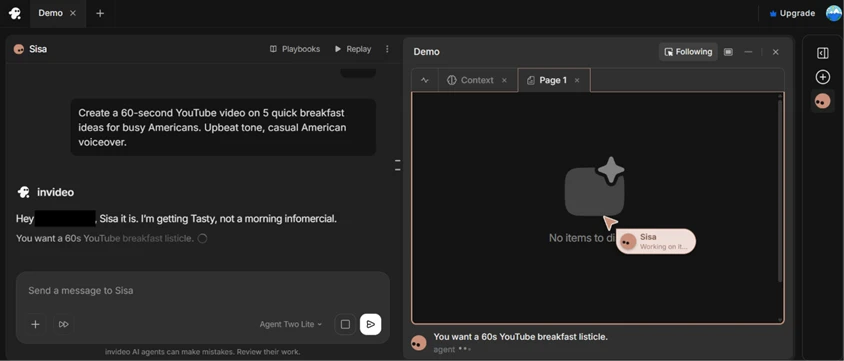
After I submitted, the tool asked me to name the project. I called it Sisa. It spun up a workspace and started reasoning about the brief out loud, restating my request as a 60-second breakfast listicle before doing anything visual.
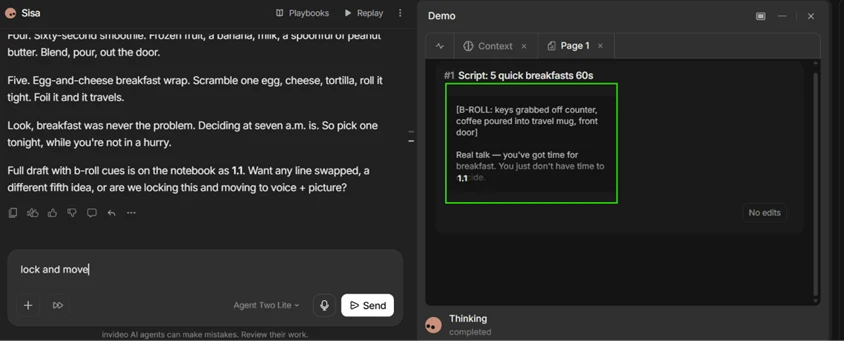
The draft script landed in under a minute, complete with B-roll cues like "keys grabbed off counter, coffee poured into travel mug." Speed is where this tool earns its keep.
The writing itself is another matter. Lines like "Real talk, you’ve got time for breakfast. You just don’t have time to decide" are exactly the filler that padded a lot of these drafts. It is serviceable and generic in equal measure. I typed "lock and move" to approve it and push forward, which is the kind of conversational command the agent handles cleanly.
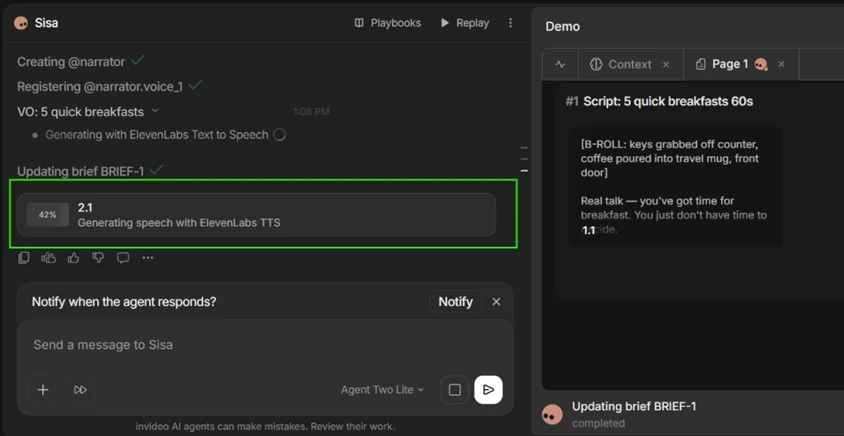
For narration the agent registered a voice and generated speech through ElevenLabs text to speech. I watched it crawl to 42 percent before moving on. The American voice matched what I asked for, so the audio side held up.
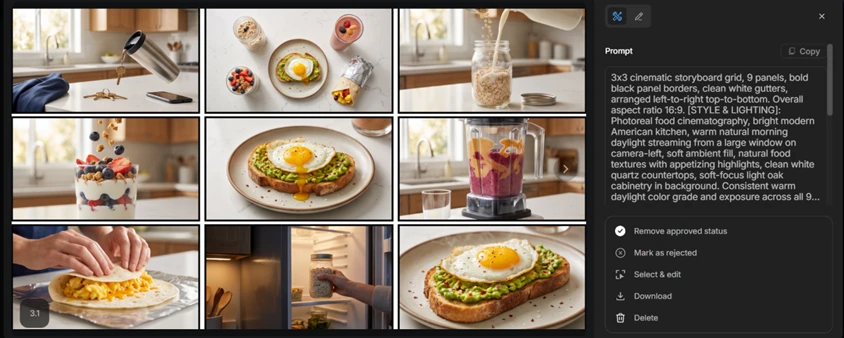
The imagery was the pleasant surprise. It built a nine-panel storyboard grid of photoreal breakfast shots set in a bright modern American kitchen, and the frames actually matched the script. Avocado toast, overnight oats in jars, a smoothie mid-pour, a scrambled-egg wrap. On a mainstream food topic the footage selection is strong.
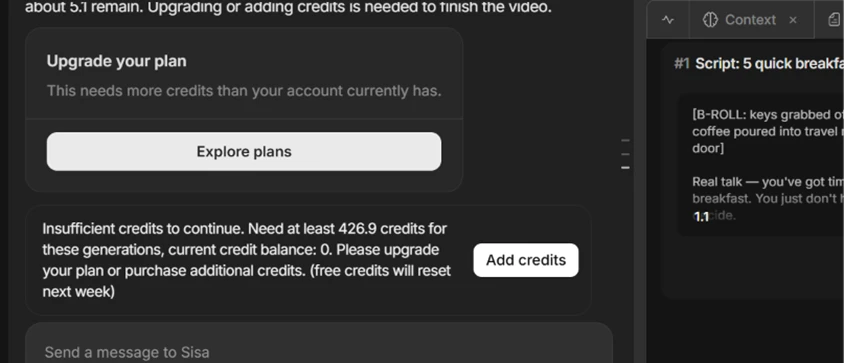
Then the run hit a wall. Mid-generation, the tool told me it needed at least 426.9 credits to continue and my balance was zero. It could not finish the video I had already watched it start.
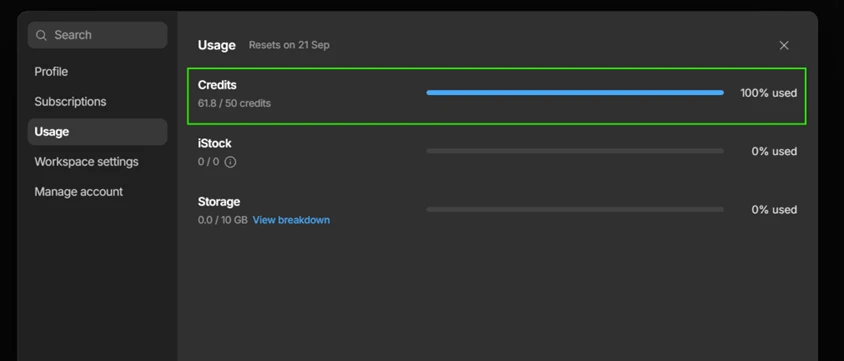
The usage page explained why. My free allowance is 50 credits, and I was sitting at 61.8 of 50 used, marked 100 percent, with a reset date of September 21. One 60-second video had blown past the entire weekly budget before rendering finished. Credits are spent on generation attempts whether or not you ever get a usable file, and nothing rolls over to the next week.
That is the finding that matters most for anyone in the US weighing the free plan before paying. The pipeline is quick and the breakfast visuals were genuinely good, but the free tier ran dry before a single short video could cross the finish line. I could not test footage quality on a technical topic or export a finished cut, because the credits were gone by the time the first video was halfway rendered.
| Dimension | Our test | User signal | Verdict | Composite |
|---|---|---|---|---|
| Output Quality Visual fidelity and usefulness | 8 | 7.5 | Good | |
| Credit Fairness Transparency of credit usage | 6 | 5.5 | Weak | |
| Ease of Use Learning curve and workflow clarity | 8 | 7.5 | Good | |
| Reliability Stability and error frequency | 7 | 6.7 | Moderate | |
| Customer Support Helpfulness and resolution quality | 8.5 | 8 | Good | |
| Value for Money Cost versus delivered results | 6.5 | 6 | Moderate |
Toolscopia uses cookies to keep you signed in, remember your preferences, and understand how our reviews get read. Analytics are anonymous. See our privacy policy for the full detail.



Comments 0
Join the discussion and share your perspective.
Sign in to post a comment and reply to other readers.
No comments yet
Be the first to share your perspective on this tool.