1
Hairstyle virtual try-on
Apply long styles to your uploaded photo.
LongHair AI is a web-based hairstyle try-on tool that applies long hairstyles, lengths, and colors to an uploaded photo, with a style gallery, face-shape analysis, and a set of extra face filters, free to start.
Independent review — we test tools ourselves and analyze public user reviews. How we test.
LongHair AI lands at a combined 7.3 out of 10, a useful hairstyle previewer with some rough edges. On subtle work it is genuinely good: nine long-hair variations on one portrait kept the face consistent and natural, which is exactly what someone weighing a restyle wants. The problems show on bigger changes, where identity drifts and the result can look like a younger, different person. It also reaches past hair into face-altering filters, including a skin-color changer that sits oddly in a styling app, and it pushes affiliate products throughout. For a quick, free look at long styles on your own face, it works. Treat the dramatic transforms and the extra filters with more caution.
LongHair AI, branded as LongHair Hub, is a browser-based tool for previewing long hairstyles on your own photo. You upload a front-facing picture, pick a style, and it generates a version of you wearing it in a few seconds.
The core is virtual try-on: layers, waves, curls, bangs, updos, and braids, plus length and color changes. A face-shape analysis suggests styles that may suit you, and each result can carry an effort rating and an upkeep estimate. A gallery collects trend styles, and care guides cover growing and maintaining long hair.
Around the hair tools sits a wider set of face filters, including age, a fat filter, a baby generator, and a skin-color changer, which go beyond styling and alter facial features.
The tool is free to start with credits, with an optional HD upgrade for higher-quality downloads. It runs in any browser. The operator is named only as LongHair Hub, with a contact email and no company or address listed, and the site runs an affiliate shop linking to Shein and Amazon.
Apply long styles to your uploaded photo.
Preview waves, curls, straight, and braids.
Try different shades on your own photo.
Suggests styles that may suit your face.
Each style can show maintenance detail.
Trend looks and long-hair maintenance articles.
Results download clean, with an HD option.
A hairstyle try-on tool lives or dies on one question: does the result still look like you. So we fed LongHair AI real photos, applied a range of styles, and watched closely for the moment the face stopped being the same person. We ran a woman's photo, a man's photo, and a few of the extra filters, all on the free credits.
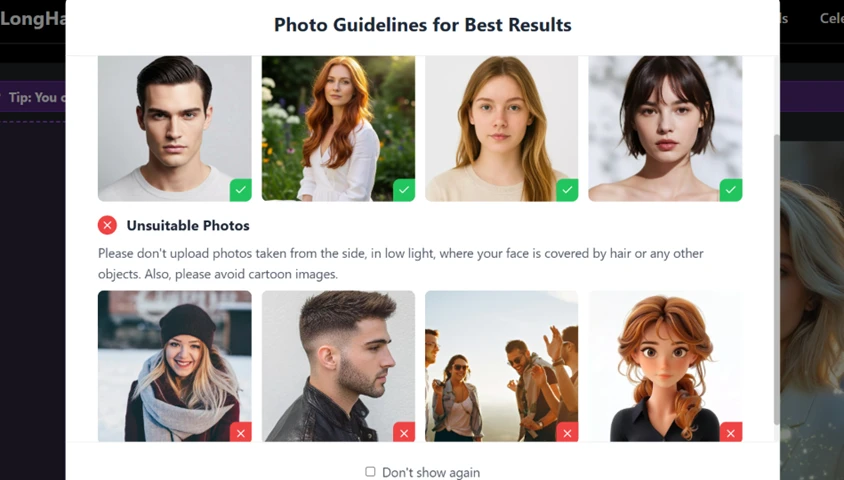
Before anything uploads, a panel lays out what works and what does not, with example photos marked good or bad. Side shots, low light, covered faces, and cartoons are flagged, which sets a user up to feed it something usable.
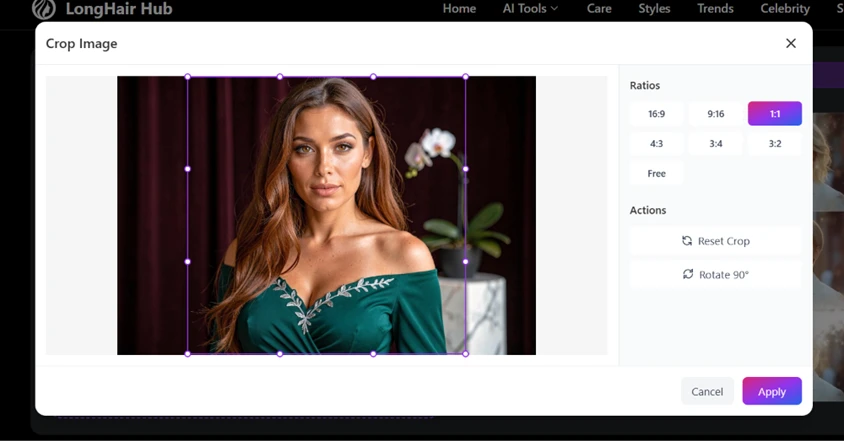
After the upload you can crop, rotate, and set an aspect ratio, so a slightly off photo can be squared up before you spend a credit.
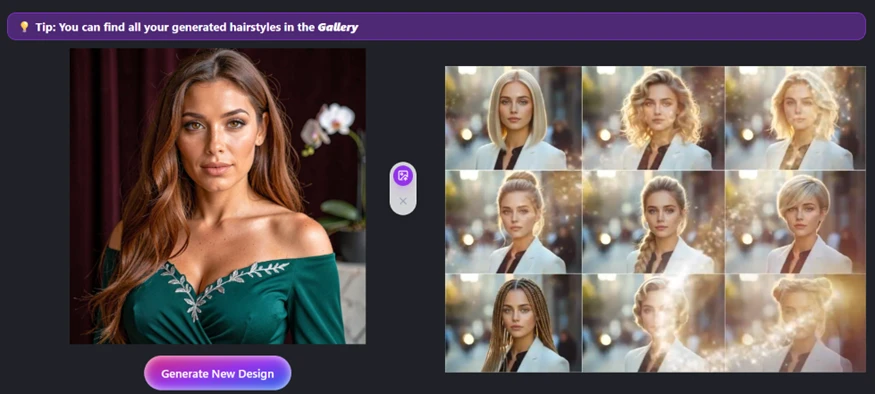
We started with a front-facing portrait of a woman and asked for a set of long looks.
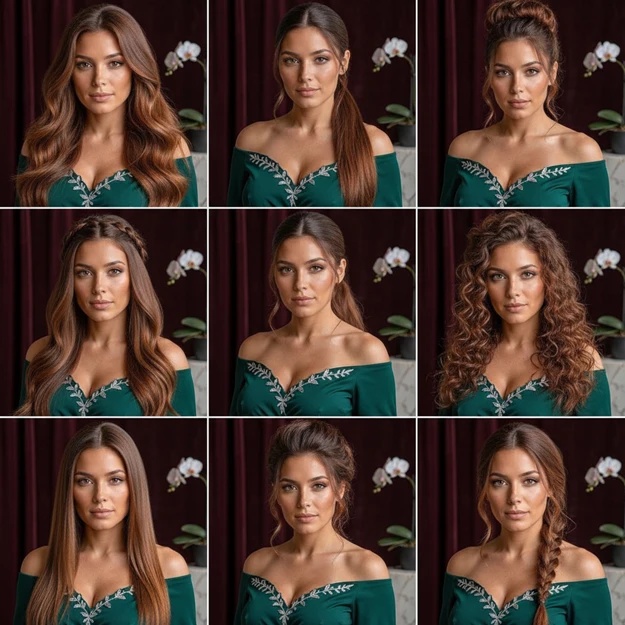
This is where the tool earns its keep. It returned nine variations, waves, a ponytail, an updo, tight curls, straight, and a fishtail braid, and across all of them the face stayed the same person. The hairlines sit naturally and nothing looks pasted on. For someone deciding between a few long styles, this is a genuinely useful preview.
Then we pushed harder, running the long-hair filter on an older man with short grey hair.
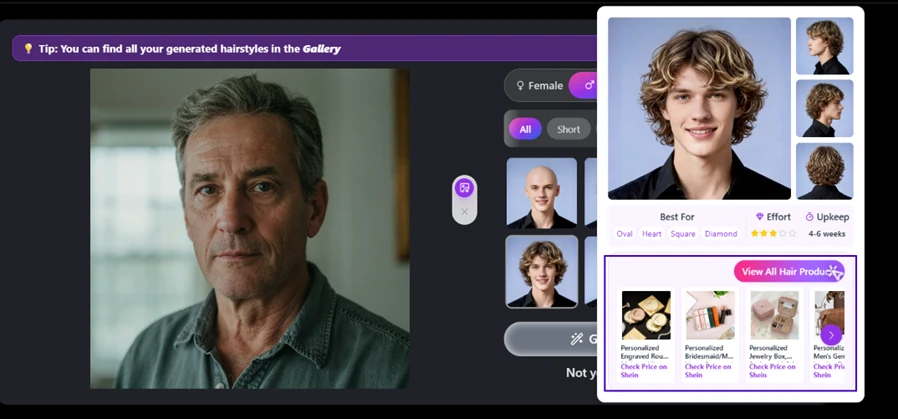
The result is where the cracks show. The final image keeps him recognizable with longer hair, which is fair, but several of the preview thumbnails turned him into a younger, blonder, different-looking man. The tool also attached a face-shape guide, an effort rating, and an upkeep estimate, useful extras, next to a strip of products to buy.

LongHair AI is not only hair. It carries a set of face-altering filters, among them age, a fat filter, a baby generator, and a skin-color changer. We tried the last one.
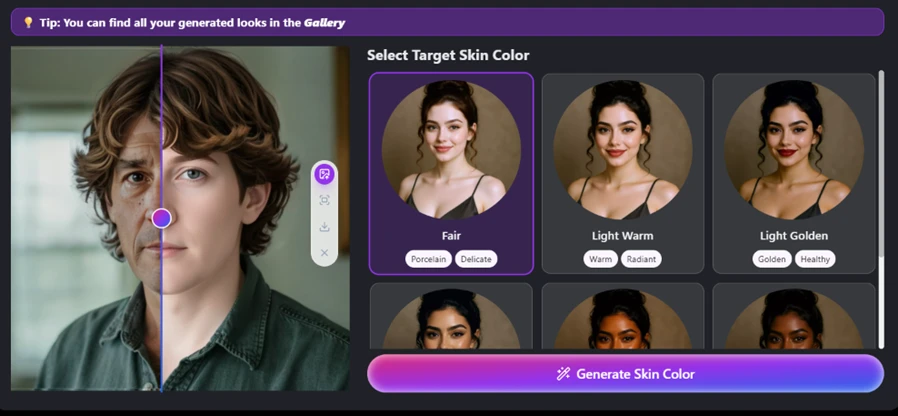
The slider here is a comparison handle, parked in the middle to show the original on one side and the generated version on the other, not a half-edit. What it reveals is twofold. The tool changes the whole face, not just the hair, and it smoothed and shifted his features in the process, so identity drifts again. A skin-color changer also sits oddly inside a hairstyle app, and it is the kind of feature a reader deciding whether to trust the tool should know is there.
Running through the tools, product pitches are never far away. A full shop sits in the navigation.
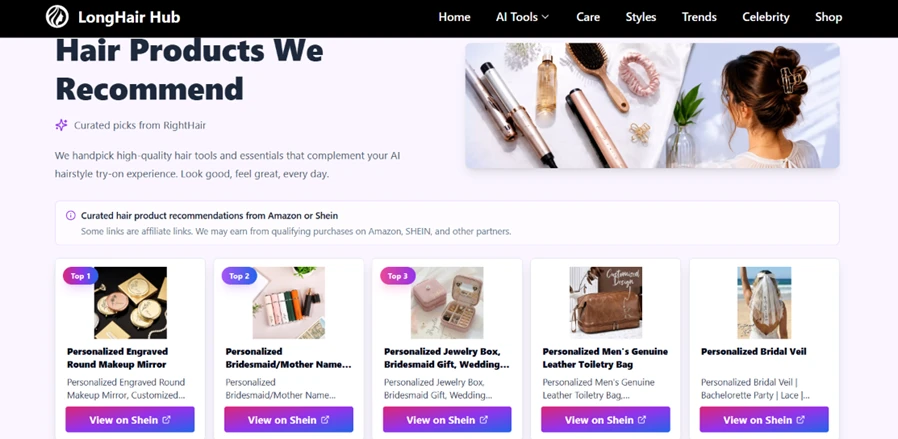
The page states plainly that the links are affiliate links earning commission through Shein, Amazon, and other partners. That is disclosed, which is to its credit, but the result is a try-on tool that keeps steering toward a purchase. The free try-on is the draw; the shop is how the site makes money around it.
| Dimension | Our test | User signal | Verdict | Composite |
|---|---|---|---|---|
| Realism How natural everyday restyles look | 9 | 8 | Excellent | |
| Identity Preservation How well your face survives bigger changes | 6 | 6 | Moderate | |
| Style Variety How many looks and options it offers | 8 | 8 | Good | |
| Ease of Use How simple it is from upload to result | 8 | 8 | Good | |
| Value What the free credits and HD option give | 7 | 7 | Good | |
| Focus & Experience Staying on-topic without heavy upselling | 6 | 6 | Moderate |
Toolscopia uses cookies to keep you signed in, remember your preferences, and understand how our reviews get read. Analytics are anonymous. See our privacy policy for the full detail.



Comments 0
Join the discussion and share your perspective.
Sign in to post a comment and reply to other readers.
No comments yet
Be the first to share your perspective on this tool.