1
Multiple AI models
Offers a variety of AI models, widely praised for creative flexibility and quality.
PicLumen is an AI image and video generator focused on ease of use, creative variety, and fair pricing, aimed at hobbyists, content creators, and beginners who want fast, vivid visual results without complex workflows.
Independent review — we test tools ourselves and analyze public user reviews. How we test.
PicLumen delivers high quality AI images and videos with very simple workflows, varied models, and pricing many reviewers call reasonable or affordable. Users repeatedly praise fast, engaged customer support and a friendly interface that suits both beginners and regular heavy users. On the downside, some complain about confusing or limiting credit and subscription mechanics, a billing dispute, rare technical glitches, and occasional off target AI outputs. It is best suited to creative users and content makers who value ease of use and support, and can live with a token system and minor quirks.
PicLumen is an all-in-one AI creative platform for making images and videos from text or reference files. At its core it runs text-to-image and image-to-image generation, but it also folds in video generation and a community feed where people share what they make. The model lineup is what sets it apart. Rather than locking you into one engine, it hosts several under a single interface, including big names like Flux and GPT-4o alongside its own in-house options such as Realistic V2 and Anime V2, so you can switch depending on the style you're chasing.
The platform is free to start, running on a credit system called Lumens that refills with 10 free credits a day. Beyond generation, it packs one-click editing tools for jobs like background removal, upscaling, inpainting and colorizing, plus themed effect presets and creative challenges that pay out Lumens when you enter. Paid plans add commercial rights and heavier usage. It's aimed at a wide crowd of creators, marketers, anime fans and small sellers who want to turn an idea into a finished visual without opening professional software.
Offers a variety of AI models, widely praised for creative flexibility and quality.
Generates detailed images that often match prompts closely, with bright and vivid results.
Includes tools to make AI videos, appreciated by users creating short clips.
Layout and controls are called easy, intuitive, and smooth by many reviewers.
Uses Lumen credits and rewards; seen as generous by some, restrictive or confusing by others.
Pricing is frequently described as reasonable and good value for money.
Support team is often praised as fast, polite, and helpful in resolving problems.
Includes a community page, positively mentioned for engagement with other creators.
Library organization works, though date changes when moving images annoy some users.
The first screen I hit after opening PicLumen was this dashboard, and it looked identical whether I was logged out or logged in.

My eye went straight to the big prompt box parked in the middle, already pre-filled with a placeholder about a serene lake at sunrise. Underneath it were toggles for AI Video and Picflow, plus controls for aspect ratio and clip length. The “Start for Free” button in the top right is impossible to miss. Down the left rail I had quick access to Home, Canvas, Video, Image, Assets and the Marketplace, so every mode was one click away.
The small thing I appreciated: a credit counter (45) sitting right next to the generate arrow. It told me actions cost something before I committed to anything, which set my expectations early.
Next I went into the Image tab to test plain text-to-image. I pasted in a heavy, detail-loaded prompt to see how far I could push the realism:
“A stunning 25-year-old woman with natural freckles, deep hazel eyes, and long wavy brown hair, wearing a simple white linen shirt, standing near a large window during golden hour. Soft sunlight illuminates her face with realistic skin texture, visible pores, tiny facial hairs, and subtle imperfections. Cinematic composition, shallow depth of field, creamy bokeh, highly detailed eyes, natural color grading, captured with a full-frame DSLR, 85mm lens, f/1.4, HDR, photorealistic, ultra-realistic, 8K.”
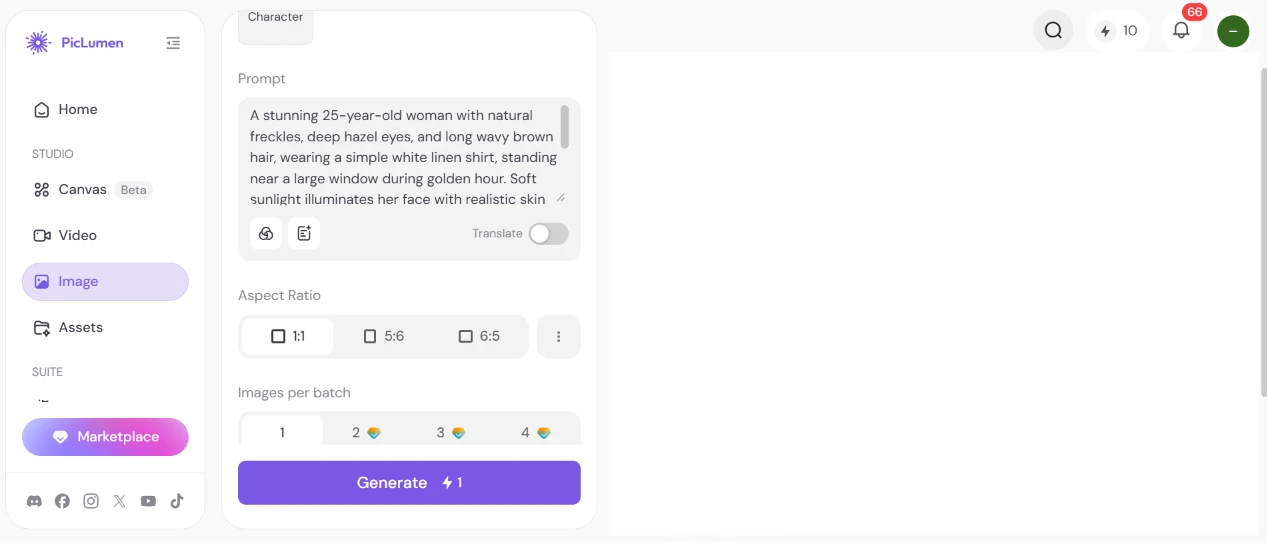
The Image screen is stripped down. I got a prompt box, a Translate toggle, three aspect ratio presets (one square 1:1, plus two rectangular crops at 5:6 and 6:5) and a row for choosing how many images to make per batch. A single image cost one credit, which the Generate button spelled out plainly. I left the batch on one and clicked Generate.
Then came the result.

This surprised me. The skin texture survived the golden-hour lighting. The freckles landed roughly where I asked, and the hair caught the light the way a real 85mm shot might. The eyes stayed sharp instead of going glassy, which is where a lot of generators fall apart. It also respected the window setting and the white linen shirt without me having to wrestle it. For a one-credit generation, the fidelity beat what I walked in expecting.
The one catch: a PicLumen watermark stamped into the bottom-right corner of the output. Good to know before you plan to use these anywhere.
Feeling good about the still image, I wanted to see the video side. I switched to the PicFlow video model and dropped the same portrait prompt in, curious whether it would animate a matching scene.
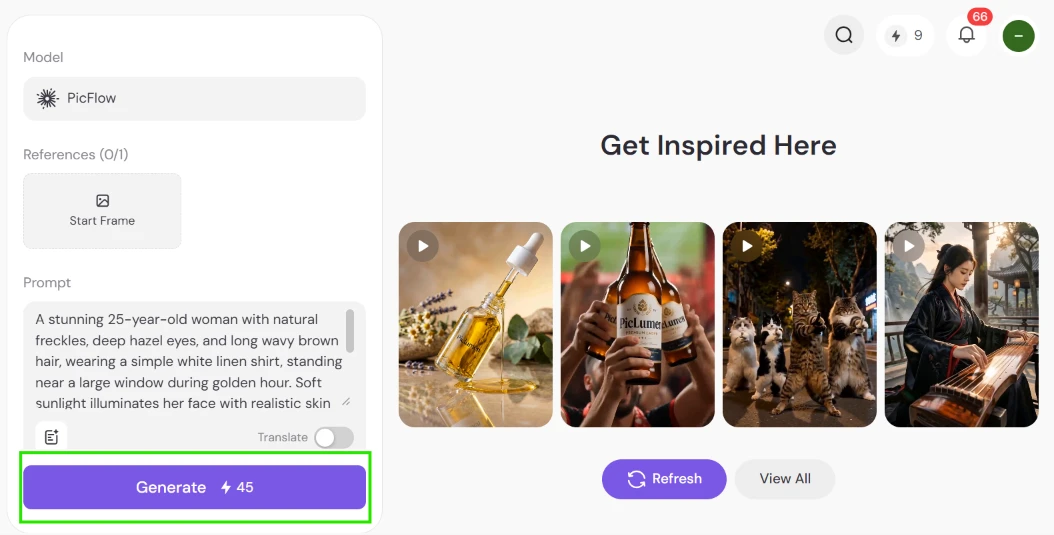
Then I hit a wall.
The Generate button wanted 45 credits. My balance at that moment was 9. So I physically could not run the generation. The right half of the screen kept dangling a “Get Inspired Here” strip of sample clips at me (a spinning oil dropper, a beer bottle held up to the camera, a pack of dancing cats, a woman playing a stringed instrument), which only made me more curious about what I was locked out of.
The jump from 1 credit for an image to 45 for a video is steep. Video is heavier to compute, I get that, but burning through a free balance this fast felt limiting. I would have paid nothing to trade one free video generation for the chance to judge the output myself instead of trusting the showcase reel.
The Canvas, still wearing a Beta tag in the sidebar, turned into one of the more interesting stops of my session. I opened a project built around a woven handbag and let it spin up a multi-view product shot.
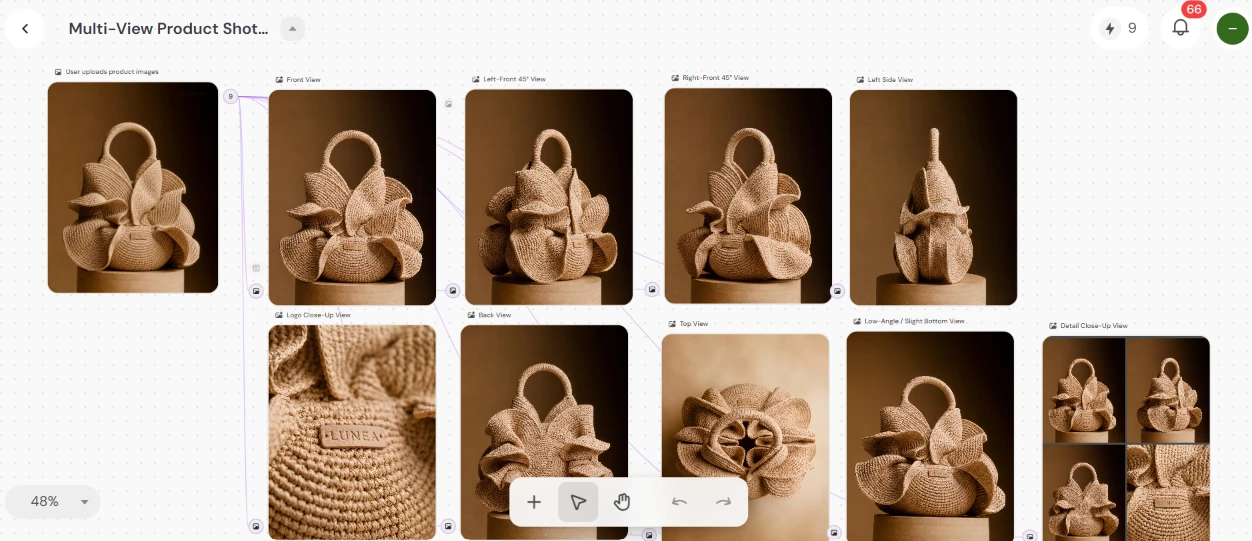
It handed back a full spread of the same bag from every angle I could want: straight-on front, left-front at 45 degrees, right-front at 45, a left side profile, a logo close-up, the back, a top-down, a low hero angle and a tight detail crop. Everything sat on an infinite canvas I could pan around, zoomed out to 48%. The consistency between angles was the part that impressed me. The woven texture stayed coherent from shot to shot, which is exactly what a product listing needs.
Anyone selling physical goods who needs a rack of catalog images without booking a photo studio could get a lot of mileage out of this.
By now my thin credit balance was nagging at me, so I went hunting for ways to top up without paying. That search dropped me into the Challenge Center.

It runs like a rewards board. An active “Rep Your Team: Fan Gear Challenge” was counting down (a little over five days left when I looked) with 9,000 Lumens on the line, sitting beside a “Soccer Creative Challenge” that had already closed. Two more expired challenges sat underneath. The little flame counter on each card (169 on one, 257 on another) looked like a tally of how many people had jumped in.
Here is the math that caught my attention: 9,000 Lumens dwarfs the 45 a single video eats. These challenges look like the actual route to generating a lot without opening my wallet. The cost is effort. You have to produce competitive work and wait out the challenge cycle, so it rewards sticking around rather than a quick one-off visit.
The effects library is what kept me clicking longest. I opened the Tools section and started scrolling.

The first row alone threw a lot at me: a Figurine effect that turns a character into a collectible statue, a Background Remover, a Professional ID Portrait maker, and a Describe Image tool that reverse-engineers a usable prompt out of any picture you feed it. Under that sat Refine for tidying up line drawings, Auto Coloring for flat sketches, a Photo-to-Polaroid-Selfie converter and an Anime-to-Cosplay effect that reimagines anime characters as realistic cosplay shots. Tabs across the top (Edit, Photo, Style, Play) let me filter by category.
I kept scrolling and dropped straight into a themed pack.

This stretch was wall-to-wall football effects: Football Star Arrival, Red Card Call, On the Pitch, Blue Glory Champion, Run Into Glory, Slide Celebration, Golden Entrance, Trophy Lift and a run of others below. It clicked that these feed directly into the fan gear and soccer challenges I saw earlier, so the effects and the contests are wired into the same loop. That is a sharp bit of product design.
The volume of options is the strongest thing going for casual play. Every effect is a one-click preset, so I never had to write a prompt to try one. That drops the barrier hard for anyone who just wants to throw a selfie in and see what happens.
The last thing I poked at was an article publisher, which I did not expect to find bolted onto an image tool.
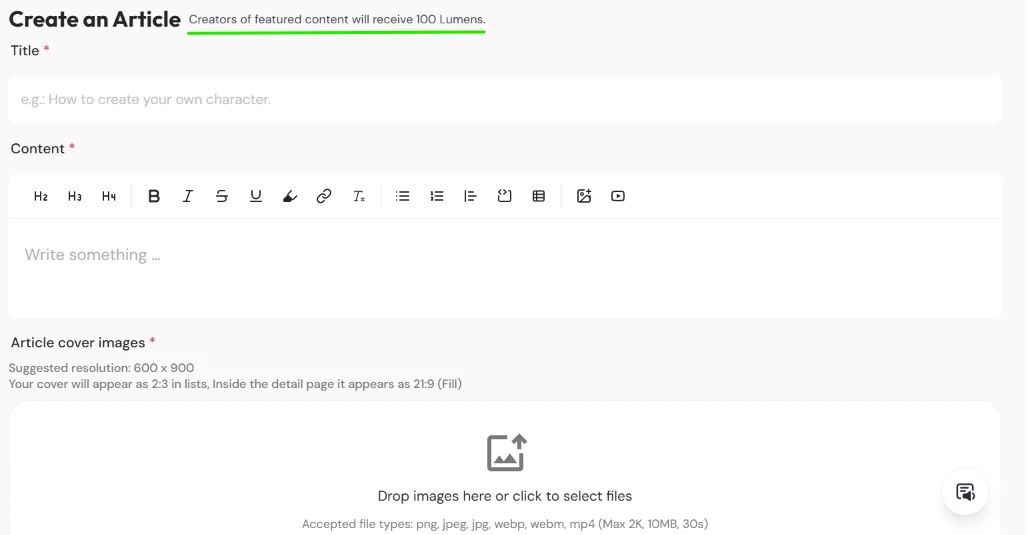
There is a full “Create an Article” editor with a title field and a rich body area carrying its own formatting toolbar. A cover-image uploader sits below that. The line that stopped me: creators of featured content get 100 Lumens. So a solid tutorial or showcase can pay you back in credits. The uploader takes png, jpeg, jpg, webp, webm and mp4 files up to 2K resolution and 10MB, with video capped at 30 seconds.
| Dimension | Our test | User signal | Verdict | Composite |
|---|---|---|---|---|
| Output Quality Detail, fidelity, visual appeal | 9 | 9.2 | Excellent | |
| Ease of Use Onboarding, navigation, learning curve | 9.3 | 9.5 | Excellent | |
| Value for Money Pricing fairness and perceived value | 8.5 | 8.7 | Excellent | |
| Reliability Stability and glitch frequency | 8.2 | 8.4 | Good | |
| Customer Support Speed, clarity, helpfulness | 9 | 8.8 | Excellent | |
| Billing Transparency Subscription clarity and control | 7 | 7.2 | Good | |
| Free Tier Generosity Free credits and limitations | 7.5 | 7.8 | Good |
Toolscopia uses cookies to keep you signed in, remember your preferences, and understand how our reviews get read. Analytics are anonymous. See our privacy policy for the full detail.



Comments 0
Join the discussion and share your perspective.
Sign in to post a comment and reply to other readers.
No comments yet
Be the first to share your perspective on this tool.