1
Customer support desk
Frequently praised for fast, friendly, and proactive email based help resolving technical and account issues.
Online animation and video presentation maker aimed at educators, marketers, and teams who want templated explainer videos, but opinions are sharply split between loving the support and hating pricing, usability, and reliability.
Independent review — we test tools ourselves and analyze public user reviews. How we test.
Powtoon delivers quick, human customer support and helps many users ship decent looking explainer videos with limited effort. However, reviews repeatedly flag confusing pricing, aggressive upgrade prompts, template and customization limits, and performance issues like lag and crashes. Billing disputes and refund refusals appear frequently and seriously damage trust. It suits teams that value responsive support, can live with stricter template driven design, and are comfortable managing subscription details carefully.
Powtoon started life as a drag-and-drop maker for animated explainers and presentations. It has since rebuilt itself around AI and now calls itself a unified AI video platform, with the generative layer branded Powtoon Imagine.
The thing that separates it from a one-click generator is what happens after the AI finishes. Your prompt, document, or script becomes a draft inside a full editor rather than a finished file you are stuck with. From there you can rewrite the script, swap the clip, add a voiceover, or drop in stock footage and animated characters.
Under the hood it does not run its own model. Powtoon routes generation through outside engines like Seedance, Veo, Imagen, and ElevenLabs, then wraps them in its own editing interface and asset library.
Two details shape every decision you make inside it. The AI features run on a credit system that depletes fast, and the free output carries a Powtoon watermark. That pricing structure, more than any single feature, decides whether the tool fits your workflow.
Frequently praised for fast, friendly, and proactive email based help resolving technical and account issues.
Templates considered useful by some, but others call them limited, dated, and hard to customize deeply.
Heavily criticized for glitches, poor outputs, credit consumption, and lack of clear credit tracking.
Recurring billing and refunds generate many complaints about unwanted renewals and inflexible policies.
Free and lower tiers restricted by watermarks and format limits, frustrating users near deadlines.
Premium items often appear without clear labeling, causing export blocks and unexpected upgrade pressure.
Described as easy and intuitive by some, yet cluttered, confusing, and time consuming by others.
Business users note helpful enterprise support, including pricing adjustments and collaborative assistance.
I signed up for the free Pro Trial and ran Powtoon through a real task instead of poking at the feature list. My brief was simple. I asked it to build a 30-second explainer introducing a small US coffee subscription brand I called "Morning Haul," then I tried to voice it, edit it, and export it without paying a cent. Here is what actually happened.
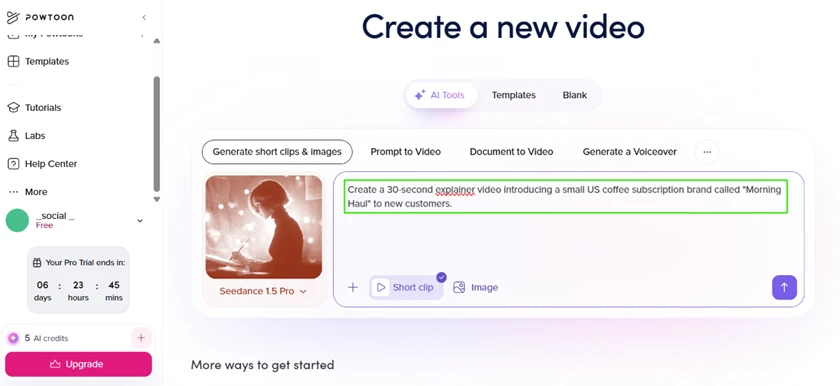
The starting screen puts the AI tools front and center. I picked "Generate short clips & images," dropped in my prompt, and noticed two things before I even clicked send. My Pro Trial had six days left, and my entire AI credit balance was 5.
Clicking send opened a clip-generation modal running on Seedance 1.5 Pro. This is where the first surprise showed up. My prompt asked for 30 seconds. The tool defaulted the length to 4 seconds, with a ceiling of 12, and the dropdown made it plain that longer durations burn more credits. So the "30-second explainer" I requested was never on the table at this tier.
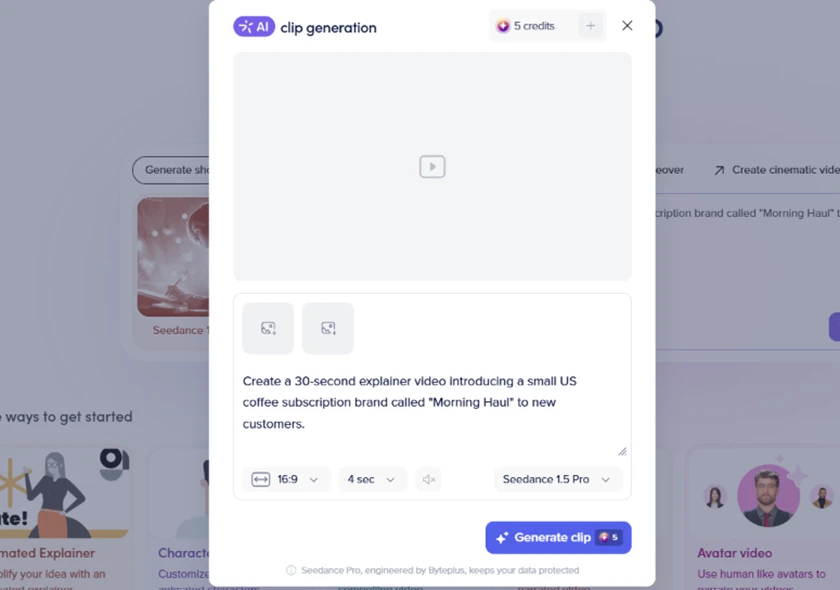
The price tag on that button is the headline finding of this whole test. One 4-second clip costs 5 credits. That is the full free allowance gone in a single generation. I clicked it anyway, because a review needs the output.
Once the clip generated, it dropped straight into Powtoon's Studio rather than handing me a locked video file. The timeline is editable, there are dedicated fields for voiceover and on-screen text per slide, and a SWAP button sits over the clip so I could replace it without starting over. This is the clearest thing Powtoon does better than a pure prompt-to-video generator. The AI gives you a starting point, and then you work on it like a normal editor.
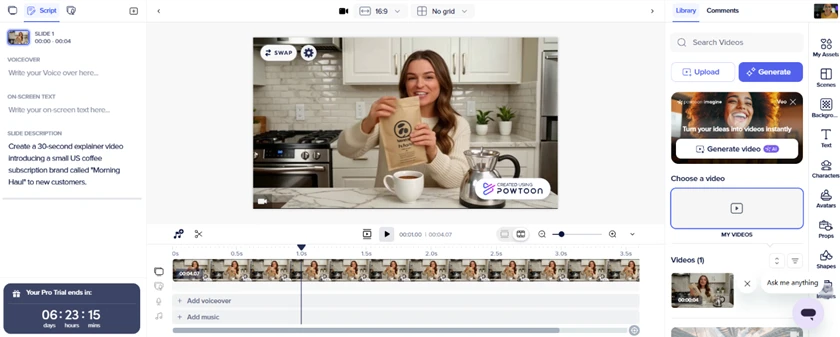
The asset libraries backed this up. The stock footage panel is deep and sorted by mood and theme, so filling four seconds of B-roll took seconds.

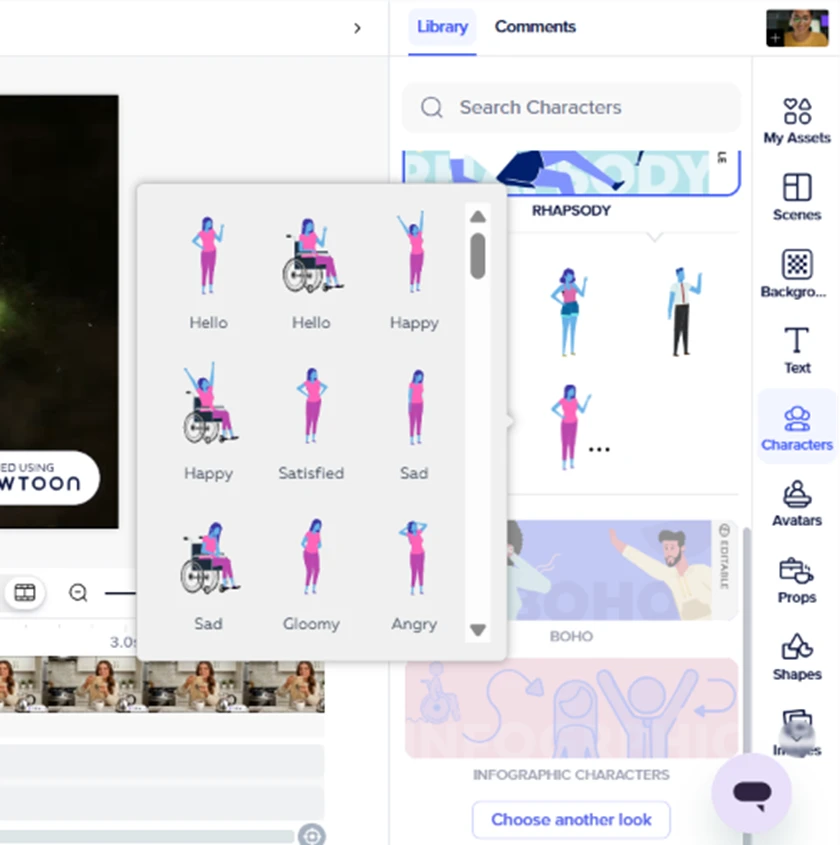
The character library is where Powtoon's animation roots still show. There is a wide set of animated characters with multiple poses and expressions, including wheelchair-user characters, which matters for US business and training content that needs to look inclusive.
Then I zoomed into the generated frame, and the AI's limits were obvious. The model's hands are malformed, the coffee pours from a point below the bag instead of from the opening, and the brand name on the pack rendered as garbled lettering rather than "Morning Haul." For a 5-credit clip, that is rough. Nobody is publishing this without reshooting it or swapping it out.

The burned-in "Created Using Powtoon" badge in the corner is the other thing you cannot miss, and it leads straight into the export problem.
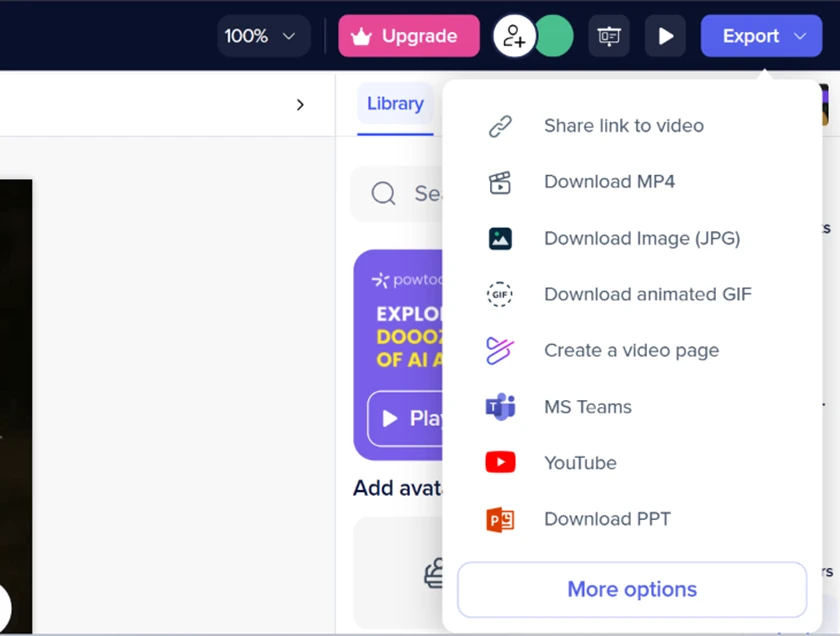
The export menu itself is generous. Powtoon pushes to MP4, JPG, GIF, a hosted video page, MS Teams, YouTube, and even PowerPoint. For a US corporate or eLearning team, PPT and Teams export are genuinely useful destinations.
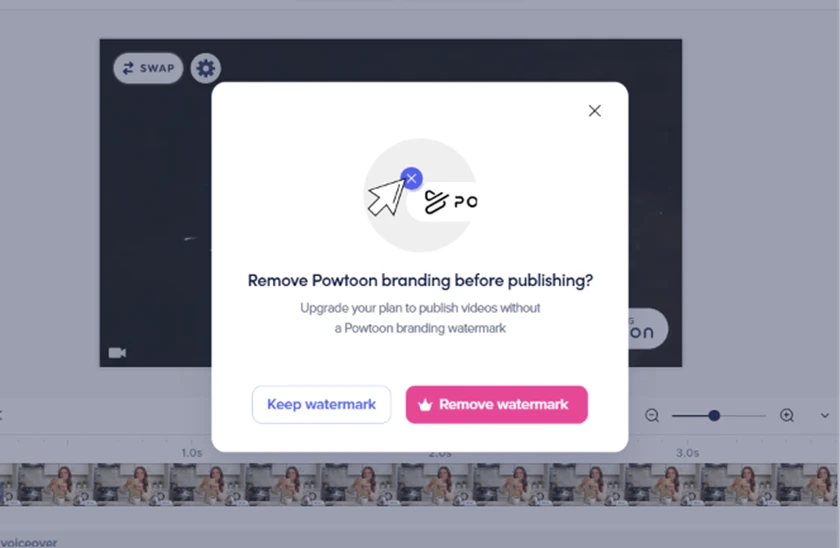
The moment I tried to export, a modal asked whether I wanted to remove Powtoon branding before publishing. On the free plan, keeping the watermark is the only option that does not send you to a paywall.
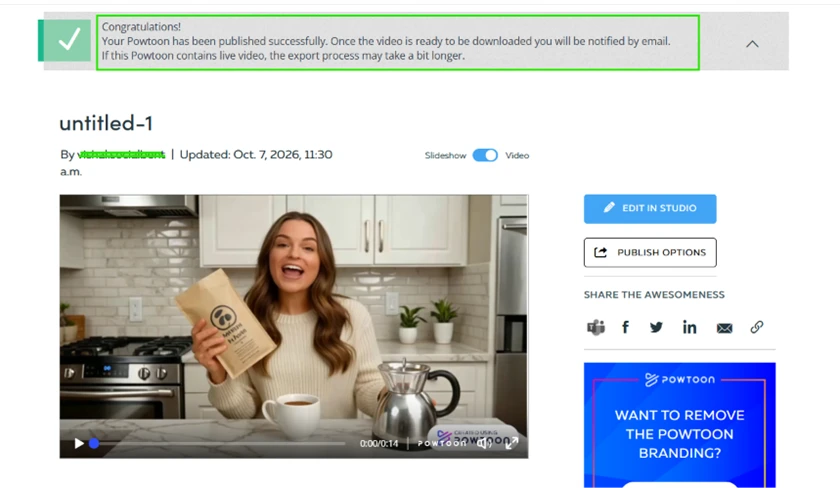
Clicking download did not download anything. Powtoon published the video to a hosted page and told me it would email me once the file was ready. For a reviewer on a deadline, and for any US small-business owner who expected a file to land in their downloads folder, that is friction nobody asked for. The published page also carried yet another prompt to remove the branding.
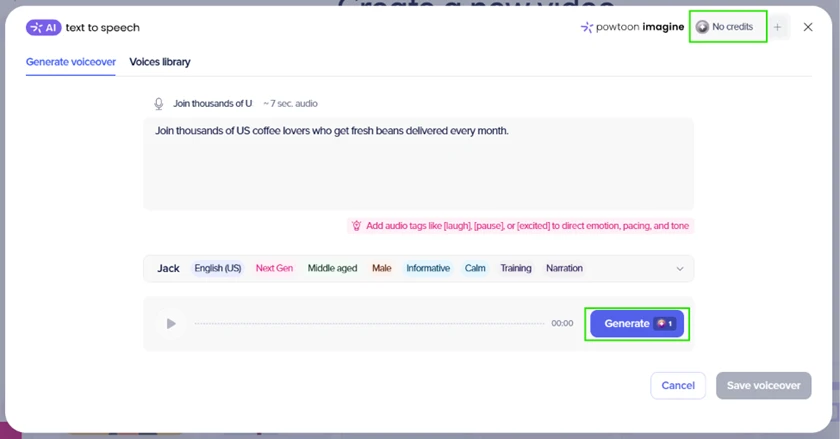
The voiceover tool is well stocked for a US audience. I fed it a line of marketing copy and found several native US English voices such as Jack, Hope, and Almog, each tagged by age, tone, and use case, pulled from a library Powtoon says runs to 300+ voices across 140+ languages and accents.
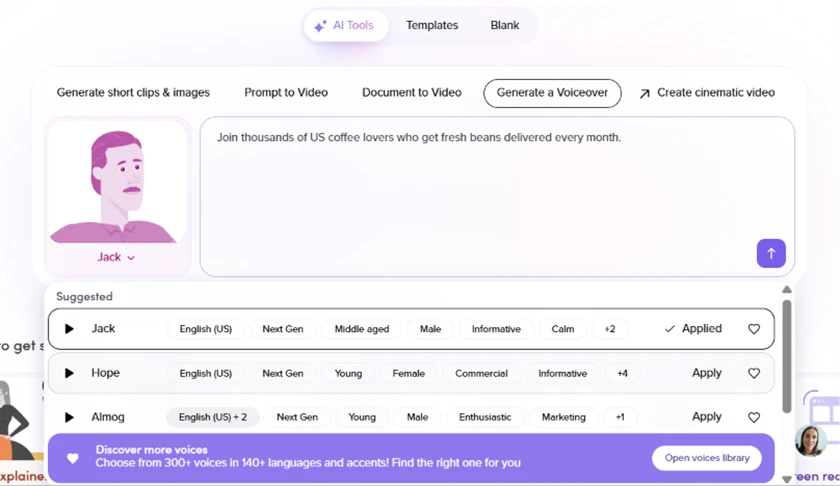
I could not actually generate one. The text-to-speech panel wanted 1 credit per voiceover, and by this point my balance read "No credits." The 5-credit video had cleaned me out. So the free trial lets you audition the voices but not hear your own script in them.
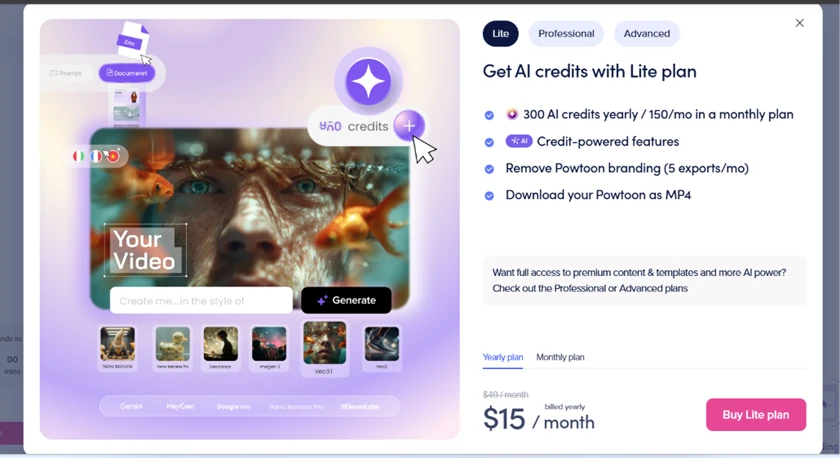
Every gated feature funneled to the same Lite plan. It runs $15 a month billed yearly, down from a $49 month-to-month rate, and includes 300 AI credits a year, watermark removal on 5 exports a month, and MP4 download. The plan modal also lists the models under the hood, which read like a who's who of current generators, so the quality ceiling is high if you are paying for the credits to reach it.
My verdict after this run is narrow and specific. Five credits buy you exactly one short, flawed clip and nothing else, no voiceover, no second attempt, no watermark-free export. The editor and asset libraries are strong enough that I understand why teams pay for it, but the only way to properly test the AI suite is to spend money the trial does not give you.
| Dimension | Our test | User signal | Verdict | Composite |
|---|---|---|---|---|
| Customer Support Speed and quality of help | 9 | 9.5 | Excellent | |
| Ease of Use Learning curve and navigation | 6.5 | 6 | Moderate | |
| Template Quality Variety and modernity of assets | 6 | 5.5 | Weak | |
| Performance Lag, crashes, and stability | 5.5 | 5 | Weak | |
| Pricing Transparency Clarity of plans and billing | 4.5 | 4 | Weak | |
| Value for Money Perceived return on spend | 6 | 5 | Weak |
Toolscopia uses cookies to keep you signed in, remember your preferences, and understand how our reviews get read. Analytics are anonymous. See our privacy policy for the full detail.



Comments 0
Join the discussion and share your perspective.
Sign in to post a comment and reply to other readers.
No comments yet
Be the first to share your perspective on this tool.