1
Paraphraser
Rewrites sentences and paragraphs with better flow and synonyms, widely praised for everyday editing.
QuillBot is a writing assistant focused on paraphrasing, grammar checking, and AI detection, ideal for students, academics, and professionals who need clearer, more natural text and quicker drafting without a steep learning curve.
Independent review — we test tools ourselves and analyze public user reviews. How we test.
QuillBot delivers strong paraphrasing, grammar correction, and humanizing options that significantly speed up everyday writing, assignments, and research work. Reviewers consistently praise its ease of use, accuracy, and genuinely useful free tier. However, some users report misleading expectations around language support, restrictive word limits in the free plan, and unreliable AI detection and humanizer quality in certain cases. It suits students, researchers, and busy professionals who mostly write in English and want quick improvements in clarity more than advanced multilingual correction.
QuillBot began in 2017 as a single paraphrasing tool and has grown into a full writing suite used by more than 35 million people. At its core sits an AI paraphraser that reworks text you supply, wrapped in supporting tools for grammar checking, summarizing, citation, and AI detection. What matters most is the category it belongs to. QuillBot edits and reshapes writing that already exists; it will not draft an argument from a blank page for you. Knowing that boundary upfront saves you from expecting the wrong thing from it.
That distinction decides who gets the most from it. Students cleaning up essays, non-native speakers hunting for natural phrasing, marketers tightening bloated copy, and researchers rewording sources all benefit, because each arrives with text that needs polishing rather than inventing. The paraphraser offers several rewrite modes and a synonym slider that controls how far each version strays from your original, giving you command over the output. Reach for QuillBot when you already have a draft and want it sharper. For generating fresh ideas or heavy structural editing, a different tool will serve you better.
Rewrites sentences and paragraphs with better flow and synonyms, widely praised for everyday editing.
Improves spelling, grammar, and punctuation, especially valued by students and professionals.
Checks text for AI generation; praised by some, criticized as inconsistent by others.
Adjusts AI written text to sound more human, helpful but sometimes yields awkward synonyms.
Summarizes longer texts, saving time for research, assignments, and professional documents.
Provides plagiarism checks, highlighted as excellent by academic focused users.
Displays sentence and line counts, useful when shortening or constraining article length.
Offers various writing modes and options, helping avoid robotic tone and match context.
Free version without ads, appreciated but limited by word and feature restrictions.
I spent a few days running QuillBot through the kind of writing I deal with every day. Rough drafts and messy sentences that needed tightening. Here is what held up and where it slipped.
I started with the grammar checker. I pasted a sentence stuffed with errors, and the tool flagged them one by one, starting by swapping "Their" for "They’re" with the fix shown inline.
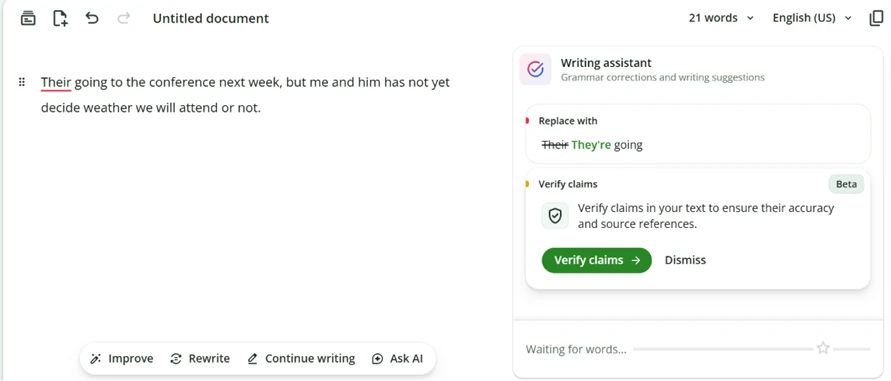
The correction card is clean and each suggestion applies with a single click, so quick cleanup takes seconds.
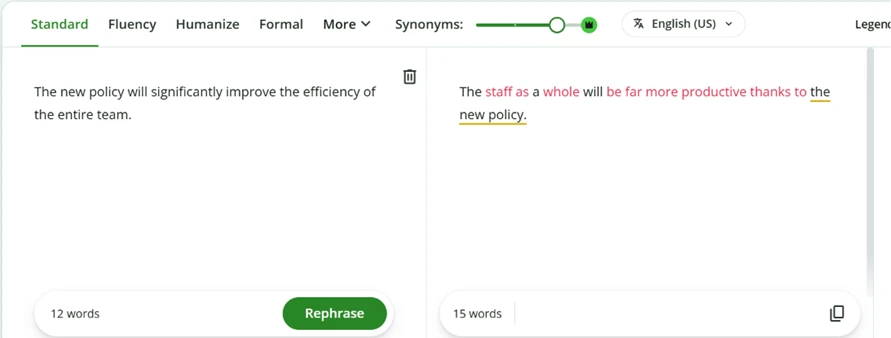
The synonym slider inside the paraphraser is the feature I liked most. Pushing it to the highest free setting rewrote "The new policy will significantly improve the efficiency of the entire team" into "The staff as a whole will be far more productive thanks to the new policy." You decide how aggressive the rewrite gets, which helps when one sentence needs a gentle edit and another needs a full rebuild.
This is where the cracks showed. I gave it a careful academic sentence about correlation and causation. The rewrite changed "variables" to "factors" and "causal" to "causative." It also softened "does not necessarily imply" into "does not always suggest."
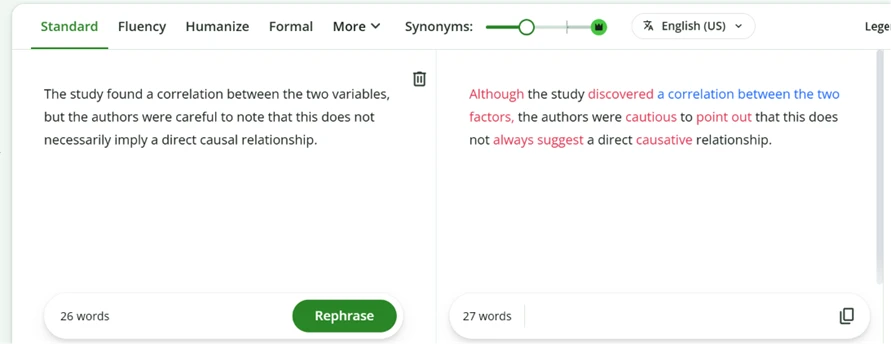
Those read like harmless synonym swaps. They are not. In statistics, "variables" and "factors" carry different technical meanings, and "does not necessarily imply" is a precise logical claim that "does not always suggest" quietly weakens. For a casual blog post this hardly matters. For academic or technical work, that drift can change what your sentence actually says.
The next test exposed a harder limit. QuillBot rewords text, but it cannot add meaning to it. I fed it a paragraph of empty, repetitive filler to see whether it could lift the substance.
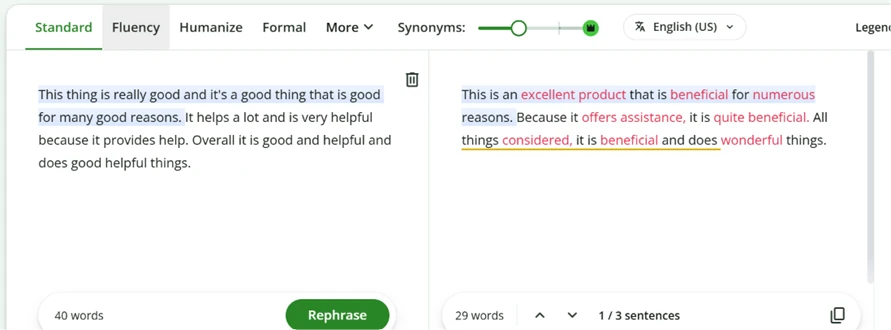
It compressed 40 words down to 29 and promoted "good" to "excellent" and "beneficial," yet the output still says nothing at all. Better vocabulary cannot rescue hollow content. The tool edits words; it does not generate ideas.
I also checked what it does to voice. I handed it an excited, casual line and watched the personality leak out.
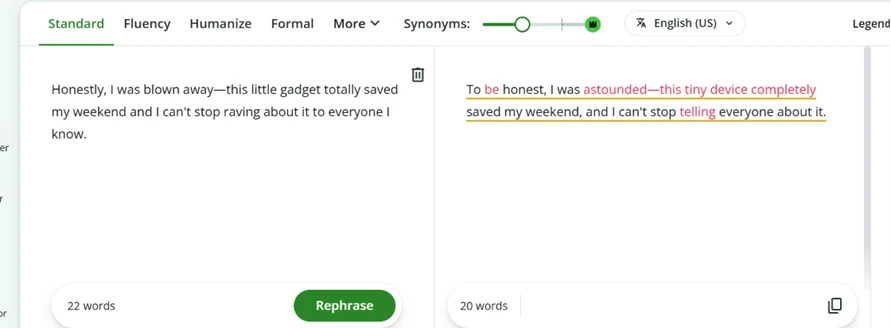
"Blown away" turned into "astounded," and "raving about it" flattened to "telling everyone." The sentence still reads fine, but the spark is gone. Writing that lives on its voice will need a human pass afterward to put the energy back.
The last test was the one I most wanted to run. Paraphrasing tools get marketed as a way to sneak AI writing past detectors. I pasted an AI-generated paragraph into the Standard paraphraser and copied the rewritten result.
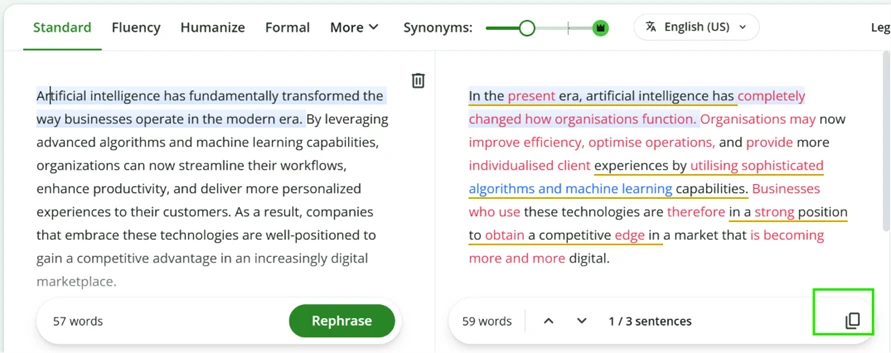
Then I dropped that rewritten text straight into QuillBot’s own AI detector.
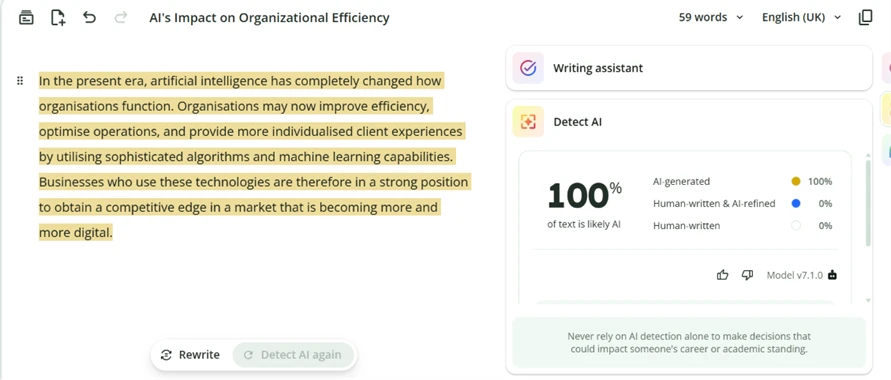
It scored 100% AI-generated. QuillBot rewrote the paragraph and its own tool still flagged every line of it. Anyone counting on the paraphraser to hide machine-written text should know it leaves the fingerprints intact.
| Dimension | Our test | User signal | Verdict | Composite |
|---|---|---|---|---|
| Paraphrasing Quality Clarity and faithfulness of rewrites | 9 | 9.4 | Excellent | |
| Grammar Correction Accuracy of grammar and spelling | 8.8 | 9.2 | Excellent | |
| AI Detection Reliability Consistency of AI content flags | 6 | 7 | Moderate | |
| Ease of Use Interface simplicity and learning curve | 9.3 | 9.6 | Excellent | |
| Value for Money Perceived worth of free and paid | 8 | 8.5 | Good | |
| Multilingual Support Quality beyond core English | 5.5 | 6 | Weak |
Toolscopia uses cookies to keep you signed in, remember your preferences, and understand how our reviews get read. Analytics are anonymous. See our privacy policy for the full detail.


Comments 0
Join the discussion and share your perspective.
Sign in to post a comment and reply to other readers.
No comments yet
Be the first to share your perspective on this tool.