1
AI image generation workspace
Central canvas for generating and editing images, praised by few for creativity but widely criticized for inconsistent quality.
AI-based image and vector design platform aimed at designers and marketers, offering mockups and generation tools, but reviews report poor output quality, opaque billing, credit burn, and unhelpful automated support that undermine any potential benefits.
Independent review — we test tools ourselves and analyze public user reviews. How we test.
Recraft AI promises versatile AI image and vector generation with a modern interface and generous free tier, and a few users do praise its creativity. Across reviews, however, most report low quality vectors, unreliable prompt adherence, and unusable SVG or icon output. The subscription plus credit model, expiring credits, and strict refund policies create strong frustration, especially when combined with opaque cancellation and repeated billing disputes. Support appears largely automated, with slow or no resolution on outages and login issues. In its current state, it suits only experimental users willing to tolerate instability and risk, not professionals needing predictable, production grade results.
Recraft is a design-focused image generator built for people who produce brand assets, not one-off art pieces. It came out of a London startup in 2023, and its current model, Recraft V4.1, runs beside a dedicated vector engine.
The trait that separates it from the pack is native vector output. Most generators hand you a flat raster and leave the tracing to you. Recraft builds the graphic as editable paths straight from the prompt, which is why designers pull it into logo and icon work where clean scaling matters.
It runs as a browser workspace with an infinite canvas instead of a single prompt box. You can generate on Recraft's own models or route the same brief through outside engines like Flux or a video model, then edit, upscale, recolor, or mock the result up without leaving the page. That range is what pushes it past a novelty into a place in an actual workflow.
A free tier lets you test the whole thing at a daily credit limit before you pay.
Central canvas for generating and editing images, praised by few for creativity but widely criticized for inconsistent quality.
Markets vector strength, yet reviewers report unusable toolbar SVGs, distorted shapes, and failed simple vector edits.
Prompts consume credits, including retries, often depleting balances quickly and blocking refunds after modest experimentation.
Paid tiers required for downloads and higher limits, with separate charges for API and no clear true monthly option.
Intended for private branded styles, but reports highlight repeated errors, unfinished interface, and non functional behavior.
Some praise helpful mockups, while others note broken mockup projects and endless uploading states after recent updates.
In app agent guides edits but often repeats minor changes, consumes credits, and fails to resolve simple design requests.
Free credits allow initial tests, with at least one reviewer finding good quality before paying, then worse paid results.
Email code based login sometimes fails to deliver codes, leaving paying users locked out without timely support help.
I put Recraft through a run of everyday design jobs to find where it holds up and where it slips. Everything below came off the free plan at default settings, two images per prompt.
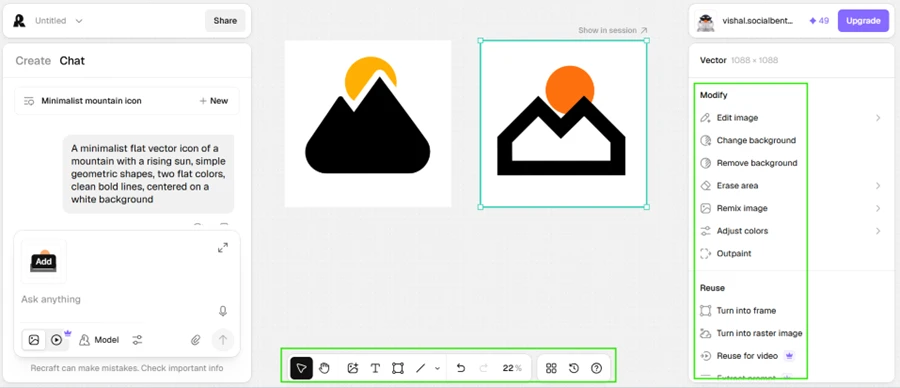
My first test was a vector icon, a minimalist mountain with a rising sun. Recraft returned two clean geometric takes at 1088x1088, and the output was an actual editable vector rather than a raster wearing a vector costume. The side panel offered to change the background, remove it, adjust the colors, or reuse the icon for video. This is the thing Recraft does that most image generators still cannot.
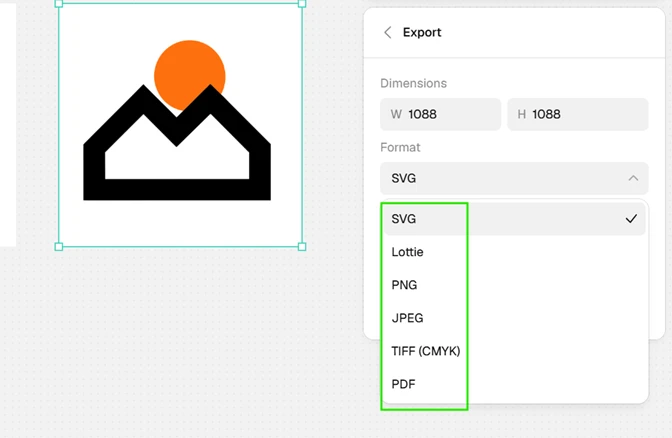
The export menu backed up that impression. A single icon could leave as SVG, Lottie, PNG, JPEG, TIFF for CMYK, or PDF, six formats out of one generation. Lottie hands me an animated version with no extra software, and TIFF for CMYK means the file walks straight into a print shop.
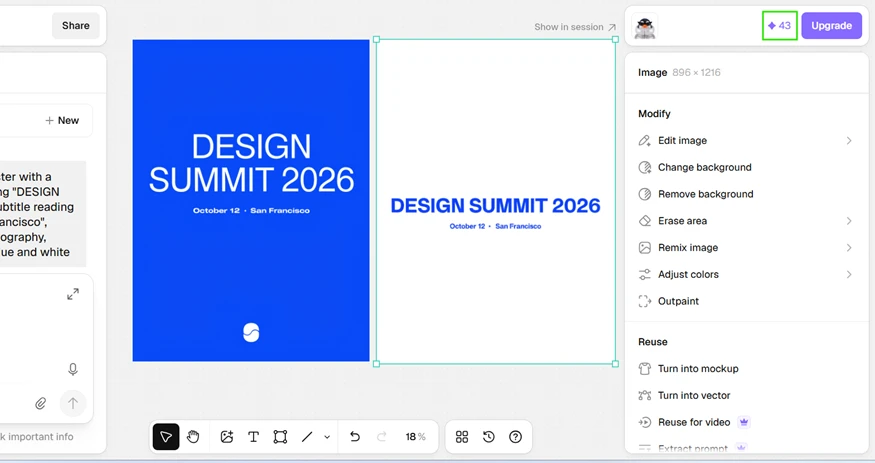
Text rendering was the surprise. AI generators have spent years mangling letters, so I asked for an event poster with a fixed headline and date. “DESIGN SUMMIT 2026” and “October 12 · San Francisco” both came back correctly spelled and properly spaced. Recraft gave me two layouts, a bold full-bleed blue version and a stripped-back white one, and I would ship either.
Then the cracks showed.
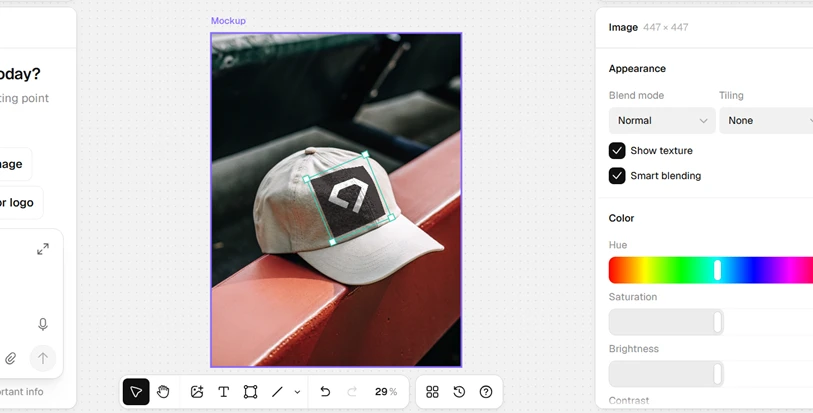
The built-in mockup tool dropped my logo onto a baseball cap. The feature is handy for a fast preview, though the logo sat flat against the fabric and refused to follow the curve of the cap even with smart blending switched on.
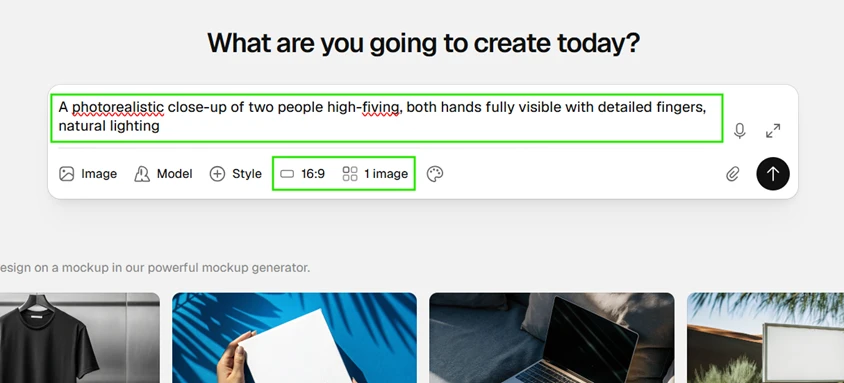
The controls were the real weak spot. For the poster I picked a 16:9 ratio and got a portrait 896x1216 image back. When I generated a photorealistic high-five, I set 16:9 a second time and locked the count to a single image. Recraft overrode both instructions. It returned two square files at 1024x1024, ignoring my ratio and doubling my output. On a plan with a daily credit cap, every forced second image quietly spends credits I never asked to use.

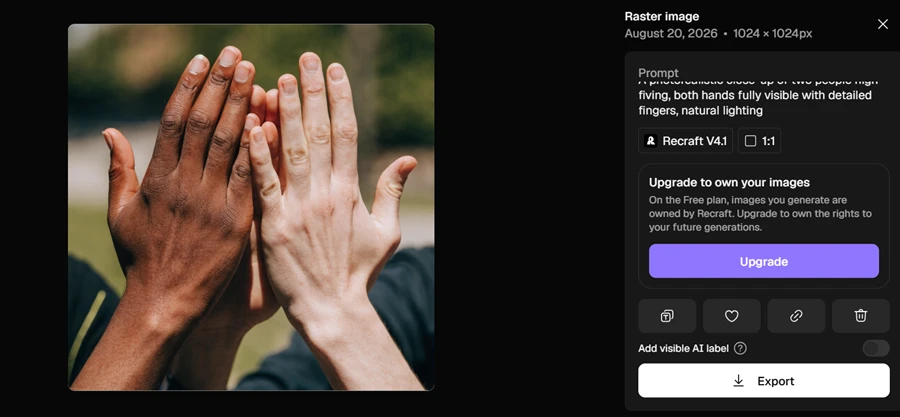
The high-five itself exposes the anatomy problem reviewers keep raising. I asked for two people, and the frame fills with more than two hands and a crowd of extra fingers that never resolve into a clean count. This ran on Recraft V4.1, the current flagship model, so an old-engine defense does not apply.
One line in that same panel matters for anyone testing the free tier. Recraft states outright that images made on the free plan belong to Recraft, not to the person who generated them, and the rights only transfer once you pay to upgrade.
| Dimension | Our test | User signal | Verdict | Composite |
|---|---|---|---|---|
| Image Output Quality Fidelity, detail, and style control | 7.5 | 7 | Good | |
| Vector and SVG Quality Usability of icons and vectors | 6 | 6 | Moderate | |
| Ease of Use Learning curve and workflow clarity | 8 | 8 | Good | |
| Value for Money Perceived fairness of pricing | 6.5 | 6.5 | Moderate | |
| Billing and Transparency Clarity of charges and cancellations | 5.5 | 5.5 | Weak | |
| Customer Support Helpfulness and speed of responses | 5 | 5.5 | Weak | |
| Platform Reliability Uptime and bug frequency | 7 | 7 | Good |
Toolscopia uses cookies to keep you signed in, remember your preferences, and understand how our reviews get read. Analytics are anonymous. See our privacy policy for the full detail.



Comments 0
Join the discussion and share your perspective.
Sign in to post a comment and reply to other readers.
No comments yet
Be the first to share your perspective on this tool.