1
NSFW Mode and unfiltered chats
Praised for minimal filtering, but criticized for overly aggressive sexual escalation.
NSFW focused AI roleplay chat platform for adults who want custom characters and explicit scenarios, but are running into weak memory, repetition, queues, strict moderation, and aggressive paywalls that drag down what could be a fun experience.
Independent review — we test tools ourselves and analyze public user reviews. How we test.
SpicyChat AI offers unfiltered NSFW roleplay, lots of characters, and some users enjoy the tone and creative freedom. However, reviews consistently flag terrible conversational memory, formulaic and repetitive replies, slow or stuck queues, and confusing bugs like bots speaking as the user. Pricing and paywalls feel steep relative to output quality, and moderation plus age verification frustrate long‑time users. It suits adults who care more about raw access to explicit scenarios than stability, consistency, or long‑term storytelling depth.
SpicyChat AI is a roleplay chatbot platform built around conversations with AI characters, and its main appeal is how few limits it places on those conversations. Where Character.AI filters heavily, SpicyChat allows mature and NSFW roleplay once you switch it on in the settings, which is why the service carries an 18+ label. You can talk to thousands of characters made by other users or build your own in a few minutes by writing a personality, a greeting, and a set of tags.
The platform runs on several open-weight language models that you can swap between mid-chat, and each one is capped at a 16K context window, which sets a hard limit on how much of a conversation a character can remember. It follows a freemium setup: the free tier handles the basics but brings wait times and locked models, while paid plans unlock quicker replies and stronger models. Compared to Janitor AI and similar tools, what SpicyChat does best is pair a beginner-friendly character creator with a large, ratings-driven library, so finding a bot worth your time takes very little effort.
Praised for minimal filtering, but criticized for overly aggressive sexual escalation.
Allows detailed personas, yet bots ignore settings and overwrite personalities frequently.
Double asterisk actions recognized, but bots often resist or override scripted directions.
Many character options and archetypes, generally viewed as a positive aspect.
Lets users try chats, yet feels heavily crippled by limits and downgraded quality.
Higher tiers marketed for better models, widely seen as expensive for the quality.
Implements waiting rooms; users report long, stuck queues and disruptive kicks.
Requires ID or face scan, frequently described as intrusive and unsettling.
Accessible without downloading an app, but recent UI changes confuse many users.
To see how SpicyChat AI actually performs rather than how it markets itself, I spent time working through the platform end to end: enabling its 18+ features, building a character from a blank form, holding conversations, swapping between the available AI models, browsing the community library, and reading the policies that govern payments and personal data. Throughout the walkthrough I used a single tame test character, "Luna Nova," so that every screenshot below reflects the same real account rather than staged marketing material. Here is what the experience looked like at each stage.
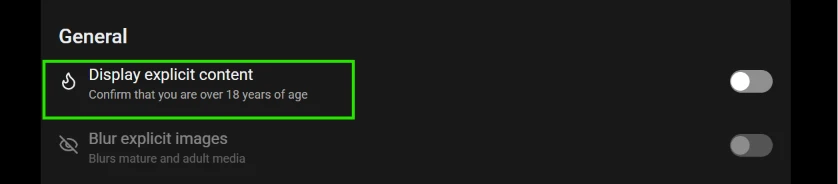
Out of the box, SpicyChat runs clean. Explicit material is switched off until you turn it on yourself, and the switch lives in the General section of the settings menu. It is a single toggle labelled "Display explicit content," with the sub-line "Confirm that you are over 18 years of age." A second toggle sitting just beneath it, "Blur explicit images," lets you keep mature media hidden behind a blur even after explicit content is enabled.
The detail worth flagging for readers is what this gate actually is. Turning on explicit content requires nothing more than flipping the switch. There is no ID upload, no payment card on file, and no secondary verification step, so the "over 18" confirmation is entirely self-declared. It is the platform's only barrier to mature material, and anyone can clear it in a second.
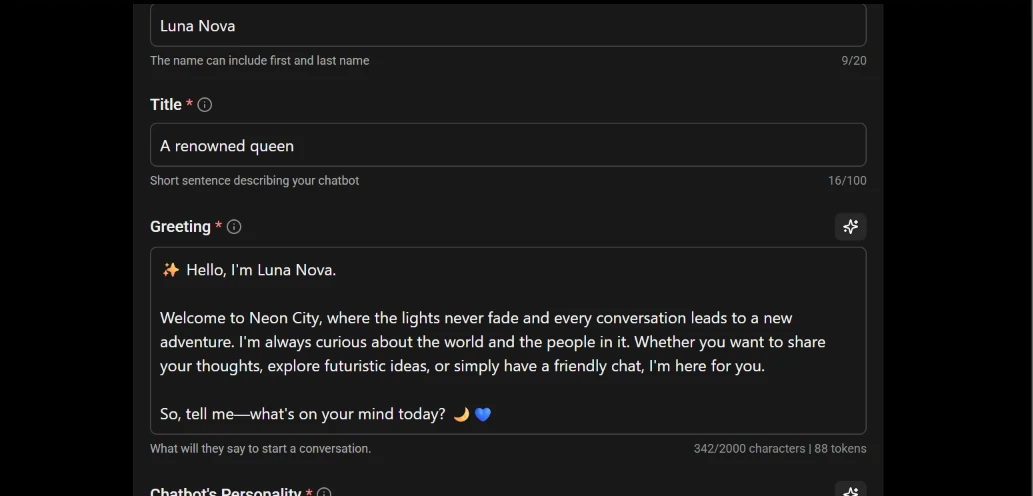
Creating an original character is one of the platform's central features, and the form makes it approachable even for a first-time user. You start by attaching a character image, then work down a set of clearly labelled fields: a Name (capped at 20 characters), a Title that acts as a short one-line description (up to 100 characters), a Greeting that serves as the character's opening message, a Personality definition, and a set of Tags used to categorise the bot in the library.
For the test I named the character Luna Nova, gave her the title "A renowned queen," and wrote a short greeting introducing her home of "Neon City." Two things stand out while filling this in. First, several fields carry a small sparkle icon that generates suggested content automatically, so you are never staring at a blank box. Second, the Greeting field shows a live character-and-token counter - my greeting registered 342 of 2,000 characters and 88 tokens. That token count matters more than it first appears: everything you write into the character's definition consumes part of the model's limited memory budget, a constraint that becomes important in the next two sections.
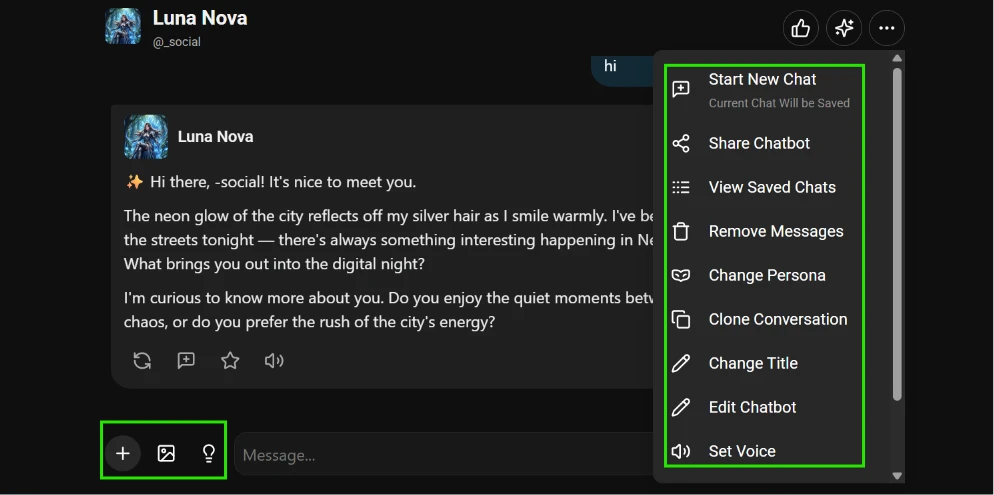
Once a character exists, the chat screen is where most of the time is spent. The character's avatar and creator handle sit at the top, the conversation runs down the middle, and a message bar anchors the bottom. Alongside the text field are three quick-access buttons: a plus button, an image button, and a lightbulb that offers reply suggestions when you are unsure how to respond.
Each reply from the character carries its own row of controls directly beneath it - regenerate the response, branch into a new message, save the message with a star, and a speaker icon to have the reply read aloud. The real depth, though, sits behind the menu in the top-right corner. Opening it reveals a full toolkit: Start New Chat (which saves the current one), Share Chatbot, View Saved Chats, Remove Messages, Change Persona, Clone Conversation, Change Title, Edit Chatbot, and Set Voice. Replies themselves come formatted in a roleplay style that mixes narration with dialogue, and the overall interface is dense with options without feeling cluttered.
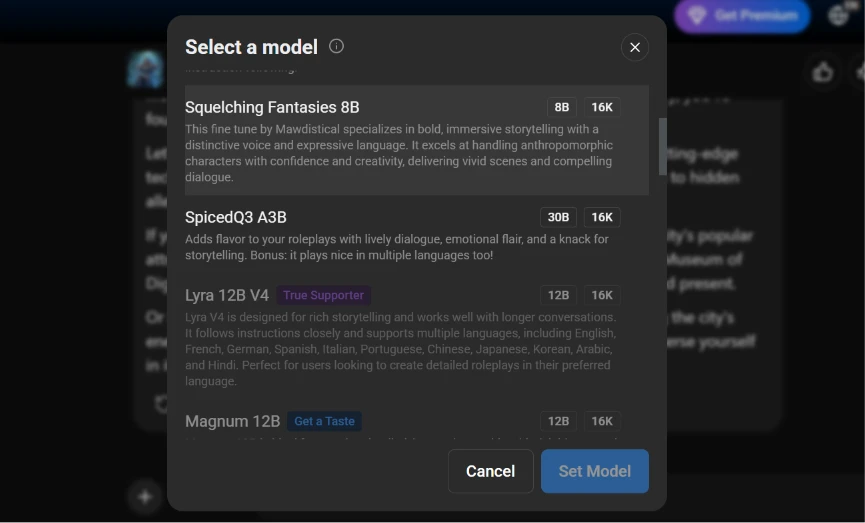
SpicyChat lets you choose which underlying AI model drives a conversation, and the "Select a model" window lists each option with two badges: one showing the model's size and one showing its context window. During testing the list included Squelching Fantasies (8B), a fine-tune built for bold, character-driven storytelling; SpicedQ3 A3B (30B), the largest on offer, promoted for lively, multilingual dialogue; Lyra 12B V4, marked with a "True Supporter" tag; and Magnum 12B, marked "Get a Taste." Those tags signal that some models are tied to the paid subscription tiers rather than being freely available to everyone.
The single most important technical takeaway is printed right there on every badge: the context window is capped at 16K across the board. That figure is the amount of conversation the model can actually "see" at once, and it applies no matter which model you select. In practice it is the ceiling on the character's memory - in a long roleplay, earlier details eventually fall outside that window and the model stops being able to reference them. Larger models such as the 30B option generally return richer and more coherent writing, while the smaller 8B model is perfectly usable but noticeably plainer by comparison.
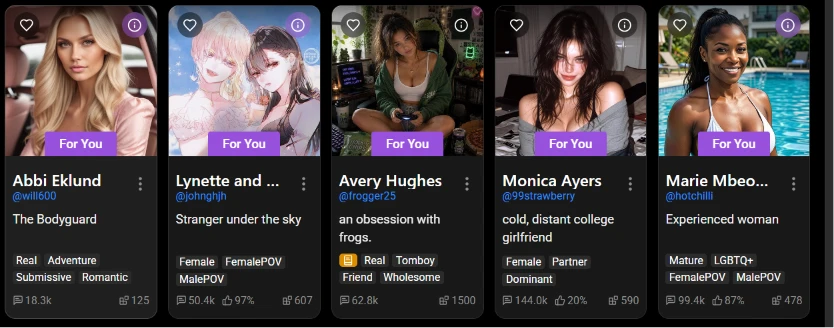
Beyond building your own characters, the discovery feed offers a large library of community-made bots. Each one appears as a card with a cover image, a name, the creator's handle, a one-line hook, and a row of tags such as Real, Adventure, Female POV, Mature, or LGBTQ+. Cards also surface engagement figures - a message count that ranged from around 18,000 to 144,000 on the row I captured, along with an approval percentage shown on some cards and an additional counter for how widely the bot has been used.
The approval percentage is the most useful signal here, because it lets you judge a bot's quality before committing any time to it. It is worth noting how widely that number swings: on a single row I saw one character sitting at 20 percent approval next to others near 87 to 97 percent. Community quality varies enormously from one bot to the next, and the rating is the quickest way to separate the polished characters from the weaker ones. Cards marked "For You" are personalised recommendations based on browsing activity.
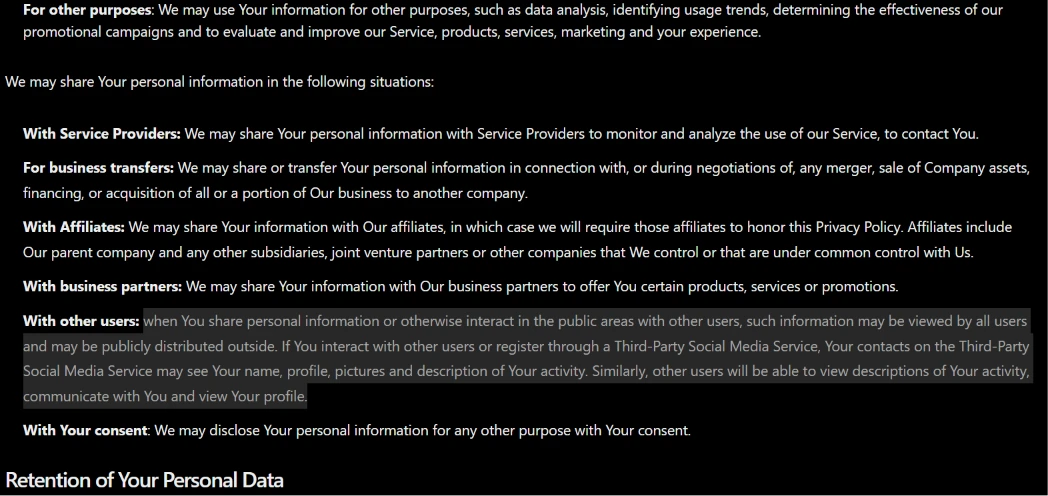
Because conversations on a platform like this can be personal, the Privacy Policy deserves a close read, and a few clauses stand out. SpicyChat states that it may share personal information with service providers who monitor and analyse the service, during business transfers such as a merger or acquisition, with corporate affiliates, and with business partners for promotions. It also notes that information may be used for broader purposes including data analysis and improving the service.
The clause most relevant to everyday users is the one covering other users: anything you share in the public areas of the platform may be viewed by other users and distributed outside the service, and if you register through a third-party social account, those contacts may see your profile and activity. In short, the data you generate can move across several categories of recipient, and public-facing activity is not private by default. The policy's Retention section, visible just below these clauses, is the next thing readers should check for how long that data is kept.
Anyone considering a subscription should understand the refund terms before paying, and here they are unusually firm. As of the policy's last update on 31 July 2024, fees are non-refundable once the login details have been used on the portal, and the company does not issue refunds or credits for any partial-month membership period. Simply not using a membership, or being unable to access the site through no fault of the platform, is explicitly stated as not being grounds for a refund.
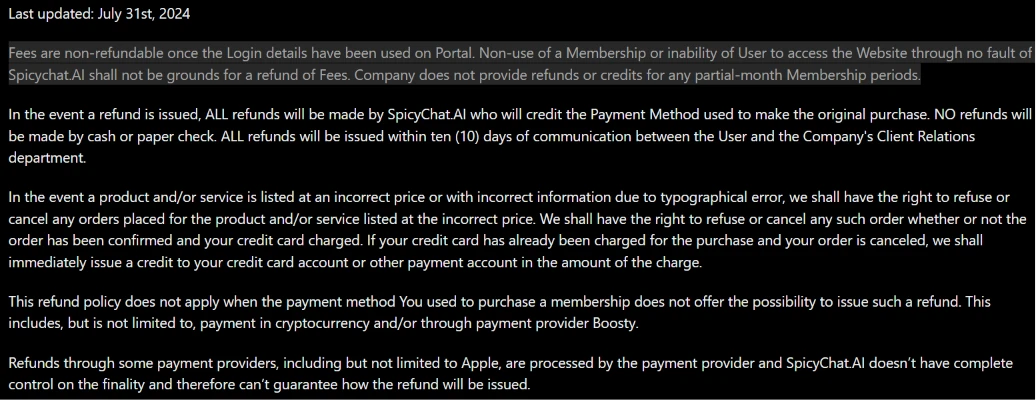
When a refund is granted, it is credited back to the original payment method within ten days and never issued as cash. Several payment routes carry additional caveats: purchases made in cryptocurrency or through the Boosty provider may fall outside the refund policy entirely, and payments processed through providers such as Apple are handled on that provider's terms rather than by SpicyChat directly. The practical summary for readers is that this is effectively a no-refund model once you have logged in, so it is worth being certain before subscribing.
| Dimension | Our test | User signal | Verdict | Composite |
|---|---|---|---|---|
| Chat Quality Variety, depth, coherence | 7.5 | 7 | Good | |
| Memory and Consistency Recall of facts and persona | 6.5 | 6 | Moderate | |
| NSFW Experience Erotic focus and control | 9 | 9.5 | Excellent | |
| Performance and Reliability Speed, queues, errors | 7 | 6.5 | Moderate | |
| Value for Money Price relative to quality | 8 | 7 | Good | |
| Safety and Privacy Moderation and data handling | 5.5 | 5.5 | Weak | |
| Ease of Use UI clarity and onboarding | 7.5 | 7 | Good |
Toolscopia uses cookies to keep you signed in, remember your preferences, and understand how our reviews get read. Analytics are anonymous. See our privacy policy for the full detail.



Comments 0
Join the discussion and share your perspective.
Sign in to post a comment and reply to other readers.
No comments yet
Be the first to share your perspective on this tool.