1
AI text humanization
Core rewriting aims to bypass AI detectors, praised by some but heavily criticized for inconsistency.
StealthWriter.ai is an AI text humanizer aimed at students, researchers, and online writers who want AI generated content to bypass plagiarism and AI detectors, with mixed reliability and serious customer service concerns.
Independent review — we test tools ourselves and analyze public user reviews. How we test.
StealthWriter.ai can produce detector evasion that some long term users rely on, particularly for Turnitin and similar academic checks. Interface, speed, and day to day usability receive praise in several reviews. However, many users report broken logic, distorted meaning, unstable models, and inconsistent bypass success. The most serious issues center on billing disputes, repeated unauthorized charges, refusal of refunds, and long periods of unresponsive or dismissive support. It suits technically patient academic writers willing to manually edit outputs and accept significant service and policy risk.
StealthWriter is an AI humanizer. You paste in text from ChatGPT, Claude, or any model, and it rewrites the wording so AI detectors are less likely to flag it. The tool is built by AiVantage LLC, and it keeps things lean: a humanizer, a built-in AI detector with two scanner versions, and a basic text generator.
The mechanism is what separates it from a thesaurus. Instead of swapping single words, it restructures whole sentences and varies their rhythm to strip out the statistical patterns detectors look for, things like uniform sentence length and predictable phrasing.
Two details matter before you rely on it. First, its rewrites run on the Ghost model family, and the free plan only gives you the weakest one, Ghost 5.2 Mini. Second, its own detector is not neutral proof. As my testing showed, a paragraph StealthWriter rated 75% human was flagged 100% AI by GPTZero minutes later. Treat the built-in score as a rough guide, then verify against the detector your readers or clients actually use.
Core rewriting aims to bypass AI detectors, praised by some but heavily criticized for inconsistency.
Several users report Turnitin bypass success, others say strict academic detectors still flag content.
Different models like Ghost tiers exist, with complaints that paid upgrades add little real improvement.
Daily and total humanization caps exist, frequently described as confusing, restrictive, and poorly communicated.
Interface called high quality and easy to navigate by some, though stability issues are mentioned.
Individual agents receive praise, but overall support is often described as unresponsive or dismissive.
Auto renewal, repeated charges, and strict no refund policies are recurring negative themes.
Supports some languages but lacks others like Korean, with downtime for certain languages reported.
Older stable versions moved behind a paywall, frustrating long time free tier users.
I did not want to review this tool from its marketing page, so I ran my own text through it on the free plan and checked every result against an outside detector. Here is what happened, output by output, with the exact scores I saw. Everything below was produced on the free tier using the Ghost 5.2 Mini model, which is the only model free users get.
I started with a 140-word blog intro about meal prepping, written in ChatGPT in a loose, conversational tone. Pasted straight into StealthWriter, its own V2 scanner rated it 0% human and tagged it as AI. That is the starting line.
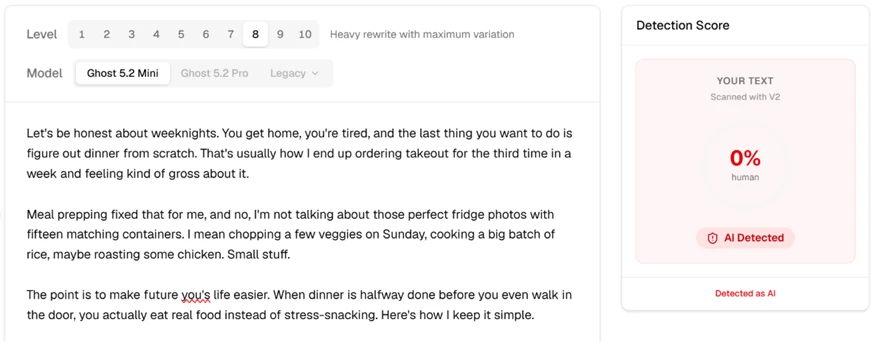
I set the level to 8 (heavy rewrite) and hit humanize. The rewrite came back readable. Lines like "you arrive home, fatigued and just wanting to eat" flow fine, and the tool's own V1 scanner jumped the score to 75% human with a green "Looks Human" badge. On its own dashboard, this looks like a pass.
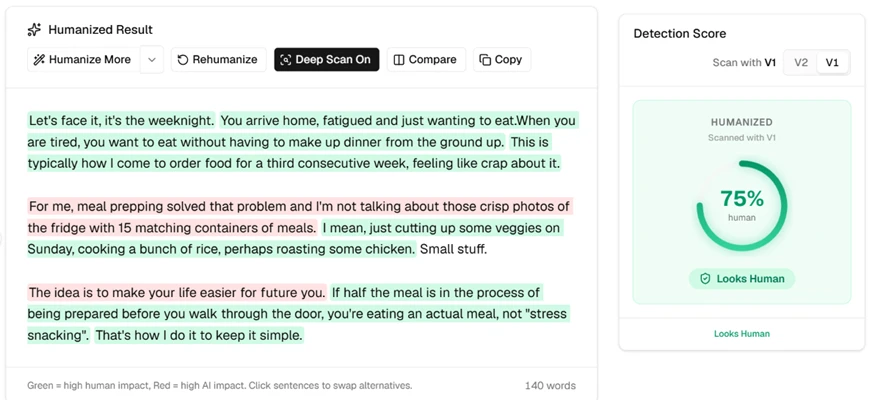
Then I took that exact humanized text and dropped it into GPTZero. The verdict flipped completely. GPTZero was highly confident the text was AI generated and scored it 100% AI, 0% human. The same paragraph StealthWriter called human, an outside detector called machine-written with no hesitation.
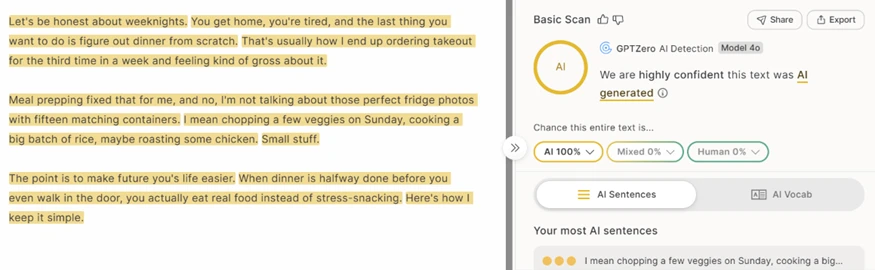
Worth flagging that even StealthWriter's two scanners disagree. Its V2 read the original at 0% and its V1 read the rewrite at 75%, so the built-in score shifts depending on which version you run. I would not treat that internal number as proof of anything.
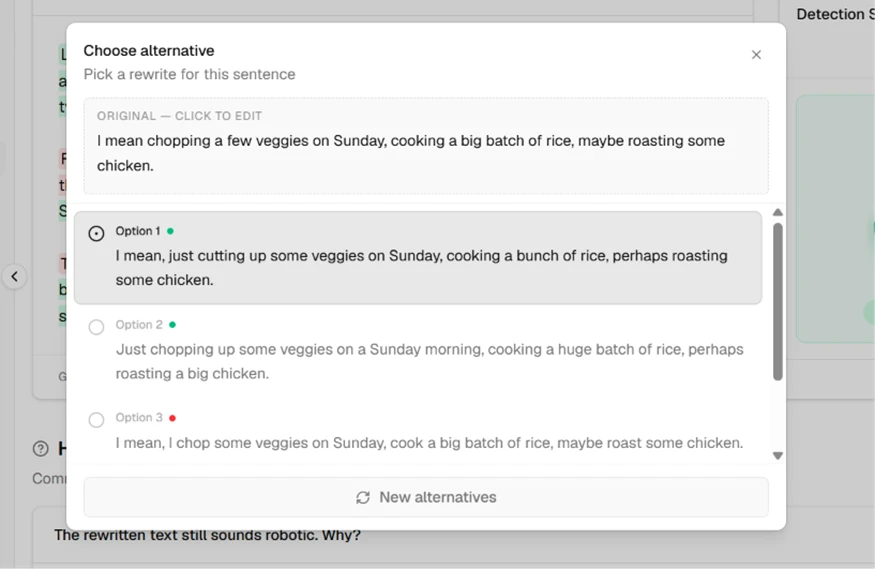
One part I did like. Click any sentence and StealthWriter offers alternative rewrites to swap in. On my meal-prep line it gave three options, and it flags each one for AI risk with a colored dot. Option 3 carried a red dot, meaning the tool itself rates that rewrite as high AI impact. So the feature gives you control, but it also quietly admits some of its own suggestions are worse than others.
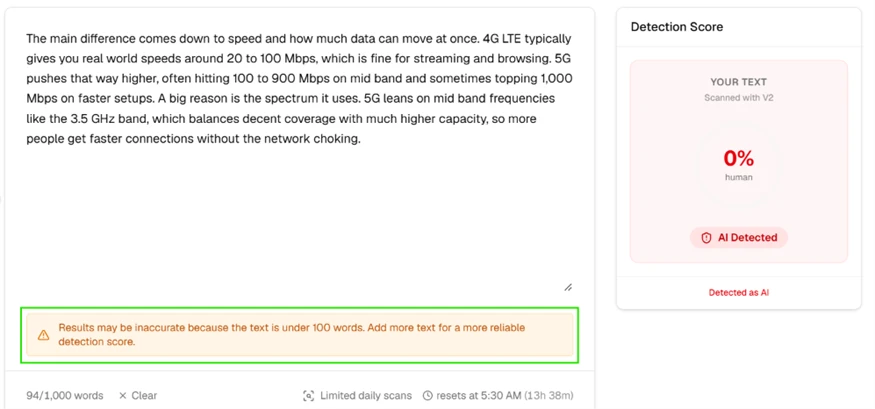
Next I tested whether facts survive the rewrite. I fed it a 94-word paragraph comparing 4G LTE and 5G, packed with figures: 20 to 100 Mbps, 100 to 900 Mbps, a 1,000 Mbps peak, and the 3.5 GHz band. Two things showed up right away. The V2 scanner again read 0% human, and a banner warned that results may be off because the text sits under 100 words. The same screen shows the free ceiling: 94 of 1,000 words used, plus a "Limited daily scans" note that resets at 5:30 AM.
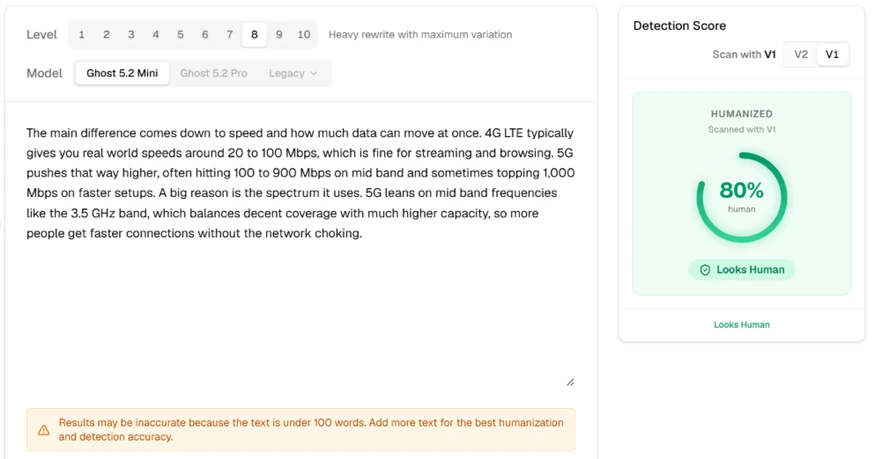
The humanized version scored 80% human on StealthWriter's V1. The genuinely good news is in the numbers: every figure came through intact. 20 to 100 Mbps, 100 to 900 Mbps, the 1,000 Mbps peak, and the 3.5 GHz band all survived the rewrite unchanged. For a tool that reshuffles sentence structure this heavily, keeping the technical facts accurate is a real point in its favor.
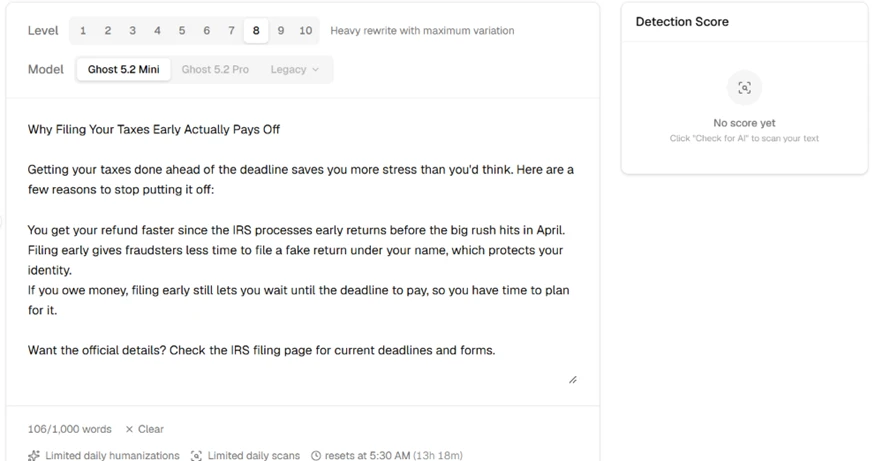
This one is a practical headache. I built a properly formatted draft on filing taxes early, with a bold H2 heading, three bullet points, one bolded phrase, and a hyperlink to the IRS filing page.

The moment it landed in StealthWriter, all of that was gone. The heading dropped to plain body text, the bullets lost their markers and collapsed into run-together lines, the bold vanished, and the IRS link became flat, unclickable text. StealthWriter reads pasted content as plain text only.
The takeaway for anyone working with finished posts: humanize first, then format. If you paste a styled draft in, you will rebuild every heading, bullet, and link by hand afterward.
The free tier is more usable than I expected. It includes the humanizer, both detector versions, deep scan, and a daily allowance of 10 humanizations and 10 scans at up to 1,000 words per input. That is enough to genuinely evaluate the tool, which is why this whole test ran on it.
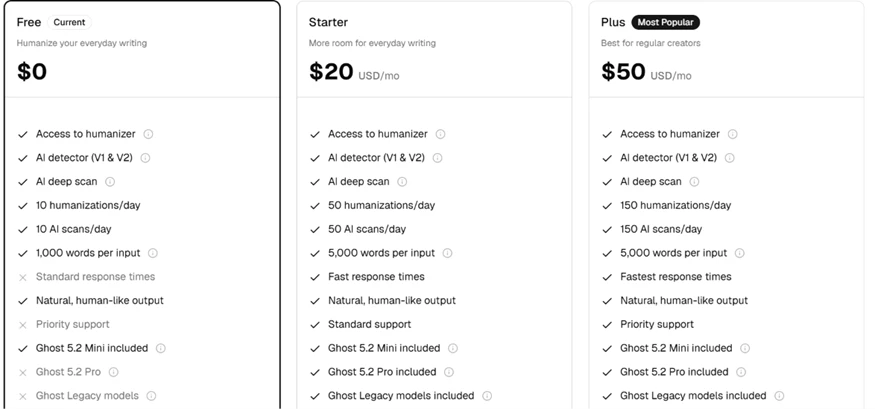
Paid plans climb steeply. Starter at $20 a month raises the caps to 50 a day and 5,000 words, and it unlocks Ghost 5.2 Pro plus the Legacy models. Plus is $50, Pro is $100, and the top self-serve tier, Scale, runs $400 a month for 2,000 humanizations a day.
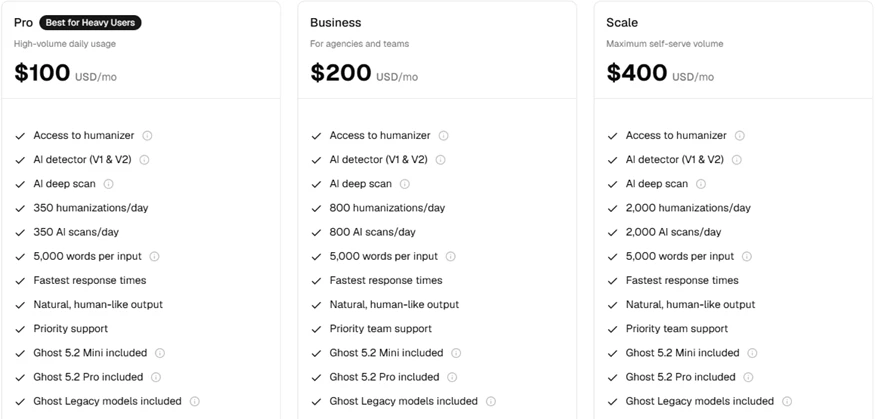
The pricing detail that matters for my results: the free plan only runs Ghost 5.2 Mini. Pro and Legacy models are locked behind Starter and up. So my GPTZero failure is specifically a Mini-model result. The paid models might do better against detectors, though I could not verify that on the free tier. On the free plan as tested, StealthWriter reliably fools its own scanner but not GPTZero, and GPTZero is the detector students and freelance clients actually run.
| Dimension | Our test | User signal | Verdict | Composite |
|---|---|---|---|---|
| Detector Evasion Reliability Bypassing AI and plagiarism tools | 4.5 | 5 | Weak | |
| Text Quality Coherence and meaning preservation | 7.5 | 7 | Good | |
| Ease of Use Interface and workflow simplicity | 8 | 8 | Good | |
| Reliability and Uptime Stability, downtime, and language availability | 7 | 7 | Good | |
| Customer Support Responsiveness and helpfulness | 4 | 4 | Weak | |
| Billing Transparency Pricing, limits, and charges clarity | 6.5 | 6.5 | Moderate | |
| Value for Money Perceived benefit relative to cost | 6 | 6.5 | Moderate |
Toolscopia uses cookies to keep you signed in, remember your preferences, and understand how our reviews get read. Analytics are anonymous. See our privacy policy for the full detail.



Comments 0
Join the discussion and share your perspective.
Sign in to post a comment and reply to other readers.
No comments yet
Be the first to share your perspective on this tool.