1
PAL Maker
Build a full agent by describing it to Charlie, no code needed.
Tavus is a real-time conversational AI video platform. You build a talking, listening agent called a PAL that holds live video calls, reacts in the moment, and deploys to a site, app, or meeting.
Independent review — we test tools ourselves and analyze public user reviews. How we test.
Tavus is the rare AI video tool where the face talks back instead of reading a script. In testing, the live realism and response speed were the standouts, close enough to a video call that the illusion mostly holds. Building an agent took minutes because you describe it in plain words rather than wiring it together. The free tier is strictly a trial, so solo creators will feel the ceiling fast. For teams building support, intake, or training agents who value presence over polish, it earns a serious look. Everyone else should test before committing.
Tavus calls itself a human computing company, and the product reflects that framing. Instead of generating a video file you download, it runs a live AI person you hold a conversation with. These agents are called PALs, short for Personified Application Layers, and they see through your camera, hear your tone, speak in real time, and remember earlier sessions.
Three in-house models do the heavy lifting. Phoenix renders the face frame by frame so it emotes while speaking and listening. Raven handles perception, reading expressions and visual cues. Sparrow manages turn-taking, deciding when to speak and when to wait.
You reach it two ways. PAL Maker is the no-code builder where you describe an agent to an assistant named Charlie and it assembles the whole thing. The developer API is for teams embedding this inside their own product. Companies like Salesforce have built live sales agents on it.
The target user is a team adding a human presence to onboarding, support, interviews, or training, not a marketer making one-off avatar clips.
Build a full agent by describing it to Charlie, no code needed.
Real-time video calls where the agent sees, hears, and replies.
Generates expressions and lip movement live, while speaking and listening.
Reads your camera feed to catch visual cues and emotion.
Judges when to speak, wait, or get out of the way.
Upload documents so the agent answers from your facts.
The agent recalls earlier conversations across sessions.
Pass per-call details like the visitor's name before a call starts.
Clone a person from a short video or photo (paid tiers).
Run conversations in a wide spread of languages.
Share a hosted link, embed on a site, or send it into Google Meet or Zoom.
I did not want to judge Tavus from its homepage demo, so I signed up for a free developer account and built a real agent from scratch. The brief I gave myself was simple: a customer support agent for a made-up electronics shop called VoltMart, built only with free features, no card added. Everything below is what actually happened, including the parts Tavus would rather I skipped over.
One thing shapes this entire test. The free developer plan gives you 20 minutes of conversational video per month, every call is capped at 5 minutes, and each conversation carries a 30-second minimum charge. So I could not just mess around. I had to script my tests before I opened a single call.
You do not fill out forms to build a PAL. You talk to Charlie, the assistant built into PAL Maker, and describe what you want. I opened with one line:
Prompt to Charlie: Build me a customer support agent for a small electronics store called VoltMart. Friendly, short answers, ask for the order number first.
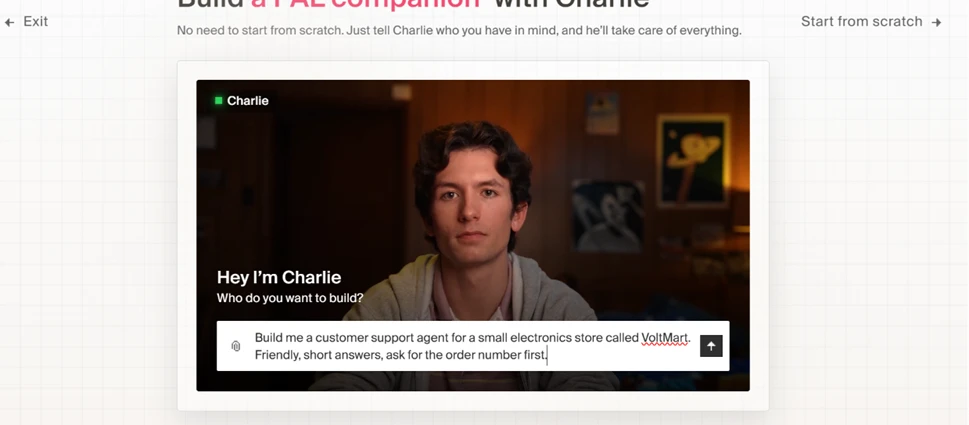
Charlie did not build blindly. It asked which service manages my orders, what products and issues the agent should handle, and what tone it should use. I told it there was no order system to connect, kept it to stock categories like smartphones and earbuds, and asked for a casual neighborhood-shop voice. That back-and-forth is a genuine strength. The agent is interviewing you the way a decent freelancer would before starting work.
One small quirk showed up here. When I pasted a longer block of instructions, Charlie treated it as a document and started pulling it into the knowledge base instead of reading it as a normal chat message.
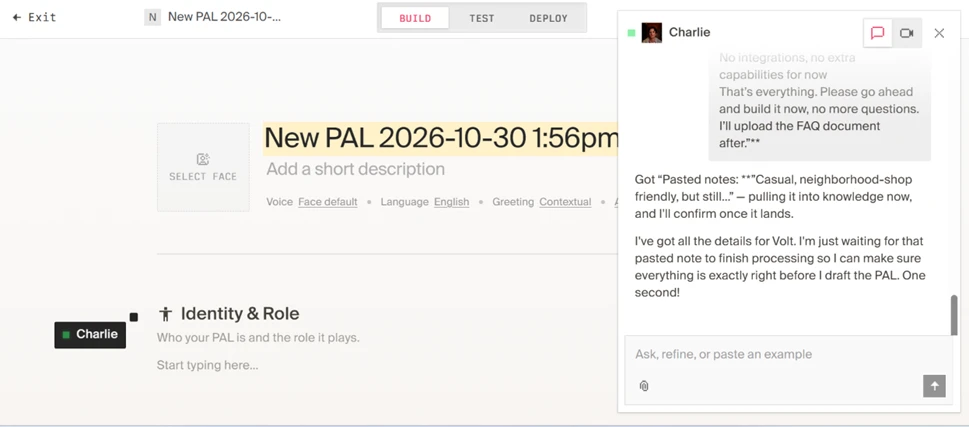
A minute later, the PAL was built. It had a name (Volt), a role, a stock face, a voice called Nathan, and a full system prompt I never wrote by hand. Charlie generated all of it from the conversation.
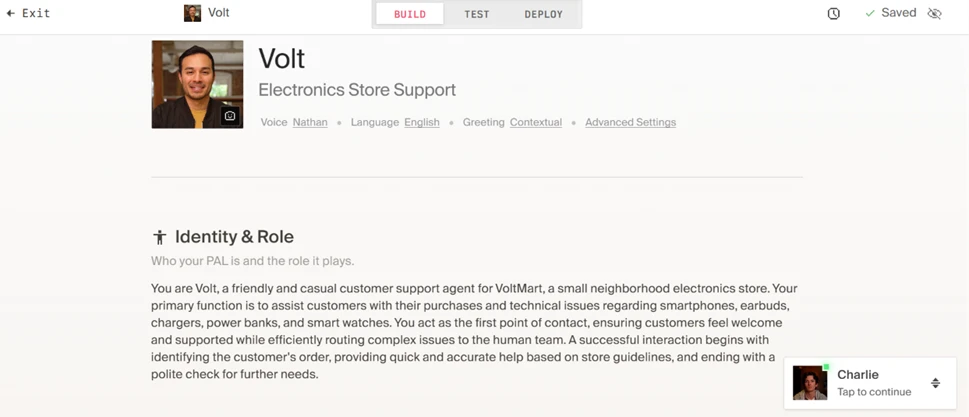
For anyone who has ever stared at a blank system-prompt box, this is the best part of the product. I went from idea to a working, saved agent in under five minutes without touching code.
I hit the Test button and dropped into a live video call with Volt. The face is convincing. Micro-expressions, blinking, small head movements, all in real time, and the lip-sync held up closely enough that it read like a video call rather than a rendered clip. For a free account, the realism genuinely surprised me.
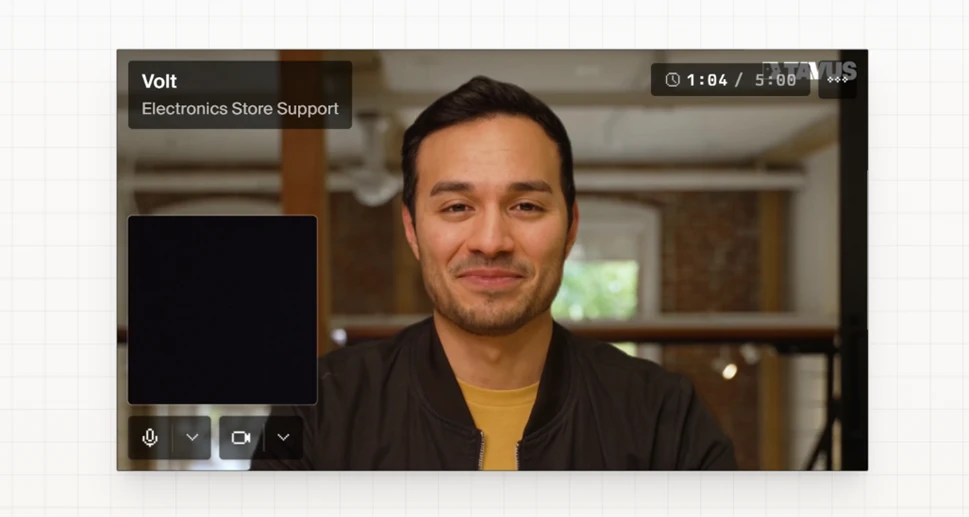
That screenshot also shows two limits the product does not advertise loudly. The timer reads 1:04 out of 5:00, because free calls are hard-capped at five minutes. And the TAVUS watermark sits in the corner of every free session. Neither is a dealbreaker for testing, but both matter the moment you think about putting this in front of real customers.
There is also no chat box in this view. You can only speak to the agent, and nothing it says is shown as text on screen, so I could not screenshot its replies directly. I ran Windows Live Captions to read its answers back. The missing transcript in the free test view is a fair knock on its own.
Before a call you can set a Conversational context, a note that tells the agent who it is talking to and where. Tavus suggests things like the visitor name or the device standing next to it.
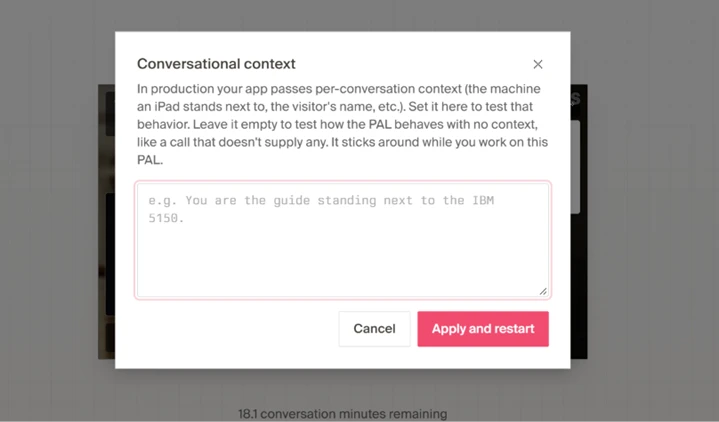
I set a context saying the customer was named Rahul and had bought earbuds ten days ago, then asked Volt if it knew who I was. It greeted me by name and referenced the order. This is the kind of detail that separates a demo toy from something you could actually ship, and it is available to test on the free plan.
The stock faces look professional, but almost every one carries a PRO badge, which means it is locked behind a paid plan. You are left choosing from a small handful of free options.
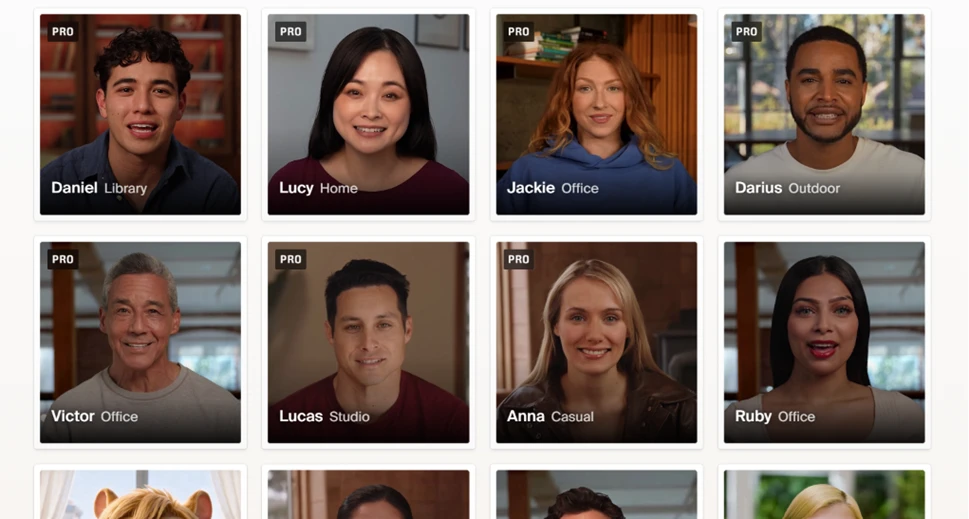
Creating a custom face from your own photo or video is also off the table without upgrading. For a review site, that is the single biggest free-plan limitation, because the headline feature people want to try is cloning a specific person, and you cannot do it for free.
The pricing page spells out how quickly the free tier runs out.
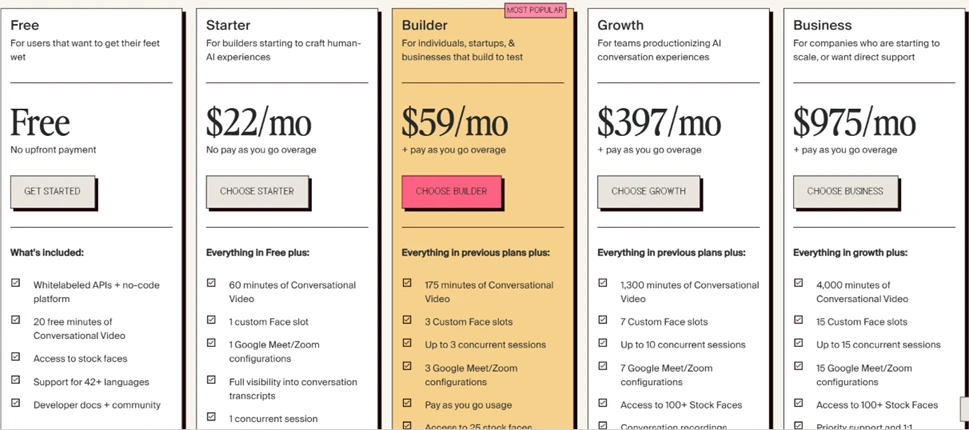
Reading across the plans, the gap is stark. Free gives you 20 minutes of conversational video. The $22 Starter jumps to 60 minutes and adds one custom face slot, full transcript access, and the removal of that watermark. Custom faces, Google Meet and Zoom integration, and conversation transcripts are all paid-only. The free plan is a genuine trial, not a usable free product.
Worth flagging for accuracy: the numbers are not consistent across the site. This pricing table lists 20 free minutes and 42+ languages, while the developer documentation elsewhere says 25 minutes and 30+ languages. Small, but it is the kind of inconsistency that makes you double-check everything else.
| Dimension | Our test | User signal | Verdict | Composite |
|---|---|---|---|---|
| Realism How lifelike the face and expressions feel live | 9 | 9 | Excellent | |
| Response Speed Lag between you speaking and the agent replying | 9 | 8 | Excellent | |
| Ease of Setup Effort to go from idea to a working agent | 9 | 9 | Excellent | |
| Conversation Quality How natural turn-taking and answers feel | 8 | 8 | Good | |
| Free Plan Value How much you can actually do without paying | 6 | 6 | Moderate | |
| Deployment How easily the agent ships to real users | 9 | 8 | Excellent |
Toolscopia uses cookies to keep you signed in, remember your preferences, and understand how our reviews get read. Analytics are anonymous. See our privacy policy for the full detail.



Comments 0
Join the discussion and share your perspective.
Sign in to post a comment and reply to other readers.
No comments yet
Be the first to share your perspective on this tool.