1
High accuracy transcription
Frequently praised for clean transcripts, even with accents, low volume, and challenging audio.
TurboScribe is an online transcription service focused on fast, accurate, multi language audio and video transcription, with a genuinely useful free tier, aimed at students, researchers, freelancers, and small teams handling regular recordings.
Independent review — we test tools ourselves and analyze public user reviews. How we test.
TurboScribe delivers very fast, high accuracy transcripts across accents, multiple languages, and long recordings, which many reviewers say outperforms rival tools. The interface is straightforward, and the free allowance of three 30 minute files per day is unusually generous and genuinely free. However, a minority report failed uploads, inaccuracies with some files, weak or unresponsive support, and disputes over billing or refunds. It best fits users who value speed, accuracy, multilingual support, and free usage, and who are comfortable with occasional rough edges in customer service and edge case handling.
TurboScribe is a browser-based transcription service that turns audio and video files into text. The detail most reviews skip is what powers it: TurboScribe runs on OpenAI's Whisper, the same open-source speech-to-text model developers use to build their own tools. That matters because Whisper is free to anyone, but running it yourself means installing Python and FFmpeg, configuring a GPU with enough VRAM, and troubleshooting dependencies before you transcribe a single file.
TurboScribe removes that entire setup. You upload a file, pick a language, and get a transcript back, with the heavy GPU processing handled on their servers. What you pay for is the wrapper around Whisper: speaker recognition, transcript editing, translation into 134-plus languages, multiple export formats, and bulk uploads.
So the honest framing for a reader is this. If you can run code and own a capable GPU, Whisper alone costs nothing. If you just want transcripts without the technical overhead, TurboScribe sells you convenience on top of a free model.
Frequently praised for clean transcripts, even with accents, low volume, and challenging audio.
Regularly completes interviews and long videos within minutes, strongly praised across reviews.
Three daily 30 minute transcriptions highlighted as genuinely free and highly valuable.
Handles many languages and mixed language files well, though occasional script selection issues reported.
Can distinguish speakers in many interviews, but some users report missed speakers and confusion.
UI described as easy to navigate, straightforward, and quick to learn for non technical users.
Exports to PDF, DOCX, and other formats, consistently praised for convenience and flexibility.
Commonly used to transcribe YouTube and other video sources, simplifying note taking and captioning.
Founder engagement praised by many, while others criticize refund handling and slow responses.
I ran TurboScribe entirely on its free plan to see how far it carries a real workload before the paywall shows up. I fed it two clips: a clean solo physics lecture with one speaker, and a noisy 47-minute recording with background sound. The gap between those two results is where the honest picture of this tool lives.
The upload flow is the part that impressed me first. I dragged a file in, picked the audio language, and chose a transcription mode before starting. TurboScribe gives you three modes named Cheetah (fastest), Dolphin (balanced), and Whale (most accurate). I ran my tests on Whale. A Speaker Recognition toggle sits right below the modes, so you set everything from one panel and hit Transcribe.
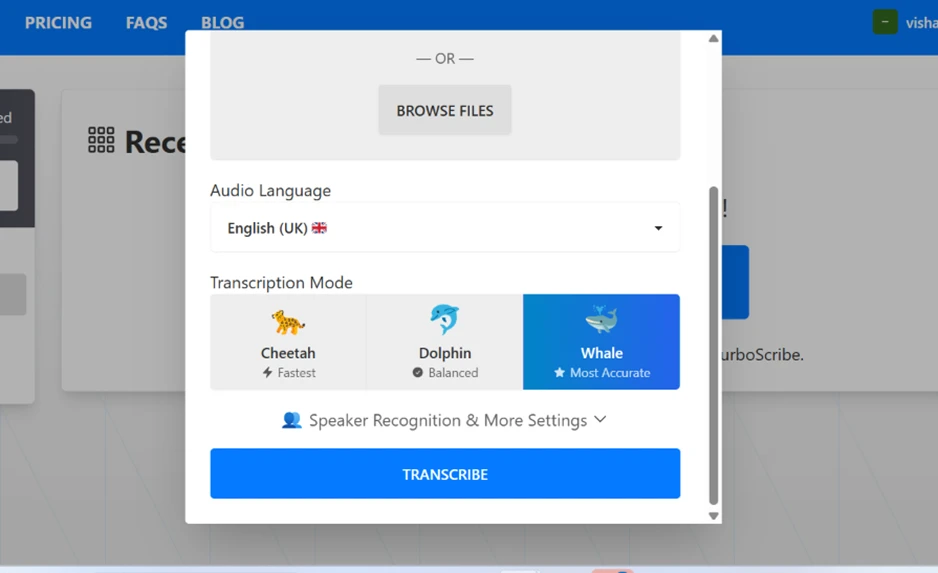
One setup detail worth flagging: the language defaulted to English (UK). If your audio is American English, switch this to English (US) before you transcribe, or you invite small spelling and phrasing mismatches in the output.
My 18-minute clean clip finished in roughly two minutes. The dashboard shows a live percentage while it works, which is a small thing that makes the wait feel manageable. The same screen also carries the first free-tier reminder, a counter reading "1 of 3 daily transcriptions used" with a progress bar toward the daily cap.
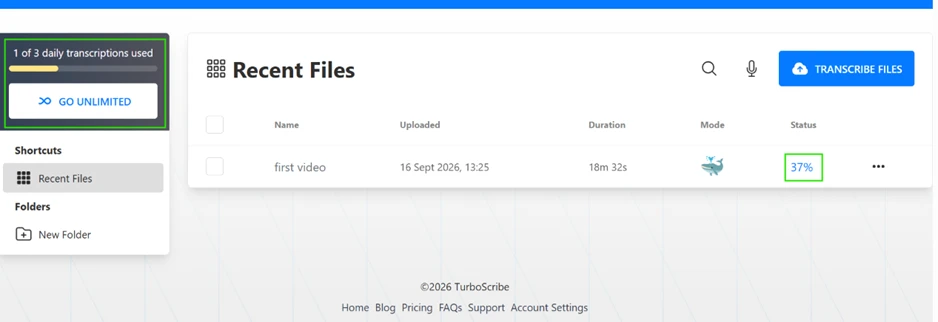
This is where TurboScribe earns its reputation. On the single-speaker lecture, the transcript came back clean, punctuated, and broken into readable paragraphs with clickable timestamps every few seconds. I checked the text against the audio and the wording held up, including the technical physics terms. For anyone transcribing a podcast, a lecture, or a one-on-one interview recorded on a decent mic, the result needs little more than a light proofread.
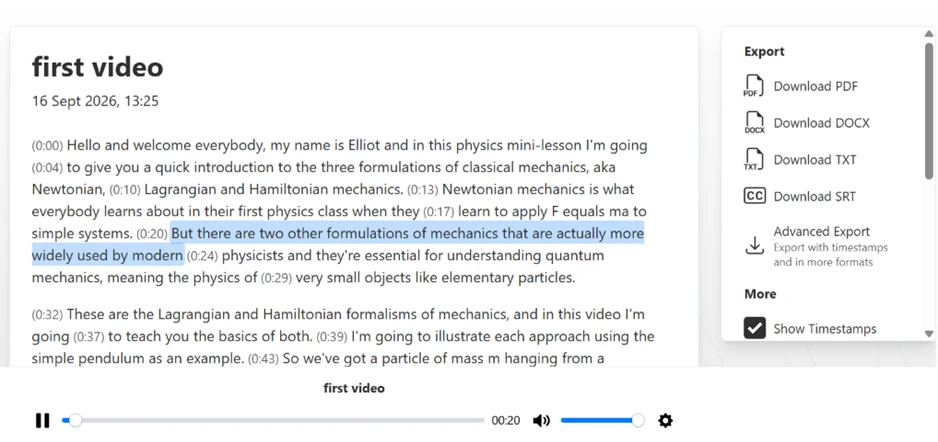
Export sits in the right rail and covers the formats most people actually hand off: PDF, DOCX, TXT, and SRT, with an advanced export for timestamped and additional formats. All of it worked on the free plan.
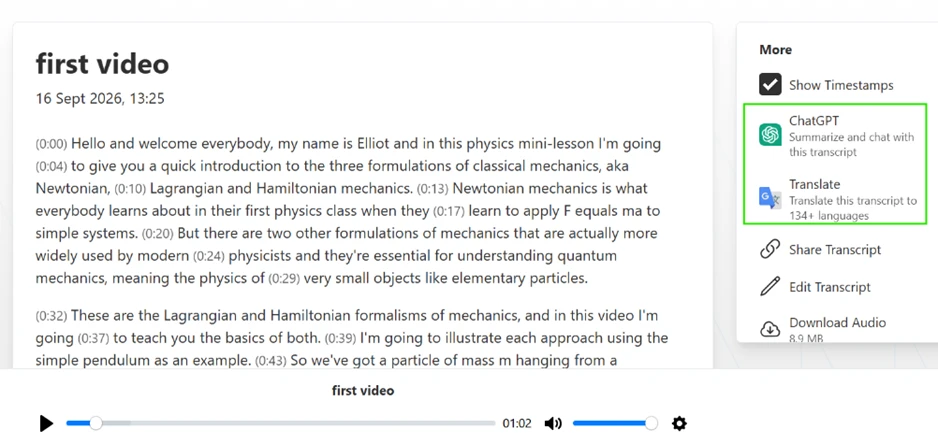
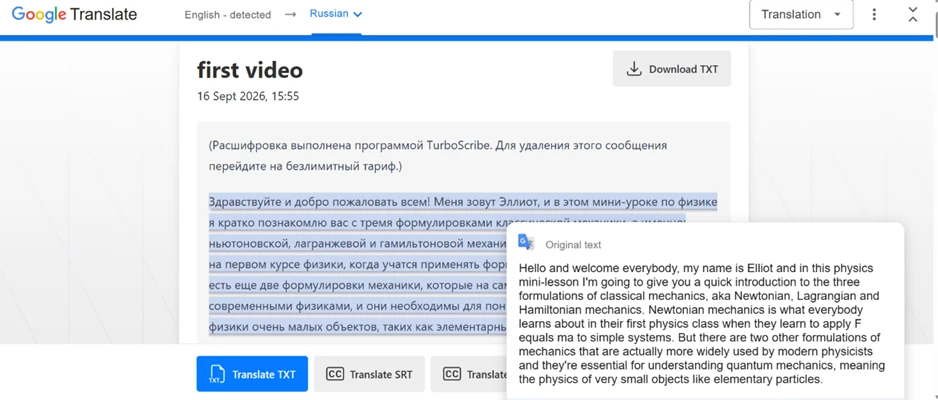
The same transcript screen carries a Translate option advertising 134-plus languages and a ChatGPT button that summarizes or chats with the transcript. Both features triggered on the free account. I translated the physics lecture into Russian to test it end to end.
The translation itself ran without trouble and I could download the translated TXT. It also surfaced a free-tier catch that belongs in any honest review: TurboScribe stamps a promotional line into the exported transcript. In my Russian output the top line read as a notice that the transcription was performed by TurboScribe, with an instruction to switch to the unlimited plan to remove the message. That watermark rides along on free exports until you pay.
The second clip is the one that exposed the limits, and it did so in two ways at once.
First, the length cap. My file ran 47 minutes. The free plan stops at 30, so TurboScribe transcribed the opening stretch and then dropped a blue banner reading "This file is longer than 30 minutes. Go Unlimited to transcribe files up to 10 hours long." The back half of my recording simply never got processed.
Second, and more revealing, the accuracy collapsed on the noisy portion it did attempt. The transcript looped. The same sentence about a huge line of people waiting for tickets printed twice in a row, and the timestamps jumped from 0:01 straight to 5:02, meaning long stretches produced nothing usable at all. This is a known failure pattern for Whisper-based engines on unclear or low-speech audio, where the model repeats phrases or hallucinates filler instead of admitting silence.
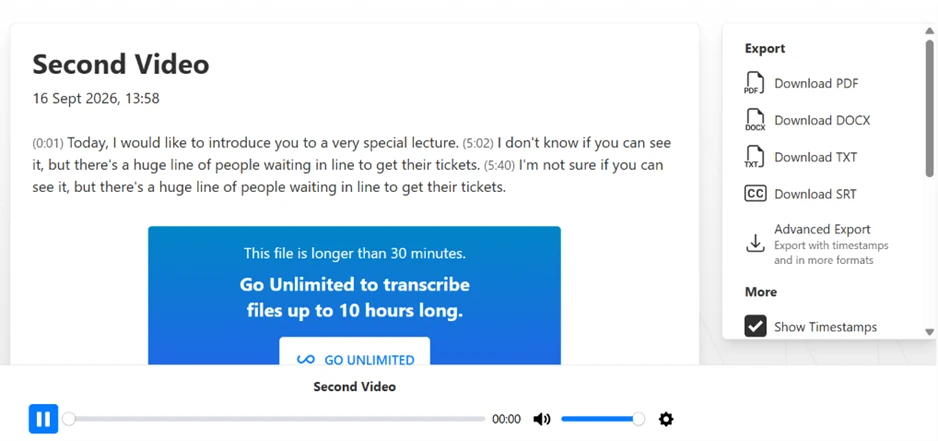
The takeaway from this clip is specific. On poor audio TurboScribe does not degrade gracefully. It produces confident, repeated text that looks fine at a glance and falls apart the moment you check it against the recording. Background noise, overlapping voices, and low recording quality all push it toward this behavior.
The pricing page lays out the boundary plainly. Free gives you 3 transcripts a day, 30-minute uploads, one file at a time, and lower priority in the queue. Unlimited runs US$10 a month billed yearly and removes those caps, adding 10-hour or 5 GB files, 50-file batches, bulk exports, and the removal of that watermark.
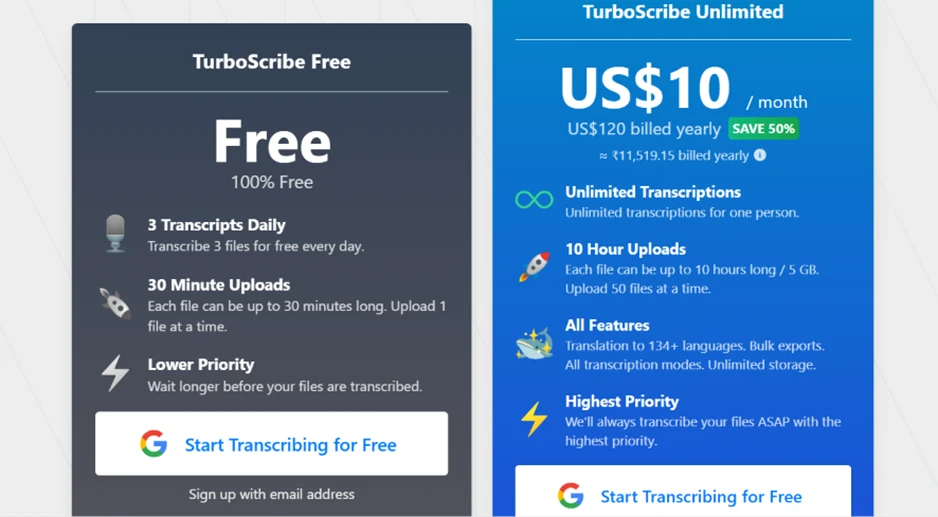
For a US reader comparing tools, the flat US$10 rate is the strongest argument in TurboScribe’s favor, since most rivals meter by the minute or the month. If you display prices from a non-US region, the page may show a local-currency equivalent alongside the dollar figure, so verify the USD number on the day you sign up.
A couple of findings do not produce a screenshot but shape the verdict. TurboScribe is cloud-only. Every file uploads to its servers, with no desktop app and no offline or on-device mode, which matters if you handle legal, medical, or otherwise sensitive recordings. And its third-party reputation is mixed: on Trustpilot it sits around 2.6 out of 5, with complaints clustered on billing disputes and slow support responses. Read a sample of those before committing to an annual plan.
| Dimension | Our test | User signal | Verdict | Composite |
|---|---|---|---|---|
| Transcription Accuracy Correctness across audio types | 9 | 9.2 | Excellent | |
| Processing Speed Turnaround time for files | 9.4 | 9.6 | Excellent | |
| Ease of Use Onboarding and daily workflow | 9.3 | 9.5 | Excellent | |
| Multilingual Handling Languages and script performance | 8.7 | 8.8 | Excellent | |
| Value for Money Pricing fairness and benefits | 8.8 | 8.5 | Excellent | |
| Customer Support Helpfulness and response speed | 6.5 | 6 | Moderate | |
| Reliability and Stability Upload success and consistency | 8 | 8 | Good |
Toolscopia uses cookies to keep you signed in, remember your preferences, and understand how our reviews get read. Analytics are anonymous. See our privacy policy for the full detail.



Comments 0
Join the discussion and share your perspective.
Sign in to post a comment and reply to other readers.
No comments yet
Be the first to share your perspective on this tool.