1
Presentation and document templates
Large library of polished templates widely praised for speeding up professional presentations and documents.
Visme is a browser-based design and presentation tool aimed at non-designers and teams who need polished presentations, documents, and e‑learning materials, with strong templates but contentious billing practices and a restrictive free tier.
Independent review — we test tools ourselves and analyze public user reviews. How we test.
Visme delivers strong value as a visual content workhorse, with many users praising its templates, alignment tools, and ease of use for presentations, ebooks, and marketing materials. Customer support is often described as fast and genuinely helpful when it engages. However, repeated complaints highlight confusing cancellation flows, unexpected renewals, paywalled downloads on the free tier, and inconsistent AI performance. It suits marketers, educators, and small teams who prioritize design quality and can live with a subscription model, but it is less ideal for casual or highly price‑sensitive users.
Visme AI is the generative layer built into Visme, the browser-based design platform. Rather than a single chatbot, it is a set of tools that sit inside the editor and handle different jobs. The AI Designer turns a text prompt into a complete presentation or document, building an outline first and then applying a visual theme to every slide. Alongside it sit an AI Writer for drafting and rewriting copy, a Text-to-Image generator for original visuals, and AI image tools that remove backgrounds, unblur, upscale, or erase and replace parts of a picture.
Everything runs on a credit system. Each account carries a monthly pool of AI credits, and each generation draws from it at a set rate, so the Designer, the Writer, and image work all compete for the same balance.
What separates Visme AI from standalone generators is placement. The output lands directly on an editable canvas with your charts, brand assets, and animation controls already around it, so a generated draft becomes a starting point you refine rather than a finished file you export and leave.
Large library of polished templates widely praised for speeding up professional presentations and documents.
Canvas editing with layering, grouping, and alignment tools, praised but occasionally criticized for clunky behavior.
AI generators that assist with layouts and content; highly divisive due to crashes and limited real intelligence.
Brand kit for colors, fonts, and logos, appreciated for keeping visuals aligned with brand guidelines.
Used heavily for ebooks, reports, and handbooks, with users praising layout flexibility and finished quality.
Extensive photo and asset library, though some users note gaps and occasional non working images.
Export features to standard formats, valued but restricted on free plans and imperfect in PowerPoint transitions.
Chat and email support that some describe as outstanding, while others report slow or unhelpful responses.
Tiered plans with strict download limits on free accounts, often criticized as bait and switch pricing.
I ran this test on a brand-new Visme account so the results reflect exactly what a first-time free user sees. The account opened on the Basic plan with 10 AI credits in the balance, and I kept everything inside the free tier for the whole test. My goal was simple. Build a real presentation from scratch using Visme AI, push it through the editor, and then try to get it out of Visme as a usable file.
I started inside Visme AI Creation Studio and typed a single prompt: "Create a 6-slide presentation on the benefits of remote work for small teams". I deliberately left Length on Auto to see whether the AI would respect the slide count written into my prompt or just invent its own. The visual style was set to Modern.
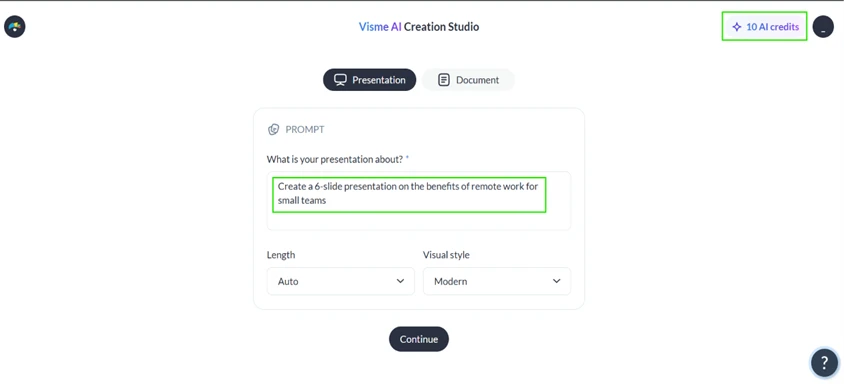
The first thing worth flagging sits in the top corner of that screen. A new account gets 10 AI credits, and that number does not refill quickly. This becomes a real constraint a few steps later.
After I hit Continue, Visme generated a full outline before touching any design. Each slide came with a title and a short supporting line, and the panel labelled every slide with a purpose like Hook the audience or Set the context. The structure was sensible and on-topic for a small-team audience.
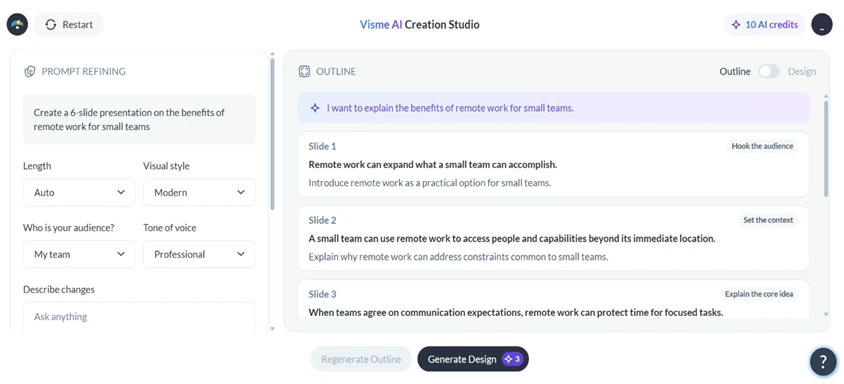
Here I hit my first friction point. The outline is not directly editable. I could not click into a slide title and rewrite it. The only way to change anything is to describe the change in the Describe changes box on the left and let the AI regenerate. For small wording tweaks that felt slower than it should be.
The bigger catch is the button at the bottom. Generating the actual design costs 3 credits, shown right on the Generate Design button. With 10 credits on a new account, that maths out to roughly three full AI decks before the balance is gone. For anyone planning to lean on the AI, the free tier runs dry fast.
I generated the design anyway. Visme built the deck and dropped me straight into the editor, and it honoured my prompt exactly. I asked for 6 slides, and the right-hand panel showed 6 slides. The Auto length setting did not override the number I specified.
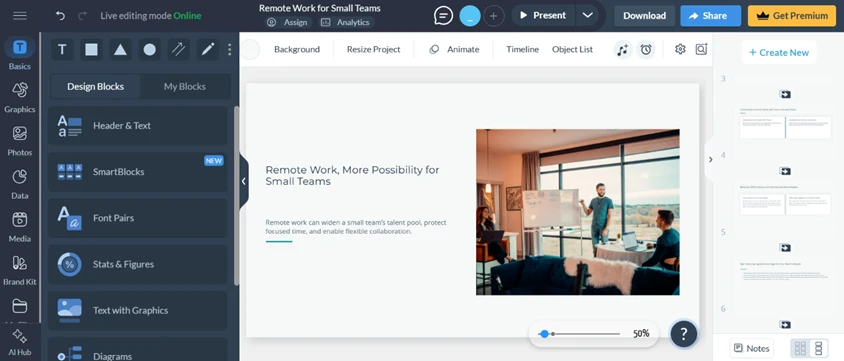
The editor itself is where Visme earns its reputation. The left rail carries Graphics, Photos, Data, Brand Kit, an AI Hub, and content blocks like Stats & Figures and Diagrams. This is a proper design workspace, far deeper than a basic slide maker, and all of it is reachable on the free plan.
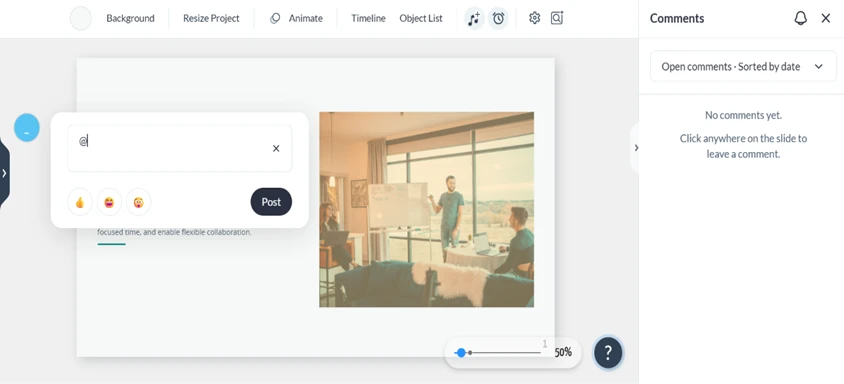
I tested the collaboration side next by opening the comments panel and clicking on the slide to leave a note. It worked without any upgrade prompt. I could tag with @ and post a comment pinned to a specific point on the canvas, which is useful when a second person reviews the work.
Sharing is where the free plan starts drawing clear lines. The Share Online panel gave me a set of appearance controls for the published version, and most of them were open to me. Two were not.
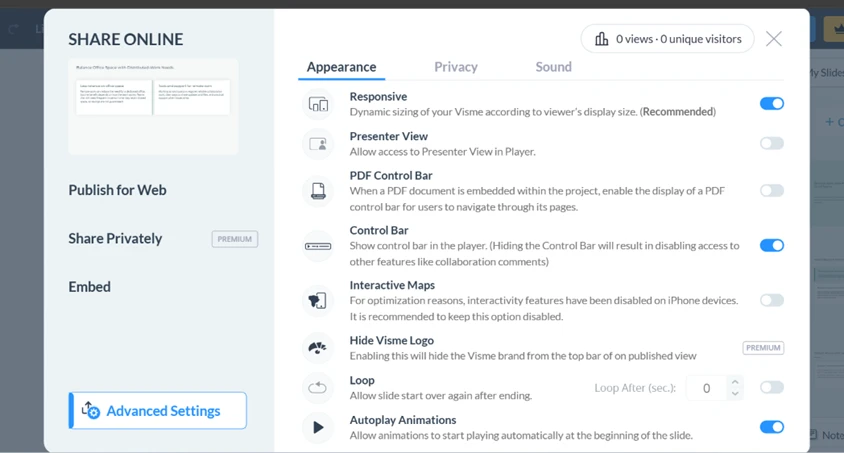
Share Privately is marked PREMIUM, so on the free plan I cannot restrict who views a shared project. Lower down, Hide Visme Logo is also locked behind PREMIUM, which means the Visme brand stays on anything I publish. That watermark is the single clearest sign that the free tier is built for trialling rather than finished client work.
The last test mattered most to me. A design tool is only useful if the work can leave it. I opened the Download dialog and went through the format options.
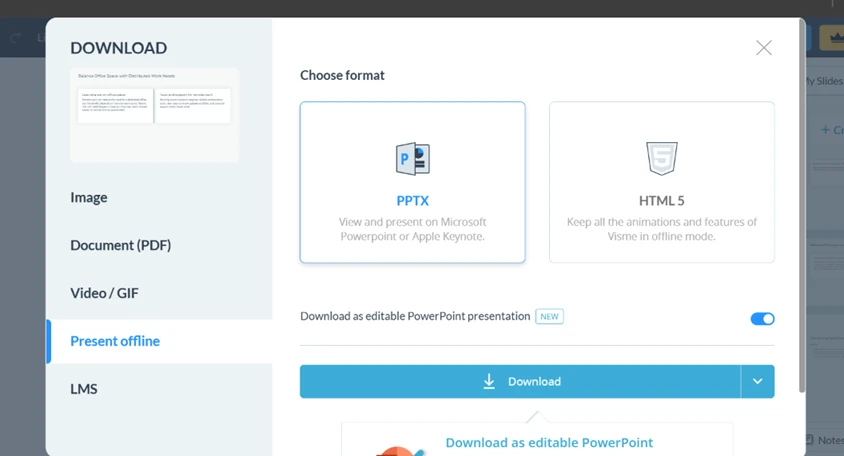
The Present offline tab offers PPTX and HTML5, and both are paid-only. There is no way to pull an editable PowerPoint out of a free account, which rules Visme out for anyone who hands .pptx files to clients. Video and GIF sit behind the same wall. On the free plan the only exits are image formats (JPG or PNG) and PDF, and every one of them carries the Visme watermark I saw locked in the share settings.
So the free plan is genuinely capable as a place to build. The AI generation works, the editor runs deep, and collaboration is open. The squeeze comes at the two ends that matter for actual output. You get 10 AI credits that drain at 3 per deck, and you cannot walk away with an editable file or a watermark-free export without paying.
| Dimension | Our test | User signal | Verdict | Composite |
|---|---|---|---|---|
| Design & Output Quality Visual polish and layout control | 9 | 9 | Excellent | |
| Ease of Use Learning curve and usability | 8 | 8 | Good | |
| Performance & Reliability Speed, stability, loading behavior | 6.5 | 6 | Moderate | |
| AI Features AI usefulness and stability | 5.5 | 5 | Weak | |
| Value for Money Perceived fairness of pricing | 6 | 5.5 | Weak | |
| Billing & Transparency Renewals, refunds, cancellation clarity | 4.5 | 4 | Weak | |
| Customer Support Speed and effectiveness of help | 7.5 | 7 | Good |
Toolscopia uses cookies to keep you signed in, remember your preferences, and understand how our reviews get read. Analytics are anonymous. See our privacy policy for the full detail.



Comments 0
Join the discussion and share your perspective.
Sign in to post a comment and reply to other readers.
No comments yet
Be the first to share your perspective on this tool.