1
Credit based usage model
Credits deplete very quickly, lack rollover, and confuse many subscribers, drawing strong criticism.
Julius AI is a credit based AI data analysis platform aimed at analysts and professionals, but aggressive credit policies, unreliable outputs, and refund disputes make it frustrating and poor value for most serious work.
Independent review — we test tools ourselves and analyze public user reviews. How we test.
Julius AI promises accessible data analysis and initially satisfied some long term users, but current reviews describe sharp decline and heavy frustration. Credit consumption, auto upgrades, and non refundable billing issues dominate feedback, alongside unreliable or hallucinated analysis that requires extensive verification. Support responsiveness and resolution quality are repeatedly criticized, especially around missing or removed credits. It may suit very light, experimental use by technically patient users, but professionals needing dependable analytics and predictable pricing are better served elsewhere.
Julius AI is a browser-based workspace built around the idea of talking to your data. You paste or upload a table, ask questions in plain English, and it runs the analysis, writes the answer, and draws any charts that help.
Its reach goes past spreadsheets. The prompt box carries modes for reasoning, Excel work, slides, websites, images, and video, so the same chat can analyze numbers and then generate a visual from them. A data-connectors feature links to outside sources for larger jobs.
The target user is a knowledge worker who wants analysis without writing code. Analysts, students, and small business teams are the natural fit, since the tool trades spreadsheet formulas and Python for ordinary questions.
Pricing is credit-based and shown openly on the site. A free plan opens with promotional credits plus a daily refresh, and paid tiers scale the monthly credit allowance. The company publishes little about itself beyond the Julius AI name and its social handle.
Credits deplete very quickly, lack rollover, and confuse many subscribers, drawing strong criticism.
Multiple tiers with Lite and higher analytics levels, but users report forced upgrades and poor value.
Supports data analysis and notebooks, yet reviewers report hallucinations, wrong datasets, and unreliable outputs.
Workflows for extracting tables from PDFs often return garbage or trivial snippets, disappointing users.
Advertised daily credits and 100 free credits feature, frequently reported as missing or insufficient.
Support mostly via email, described as slow, repetitive, and ineffective at resolving credit problems.
Audit views exist but reveal mismatched analysis, such as analyzing different data than requested.
Background notebook runs reportedly consume large credit blocks without active user sessions.
Older message limits replaced by points and credits, seen as a negative shift by long term users.
Julius sells itself on one line, “chat with your data,” so we gave it a small sales table and checked every number it returned against the answers we already knew. Then we pushed it into charts, a forecast, and its image mode. Everything ran on the free plan, which opens with 100 credits.
There is no upload ceremony. We pasted six rows of monthly sales straight into the prompt box and asked, in plain English, for the total and the top month.
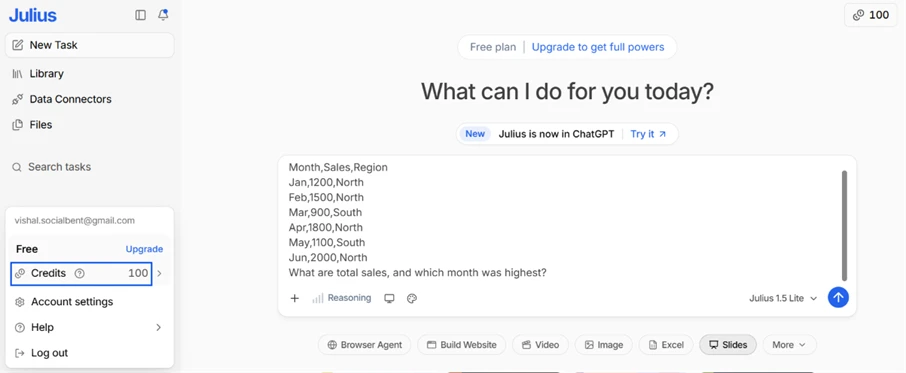
It came back with total sales of 8,500 and June as the highest month at 2,000. Both are right.
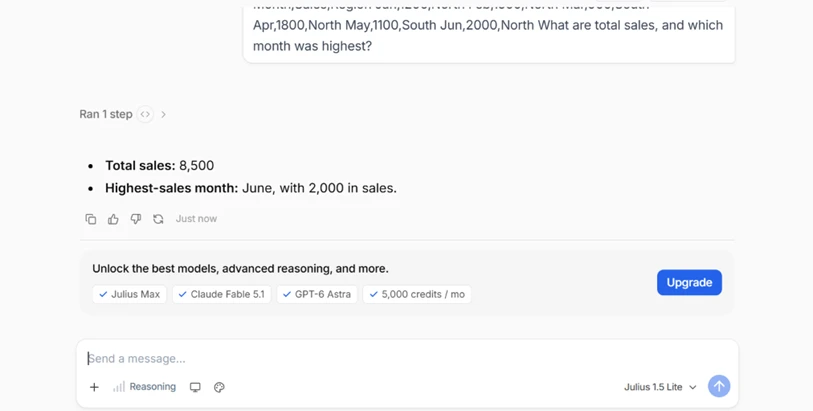
Worth noting the gray box beneath the answer. An upgrade pitch sits there, and one appears under almost every response through the whole session. The analysis is free and accurate, but the nudge to pay is constant.
We asked for a bar chart of sales by month. The chart it drew is genuinely good: correct values, data labels on each bar, the peak month shaded a different color, and a one-click PNG export.
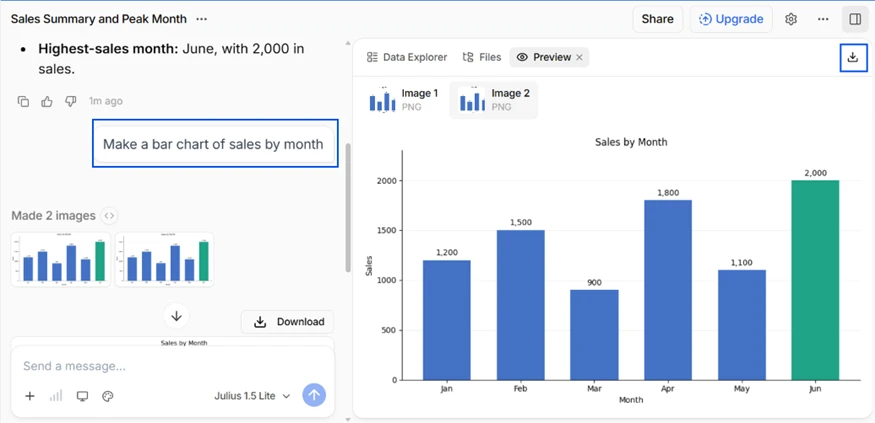
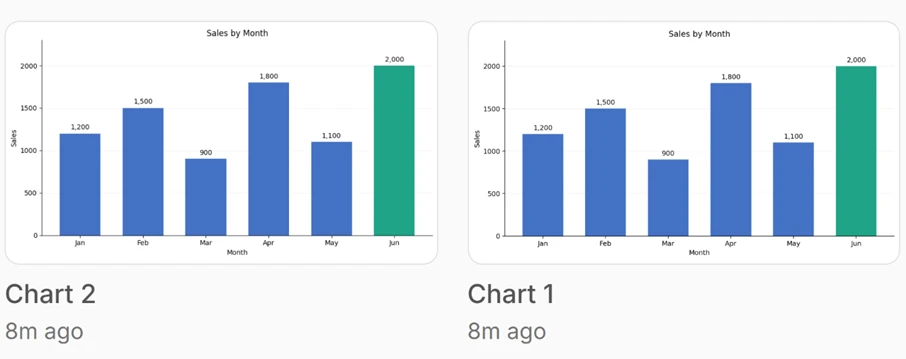
The oddity is that it made two. Lined up side by side, the pair is identical, so the second one is wasted output and wasted credits rather than a real alternative.
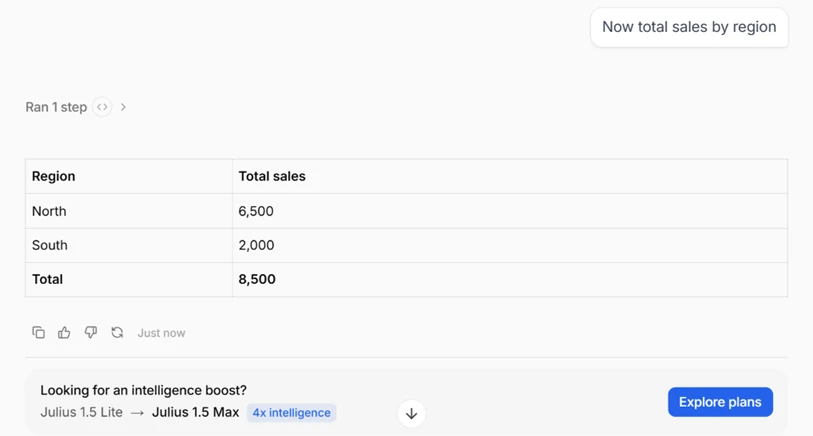
A follow-up, “now total sales by region,” returned North 6,500 and South 2,000 for a total of 8,500, laid out as a clean table. It held the context from the first question without being re-fed the data.
We asked it to predict next month and show its reasoning. It fitted a linear trend and projected July at about 1,787.
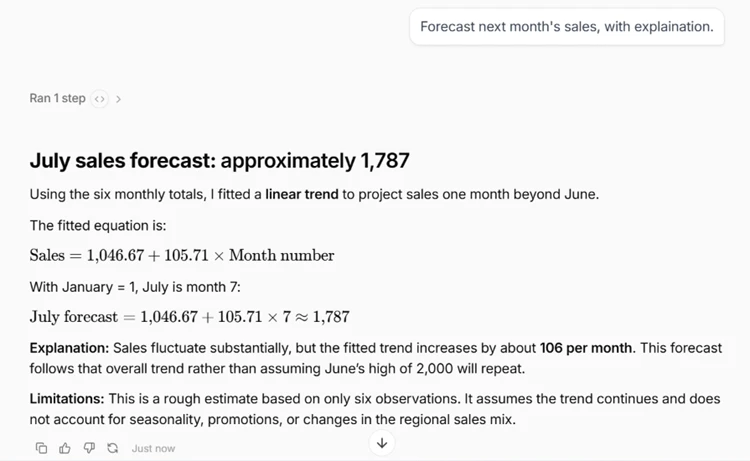
The useful part is what it added without being asked. It printed the equation it used, explained that the trend rises about 106 per month, and flagged the limitation plainly: six data points, no seasonality, a rough estimate. That is a more honest forecast than many paid tools give.
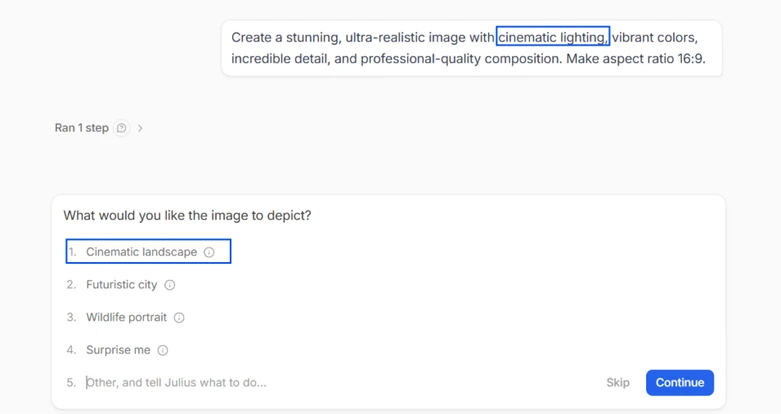
Julius also generates images, so we switched modes and gave it a deliberately vague cinematic prompt.

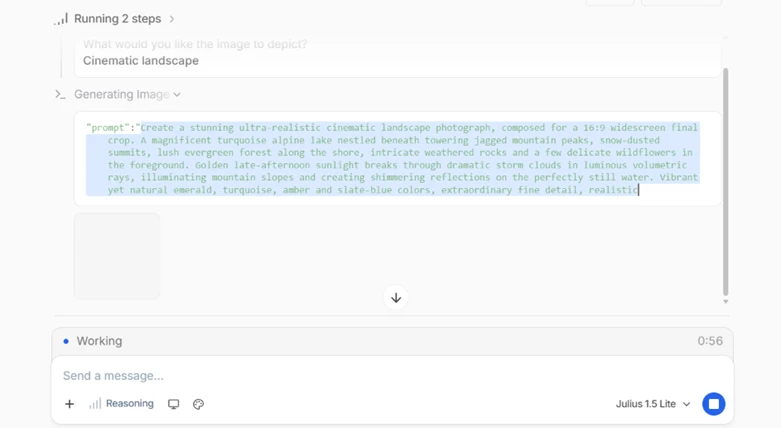
Instead of guessing, it stopped and asked what the image should depict, offering a landscape, a futuristic city, and other options. Once we chose, it showed its own expanded prompt while rendering, so nothing about the process was hidden.
The finished image looks great, an ultra-realistic alpine lake. But the duplicate issue from the charts returned.

It produced two versions that are the same picture, with only the aspect ratio and crop changed. One is even mislabeled “Chart 1,” a photo tagged as a chart. So the twin-output habit is not a chart quirk. It runs across Julius's generation, and here it also exposed a labeling bug.
Every task draws down credits, and the usage log is where the free plan turns unpredictable. Data questions cost almost nothing, logging fractions like 1.1271 and 0.6677 credits. The image, though, was a different story.
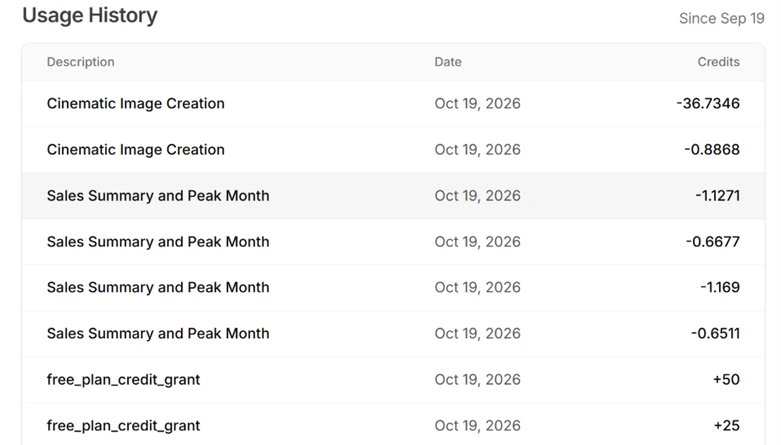
That single “Cinematic Image Creation” charge came to about 36.7 credits, more than thirty times what a spreadsheet query used. There was no warning of the cost before running it, which is a problem on a plan measured in credits.
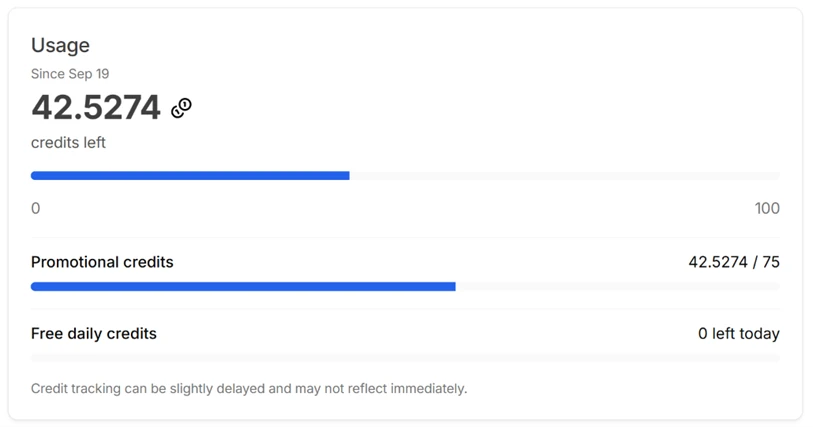
The effect is immediate. After that one image the free daily credits dropped to zero for the day, and the promotional balance fell to about 42.5 of 75. The account page also admits that tracking “can be slightly delayed,” so a user cannot reliably watch the meter in real time. A few images would exhaust a day's free allowance on their own.
Unlike some free tools, Julius shows its plans plainly.

Plus runs $20 a month, Pro is $45 and marked recommended, and Business sits at $450, each with a monthly credit allowance and a daily refresh. A free tier sits underneath all three. For a US buyer the cost is transparent, which stands in contrast to how opaque the per-task credit burn feels while you work.
| Dimension | Our test | User signal | Verdict | Composite |
|---|---|---|---|---|
| Accuracy How often the numbers and answers are correct | 9 | 9 | Excellent | |
| Chart & Image Quality How clean and usable the generated visuals are | 8 | 8 | Good | |
| Analysis & Forecasting Depth and soundness of the reasoning | 8 | 8 | Good | |
| Ease of Use How simple it is to go from data to answer | 8 | 8 | Good | |
| Value What the free credits and plans give for the cost | 8 | 7 | Good | |
| Experience Upselling and duplicate-output friction | 7 | 6 | Moderate |
Toolscopia uses cookies to keep you signed in, remember your preferences, and understand how our reviews get read. Analytics are anonymous. See our privacy policy for the full detail.






Comments 0
Join the discussion and share your perspective.
Sign in to post a comment and reply to other readers.
No comments yet
Be the first to share your perspective on this tool.