1
Login-Free Studio.
Open the workspace and build prompts with no account needed to start exploring.
Creen AI is a browser-based studio for generating and editing images and short video, running without an account and bundling dozens of frontier models into one workspace on a free daily credit allowance.
Independent review — we test tools ourselves and analyze public user reviews. How we test.
Creen makes a strong first impression. Opening a workspace stocked with premium engines and getting usable results in seconds is the kind of experience that keeps casual creators coming back. The craft on display is real, and most people will be surprised by how finished the output feels. The caution sits underneath the polish. This is a funnel designed to convert curiosity into a subscription, and the free lane is narrow. Approach it as a fast, low-stakes way to explore ideas and it delivers. Approach it as a free production tool and the ceiling arrives sooner than the homepage suggests.
Creen AI is run by Codesail Limited, a company based in Hong Kong, and it sells itself as an all-in-one creative generator aimed at people who would rather not pay for several tools at once. The pitch is consolidation. A short-form creator, a hobbyist, a small seller, or a teacher can each reach image and video generation from the same tab instead of stitching together separate services.
Where most generators tie you to a single engine, Creen leans on choice. It routes your prompt to whichever third-party model you select, so the same idea can run through a photoreal engine, a cinematic one, or a fast draft engine and come back with a different feel each time. That breadth is the core identity.
The business model is freemium. A pool of daily credits lets anyone sample the workspace, while the heavier engines and the real volume sit behind a subscription. Creen positions the free access as the hook and the paid tiers as the destination once a casual habit turns into regular work.
Open the workspace and build prompts with no account needed to start exploring.
Switch between dozens of image and video engines from a single picker.
Turn a still into a short animated clip by adding a motion prompt.
Begin from preset scene styles instead of building every shot from scratch.
Upload a reference and recompose or restyle an existing picture.
Feed several reference images into one edit for guided composition.
Reach the same generator through the iOS and Android apps.
Export stills at up to 3840 by 2160 for print and large formats.
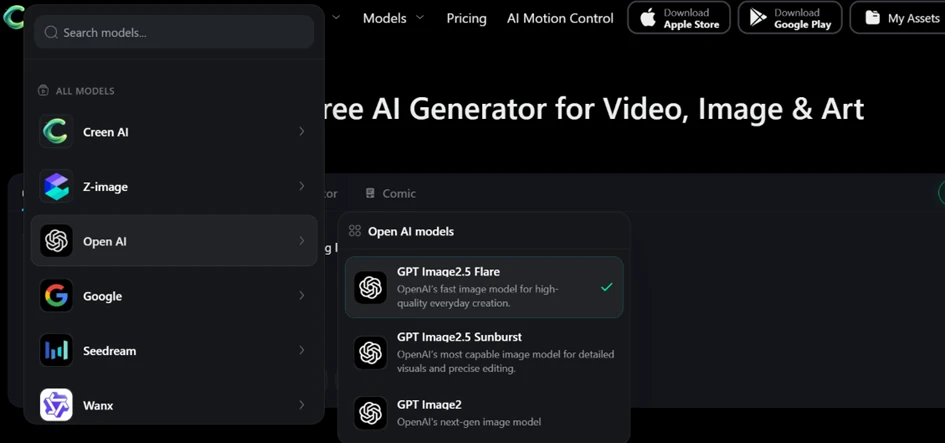
The first thing that stood out was the model picker. Creen groups its engines by provider, so Creen AI, Z-image, OpenAI, Google, Seedream and Wanx each sit in their own row, and opening OpenAI reveals GPT Image2.5 Flare, GPT Image2.5 Sunburst and GPT Image2. Having this many engines inside one tab without an account is a real advantage, and it is the kind of range most free tools do not hand you upfront.
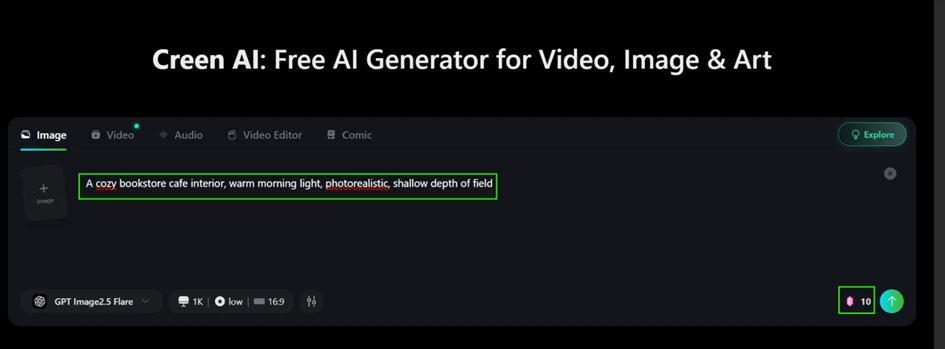
I moved to the Image tab and kept the default GPT Image2.5 Flare model at 1K resolution and 16:9, then entered a test prompt.
Prompt used: A cozy bookstore cafe interior, warm morning light, photorealistic, shallow depth of field
Before I even clicked Generate, the interface showed the cost sitting at 10 credits in the bottom corner. That transparency is useful, because it tells you exactly what each run spends against your daily balance rather than hiding it until later.
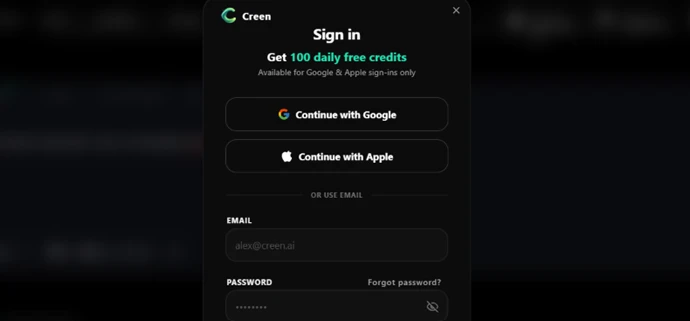
Here is the first gap between the marketing and the reality. Creen advertises a no sign-up, no login experience, and you can indeed browse and set up a prompt freely. The moment I clicked Generate, a Sign in window appeared offering 100 daily free credits, available for Google and Apple sign-ins only. So you can look around without an account, but you cannot actually create anything until you log in. The headline claim does not survive the first real action.
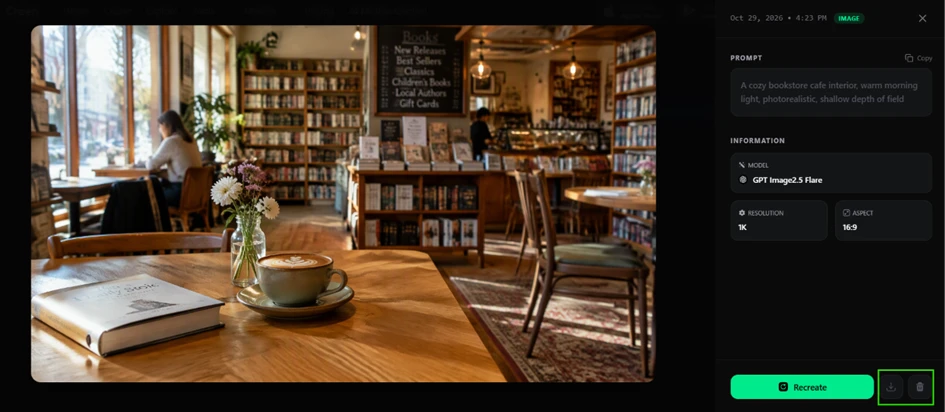
Once signed in, the generation itself delivered. The bookstore cafe image came back sharp, with believable morning light, natural depth of field and coherent detail across the shelves and the foreground table. The result panel also lists the full generation data, showing the model, 1K resolution and 16:9 aspect, which helps when you want to reproduce a look later.
One small interface quirk is worth flagging. The download button on the result panel looks greyed out, as if it were disabled, yet it works. I clicked it, the file saved, and the exported image carried no watermark. The frozen appearance is misleading, but the function is intact.
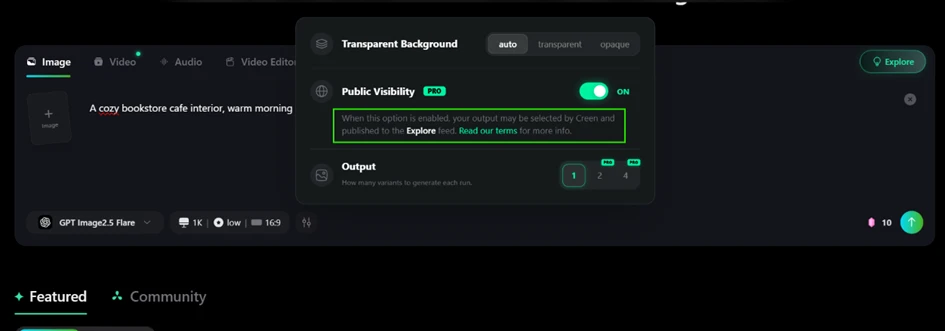
Opening the advanced settings surfaced two things a free user should know about. Public Visibility is marked PRO and switched ON by default, which means your output may be picked by Creen and published to the public Explore feed. For anyone generating private or client work, flipping this off before you start matters.
Right below it, the Output option lets you pick 1, 2 or 4 variants per run, but the 2 and 4 settings both carry a PRO tag. On the free tier you are capped at a single image per generation.
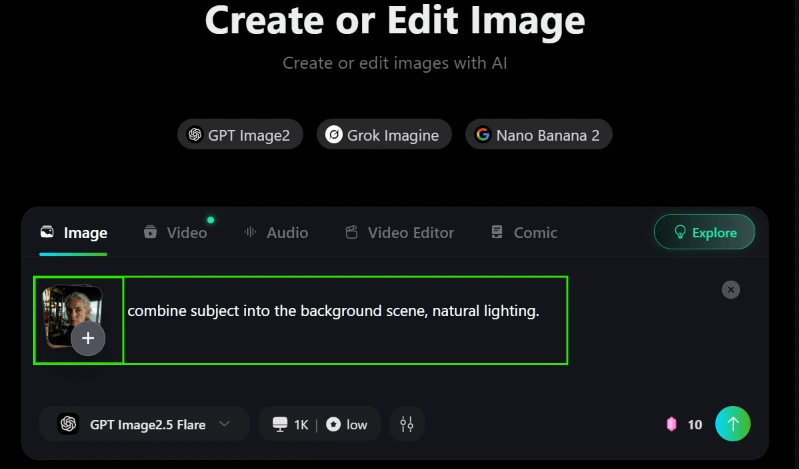
Next I tested the editing flow. I uploaded a face reference alongside the bookstore image I had just made, then asked Creen to place the subject into that scene.
Prompt used: combine subject into the background scene, natural lighting.
The composite came out better than I expected. Creen dropped the woman into the cafe with lighting that matched the window glow. It kept the bookshelves and blackboard menu behind her intact while holding the warm tone consistent across subject and background. The result looks like one photograph rather than a cut-and-paste job.
 |  |
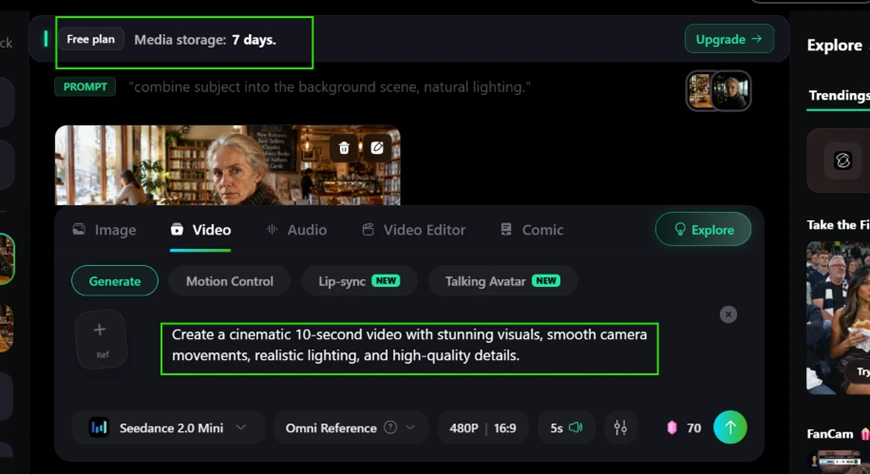
The video side is where the free run hits its wall. I switched to the Video tab, kept Seedance 2.0 Mini at 480P and a 5-second length, and entered a motion prompt.
Prompt used: Create a cinematic 10-second video with stunning visuals, smooth camera movements, realistic lighting, and high-quality details.
Two things became clear immediately. A single short clip was priced at 70 credits, seven times the cost of an image, which eats through the daily balance fast. A banner at the top also spelled out that on the Free plan your media storage lasts only 7 days. Anything you generate is removed after a week unless you upgrade, so the free tier is for trying the tool, not for building a library you can rely on.
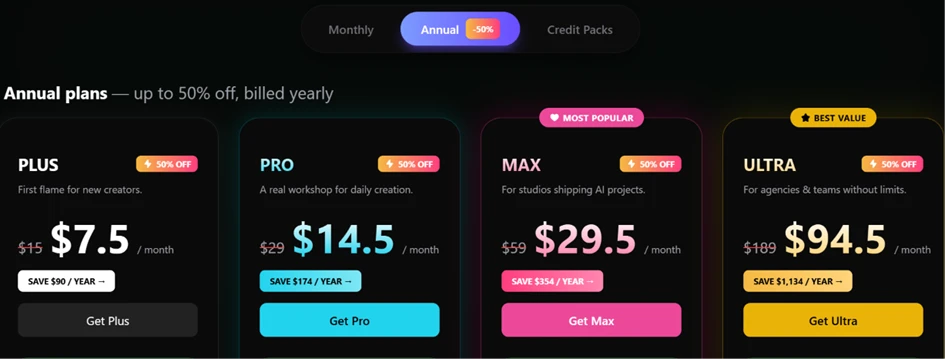
To close the loop on cost, I checked the pricing page. The annual plans run from Plus at $7.5 a month up to Ultra at $94.5 a month, with Pro at $14.5 and Max at $29.5 sitting between them. These are the numbers you move to once the daily free credits run dry or once the 7-day expiry starts to bite.
| Dimension | Our test | User signal | Verdict | Composite |
|---|---|---|---|---|
| Output Quality Realism and polish of finished renders | 9 | 8 | Excellent | |
| Model Range Breadth of engines in one place | 9 | 8 | Excellent | |
| Generation Speed How quickly a render returns | 8 | 7 | Good | |
| Ease of Use How approachable the workspace feels | 8 | 9 | Excellent | |
| Free-Tier Reach How far the no-cost run takes you | 6 | 5 | Weak | |
| Trust and Transparency Honesty of claims against real behaviour | 5 | 4 | Weak |
Toolscopia uses cookies to keep you signed in, remember your preferences, and understand how our reviews get read. Analytics are anonymous. See our privacy policy for the full detail.






Comments 0
Join the discussion and share your perspective.
Sign in to post a comment and reply to other readers.
No comments yet
Be the first to share your perspective on this tool.