1
AI image generation
Praised for realistic, high quality images and strong adherence to detailed prompts.
Magnific is an AI-first creative platform for generating and editing images and video, plus stock assets. Reviewers highlight fast, intuitive tools and strong visual quality, but recurrent billing issues and very weak customer support undermine trust.
Independent review — we test tools ourselves and analyze public user reviews. How we test.
Magnific delivers high quality AI images and videos with an intuitive interface, rich model selection, and helpful tools like Spaces and background removal. Long term users praise its evolution, pricing options, and suitability for professional design and filmmaking work. However, multiple reviews describe serious billing errors, harsh contributor policies, account suspensions, and very slow or inconsistent human support. Those risks matter if business continuity or account security is critical. Overall, it suits creators who value speed and creative range, and who are prepared to actively monitor billing and back up their work.
Magnific is the new name for what most people still know as Freepik. The Málaga company started in 2010 as a stock-resource search engine, moved into AI tools, bought the upscaler startup Magnific in May 2024, and in April 2026 took that acquisition's name for the whole platform. The rebrand is a signal: Freepik wanted to shed its stock-library image and stand for AI production instead.
What you actually get is an aggregator. Rather than paying separately for Flux, Google's models, GPT image, Ideogram, Seedream, and a dozen others, Magnific puts them behind one login and one credit system, alongside a 250-million-asset stock library and tools for video, audio, upscaling, and editing.
For anyone already running a Freepik account, nothing breaks. Your login, subscription, downloads, and API keys carry straight over to magnific.com, and both api.freepik.com and api.magnific.com stay live.
Praised for realistic, high quality images and strong adherence to detailed prompts.
Valued for fast production, but criticized when ignoring simple camera movement instructions.
Highlighted as making creation faster and organized, especially for VFX and complex pipelines.
Widely praised for preserving intricate details where competing tools fail.
Appreciated for many visual models, though some users want better pinning and favorites.
Seen as fair and attractive by many, but marred by upgrade, renewal, and refund disputes.
Considered a major improvement, speeding up workflows and access to tools.
Loved for breadth of graphics, audio, and video, though some complain about misleading “free” labeling.
Described as very effective, with some preferring an older implementation over newer versions.
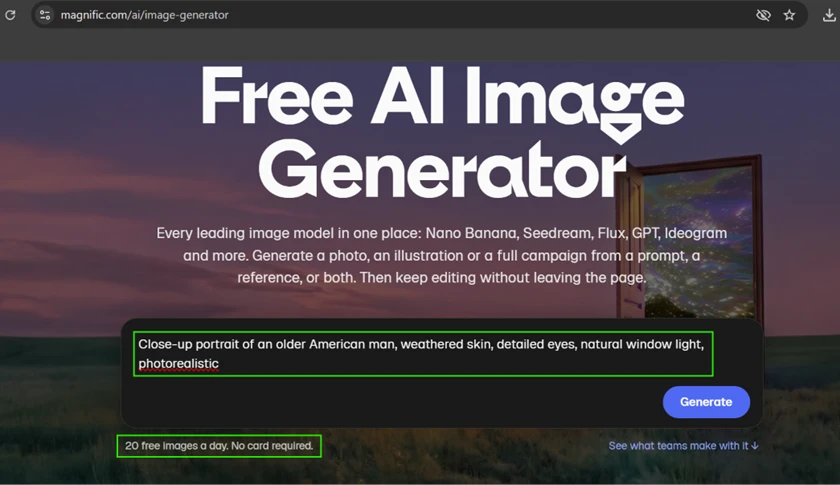
I ran Magnific on the free plan for a full day of testing, no card attached, to see how far the free tier actually goes before it asks for money. The homepage sets the terms right away: 20 free images a day, and it names the models it is fronting, including Nano Banana, Seedream, Flux, GPT, and Ideogram. I used my own prompts the whole way through and kept the same older-man portrait running across several tests so I could judge one subject under different tools.
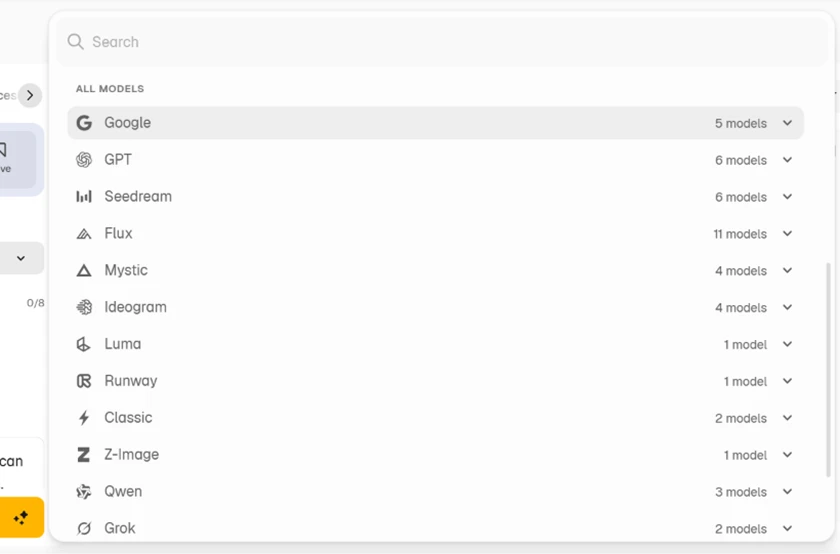
Open the model picker and the pitch makes sense. Twelve providers sit in one dropdown, and the counts next to each one add up fast: Google with 5, GPT with 6, Seedream with 6, Flux with 11, Mystic with 4, Ideogram with 4, plus Luma, Runway, Classic, Z-Image, Qwen, and Grok. That is more than 40 individual models reachable from a single login. No other image tool I have paid for puts this many engines behind one subscription, and switching between them takes one click rather than one more invoice.
My first prompt asked for a close-up portrait of an older American man with weathered skin, detailed eyes, and natural window light. The free output came back photorealistic on the first generation. Skin texture reads as real pores and creases rather than the plastic smoothing I expected, the window light falls naturally across one side of the face, and the eyes avoided the dead stare these models often produce.

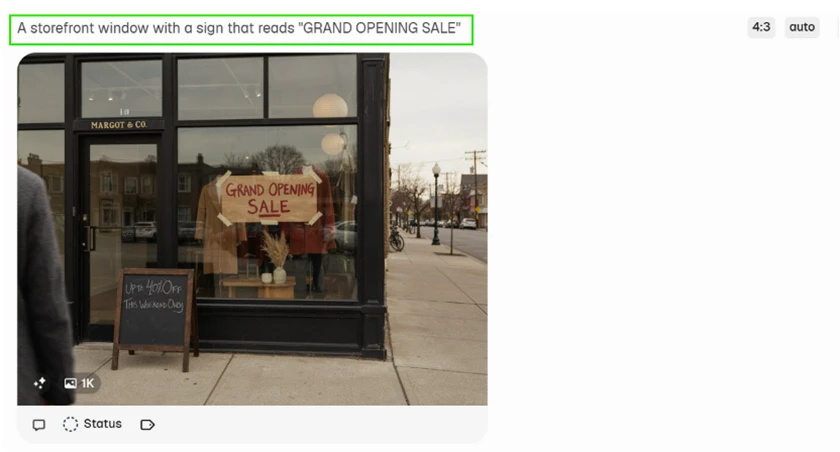
The text test surprised me most. I asked for a storefront window with a sign reading "GRAND OPENING SALE," expecting the usual garbled lettering. The sign came back clean and readable, and even the smaller chalkboard sign below it stayed legible. Anyone who has watched older image models butcher in-image text will notice how well this held together, though results will vary by model and prompt.
I pushed the portrait through the background remover to see how it handled hair, usually the first place these tools fall apart. The cutout came back tight, with the fine edges around the hair preserved instead of chopped into a hard halo. For free, this is production-usable for thumbnails or product shots.

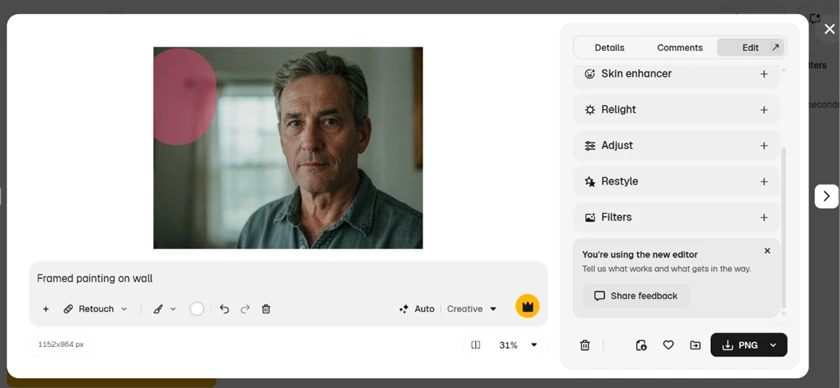
The editor is where the paywall shows up. Opening any image into the edit panel reveals Skin enhancer, Relight, Adjust, Restyle, and Filters, all marked with the gold crown. The panel loads and looks fully functional, then every meaningful AI edit asks for an upgrade.
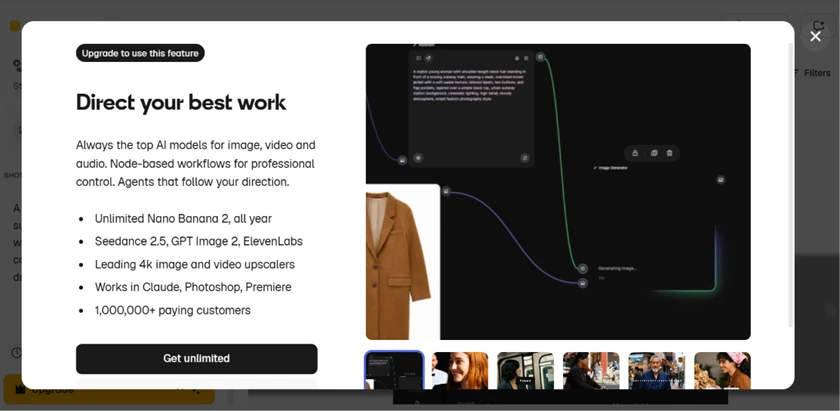
Clicking a locked feature brings up the full upgrade wall, and it is worth reading because it maps the free-paid line exactly. Premium covers unlimited Nano Banana 2, Seedance 2.5, GPT Image 2, ElevenLabs, the 4K upscalers, and the node-based workflows. Three things I wanted to test turned out to be Premium-only: the AI editing tools, the image and video upscalers, and video generation entirely. The free plan generates images, and that is the boundary.
Every easy prompt succeeded, so I pushed on instruction-following. I asked for a chef holding up five fingers on one hand and three on the other. The model rendered two anatomically correct hands, ten fingers total, and ignored the count entirely. This is the more interesting kind of failure. The hands look right; the model simply will not follow a specific counting instruction. Anyone testing it for precise, directed compositions will hit the same wall.
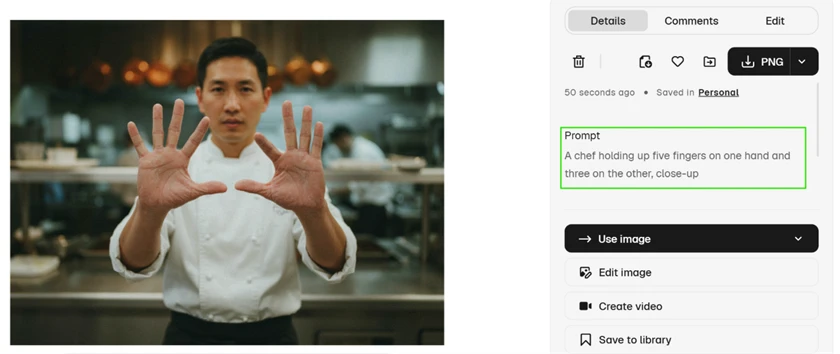
So the free plan earns its keep for straight image generation across a deep model roster, with portraits, text, and cutouts all landing on the first try. The limits are just as concrete: editing, upscaling, and video sit behind Premium, the day caps at 20 images, and the model will render a hand it cannot count on.
| Dimension | Our test | User signal | Verdict | Composite |
|---|---|---|---|---|
| Output Quality Realism and accuracy of generations | 9 | 9.2 | Excellent | |
| Ease of Use Interface clarity and learning curve | 8.5 | 8.7 | Excellent | |
| Reliability Service stability and feature uptime | 7 | 7.2 | Good | |
| Customer Support Speed, clarity, and helpfulness | 3.5 | 3 | Weak | |
| Billing and Trust Accuracy of charges and fairness | 4 | 3.8 | Weak | |
| Value for Money Perceived value at given price | 7.8 | 8 | Good |
Toolscopia uses cookies to keep you signed in, remember your preferences, and understand how our reviews get read. Analytics are anonymous. See our privacy policy for the full detail.






Comments 0
Join the discussion and share your perspective.
Sign in to post a comment and reply to other readers.
No comments yet
Be the first to share your perspective on this tool.