1
Open Prompt Gallery
Every result shows its full prompt, free to read and copy.
MeiGen AI is a community prompt gallery where you browse ready-made AI image and video prompts, copy the exact prompt behind any result, and regenerate it across several models on a free daily credit allowance.
Independent review — we test tools ourselves and analyze public user reviews. How we test.
MeiGen earns its place as a learning ground more than a production engine. The open prompts let you reverse-engineer strong results instantly, and face consistency held up when I fed it my own character, which few free tools manage. The daily refill keeps casual image work moving without a wallet. Friction starts the moment you want video or bank bonus credits, because the system quietly separates what free credits can touch from what they cannot. For studying prompt craft or producing stills, it delivers. For steady video output, the free tier runs out of road fast. Treat it as a sandbox.
MeiGen AI sits in a growing category of prompt-sharing platforms, where the product is not only the generator but the library of prompts around it. Every public creation carries its full prompt and the model that produced it, so the gallery doubles as a teaching archive. You scroll results, find a style that fits, and either copy the prompt to study it or push it straight into the generator and make your own version.
Behind the gallery sit multiple third-party models rather than one house engine. Image work routes through options like Nanobanana and GPT Image, while video leans on separate engines such as Grok Video. That multi-model setup means your result quality shifts depending on which engine a prompt was built for, and switching engines can change the character of the same prompt.
The platform wraps this in a credit economy. A daily free allowance covers routine image generation and a set of editing utilities, while heavier jobs draw on credits you buy. The audience it suits best is creators who want to skip the blank-page problem and start from a proven prompt.
Every result shows its full prompt, free to read and copy.
Send any gallery prompt into the generator without retyping.
Generate across separate image and video engines from one panel.
Lock a single face across every frame in a collage.
Upload a picture and pull a usable prompt back out of it.
Remove backgrounds, upscale, and expand images in-app.
The first thing that impressed me is that MeiGen does not hide the prompt. Open any image in the gallery and the full prompt sits right there with a Copy Prompt button, plus the exact model that made it. The collage below from the user @john_my07 was generated on Nanobanana, and the prompt is a structured JSON block starting with "scene_type": "editorial beauty collage" and an "identity_lock" flag. Nothing is locked behind a paywall to read it.
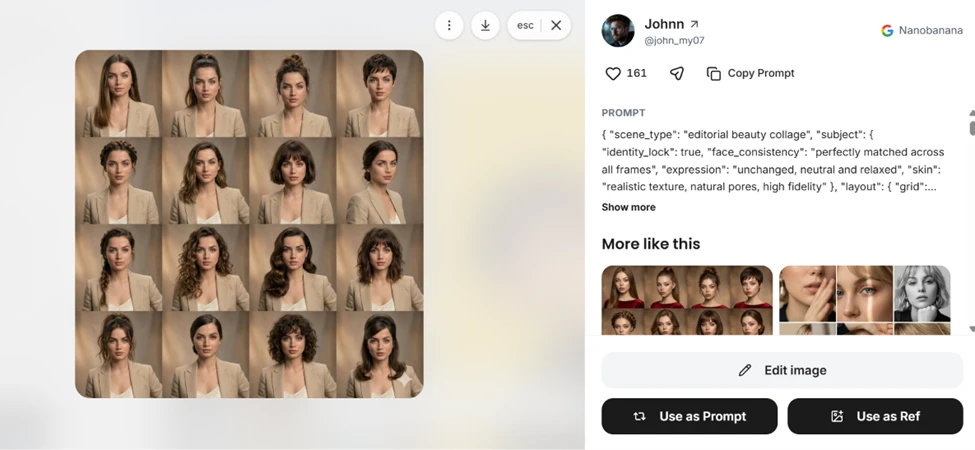
This is the strongest part of the platform for anyone learning prompt structure. You can study a result you like and lift the entire prompt in one click.
Clicking "Use as Prompt" dropped the whole JSON prompt straight into the generator with the correct model already selected. I did not retype anything. The panel showed Nanobanana 2.1 locked in and a generate cost of 5 credits, which my daily free credits covered.
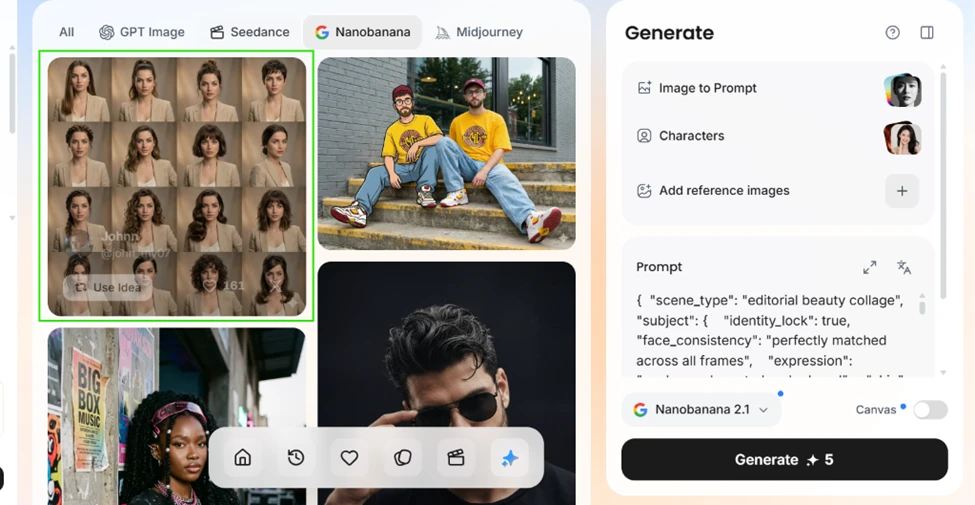
I reused the same editorial-collage prompt on the same Nanobanana model, but swapped in a character I built myself. The output below is a clean 4x3 grid of 12 labelled portraits, each panel tagged with a hairstyle such as Sleek long straight hair, High ponytail, and Pixie haircut. The face stays consistent across every frame, which is exactly what the identity_lock flag in the prompt is meant to hold.
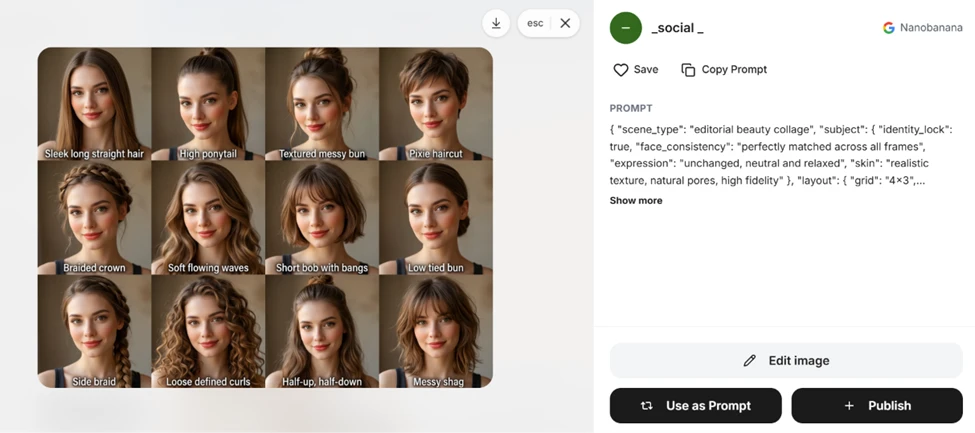
Two differences from the gallery original are worth calling out, and neither is a fault in the output. The gallery version is a 4x3 grid of 12 frames because that is what the grid value in the prompt requests, while the original I was comparing against runs a larger 4x4 grid of 16. The faces differ because the gallery image uses its creator's character and mine uses a character I made, so identity_lock locks to whichever subject you feed it rather than copying the showcased person.
The honest takeaway is that MeiGen reproduced the prompt accurately. The face consistency held, the labels rendered cleanly, and the grid matched the spec. What the gallery cannot give you is the original creator's exact character, so your result will carry your own subject, not theirs.
MeiGen offers 50 credits when you publish work that gets accepted. I submitted my collage to test the loop. Two things stood out. First, the popup states that works published by paid members get an exclusive gold badge in the gallery, so free submissions start at a disadvantage for visibility.
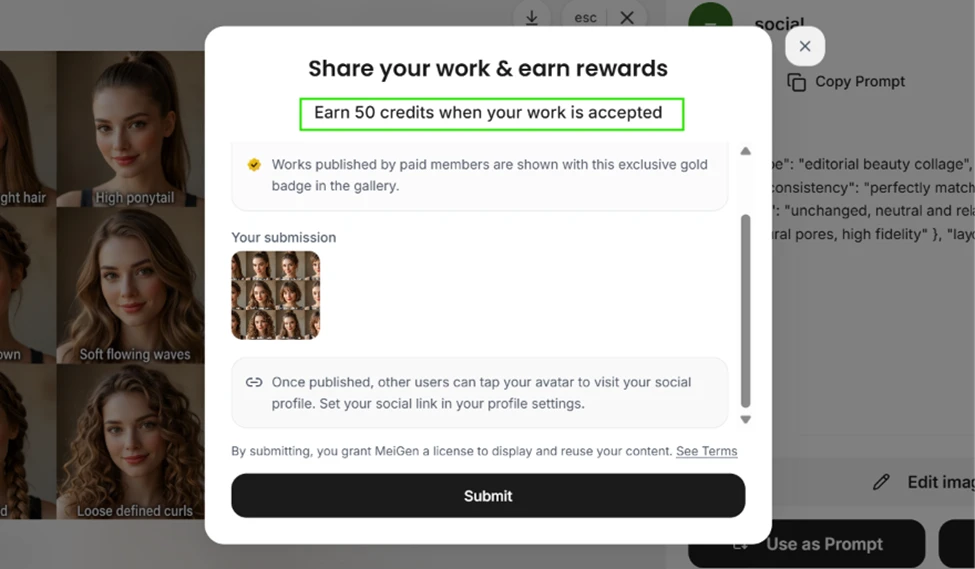
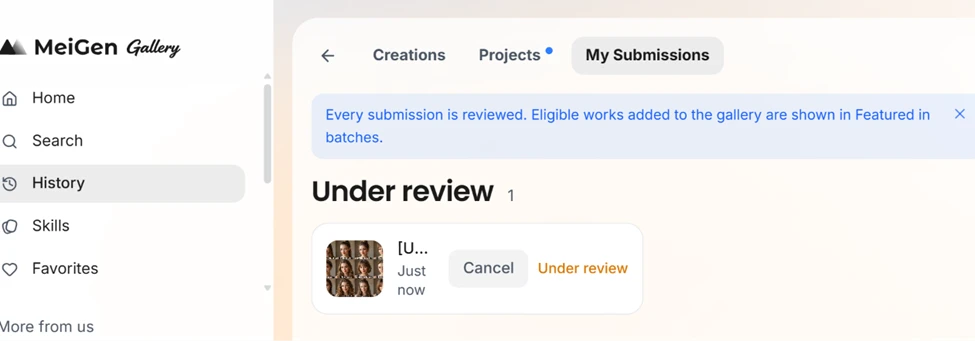
Second, the reward is not instant. My submission went straight into an "Under review" queue, and the notice says eligible works are added to the gallery in batches. So the free credit top-up depends on manual approval you do not control.
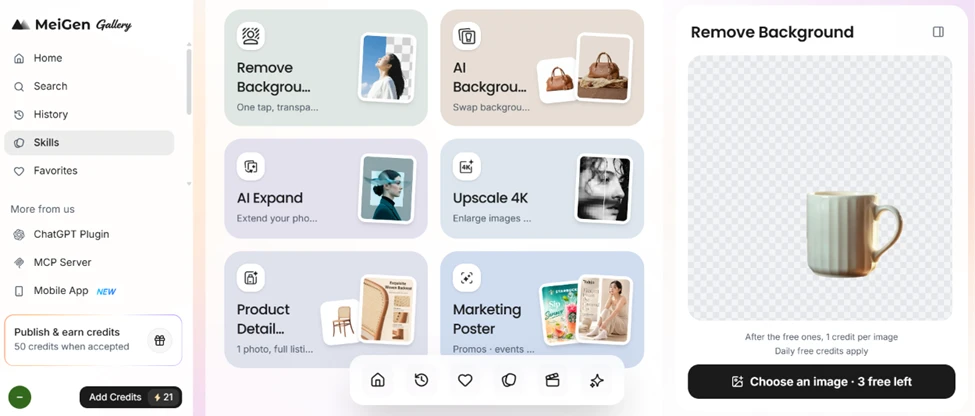
MeiGen is more than a prompt gallery. The Skills page carries real editing utilities including Remove Background, AI Expand, Upscale 4K, Product Detail, and a Marketing Poster maker. The background remover showed "3 free left" on the free plan, and a note that daily free credits apply after the free ones.
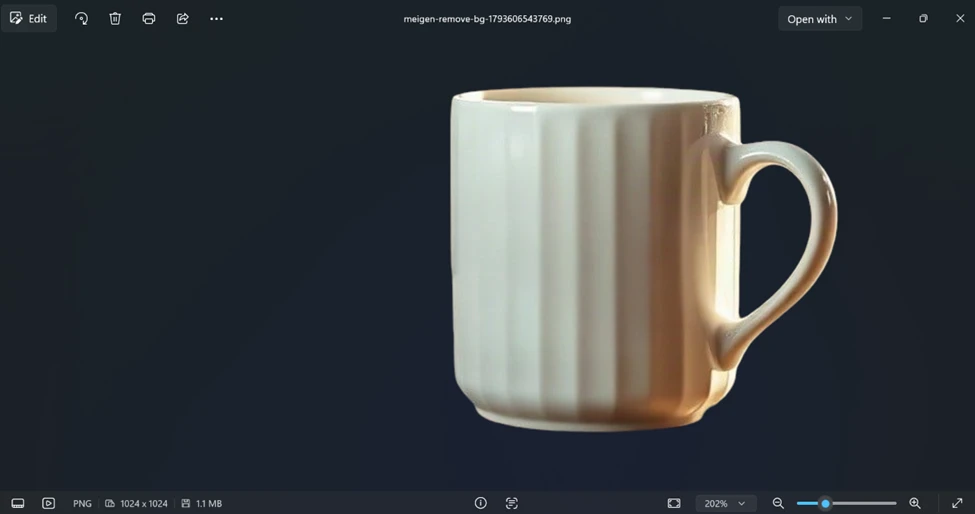
I ran the background remover on a ceramic mug and downloaded the result. Viewed on a black background, the cutout holds up well. The edges around the handle and the rim are clean, there is no leftover halo, and the file came out as a 1024x1024 PNG.
This is the finding that matters most for the "is it free" question. I opened the video tool and entered a prompt.
Video prompt: Create a cinematic 4K video with stunning visuals, smooth camera movements, realistic lighting, and a professional, eye-catching atmosphere.
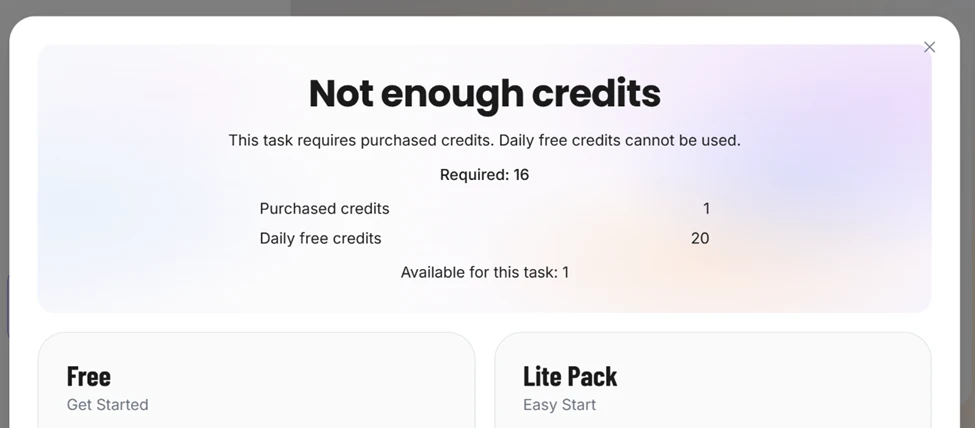
The job cost 16 credits on Grok Video 1.5, and my balance showed 21 credits. By plain maths I had more than enough.
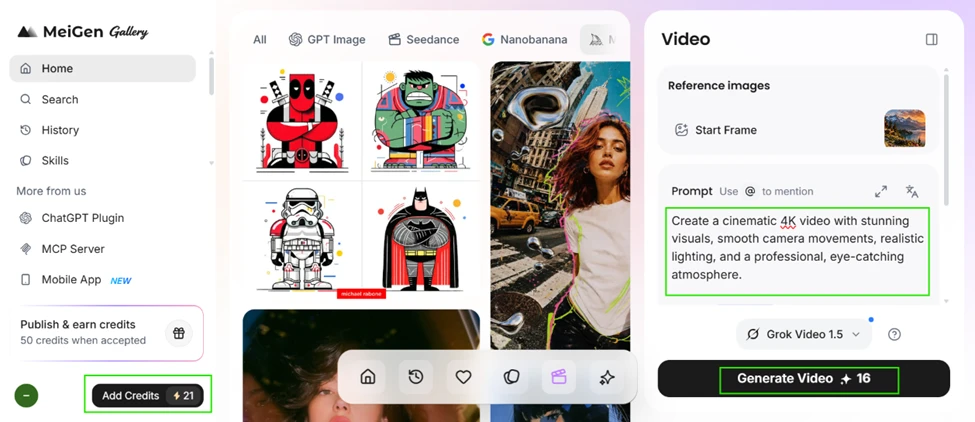
It still blocked me. The popup explained why. Video requires purchased credits, and daily free credits cannot be used for it. Of my 21 credits, only 1 was a purchased credit and 20 were daily free, so the task saw just 1 credit available against the 16 it needed. Free video generation is effectively off the table.
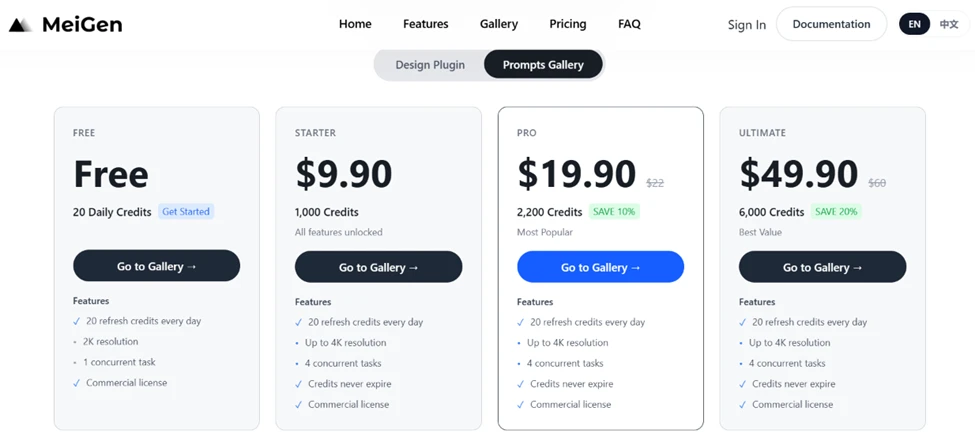
The pricing page is split into two tabs, which is easy to misread. The Prompts Gallery tab runs from a Free plan with 20 daily credits up to 49.90 dollars for 6,000 credits. The free column is capped at 2K resolution and 1 concurrent task, while paid tiers unlock 4K and 4 concurrent tasks. Commercial licence is included even on the free plan.
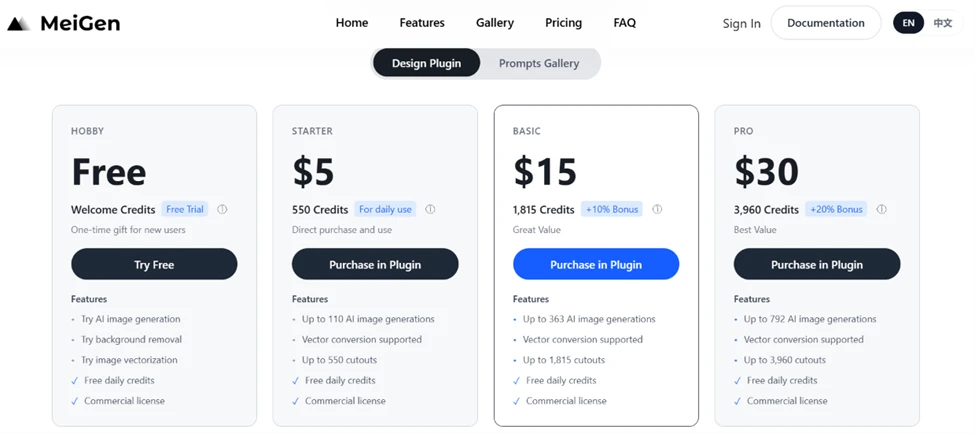
The Design Plugin tab is a completely different price ladder, from a free Hobby trial to 30 dollars, with its own credit maths tied to image generations and cutouts. A reader comparing MeiGen to other tools needs to know which of these two systems they are actually buying into.
| Dimension | Our test | User signal | Verdict | Composite |
|---|---|---|---|---|
| Output Fidelity How closely results match the prompt intent | 8 | 8 | Good | |
| Ease of Use How fast a newcomer gets a usable result | 9 | 9 | Excellent | |
| Consistency Whether repeated runs hold the same quality | 7 | 6 | Moderate | |
| Speed Turnaround from generate to finished output | 7 | 7 | Good | |
| Free Tier Reach How far you get without paying | 5 | 4 | Weak | |
| Learning Value How much it teaches you about prompting | 9 | 8 | Excellent |
Toolscopia uses cookies to keep you signed in, remember your preferences, and understand how our reviews get read. Analytics are anonymous. See our privacy policy for the full detail.






Comments 0
Join the discussion and share your perspective.
Sign in to post a comment and reply to other readers.
No comments yet
Be the first to share your perspective on this tool.