1
Architectural visualization models
Models tailored for architecture and interiors, widely praised for realism and material rendering.
mnml.ai is an AI visualization platform focused on architecture and interiors, delivering fast, photorealistic renders that fit into professional workflows, but still shows quirks around prompt adherence, editing reliability, and billing or credit handling.
Independent review — we test tools ourselves and analyze public user reviews. How we test.
mnml.ai delivers strong visual quality, big time savings, and specialized tools for architectural and interior workflows. Reviewers highlight fast renders, photorealistic results, and responsive human support as clear strengths. On the downside, prompt fidelity, the Edit tool, and credit or billing flows create real frustration for some users. It is best suited to design professionals who can tolerate some quirks while benefiting from high quality outputs and architecture focused features.
Mnml AI is a browser-based rendering platform aimed at architects and interior designers who want a photoreal image without opening V-Ray or Lumion. You upload a sketch or a SketchUp screenshot, describe the materials and mood in a text box, and the AI returns a finished render in about thirty seconds.
What separates it from a generic image generator is how it treats your input. Tools like Midjourney invent a building from a text description. mnml conditions its output on your actual geometry, so window positions and rooflines carry through instead of being reimagined.
The platform bundles several modes under one canvas, covering exterior, interior, masterplan, and landscape work, alongside editing tools such as an AI object eraser. It runs on a credit system: a main render costs 30 credits and smaller edits cost 10, with a free trial that hands you 100 to start. Founded in 2020 and based in Cairo, it now serves designers who need output speed over pixel-perfect control.
Models tailored for architecture and interiors, widely praised for realism and material rendering.
Newer models produce faster results, saving substantial time in active design workflows.
Studio environment supports architectural workflows, appreciated for integrating into daily practice.
Edit functionality criticized for ignoring prompts and creating messy, unreliable changes.
Credit bundles and subscriptions convenient, though credit expiry caused notable dissatisfaction.
Tools for interiors, architecture, masterplans, video, and upscaling, praised for breadth and quality.
Supports positive and negative prompts, but sometimes ignores instructions, increasing render iterations.
Support team often commended for clear communication and resolving billing or access problems.
Transforms wireframes into rendered images, positively mentioned for everyday production use.
My first upload was a contemporary two-story house sketch with horizontal cladding, a low roof, wide glazing, and an entry deck.
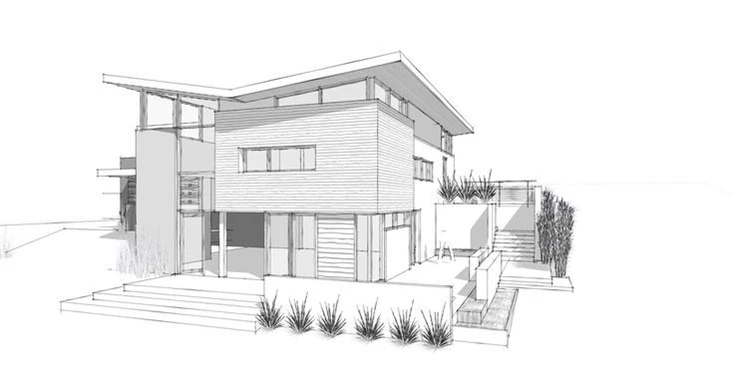
I selected Exterior mode and the Photoreal style, then typed a prompt loaded with specific, checkable details:
“Warm cedar wood cladding, black window frames, a red front door, golden hour sunlight, two large trees on the left side, suburban setting”
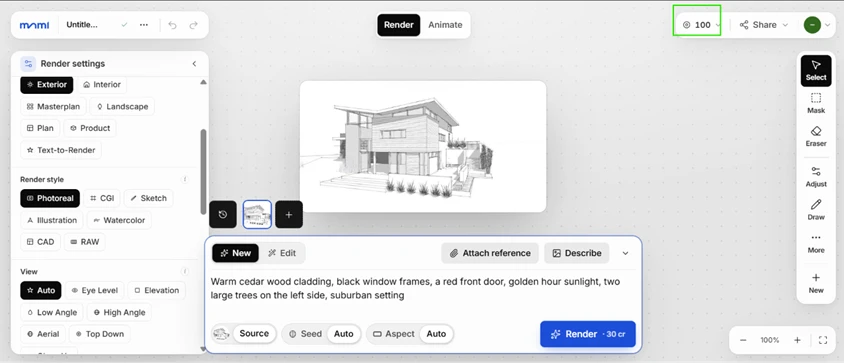
The render came back in roughly half a minute.
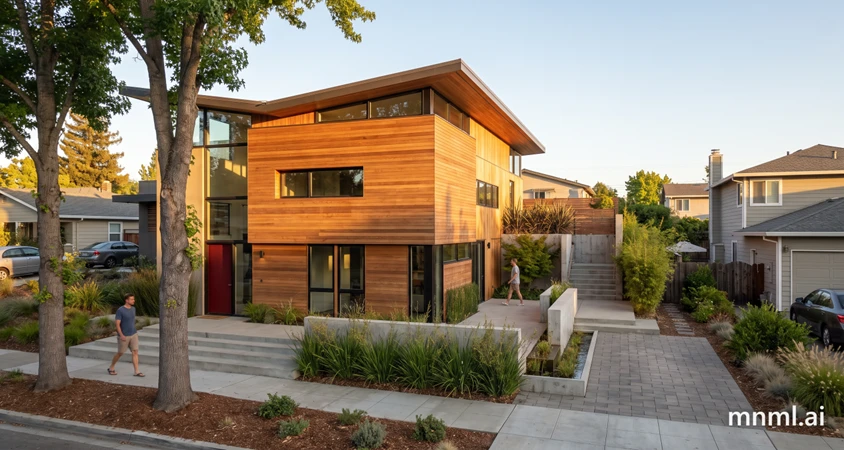
Two things stood out. The geometry held: my window positions, the entry steps, the deck, and the cantilevered upper volume all survived the jump from line drawing to photoreal output, which is the main reason an architect would pick this over a text-only generator. Prompt adherence was the second surprise. I expected the model to drop at least one instruction, yet the cedar cladding, the black frames, the red door, and the golden-hour light all appeared as asked, with the trees sitting on the correct side. On this test mnml earned both of the points I set out to check.
Then I ran the identical prompt on the identical sketch, with the seed left on Auto, to measure how repeatable the output is.
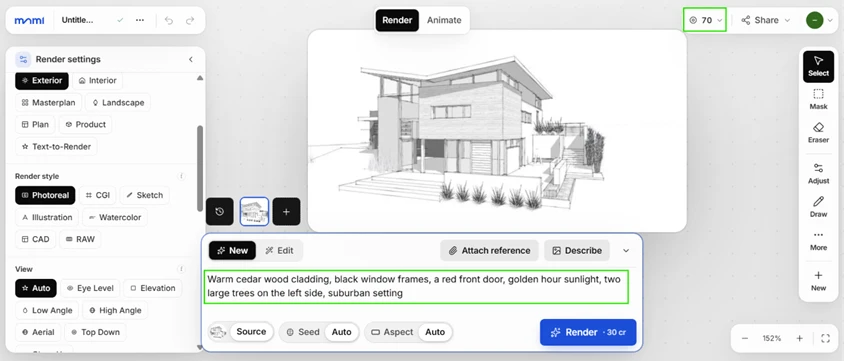
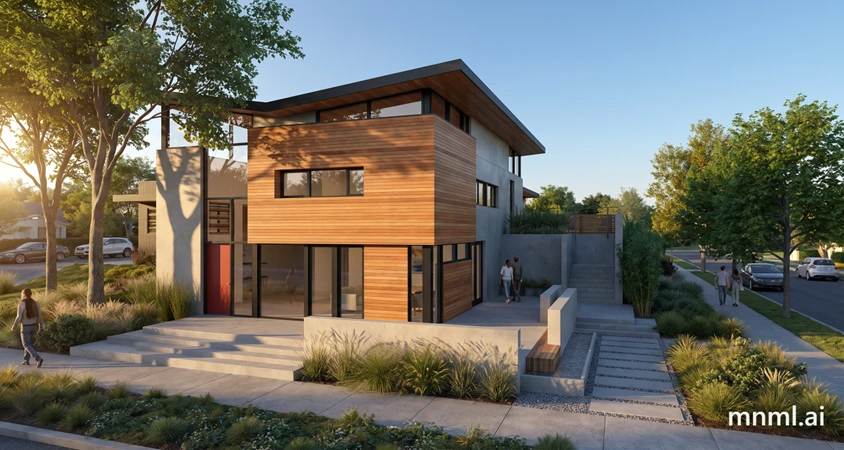
The second building is not the first one. The camera pulls wider than before. The massing on the left reads differently, and the window layout has shifted. For a mood-board pass this variety helps. For a client who approved version one and now wants the same image at higher resolution, it becomes a problem, because the default settings hand you a fresh interpretation every time instead of a locked result.
This was my clearest criticism of the exterior workflow.
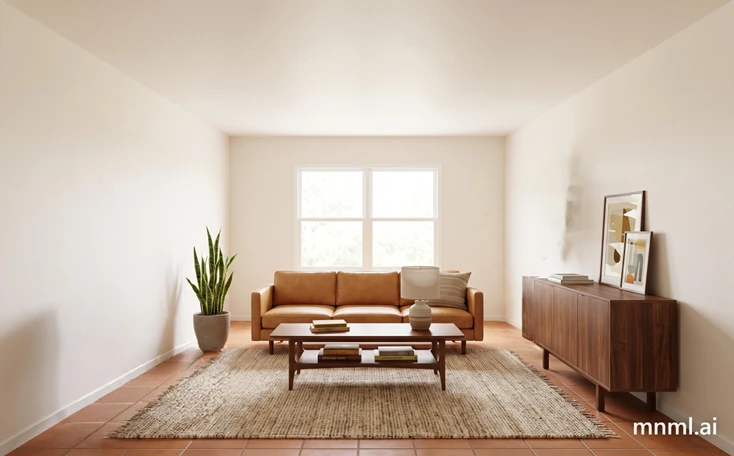
For the third tool I switched to Interior mode and fed it a bare, empty room with neutral walls and a single daylit window.
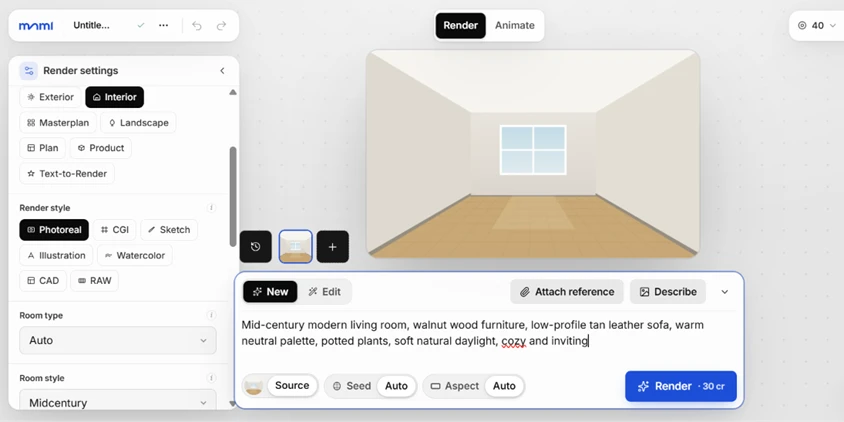
I set the style to Mid-Century Modern and rendered.
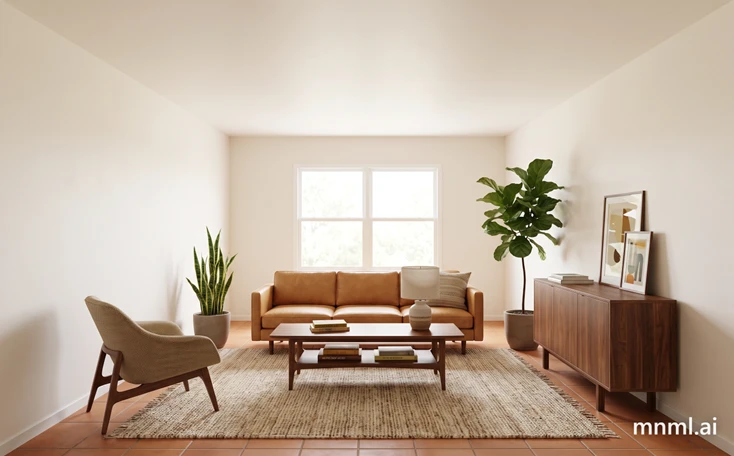
This was the strongest visual result of the session. From a flat, furniture-free box the tool produced a styled living room: a tan leather sofa, walnut cabinetry, a jute rug, and a fiddle-leaf plant, all lit with soft daylight. Anyone staging a listing or selling a client on a mood would find this useful.
One flaw showed up on a zoom. The titles printed on the coffee-table books are nonsense text, the garbled lettering that gives away an AI image the moment a viewer looks closely.
mnml's AI Eraser costs 10 credits per edit, and I spent one of my last credits on it. I masked two items for removal: the accent chair on the left and the tall plant on the right.
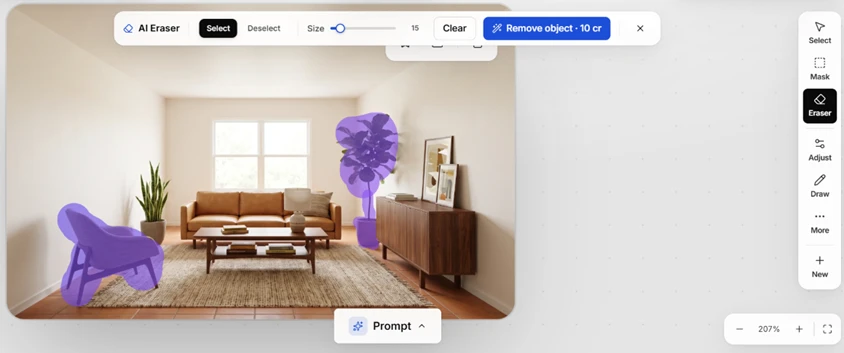
The objects disappeared cleanly. Their shadows did not. The chair left a soft contact shadow on the rug where it had stood, and the plant left its shadow on the wall behind it, floating with nothing to cast it. The eraser strips the object's pixels but has no grasp of the light that object created, so it reads the shadow as background and leaves it sitting there. Any serious use of this feature means a second pass in Photoshop to clean up what the AI missed.
Every render I produced on the free trial carried an mnml.ai watermark in the corner.

The Video tool would not run at all. Selecting it threw up an upgrade wall telling me that video sits behind a paid plan.

Human figures were the weakest part of every exterior render. Zooming into the people walking past the house showed distorted legs and smeared faces, the classic failure zone for this class of model.

By the end my meter read zero. The 100 free credits covered two exterior renders and one interior render, plus a single object-removal edit, before the platform asked me to subscribe. That is an honest picture of the free tier: enough to judge the output quality on a couple of projects, not enough to finish one.
| Dimension | Our test | User signal | Verdict | Composite |
|---|---|---|---|---|
| Render Quality Realism and visual fidelity | 9 | 9.2 | Excellent | |
| Prompt Accuracy Faithfulness to instructions | 6.2 | 6 | Moderate | |
| Editing Tools Effectiveness of edit features | 4.5 | 4 | Weak | |
| Ease of Use Learning curve and workflow fit | 8 | 8.3 | Good | |
| Billing and Credits Payment, credits, and access | 6.5 | 6 | Moderate | |
| Customer Support Speed and helpfulness of support | 9 | 9 | Excellent |
Toolscopia uses cookies to keep you signed in, remember your preferences, and understand how our reviews get read. Analytics are anonymous. See our privacy policy for the full detail.






Comments 0
Join the discussion and share your perspective.
Sign in to post a comment and reply to other readers.
No comments yet
Be the first to share your perspective on this tool.