1
Text-Prompt Editing
Describe a change in words and the AI applies it.
Muke AI is an online photo editor that edits pictures from text prompts. Upload a photo, type the change you want, and it generates a new version in seconds without manual tools or design experience.
Independent review — we test tools ourselves and analyze public user reviews. How we test.
Muke AI does the everyday edits well. Background replacement and cleanup come back looking natural, and the output quality reflects the strong model running underneath. The weak spots sit around control and longevity. The tool guesses when you need precision, and its free access runs out quickly. For a fast, one-off edit it holds up. For anything you plan to rely on week after week, the ground feels unstable, especially with the platform changing hands soon. Treat it as a quick utility rather than a home for your workflow, and it rewards the time.
Muke AI sits in the category of prompt-based photo editors, the kind that replaced slider panels and manual selection tools with a single text box. The engine is nano-banana, Google's image-editing model, which the model selector names openly. In practice that makes Muke a front-end wrapper: the intelligence belongs to Google, and Muke supplies the interface and the billing around it.
The layout stays minimal. An upload area sits on the left with a prompt box below it, and a row of aspect ratio buttons covers square, portrait, landscape, and classic ratios. Results appear on the right, beside a history panel that holds recent outputs for a day.
The audience is people who want a finished result without opening Photoshop. A small-business owner cleaning up a product shot or a creator fixing a messy background both fit the profile. The confidential-processing promise on the homepage speaks to users who worry about where their uploads travel after editing.
Muke presents itself as a speed tool, built to get an acceptable edit out of a browser in one step rather than to replace a full editing suite.
Describe a change in words and the AI applies it.
Erases unwanted items and rebuilds the space behind them.
Turns a casual selfie into a studio-style portrait.
Replaces or blurs the backdrop behind a subject.
Edits a group of images in one consistent style.
Animates a still photo into a short clip.
Before I reached the editor, a popup told me the tool is closing. Muke AI stops operating on January 1, 2027 and moves to a new platform called Vizea AI. My account and credits carry over to it, but anything I create here will not transfer. I kept testing anyway, since the editor still runs for now.

I uploaded a casual photo of a barista holding a coffee cup and set the aspect ratio to 1:1. The prompt I entered was:
Replace the background with a clean studio grey backdrop, keep the person’s face, hair and clothing exactly the same, match the lighting to the new background
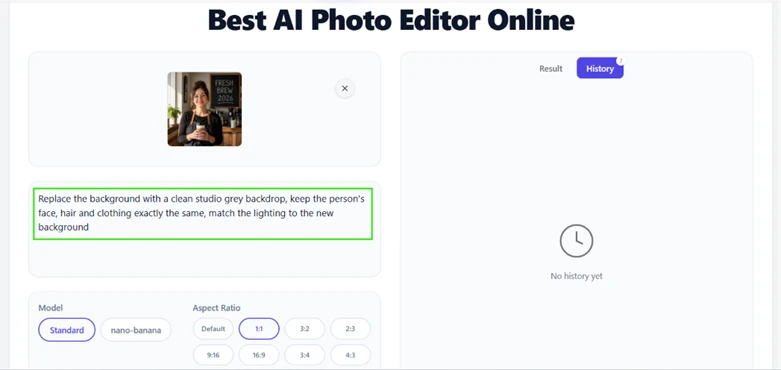
The edit came back in a single pass. Her face stayed the same and the apron and cup were untouched. The grey backdrop looked like a real studio wall rather than a flat cut-out, and the lighting on her skin matched the new setting instead of clashing with it. This is the edit most people want from a tool like this, and Muke handled it cleanly.

Next I uploaded a desk photo with a coffee mug in the middle and typed:
Remove the cup on the right and naturally fill in the background so it looks untouched
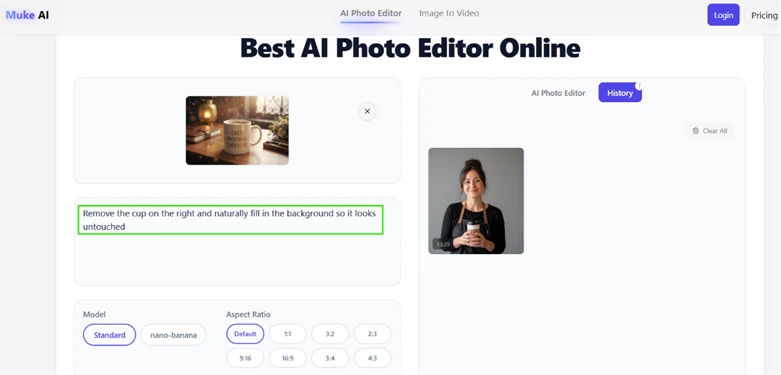
The mug disappeared and the desk filled back in with the lamp and the soft window light behind it. I zoomed into the spot where the mug had been and found no smearing or obvious patch.
One caveat: the tool redraws a wider area of the scene instead of erasing only the object, so small details around the edit can shift.

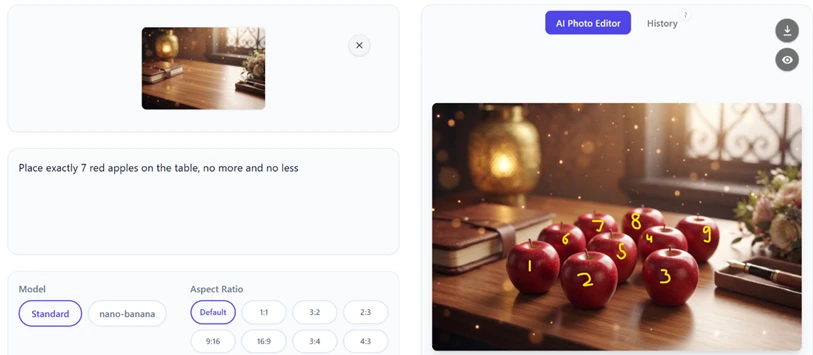
This is where the tool slipped. I gave it a counting task:
Place exactly 7 red apples on the table, no more and no less

The output placed nine apples on the desk instead of seven. I marked each one with a number so the miscount is easy to see. The apples themselves look convincing, with believable shadows and reflections, but the exact quantity gets ignored. If your edit depends on a precise count, check every result by hand.
I completed two generations without an account. On the third attempt, a login wall appeared and asked me to register for ten credits.

So the no-signup window is two edits. After that you create an account, and each generation pulls from a small credit balance.
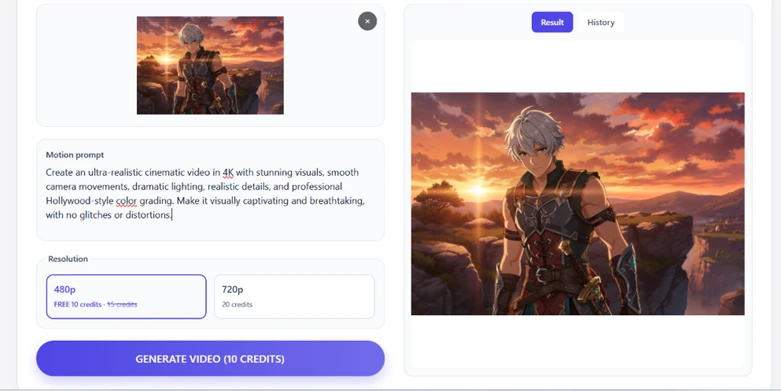
Video sits behind a harder wall. The Image to Video tool charges ten credits for even the lowest 480p setting, which is the whole free balance spent on one short clip. The 720p option costs twenty. My motion prompt was ready to run, but a single clip would have emptied the account.
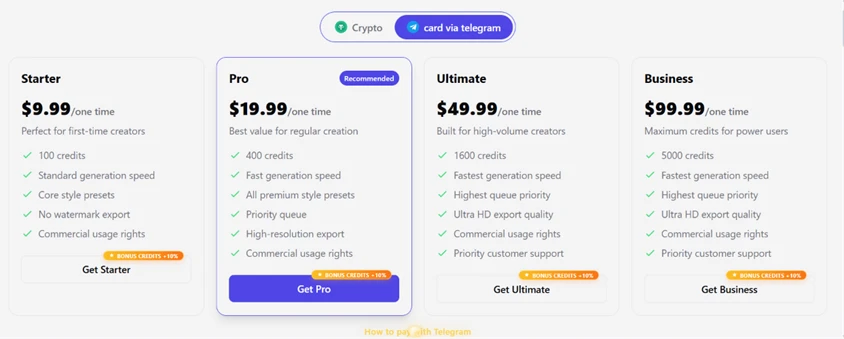
The pricing page sells one-time credit packs that start at $9.99 for 100 credits and reach $99.99 for 5,000. There is no monthly subscription. Payment is where I stopped: the two options are crypto or a card payment handled through Telegram. A normal card checkout is not offered.
| Dimension | Our test | User signal | Verdict | Composite |
|---|---|---|---|---|
| Edit Quality How natural a finished edit looks | 8 | 7 | Good | |
| Prompt Accuracy How closely output follows the instruction | 6 | 5 | Weak | |
| Ease of Use How fast a beginner reaches a result | 8 | 8 | Good | |
| Speed Turnaround time per generation | 8 | 7 | Good | |
| Value Usable output returned per credit | 5 | 4 | Weak | |
| Reliability Stability of the platform over time | 4 | 5 | Weak |
Toolscopia uses cookies to keep you signed in, remember your preferences, and understand how our reviews get read. Analytics are anonymous. See our privacy policy for the full detail.





Comments 0
Join the discussion and share your perspective.
Sign in to post a comment and reply to other readers.
No comments yet
Be the first to share your perspective on this tool.