1
Director mode for video projects
Highly capable planning agent, but widely criticized for misfires and extreme credit consumption.
OpenArt.ai is an AI image and video creation platform that shines for visual quality and flexible tools, but its unpredictable credit system, Director workflow, and support consistency can make serious video work expensive and risky.
Independent review — we test tools ourselves and analyze public user reviews. How we test.
OpenArt.ai delivers strong image quality, varied models, and genuinely creative video tools when projects stay small and workflows are carefully controlled. Many reviewers praise ease of use and highlight excellent support in some cases. However, the Director workflow, unclear credit pricing, and inconsistent refund handling lead to repeated complaints about lost credits and unusable videos. It fits best for experienced creators who can manage short clips, monitor credit burn closely, and are comfortable absorbing occasional failed generations.
OpenArt is a browser-based generative studio that puts image creation, character building, editing, and short video under one login and one credit balance. What sets it apart from single-model tools like Midjourney is the roster: you pick from more than 100 models, including Seedream, Nano Banana Pro, Flux, and Veo, and each carries its own credit price and visual signature. You are choosing an engine per task rather than living inside one fixed house style.
The feature that defines the platform is Consistent Characters. You generate a face once, save it, and reuse it across new prompts and scenes without it drifting into a stranger. That solves a problem serialized creators hit constantly: comics, storyboards, brand mascots, and faceless YouTube B-roll that need the same person in shot after shot. Everything runs on credits that reset monthly and do not roll over, so the platform rewards planning over experimentation. Understanding that economy matters as much as understanding the tools.
Highly capable planning agent, but widely criticized for misfires and extreme credit consumption.
Flexible but often confusing; users report unpredictable costs and fast draining balances.
Frequently praised for quality, consistency, and wide model selection across creative styles.
Generates strong five to fifteen second clips, suitable for B roll and music snippets.
Useful for music videos, though some report morphing faces, inconsistency, and weaker multi character support.
Often described as intuitive, although newer interfaces and some tools feel clunky.
Occasional unlimited promotions criticized for hidden fair use limits and unclear terms.
Experiences polarized, from exemplary refunds and help to weeks of silence on serious issues.
Perceived as overly restrictive by some, especially for borderline artistic content.
I opened with a deliberately dense prompt to push the model on complex composition and on-image text, asking for a rainy Tokyo café at night with a specific wall sign.
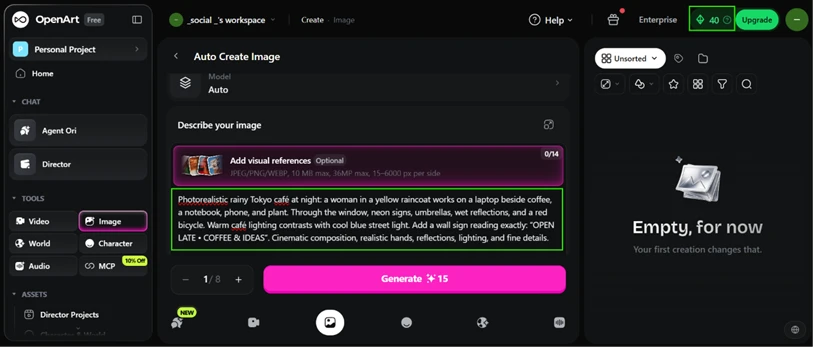
On the Auto model this cost 15 credits. The output was sharp, the warm and cool lighting held together, and the sign text came through almost word for word.
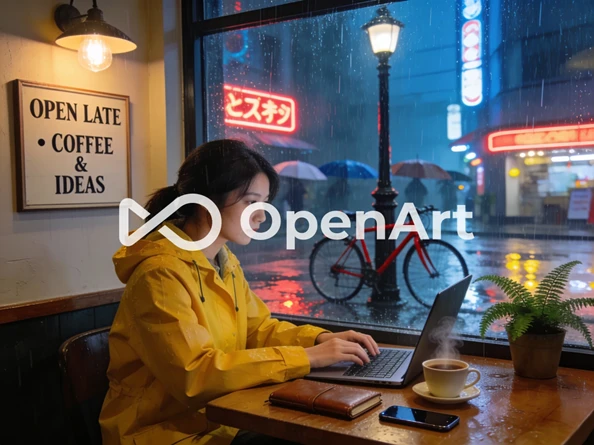
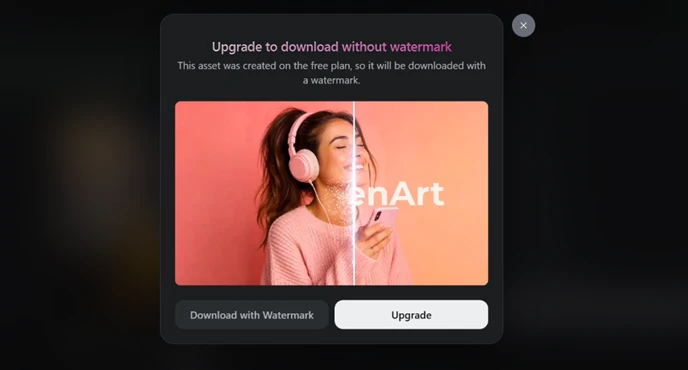
Then I hit download. A modal told me free-plan assets ship with a watermark, and the finished image arrived with a large OpenArt logo stamped across the middle of the frame. Free output works for previewing an idea. It is unusable for anything public.
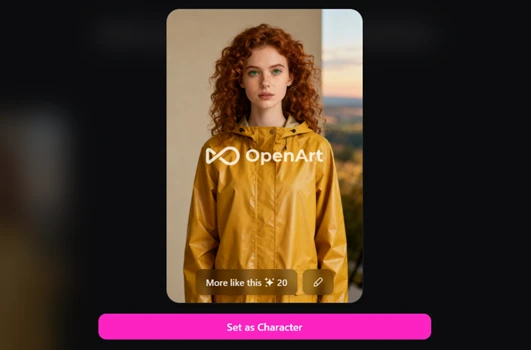
Character consistency is the feature OpenArt is best known for, so I gave it a proper run. I described a young woman in a mustard raincoat and generated her on the Seedream 4 model for 15 credits.

Out of curiosity I ran the identical prompt on Nano Banana Pro.
The cost jumped to 40 credits for the same words, more than double, which told me quickly that model choice is where a free balance evaporates.

I went back to Seedream. The character it produced matched the brief closely, down to the curly auburn hair, green eyes, freckles, and the mustard raincoat.
The real test is whether the face survives a change of setting. I placed the same character in front of the Eiffel Tower on an overcast morning.

Her face carried over intact, freckles and all, into a completely different background. This is the strongest thing OpenArt does, and it does it well.

Video is where the free plan stops being usable. A single clip at the maximum settings of 2K resolution and 15 seconds costs 1350 credits.
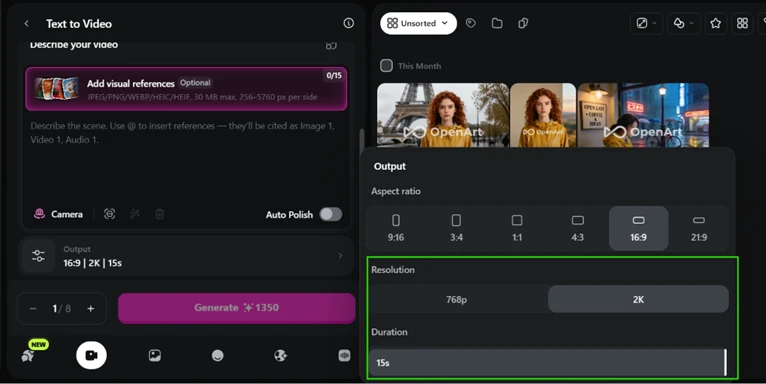
A new account has 40. You would need to buy credits before generating even one video, which puts the headline feature out of reach for anyone still deciding whether to pay.
By late morning my balance read zero. The history tells the whole story: a signup grant of 40, followed by three image generations that emptied it.
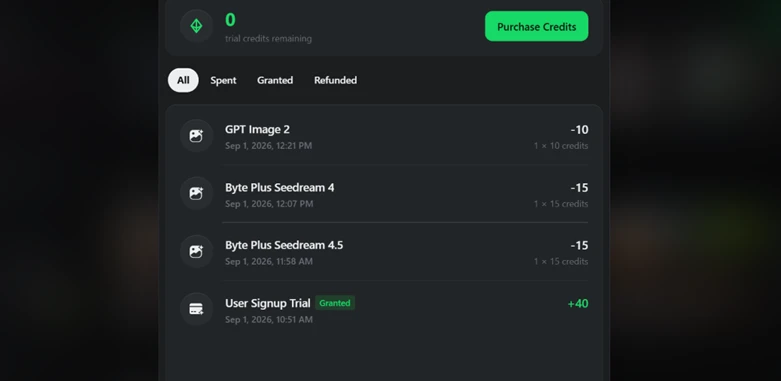
Four generations was my entire free trial. That single number captures the tension at the center of OpenArt more honestly than any feature list. The tools are good. The meter starts running from the first click, and you feel it.
| Dimension | Our test | User signal | Verdict | Composite |
|---|---|---|---|---|
| Image Quality Sharpness, style, consistency | 8.5 | 8.2 | Good | |
| Video Output Quality Visuals, motion, usability | 6 | 4.5 | Weak | |
| Credit Value Cost per usable result | 3.5 | 3 | Weak | |
| Ease of Use Learning curve and workflow | 7.5 | 7.8 | Good | |
| Customer Support Speed, fairness, resolution | 4.5 | 4 | Weak | |
| Reliability Consistency, bugs, stability | 4.5 | 4.2 | Weak | |
| Pricing Transparency Clarity of costs upfront | 3.5 | 3.2 | Weak |
Toolscopia uses cookies to keep you signed in, remember your preferences, and understand how our reviews get read. Analytics are anonymous. See our privacy policy for the full detail.






Comments 0
Join the discussion and share your perspective.
Sign in to post a comment and reply to other readers.
No comments yet
Be the first to share your perspective on this tool.